


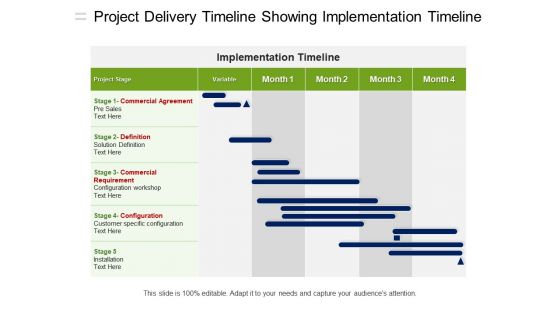
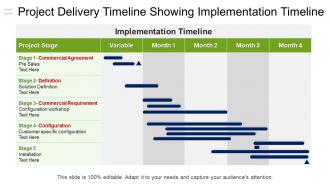
Project delivery timeline showing implementation timeline




Try Before you Buy Download Free Sample Product
 Impress Your
 Audience
 100%
100% Editable
 Save Hours
 of Time


Clear out existing cobwebs with our Project Delivery Timeline Showing Implementation Timeline. Free folks from any doubts.
People who downloaded this PowerPoint presentation also viewed the following :
Project delivery timeline showing implementation timeline with all 5 slides:
Decide on avenues to follow with our Project Delivery Timeline Showing Implementation Timeline. They allow you to gauge the future.



FAQs for Project delivery timeline
You'll want to map out your major milestones first, then figure out which tasks depend on others finishing. That's your critical path - basically the stuff that can't be late or everything gets pushed back. Always build in extra time, like 15-20% buffer minimum. Trust me on this one, projects never go exactly as planned lol. Be super clear about who's doing what and when they need other people's work done first. Set up regular check-ins so you can spot problems early instead of scrambling at the end. Honestly, a realistic timeline that expects some chaos is way better than an overly optimistic one.
Honestly, Gantt charts are pretty brilliant for this stuff. You get these horizontal bars that show when tasks start and finish, plus how they connect to each other. Way better than staring at endless spreadsheets, trust me. The cool thing is you can spot bottlenecks before they screw you over. Critical path becomes super obvious too. I'd start with your big milestones first - like the major deadlines you absolutely can't miss. Then fill in all the smaller tasks between them. Makes the whole timeline way less overwhelming when you can actually see it laid out visually.
Honestly? Asana's my go-to for smaller teams - super easy to use and people actually stick with it. Monday.com and Microsoft Project are solid too if you need more heavy-duty features. MS Project handles those messy project dependencies way better, but it's overkill sometimes. Don't sleep on Google Sheets though - I've watched teams crush it with just a well-organized spreadsheet. Way less fancy but gets the job done. Pick whatever plays nice with the tools you're already using. A timeline that actually gets updated beats some perfect system everyone ignores, you know?
Good stakeholder communication basically saves your timeline from getting completely wrecked. You catch problems early instead of getting hit with surprise changes that mess everything up. Regular check-ins help manage expectations too - people hate being caught off guard by delays. It also means you're actually building what they want, so you won't have to redo stuff later (been there, not fun). Set up consistent update meetings from the start. Oh, and build in time for their feedback - trust me, they'll have opinions whether you ask or not.
Look, delays suck but you've got options. Cut anything that's not absolutely critical first - nobody's gonna die if you drop those nice-to-have features. Throw more people at it if you have the budget (though let's be real, most of us don't). Try running tasks at the same time instead of one after another when possible. Oh, and talk to stakeholders ASAP about adjusting scope or deadlines. Honestly, the worst thing you can do is just sit there hoping it'll fix itself. Act quick once you see trouble coming.
Think of dependencies like dominoes - one task has to finish before the next can start. When something gets delayed, everything after it shifts too. The longest chain of connected tasks? That's your critical path, and it determines how fast your project can actually get done. You can't just throw more people at it to speed things up (trust me, I've tried). Some delays won't kill you if you have parallel work streams running. But map this stuff out early so you know which tasks are actually blocking progress versus the ones that just feel urgent.
Honestly, you gotta prioritize or your timeline will be total garbage. List everything out first, then be brutal about ranking by actual impact and real deadlines. Half the stuff that feels urgent really isn't - we just trick ourselves into thinking it is. Dependencies are huge too - figure out what has to happen before other things can even start. I always mess this up and end up with tasks that can't begin because I'm waiting on something else. Give yourself buffer time for the risky stuff. Most people cram way too much in and wonder why they're always behind.
So basically, timelines show you exactly when you need people and money - makes planning way easier. I always map the critical path first, then figure out who I need when. You'll spot problems early, like when Sarah's needed on three different tasks the same week (ugh). Management loves concrete dates too when you're asking for more resources. The dependency stuff really helps justify your requests. Plus you can shuffle people around when some tasks are light and others are crazy busy. Honestly, it's one of those things that saves your butt later.
Dude, two big things always bite people: you're gonna underestimate how long stuff takes, and you'll forget buffer time. Like, that "quick" design phase? It's never quick. Don't create impossible dependencies either - your designer can't magically finish mockups while waiting for the client to send content (learned this the hard way lol). Pack in review cycles, revisions, all that back-and-forth with stakeholders. I always add 15-20% cushion time now. Map out approval chains too - who signs off before the next person can even start? Sounds boring but it saves your sanity later.
Honestly? I check mine weekly but it really depends on your project. Fast-moving stuff needs updates every few days - trust me on that one. Big changes are your main triggers: hitting milestones, scope creep, or when you realize your estimates were completely wrong (we've all been there). Don't wait for meetings if something major happens - just update it right away. I set calendar reminders because otherwise I forget when things are going smoothly. Complex projects are different beasts though, they'll need way more attention than simple ones.
Ugh, scope creep is the worst - it basically kills your timeline because suddenly you're doing way more work but nobody moved your deadline. Picture stuffing twice as much into the same container, you know? Everything gets squeezed and rushed. Your team ends up scrambling to hit impossible targets, quality goes downhill, and then everyone's mad at you for being "behind schedule" when really the scope doubled. Honestly, the only thing that saves you is writing down every single change request and showing exactly how it'll push things back before you say yes.
Honestly, timelines are game-changers because everyone can see exactly what they're supposed to do and when. No more "I thought Sarah was handling that" disasters. You get these built-in checkpoints that catch problems early - way better than scrambling at the end. There's actually something satisfying about crossing stuff off a visual timeline too (maybe that's just me being weird). The trick is posting it somewhere people actually check daily, not buried in some random folder. Just make sure it's realistic or people will ignore it completely.
Honestly, break big tasks down first - way easier to estimate "write user stories" vs "build entire feature." Check your old work for similar stuff if you've got it. I do this three-point thing: best case, worst case, most likely. Always pad with buffer time because something will definitely break (learned this the hard way lol). Don't guess yourself - ask whoever's actually doing the work. Track your estimates against reality. You'll spot your weak areas fast and get way better at this whole thing.
Oh man, this is so real! Different cultures have totally different approaches to deadlines and it can mess with your head. Like, some teams need to build relationships and get everyone on board before they'll move forward - which feels painfully slow if you're used to just charging ahead. Then you've got people who'll agree to impossible timelines because saying "no" feels rude. Our Tokyo project taught me that lesson the hard way, ugh. Communication styles are all over the place too. Some people are super direct about delays, others drop hints you might totally miss. My advice? Set expectations early, pad your timelines (seriously), and do frequent check-ins so problems don't blindside you later.
Honestly, scope creep is the real killer - that's where most timelines completely fall apart. Track your schedule variance first (planned vs actual dates), then milestone completion rates. Budget variance matters too since delays usually equal money drain. Resource utilization tells you if you're burning people out or underusing them. If you're doing sprints or iterations, definitely measure team velocity. Oh, and stakeholder satisfaction scores are clutch - they'll tell you whether your timeline actually worked for the business side. Start tracking this stuff from day one though, not when everything's already on fire.
-
Designs have enough space to add content.
-
Excellent template with unique design.