


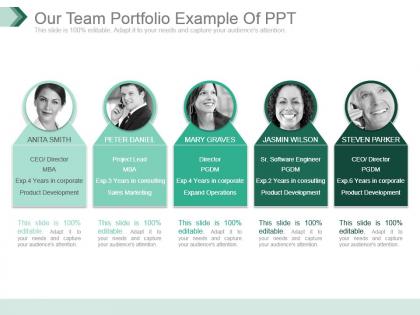
Our team portfolio example of ppt




Try Before you Buy Download Free Sample Product
 Impress Your
 Audience
 100%
100% Editable
 Save Hours
 of Time


Acquire full backing with our Our Team Portfolio Example Of Ppt. They help you gather endorsements.
People who downloaded this PowerPoint presentation also viewed the following :
Our team portfolio example of ppt with all 7 slides:
Embark on your journey with our Our Team Portfolio Example Of Ppt. You will find it's contribution invaluable.
FAQs for Our team portfolio
Start with who you guys are and what you actually do. Pick 3-4 solid projects that show off different skills - for each one, explain the problem, what YOU specifically did, and real numbers like "boosted conversions 30%." Honestly, employers eat up the teamwork stuff, so definitely talk about how you collaborate. Oh and add some personality! Maybe that weird team photo from the holiday party or whatever. Keep it visual and scannable - one slide per project max. People's attention spans are terrible these days.
First thing - figure out who's doing what and agree on your overall theme. Get a shared Google Drive or something where you can all see drafts and leave comments. Trust me, this saves so much headache later. Set up regular check-ins to review each other's work and keep everything consistent. Pick one person to do the final review before you submit - someone with good attention to detail. Oh, and make a timeline with actual deadlines for drafts and edits. Don't assume everyone knows what they're supposed to be doing. Over-communicate everything, even if it feels excessive.
Honestly, white space is your best friend here - don't cram everything together. Stick to maybe 2-3 colors that match your brand vibe. Good images make a huge difference, and please use consistent fonts (seriously, Comic Sans will get you laughed out of the room). Your layout needs clear headings and sections that are easy to scan. Leave room for brief project descriptions plus any key results or metrics. Oh, and definitely check how it looks on mobile since clients scroll through these on their phones all the time. One trick - create a master slide with your grid so everyone on the team keeps things consistent when they add their work.
Honestly, just pick your biggest wins first - the stuff that actually moved the needle or fixed real problems. Don't try to showcase every single thing you've done (I know it's tempting, but resist). Maybe 3-4 diverse projects that tell a good story about what your team can do. Definitely include something recent so they know you're not stuck in 2019 or whatever. Oh, and lead with the results, not how you got there. Like what actually changed because of your work? Numbers help if you've got them. The process stuff is way less interesting than the impact.
Figure out who you're presenting to first. Executives? Hit them with ROI and business impact - they don't have time for fluff. Tech people are different though - they actually want to see your process, tools, all that behind-the-scenes stuff. Clients just care if you fixed their problems and what results you got them. Match your visuals and examples to what each group responds to. Oh, and definitely grab someone who knows the audience beforehand for a quick sanity check. Trust me on that one - it's saved me more times than I can count.
Dude, your portfolio shouldn't just be a list of projects you built. Think about it like telling stories instead - what problem were you trying to solve? What went wrong along the way? How did your team figure it out? People's brains are wired to remember stories way better than bullet points. Makes sense when you think about it. Each project becomes this mini-journey with actual conflict and resolution. Way more engaging than "I used React and Node.js" or whatever. Honestly, you'll probably have more fun presenting too. Start with one project and map out its whole story arc first.
Look, numbers are everything when you're presenting to stakeholders. Don't just say "we improved efficiency" - that's meaningless fluff. Instead, hit them with "we cut processing time by 32% and saved 15 hours weekly." See the difference? Specific data turns your claims from nice-sounding opinions into actual proof. I learned this the hard way in my first big presentation - went in with vague statements and got torn apart. Now I always lead with the claim, then immediately back it up with metrics. It's what makes people trust you and actually see the value your team brings.
Yeah definitely! First thing - nail down your visual consistency stuff like fonts and colors so everything looks cohesive. Then actually assign sections based on what people are genuinely good at. Your data person should totally own the metrics slides, while whoever has the design eye handles visual storytelling. Don't just split things evenly because that's honestly kind of lazy. I've watched teams crush presentations this way - the secret is setting that framework first, then letting everyone do their thing within it. Way better than forcing someone to present about stuff they're not passionate about.
Don't stuff every slide with tiny text - nobody can read that mess anyway. Make sure there's actually a story connecting all your projects instead of just random work thrown together. Oh, and this one's huge: don't let Steve (or whoever) hog all the talking time. Everyone should get real speaking moments, not just "thanks, back to you" handoffs. Keep the project deep-dives short. Focus more on showing how you guys actually work together and get stuff done. Definitely practice those transitions between speakers beforehand - awkward pauses kill the vibe completely.
Definitely embed videos and audio straight into PowerPoint or Google Slides - it makes such a difference. Screen recordings of your process work great, plus client testimonials hit way harder as videos than boring text quotes. Quick team intros are solid too. Audio-wise, throw in some voice-overs for complicated visuals or background music between sections. Oh, and compress those files first or you'll be sitting there watching everything freeze up mid-presentation (learned that one the hard way). Test it all beforehand though - have backups ready just in case.
Honestly, I'd start with **Figma** - it's free and super easy for teams to collaborate on. Everyone can jump in and edit stuff together. **Canva** works great too if you want something even simpler. **Prezi** could be cool for that zooming presentation thing, but I swear it makes half the audience nauseous lol. If you're feeling ambitious, **Adobe XD** or **Webflow** let you build really slick web portfolios with animations and all that. But seriously, just go with Figma first. You can share a link and people can view it or leave comments right on your work. Way easier than emailing files back and forth.
Quarterly updates are your sweet spot, plus whenever you knock out a big project or pick up new skills. God, I used to totally forget about ours for months then panic right before client meetings - such a mess. Don't do that! Treat it like a living thing instead of some dusty annual chore. Set a calendar reminder (seriously, you'll forget otherwise) and make someone the designated keeper of team wins. Maybe rotate who does it? That way when someone asks what you've been up to, you're not scrambling to remember that awesome project from three months ago.
Honestly, feedback loops are a game changer. Practice with your team first - they'll roast you in the best way about content and flow. Then grab some random colleagues who don't know your project inside out. Fresh eyes catch stuff you're blind to since you've been staring at it forever. Oh, and record your practice runs! You'll cringe at weird pauses you didn't realize you were making. After the real deal, don't just ask "thoughts?" Create a short feedback form with like 3 targeted questions. Way more useful than generic responses.
Honestly, the teams that bomb are the ones who just wing it and ramble on stage. You'll want to rehearse multiple times, but focus on telling a story instead of just rattling off accomplishments. Time each section so you don't go over. Make sure everyone knows their role and how to smoothly pass between speakers - those awkward handoffs are painful to watch. Use real examples that show your passion for the project. Oh, and practice fielding questions! Make eye contact with different people around the room too. Do a full run-through the day before to catch any tech issues.
Okay so the biggest thing is don't get defensive when they ask tough questions. Repeat back what they asked to make sure you got it right, then let whoever knows that stuff best jump in. If you don't know something? Just say you don't know - way better than bullshitting your way through it (learned that the hard way lol). Oh and pick someone beforehand to handle the Q&A flow so you're not all interrupting each other. Treat their feedback like free consulting instead of personal attacks. Keep answers short and ask what they're really trying to figure out if it's unclear.
-
Best way of representation of the topic.
-
Unique and attractive product design.