

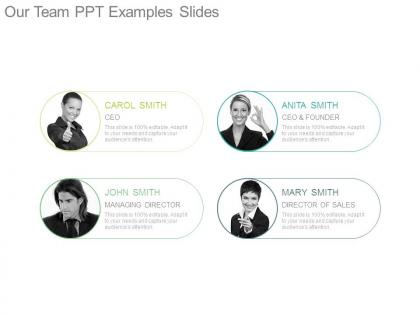
Our team ppt examples slides




Try Before you Buy Download Free Sample Product
 Impress Your
 Audience
 100%
100% Editable
 Save Hours
 of Time


Looking for a PPT template that can help you introduce your project team to the audience? SlideTeam, being a leading PPT templates company has come up with a professionally designed our team PowerPoint template examples slide. This “our member's” presentation template consists of an impressive icon such as professionals’ silhouettes and the lights focusing on the managing directors. In this project team members PowerPoint template slide, enough space is presented so that you can highlight the project responsibilities of each team member. Use this impressive team members presentation template to leave a remarkable impact on the audience. Apply this PPT template design in your presentation to grab the attention of the viewers. Our presentation designers aim at crafting the template designs that are highly impactful and self-descriptive. As the template slide is editable, you can easily employ the same template for creating a presentation on the various similar topics by making changes as per the needs. Get your projects done faster. Our Our Team Ppt Examples Slides are ready to be implemented into your presentations at once.
People who downloaded this PowerPoint presentation also viewed the following :
Our team ppt examples slides with all 7 slides:
Counter flawed arguments with our Our Team Ppt Examples Slides. Highlight assumptions that are ill founded.
FAQs for Our team
Honestly, just make sure everyone knows their part so you're not stepping on each other. Practice those handoffs between speakers - that's where things usually get weird. Your slides need to look like they came from the same presentation too, not like five different people made them separately (been there, it's obvious). Pick one person to handle questions at the end or you'll all be talking over each other. Oh and actually rehearse it together at least twice. I know it feels like overkill but trust me on this one.
Okay so first thing - figure out who's best at what and divide up sections that way. Like, don't stick your shy friend with the opening (learned that the hard way lol). Put your numbers person on data stuff, most confident speaker gets intro/outro since those parts really matter. Everyone needs to know the whole flow though, not just their bit. Set time limits or someone will definitely go over. Practice together at least twice - trust me, you'll find weird transitions and gaps you never noticed. Oh and maybe do a timer run-through because presentations always feel longer when you're actually up there!
Honestly, divide up the work first thing - figure out who's doing research, who's on slides, all that. Google Slides is a lifesaver since everyone can edit at once without that nightmare of emailing versions back and forth. Check in regularly or someone will definitely go off the rails with their section (I've watched this happen SO many times). Group chat helps for random questions between meetings. Oh, and practice those transitions together at least twice - nothing's worse than awkward silence during handoffs. Pick one person to be the final editor though, otherwise you'll end up with like three different fonts and zero consistency.
Know your audience first - that's everything. Executives want the big picture and business impact, not technical details. Flip that for your dev team who'll want to see the actual methodology. Mixed groups are trickier, but you can layer your content to hit both levels. I always check who's actually showing up beforehand since the guest list changes. Then watch faces during your talk - glazed eyes mean you need to switch gears fast. Honestly, I've learned to prep multiple versions of my key slides. Sounds like overkill but it's saved me so many times when I had to pivot mid-presentation.
Dude, visual design can make or break your whole presentation. I've watched people with solid ideas completely crash because their slides looked like a garage sale exploded on screen. Keep things clean - consistent fonts, colors that don't hurt your eyes, plenty of white space. Don't cram everything onto one slide either. Your graphics should actually help tell the story, not just sit there looking pretty (or ugly). Oh, and that whole "death by PowerPoint" thing? It's real. People zone out fast when slides are cluttered messes. Spend some time making it look decent or your message disappears.
Honestly, I'd start with a problem your audience actually deals with daily. Walk them through your solution like you're telling a story - not just listing features. The "before, during, after" approach is gold for this. Show the mess they're in, your process, then the happy ending. If you've got a real customer example, use it! People need to picture themselves in your story or they'll tune out. I usually script my main points ahead of time so I don't ramble (happens more than I'd like to admit). Makes the whole thing flow way better.
Just stick with Zoom or Teams - everyone already knows them and they actually work. PowerPoint or Google Slides are totally fine for most stuff, don't overthink it. Miro's cool if you need people to collaborate on a whiteboard or whatever. Oh, and Figma's solid for design presentations since people can watch you work in real-time (kinda satisfying actually). But seriously, use whatever your team already has. Learning new software right before presenting is asking for trouble. I made that mistake once and spent half the meeting troubleshooting instead of actually presenting.
Pick someone to handle questions beforehand - trust me, you don't want everyone talking over each other. Got stumped? Just say "great question, let me circle back with you on that." People actually respect honesty over made-up answers. Have your teammates ready to jump in when it's their thing. Oh, and repeat confusing questions back - buys you time to think. We always practice this by asking each other random hard questions during rehearsal. Sometimes the weird ones they throw at you are totally out of left field, but that's where the "I'll get back to you" line saves your butt.
Okay so first thing - make sure you can all say your main point in one sentence. Like actually quiz each other on this, it's kinda awkward but works. Then figure out smooth handoffs between speakers because nothing kills a presentation faster than "um, so... Sarah?" Use the same words for the same stuff throughout - don't call it "user experience" then switch to "customer journey" halfway through. Each person should build on what the last person said instead of jumping around. Oh and have whoever's finishing each section give a quick preview of what's next. Honestly this is what separates good group presentations from the disasters where it feels like four separate presentations glued together.
Definitely shoot them an email within a day or two while it's still fresh. Drop in the main points, whatever resources you said you'd send, and ask for feedback - but be specific about it. Like "what's one thing we could've explained better?" gets way more useful responses than just "thoughts?" I learned this the hard way after getting crickets on generic feedback requests. If it was a big deal presentation, maybe grab coffee with the key people individually. The whole point is making it super easy for them to actually respond instead of just deleting your email.
Oh man, the worst thing is when everyone's stepping on each other's lines or you get those painful silences. Practice your handoffs! Seriously, figure out who's saying what and when. Don't let one person hog the whole thing while everyone else just stands there like mannequins - super awkward. Give everyone actual substance to talk about, not just random filler. Tech always fails at the worst moment, so have a backup ready. Run through it twice minimum as a group. Oh, and someone needs to watch the clock or you'll definitely go over time.
Survey your audience right after - ask specific questions about what hit home, not just boring 1-10 ratings. Then track whatever matters for your goals: meeting requests, approvals, sign-ups over the next few weeks. One-on-one check-ins work way better than group feedback since people actually tell you the truth. Oh, and definitely do a team debrief within a couple days while everything's still fresh in your head. I've found that mix of immediate reactions plus delayed results gives you the real picture of whether you nailed it or not.
Here's what's worked for us - create one master template and stick to it religiously. Put someone in charge of updates (trust me, you'll thank yourself later when logos change). Everyone should grab it from the same shared folder so there's no confusion. Honestly, the biggest mistake teams make is letting people go wild with customization. Set some boundaries - fonts and brand colors stay the same, but slide layouts can flex a bit. Oh, and do a quick demo for your team when you roll it out. Sounds obvious but you'd be surprised how many people will just wing it otherwise.
Here's what's worked for me - grab people from different teams and experience levels when you're planning. The fresh perspective from someone who just started versus your seasoned veteran? Night and day difference. Actually listen when people disagree with you too (I'm terrible at this sometimes). Try splitting up sections between people who think differently. Oh, and before you wrap up, just ask yourself: are we all thinking the same way here? If everyone's nodding along, you probably need more voices. Trust me, it'll make your presentation way more interesting than the usual echo chamber stuff.
Honestly, you've gotta switch things up every 5-7 minutes or people will zone out completely. Rotate who's talking, throw in some polls, ask questions - whatever breaks the monotony. Stories are your best friend here, way more engaging than just dumping statistics on everyone. Don't plant yourself in one spot either, move around and actually look at people. Oh, and always read the room! The second you see phones coming out or that glazed-over look, jump into a quick discussion or activity. Trust me, adaptation is everything.
-
Enough space for editing and adding your own content.
-
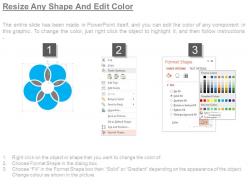
Easy to edit slides with easy to understand instructions.