

Project completion timeline powerpoint images




Try Before you Buy Download Free Sample Product
 Impress Your
 Audience
 100%
100% Editable
 Save Hours
 of Time


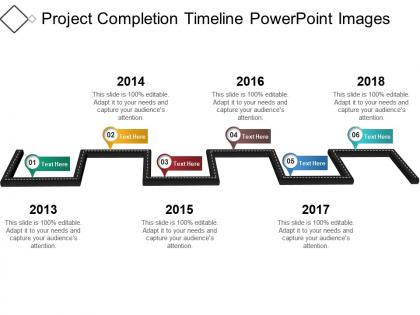
Capture the growth of your business projects with our project completion timeline PowerPoint slide. It will help in providing a glance over the project accomplishment. And how it can be done through some effective techniques. Use this project management timeline PowerPoint template will help in building the matrix of responsibilities for your project team members to follow. It also allows them to work in accordance to each other so that to achieve the targets as per the defined project timelines. Use this project milestone planning PPT slide template to define the essential elements of your company projects. It includes the list of project tasks needs to be completed, the dates on which they should be completed. And the expected timeline for each stage of the project. This company project timeline PPT diagram would help in building an improved project structure for your organization. Thus, simply click on the download tap given below to just start developing an essential business project timeline PPT template for your company. Eliminate any cause for irritation with our Project Completion Timeline Powerpoint Images. Handle any jarring aspects.
People who downloaded this PowerPoint presentation also viewed the following :
Project completion timeline powerpoint images with all 5 slides:
Our Project Completion Timeline Powerpoint Images guarantee an exceptional beginning. They ensure you cut your teeth in the business.
FAQs for Project completion
Definitely nail down project kickoff, major deadlines, and testing phases first. Critical decision points are huge too - mark those clearly. Honestly, I learned the hard way to always pad in extra time because projects get weird. Client reviews will slow you down if you don't plan for them upfront. Dependencies between tasks? Super important to map out so you can spot potential delays early. Oh, and get everyone to actually agree on the timeline before you start - saves so much drama later. Buffer time is your best friend, trust me on this one.
Honestly, project timelines are lifesavers for resource planning. Think of it as your crystal ball - you'll see exactly when you need specific people or tools instead of panicking later. Helps you spot when your team's gonna be buried vs. when they can actually breathe. The expensive stuff like software licenses? You'll know months ahead when you need them. I swear, half the projects I've watched fail could've been saved with better timeline mapping. Just don't set it and forget it though - keep updating that thing so you catch bottlenecks before they wreck everything.
Honestly, Microsoft Project is powerful but way too much unless you're managing something massive. Asana's probably your best bet - clean interface, decent collaboration stuff, and their free version is solid for testing things out. Monday.com works too if you want something similar. Trello's surprisingly good with timeline add-ons if you like the card thing, though I know some people find it too simple. Google Sheets works in a pinch but feels kinda clunky after using the real tools. I'd mess around with Asana first since it won't cost you anything to try.
Ugh, delays are the worst but don't just push everything back - that's where people mess up. Figure out what's actually critical versus stuff that can wait. Tell your stakeholders ASAP because honestly, they'd rather hear bad news early than be blindsided later. Can you run any tasks at the same time instead of one after another? Maybe throw more people at whatever's creating the bottleneck. I learned this the hard way - you can't just hope you'll magically catch up. Look at your timeline now and spot the riskiest parts before they bite you.
Dude, you've got to stay on top of stakeholder communication or your timeline will absolutely tank. I learned this the hard way on my last project. Regular updates help you spot scope creep and resource problems before they blow everything up. People feel way more confident when they know what's happening too. Good communication gets you faster approvals and makes sure stakeholders actually show up for reviews instead of ghosting you. Honestly, just do a weekly email from the start - doesn't have to be fancy, just status and any issues you're hitting.
Ugh, unclear requirements will absolutely destroy your timeline. Your team builds something, then stakeholders go "actually that's not what we wanted" and boom - you're rebuilding everything. Scope creep becomes this constant nightmare too since the "requirements" keep changing mid-project. I learned this the hard way on like three different projects. Super frustrating. Push for signed-off requirements before any coding starts. Yeah, you'll feel like you're being a pain about it, but trust me - it's way better than dealing with endless revisions later.
Dude, you HAVE to set realistic deadlines or your team will hate you. I learned this the hard way when my old boss crammed a month's worth of work into one week - total disaster. Break everything down into smaller tasks first, then add like 20% extra time because something always goes wrong. Trust me on this. Your team won't be stressed, the quality stays decent, and you'll actually look competent to higher-ups instead of constantly making excuses. Plus there's breathing room for those random issues that pop up. Way better than overpromising and looking like an idiot later.
First thing I do is list everything that needs to happen, then figure out what can't start until something else wraps up. Draw some arrows between them - honestly feels like making a weird flowchart but it works. Gantt charts are great if you're into that, or just use a basic spreadsheet. The critical path thing is huge - that's your longest chain of tasks that determines how long everything takes. Always pad your timeline though because dependencies love to mess with you in ways you didn't see coming. Trust me on that one.
Honestly, ditch the text-heavy slides - nobody reads those anyway. Progress bars are clutch for showing where you're at. Color-code different phases so people can follow along without getting lost. Icons help too, especially for milestones and different task types. Gantt charts might sound boring but they're actually perfect for showing how everything connects. I always throw in little celebration icons when phases wrap up because why not? The whole thing should be scannable in like 10 seconds max. Start simple with one visual per slide, then add more if you need to.
Check your timeline every Friday - seriously, it's a lifesaver for weekend peace of mind. When priorities change (and they always do), update everything right away instead of crossing your fingers that you'll magically catch up. Be brutally honest about delays rather than keeping fake deadlines that stress everyone out. I learned this the hard way lol. Build in 15-20% buffer time from the start. Minor hiccups won't destroy your whole schedule that way. Also track what's actually taking forever so you can estimate better next time. Your stakeholders will thank you for the heads up on changes.
Dude, productivity swings will mess with your timelines so badly. Like, your star players might knock out work 2-3x faster than normal, but then someone gets sick for a week and suddenly your whole sprint is toast. I've watched entire projects get derailed because one key person was out - it's honestly ridiculous how fast things can fall apart. Build in buffer time from day one, that's non-negotiable. Track your team's velocity too so you can give stakeholders a heads up before everything goes sideways. Better to under-promise than scramble later explaining why you're behind.
Honestly, throwing more people at it can help if you've got tasks that can run at the same time - though fair warning, it sometimes makes things messier before they get better. I'd start by figuring out your critical path and clearing any roadblocks there first. Cutting scope is probably your fastest win, even if stakeholders push back. Can you run stuff in parallel instead of one after another? That's huge. You could also bring in contractors for specific skills or extend hours temporarily (not sustainable long-term obviously). Really though, focus on those bottlenecks - they're killing you.
Okay so first thing - make a list of everything that could realistically blow up your timeline. Delayed approvals, that one person who always wants last-minute changes (seriously, why is there always one?), tech issues, whatever. Then guess how much each thing might set you back and add like 20-30% buffer time to your riskiest phases. Don't just dump it all at the end though - spread it around where you think problems will actually happen. Write down why you made these choices too. That way when stuff inevitably goes sideways, you look like you planned ahead instead of just throwing darts at a calendar.
Dude, time estimates are where everyone screws up - myself included. Never trust your first guess, always tack on like 20% extra because something will go wrong. Dependencies are brutal too. Task B literally cannot start until Task A is 100% finished, not 95%. People forget that all the time. Also your team will get sick, take vacations, whatever. They're humans, not machines that work 24/7. I learned this stuff the hard way on way too many projects. Buffer time is your best friend, seriously.
Build in feedback checkpoints after each major milestone - don't wait until the end when it's too late to fix anything. Quick review sessions with stakeholders let you pivot before you're in too deep. I learned this the hard way on a project last year, honestly. Schedule these touchpoints upfront when you're planning everything out. Buffer time is crucial too - you need room to actually make changes without everything falling apart. Make feedback collection part of your regular process instead of scrambling for input when problems pop up. Trust me, it saves so much headache later.
-
Use of icon with content is very relateable, informative and appealing.
-
Awesome use of colors and designs in product templates.