


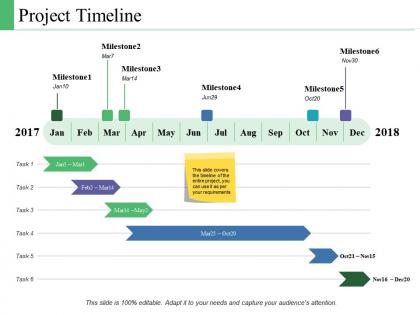
Project timeline ppt powerpoint presentation model summary





Try Before you Buy Download Free Sample Product
 Impress Your
 Audience
 100%
100% Editable
 Save Hours
 of Time


Get ahead as fast as you can with our Project Timeline Ppt Powerpoint Presentation Model Summary. They enable you to build a fabulous career.
People who downloaded this PowerPoint presentation also viewed the following :
Project timeline ppt powerpoint presentation model summary with all 5 slides:
Folks come closer with our Project Timeline Ppt Powerpoint Presentation Model Summary. They become extremely cohesive.

FAQs for Project timeline ppt powerpoint
For your timeline, definitely hit the big milestones and key deliverables first. Map out realistic task durations - I learned this the hard way when I thought I could finish everything in half the time lol. Figure out your critical path so you know which delays actually matter. Buffer time is clutch for reviews and random stuff that pops up. Gantt charts are honestly way better than lists for seeing how everything connects. Oh, and assign who's doing what upfront. Trust me, dependencies get messy fast without a visual layout.
Break each phase into specific tasks first, then estimate based on what your team can *actually* handle - not some perfect world scenario. Past projects are your best friend here for realistic timing. Dependencies between phases matter too since nothing happens in isolation. I personally always tack on 20% extra time because something inevitably goes wrong (learned this the hard way). Check your team's current workload and any holidays coming up that'll mess with productivity. Be brutally honest about how much people can get done per week. Oh, and definitely run your estimates by the folks who'll actually be doing the work - they'll catch stuff you missed.
Honestly, Canva's my go-to for making timelines that don't look boring as hell. Monday.com and Asana are solid too if you're already using them for project stuff. Timeline Maker's pretty decent if you want something built just for this. Oh, and Lucidchart's nice but I always get distracted by all their other features. Start with whatever your team's already comfortable with - switching tools mid-project is the worst. You can always move to something fancier later if you need more visual pizzazz. ClickUp's another option but their interface feels cluttered to me.
Keep it visual - nobody wants to read a wall of text. Gantt charts are your best friend for showing milestones and progress quickly. I once sent a 3-page timeline that got completely ignored, so yeah, learned that lesson! Build in buffer time and call out risks that might mess with your dates. Regular updates are key, even boring "nothing changed" ones, because radio silence freaks stakeholders out. Oh, and match your style to who you're talking to - execs want the big picture dates while your project team needs all the nitty-gritty details.
Think of your project timeline as a crystal ball for catching problems early. You'll spot bottlenecks and resource conflicts way before they blow up your whole project. Mapping out those dependencies? Game changer. I learned this the hard way on my last big project - wish I'd built in more buffer time around the critical stuff. Those "what-if" scenarios aren't really what-ifs, they're gonna happen. The timeline also helps you tell stakeholders upfront when things might get messy. Seriously, add contingency time now, especially for anything on your critical path.
Check your timeline weekly at minimum. Fast-moving projects with tons of dependencies? Maybe every few days honestly. I've watched entire projects crash and burn because people got lazy with updates - waited like a month and suddenly everything's a disaster. The whole point is spotting problems before they snowball into catastrophes. Just set a calendar reminder, make it a quick 10-minute thing. When your stakeholders start breathing down your neck asking wtf is happening, you'll be glad you stayed on top of it.
Dude, always pad your estimates - like 20-30% extra because random stuff WILL pop up. I learned this the hard way lol. Break everything into smaller pieces so you catch issues early instead of panicking later. Actually ask the people doing the work what they think is realistic, not just what sounds good to management. Oh, and set up regular check-ins where you can tweak timelines before everything goes sideways. Being brutally honest upfront about what's doable beats overpromising every single time.
Okay so first thing - figure out your critical path. What absolutely has to happen before other stuff can start? Dependencies are huge here. Then I'd look at deadlines, who's actually available to do the work, and how much it'll impact the business. Honestly, I always just dump everything into one of those urgent vs important grids because I'm lazy like that, but it works. Don't forget about external stuff too - client approvals take forever, vendors are unpredictable. Once you've got priorities straight, add buffer time around anything risky and make sure everyone knows the timeline.
Honestly, the two biggest ones are totally underestimating how long stuff takes and missing those task dependencies that bite you later. Always build in buffer time - like 15-20% extra for major milestones because something WILL go sideways. I learned this the hard way lol. Also factor in real-world delays like people being on vacation, approval cycles dragging on forever, etc. Oh and definitely get your team involved in planning from the start. When you don't, you end up with these completely unrealistic timelines that stress everyone out. Better to be realistic upfront than scrambling later.
I always build in 20-30% buffer time right from the start - learned that the hard way on too many projects! Figure out which tasks are actually on your critical path so you know when delays matter vs when they don't. Weekly reviews are clutch because everything takes longer than you think it will. The worst thing you can do is stay quiet hoping you'll catch up later (spoiler: you won't). I do milestone check-ins every couple weeks to spot problems early. Oh and communicate changes fast - stakeholders hate surprises way more than they hate revised timelines.
Definitely go with color coding - different shades for phases, teams, whatever makes sense. Milestone markers are clutch (I like using diamonds). Progress bars show how much is done without people having to ask. Icons might seem extra but they actually help people scan faster, trust me. Keep your text short and don't cram everything together - spacing matters more than you'd think. Oh, and make sure someone can look at it for like 20 seconds and basically get the whole project flow. That's when you know it's working.
Your old project timelines are gold for planning new stuff. Check what actually took forever vs what you thought it would - then build in that extra time upfront. Honestly, the same problems always repeat themselves, so you'll start seeing patterns pretty quick. Team handoffs are where things usually go sideways, so watch those closely. Map your new tasks against similar ones from before, but don't forget to adjust if your scope or team's different this time. It's way better than guessing from scratch.
Honestly, focus on three main things: schedule variance (are you behind or ahead?), milestone completion rates, and whether your team's swamped or sitting around. Budget tracking matters too - cost overruns are awkward conversations with the boss. Scope creep will destroy your timeline faster than anything else, trust me on that one. Just throw these into a simple dashboard you check weekly. Short sentences work better than long ones for spotting problems early. You don't want to be scrambling last minute trying to fix everything.
Don't wait until the very end to get feedback - that's a recipe for disaster. Set up quick weekly check-ins or milestone reviews so people can actually tell you when deadlines are totally unrealistic or when they're stuck on something. Trust me, I learned this one the hard way lol. When feedback comes in, figure out if you need to push deadlines, move resources around, or just break big tasks into smaller pieces. Your timeline isn't set in stone - it's gonna change as you learn more. Just make sure you tell everyone about updates so nobody's working off the old plan.
Honestly, having a solid timeline is a game-changer for getting stuff done. Your team stops wasting mental energy figuring out what to work on next - they just know. No more panic mode when deadlines sneak up either. You'll catch problems way earlier, which is clutch for moving people around when needed. There's also this weird dopamine hit from crossing things off that keeps everyone motivated. Just make sure it's not some fantasy timeline where everything takes half the time it actually will. And obviously share it with everyone - I've seen too many teams where the PM hoards the schedule like it's classified intel.
No Reviews