Project timeline ppt inspiration example

Slide 1 of 5

or

Favourites Favourites

Try Before you Buy Download Free Sample Product

Audience Impress Your
Audience
Editable 100%
Editable
Time Save Hours
of Time
The Biggest Sale is ending soon in
0
0
:
0
0
:
0
0
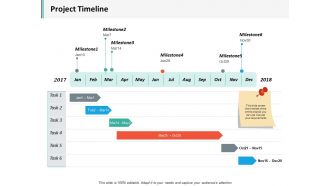
Presenting this set of slides with name - Project Timeline Ppt Inspiration Example. This is a six stage process. The stages in this process are Business, Management, Strategy, Analysis, Marketing.

Content of this Powerpoint Presentation

Do you know what the beating heart of the project is? Project Timeline! Yes, you heard it right.

A timeline lays out deadlines and tasks associated with the project to keep the team informed of each step. When not met, it can lead to unhappy customers, harming the reputation of your business.

As per the Project Management Institute’s Pulse of the Profession report, 48% of projects do not meet the deadlines. No harm but missed deadlines cannot be overlooked.

Why Do You Need to Develop a Project Timeline?

Your team working mindlessly on a task will lead them nowhere. They need to have a specific time estimate for each milestone which in turn helps in tracking the progress of the project.

Look at the following pointers which clarify the benefits of creating a deadline for a task:

  • Manage the time like never before

  • Communicating expectations reduces chaos

  • Track progress with predefined benchmarks

  • Motivate team members with the milestones

  • Prioritize tasks as per importance 

  • Transparency and clarity to stakeholders.

While you are doing everything to strategize your timeline, you might think of an inspiration for developing a presentation that clearly indicates the scheduled tasks. Slideteam’s project timeline PPT inspirations will give you a perfect platform to optimize the planning of timelines. Even if you are handling multiple projects at a time, our Quarterly based multiple project timeline template will do justice to your expression.

With this blog, we have highlighted the key features of the project timeline slide so that you can clearly define the goals, timeframes, and dependencies to the respective parties involved.

Template 1 Project Timeline Slide PPT Template

In this slide, you can elaborate on tasks against the milestones.  It clearly indicates project timelines with key achievements through this visually-appealing slide. Use it as a common reference point for discussing challenges, priority tasks, and progress of each milestone. You can visualize a roadmap for the project, wherein team members will be empowered to undertake individual responsibilities and will be motivated to work on those goals.

Use this template to showcase the visibility of project progress and upcoming milestones to the stakeholders. It means you would be able to engage every member in the project lifecycle and expectations are managed easily. With each milestone achievement, the team will get motivated and it will lead to the creation of a sense of accomplishment for the entire team.

Missing a deadline can cost you a lot, especially when you are dealing with a time-specific client. Understanding project priorities and communicating them to the client and team members will exhibit professionalism and lead to success.

This lucrative project timeline slide will help you manage your tasks easily. You can communicate what needs to be done at what time so that everyone gets a clear idea of how they are going to prioritize the tasks. It is high time to make your team productive and improve project delivery. Just download this slide; it will show you the way and create miracles.

FAQs for Project timeline

Okay so you'll need the basics: milestones, task dependencies, who's doing what, and buffer time. I always start with the big deliverables then work backwards - way easier that way. Dependencies matter tons (like obviously you can't launch before testing, right?). Be realistic about timing because we all lowball how long stuff takes. Assign clear owners and check their availability. Oh and definitely pad your timeline because something random always breaks. Weekly check-ins keep everyone on track. Honestly the buffer time thing has saved my butt so many times.

Dude, you've gotta try Gantt charts for your project stuff. They're like a visual timeline that shows everything - which tasks overlap, what's blocking other things, how behind you actually are. Way clearer than those messy to-do lists we always make. Honestly, once I started using them, I felt way more in control of deadlines. Plus when you need to explain timing to your boss or whoever, the visual bars just make sense instantly. Even something basic like Excel works fine - though I know it sounds kinda old school. Trust me on this one.

Dude, Microsoft Project and Smartsheet are solid if you want all the bells and whistles. But honestly? I've seen some killer timelines made in PowerPoint that executives absolutely eat up - something about those visuals just works. Monday.com and Asana are clutch for team stuff where everyone needs to collaborate. Lucidchart's great when you need something clean fast. Excel works too if you're flying solo (there are decent templates out there). Really depends who you're presenting to though. Execs want pretty charts, your actual team needs something functional they can update.

Okay so waterfall is basically one long timeline where you plan everything upfront and stick to it no matter what. Agile breaks things into these short 1-4 week sprints instead. With waterfall you're locked into that original plan (which honestly sucks when stuff inevitably changes). Agile lets you pivot constantly based on what you learn each sprint. You'll get working stuff way earlier with agile, though your final deadline becomes more of a moving target. If you need a hard deadline, go waterfall. Want flexibility and quick feedback? Agile's your friend. Really depends on your situation.

Dude, you absolutely need to stay on top of stakeholder communication if you want your project to survive. Think of it as your safety net - when people know what's happening, they can actually help you solve problems before they explode. Quick approvals, more resources, fewer surprises that make everyone lose their minds. Here's the thing though: don't just blast out boring status updates. Actually talk to them. Ask real questions. Get them involved. I learned this the hard way on my last project - radio silence leads to those awful "wait, what about this other thing we need?" conversations that happen way too late. Set up regular check-ins from the start. Trust me on this one.

Dude, you've gotta plan for the stuff that'll mess up your timeline before it happens. Dependencies are honestly the absolute worst - you're just sitting there waiting on other teams who don't care about your deadlines. Resource shortages and scope creep will also destroy you. Build in buffer time upfront, like 15-20% extra depending on how complex things get. Figure out your biggest risks early and have backup plans ready. Don't be that person scrambling when everything hits the fan. Check on these risks during your regular meetings so you can actually do something about them before they wreck your schedule.

Honestly, the biggest lifesaver is padding your timeline with buffer time right from the start. Focus on your critical tasks especially. Figure out what deliverables can actually slide without destroying everything else - trust me, there's usually more wiggle room than you think. Changes will happen (they always do), so jump on impact assessment immediately. Hit up stakeholders with updated dates before they come asking. Document why stuff shifted so you're not scrambling to remember later. Here's the thing though - don't just eat all the delays yourself. Push back on scope or ask for more resources. Your team will thank you for not letting them burn out completely.

Honestly, you'll want to map out which tasks depend on others before you even touch the timeline. That way you're not just making up buffer time - you actually know where you need it. The critical path stuff is huge too, like those tasks that'll totally wreck your deadline if they run late. I learned this the hard way on my last project, ugh. You can also figure out what can run at the same time to move faster. Without mapping dependencies first, you're gonna get blindsided by delays every time. Trust me on this one.

Honestly, the worst thing you can do is be too optimistic with your timeline. I learned this the hard way lol. Buffer time is everything - like seriously, add 20-30% padding to whatever you think it'll take. Also make your milestones super specific instead of vague stuff like "research done." Dependencies will bite you too if you don't map out what needs to happen first. Oh, and actually talk to the people doing the work instead of guessing! Don't forget about holidays and competing projects either. Being brutally realistic upfront saves so much pain later.

Honestly, it's all about who you're talking to. Executives just want the big picture - major milestones, key deliverables. They don't care about every little task (and frankly, they'll tune out if you show them). Your actual team though? Break everything down into 1-2 week chunks they can actually tackle. Early on, stay high-level until things get clearer. Then dig deeper as you approach deadlines. I usually just think: what does this person need to either make a decision or actually get their work done? Works pretty well as a rule of thumb.

Hey! So yeah, more resources usually speeds things up, but honestly it's not that straightforward. You can actually make things worse by cramming too many people onto one task - they'll just trip over each other. I learned this the hard way on a project last year lol. What works better is figuring out which parts can happen at the same time vs. what has to wait for other stuff to finish first. Too few people and you're stuck waiting forever. Too many and suddenly everyone's spending half their time in meetings just trying to coordinate. Map out what can run parallel, then match people to tasks based on timing.

Put your milestones where stuff actually gets decided or finished - design sign-offs, testing wraps, that kind of thing. Don't just throw them everywhere randomly. I learned this the hard way on a project last year, but anyway... Space them maybe 2-3 weeks apart tops. Any longer and problems snowball before you notice. Each one needs to be super clear about what "done" looks like. No wishy-washy stuff. The best part? When you hit each checkpoint, you can tweak the rest of your timeline based on what's really happening instead of just hoping for the best.

Honestly, I always add like 20-30% extra time when working with external teams. Their priorities aren't your priorities, you know? Communication takes forever, and don't even get me started on their approval processes. Coordinating schedules is such a nightmare - it's basically herding cats. You'll sit there waiting for their "quick review" that somehow takes two weeks. Scope changes happen out of nowhere too. My trick is setting internal deadlines way earlier than what I actually promise them. Build in time for all the back-and-forth stuff. Trust me on this one.

Take your original timeline and compare it to what actually went down. Seriously, this stuff is pure gold for next time. Were you way too optimistic about certain tasks? I always am with anything involving other people's feedback - learned that the hard way. Write down where things went sideways and why. Scope creep? Not enough resources? Unrealistic expectations from the start? Document it while it's still fresh in your head. Next project, you'll have real data instead of just crossing your fingers and guessing.

Honestly, less is more with timelines - just show the big milestones, not every single task. Stakeholders need to see the main picture without drowning in details. Always build in buffer time because something will definitely break (learned that one the hard way). If you've got multiple teams, color-coding helps a ton. Put clear dates on everything and call out which pieces depend on others. Oh, and don't hide the sketchy stuff - if that vendor hasn't responded in ages, mention it upfront. Way better than explaining later why you're behind schedule.

Ratings and Reviews

0% of 100
Review Form
Write a review
Most Relevant Reviews

No Reviews