

Firewall Implementation For Cyber Security RACI Matrix For Firewall Implementation Plan




Try Before you Buy Download Free Sample Product
 Impress Your
Audience
 100%
Editable
 Save Hours
of Time


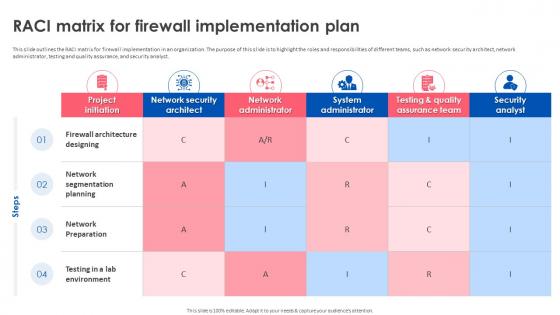
This slide outlines the RACI matrix for firewall implementation in an organization. The purpose of this slide is to highlight the roles and responsibilities of different teams, such as network security architect, network administrator, testing and quality assurance, and security analyst.
People who downloaded this PowerPoint presentation also viewed the following :
Firewall Implementation For Cyber Security RACI Matrix For Firewall Implementation Plan with all 9 slides:
Use our Firewall Implementation For Cyber Security RACI Matrix For Firewall Implementation Plan to effectively help you save your valuable time. They are readymade to fit into any presentation structure.








FAQs for Firewall Implementation For Cyber Security RACI Matrix For
Okay so stateless firewalls just check each packet individually - no memory of what happened before. Stateful ones actually track your connections and remember the whole conversation flow. Way better security with stateful since they can catch weird traffic patterns and hijacking attempts. Honestly, stateful is pretty much the standard now unless you're doing something really niche. Think of it like having a bouncer who remembers faces vs one who just checks IDs without context. You'll want stateful for most situations.
First thing - figure out what you're actually protecting and map your network setup. Critical assets, data flows, all that stuff. Your current traffic patterns matter too, plus whatever compliance headaches you're dealing with. Budget's obviously a factor, but honestly, don't cheap out if you can help it. How tech-savvy is your team? Some firewalls are a nightmare to configure. Growth plans are huge - you don't want to be shopping again in six months because you outgrew everything. Make a simple must-have vs nice-to-have list, then demo vendors using your actual scenarios, not their canned presentations.
So basically a firewall is like having a bouncer at your network's front door - filters all the traffic coming in and out based on rules you set. Pretty good at blocking sketchy connections before they get to your stuff. But don't think it's gonna solve everything on its own, you know? You'll still want antivirus, monitoring tools, proper access controls - the whole nine yards. That's what layered security is about. If your firewall screws up, hopefully something else catches the bad guys. Oh and actually update those firewall rules regularly instead of just setting it once.
So there's basically three types you'll run into. Packet filtering is the simplest - just blocks based on ports and IPs, but it's kinda dumb. Stateful inspection is way better since it actually tracks whether traffic belongs to a real connection. Then you've got application-layer firewalls that dig into the actual data content, though they're slower. Honestly, most places mix stateful with application-layer stuff now. I'd start with stateful as your base and throw in application rules for anything critical. Oh, and don't go overboard with the app-layer filtering at first - it can slow things down more than you'd expect.
Dude, don't just rip out the old firewall and hope for the best. Run both systems side by side and slowly move traffic over during quiet hours - weekends are your friend here. Lab testing is absolutely crucial, trust me on this one. I've seen people skip that step and regret it big time. Clustering helps if you've got the cash, but either way you need a solid rollback plan. Oh, and keep your monitoring running the whole time so you'll know immediately if something goes sideways and need to bail back to the old setup.
Honestly, just block everything first then open what you actually need - makes you really think about each rule. Document why you did stuff because trust me, you'll have no clue why that random printer exception exists later. Give minimum access only, nothing extra. I like grouping similar services so it's not a total mess to read. Check your logs regularly though - you'll catch bad stuff AND realize when you accidentally blocked something important. Oh and definitely test changes somewhere safe first if you can swing it. Clean out old rules every few months too.
Dude, traditional firewalls just check ports and IPs - pretty basic stuff. NGFWs actually dig into your traffic content and can spot specific apps your team's using. They'll catch malware as it happens too, which is huge. It's like... old firewalls are bouncers checking IDs, but next-gen ones are security guards who actually walk around and see what's going down inside. The threat landscape's gotten crazy complex lately. If you're still running traditional ones, you're honestly leaving yourself pretty exposed. Deep packet inspection plus app-aware policies - that's where you want to be.
Yeah, cloud firewalls are actually great for remote teams. Your security follows people around instead of forcing everyone to VPN back to the office - which honestly kills performance. Someone's at home, Starbucks, or traveling? Same protection everywhere. The downside is you're betting on your internet connection and trusting your cloud provider won't mess up. But the flexibility is usually worth it. I'd test it with a small group first though, just to make sure performance doesn't suck before you roll it out to everyone.
Definitely run some pen testing and vulnerability scans - that's where you'll actually see if your firewall holds up. I'd start with Nmap or Nessus for the basics, checking open ports and misconfigs. Then get some ethical hackers in there for the real stuff. Honestly, I've watched so many "secure" firewalls just fall apart when properly tested. Don't forget regular rule audits too - those overly permissive policies always sneak back in somehow. Set up decent logging so you can actually see what's getting blocked vs what slips through. Test quarterly minimum, and after any big changes obviously.
You'll need to watch both performance and security stuff. Performance means tracking throughput, latency, connection rates, plus CPU/memory on your firewall boxes. Security side - blocked vs allowed traffic, intrusion attempts, malware hits, policy violations. Set up alerts for weird spikes instead of staring at dashboards all day. Trust me, the logs will bury you otherwise. Build your baselines first, then configure thresholds that ping you when things go sideways. I usually start with weekly reports to catch trends, then tweak from there based on what's actually happening.
Map your firewall rules to your compliance needs first - like blocking unauthorized access for GDPR or stopping PHI from going where it shouldn't for HIPAA. Figure out what data flows through your network and where you're exposed. Honestly, it's a pain at first but totally worth doing right. Block unnecessary ports, encrypt sensitive stuff, and log everything. I learned this the hard way during our last audit - document how each policy supports compliance requirements. Auditors eat that stuff up, and you'll thank yourself later when they come knocking.
Firewall screwups are brutal - they either let hackers waltz right in or lock out your own users. I've watched both scenarios tank projects completely. The worst part? Overly loose rules create backdoors you don't even realize exist. Regular audits are your friend here, plus stick to least-privilege access. Document everything with actual business reasons (not just "because security said so"). Get someone else to eyeball your configs before going live - you'll miss stuff after staring at rules all day. Oh, and automate reviews if you can swing it.
So basically you want both working together for layered security. Your firewall stops the obvious bad stuff at the door, but the IDS watches everything that makes it through and catches weird patterns or sneaky attacks that look normal. Think of it like... okay this is dumb but like having a bouncer plus security cameras. The IDS can actually send intel back to your firewall too, so it updates its blocking rules automatically. You'll catch way more threats this way. Definitely set up some automated responses between them though - trust me, you don't want to sit there matching up alerts manually all day.
So ML basically makes your firewall way smarter - it stops just following rigid rules and starts learning patterns. Your system can spot weird traffic behavior that screams "new threat" even if it's never seen that exact attack before. Pretty cool honestly. False positives drop too since it figures out what your normal network activity looks like. The behavioral stuff is huge - catches things that old-school signature detection misses completely. Oh and the detection just keeps getting better over time which is nice. I'd probably start with anomaly detection if you're thinking about trying this.
Bandwidth and connection limits will bite you way sooner than you think - seriously, most companies hit those walls within months. Get hardware that handles 3x your current needs minimum. Modular stuff is clutch because you'll definitely need to expand later. Oh, and set up centralized management from the start - trust me on this one, juggling separate firewalls is pure hell. Don't forget about remote workers either, you'll need solid VPN capacity and maybe SD-WAN down the road. Yeah, enterprise-grade seems expensive now but migration nightmares cost way more than just doing it right initially.
-
Awesomely designed templates, Easy to understand.
-
Appreciate the research and its presentable format.