

Cyber Security Action Plan Process





Try Before you Buy Download Free Sample Product
 Impress Your
 Audience
 100%
100% Editable
 Save Hours
 of Time


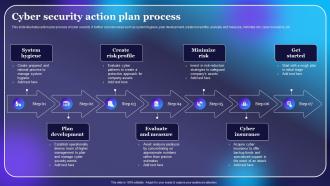
This slide illustrates action plan process of cyber security. It further consists steps such as system hygiene, plan development, create risk profile, evaluate and measure, minimize risk, cyber insurance, etc
People who downloaded this PowerPoint presentation also viewed the following :
Cyber Security Action Plan Process with all 6 slides:
Use our Cyber Security Action Plan Process to effectively help you save your valuable time. They are readymade to fit into any presentation structure.





FAQs for Cyber Security
Dude, you're gonna deal with phishing emails, ransomware, and malware mostly - that's like 80% of business attacks right there. Phishing's still huge because hackers just target your employees with sketchy emails and links. Super effective, unfortunately. Ransomware locks everything up until you pay them, while regular malware just messes up your whole system. Don't forget about angry employees either, or people using "password123" for everything. Most of this happens because someone clicks the wrong thing, not some movie-style hacking. Get your team trained on this stuff and keep your software updated.
Forget those brutal all-day training sessions - nobody remembers anything from those anyway. Break it into short, regular chunks instead. Focus on stuff they'll actually encounter, like fake emails from "HR" asking for passwords. Interactive scenarios work way better than lectures, honestly. Let people practice spotting sketchy links and attachments. Quiz them to see what's actually sticking. You want folks comfortable asking security questions without feeling like they're bugging IT. Run fake phishing tests every few months, but treat failures as learning opportunities, not ways to embarrass people. Building that culture where security feels approachable makes all the difference.
So encryption scrambles your data into unreadable nonsense. If hackers break in, they can't do anything with encrypted files - it's like stealing a locked safe without the combination. You'll want to encrypt customer info, financial stuff, anything sensitive really. Use it for data that's sitting in storage AND when it's moving around your network. Honestly, it's probably your strongest defense against breaches. Even my least tech-savvy clients get this one right because the tools are pretty straightforward now. Just make sure you're using current encryption standards, not something from like 2010.
So MFA is basically extra locks on your accounts beyond just passwords. You're combining something you know (password) with something you have (like your phone) and sometimes biometrics too. Yeah, it's annoying when you're running late and need to wait for that text code. But seriously, it stops so much fraud. Hackers might crack your password, but they'd still need your actual phone to get in. I learned this the hard way after my cousin got her account cleaned out last year. Turn it on for banking stuff at least - you'll thank yourself later.
So basically, breaches are when hackers actually break in - they're stealing passwords or finding security holes to get your stuff. Leaks are more like... oops, someone left the data sitting out there by accident. Could be a misconfigured server or Jim from IT screwed up the settings (happens way more than you'd think). Both are terrible, obviously. But you gotta protect against them differently - breaches need better monitoring and access controls, while leaks are more about training people properly and double-checking your configurations. It's annoying that there's two different ways your data can get screwed.
Honestly, just start by mapping out all your systems and seeing where you're actually vulnerable. Run some vulnerability scans, test your people with fake phishing emails (trust me, someone will definitely fall for it), and maybe get an outside pen tester if you can swing the budget. Your incident response plan probably needs updating too - when's the last time you looked at that thing? The biggest mistake is treating this like a one-and-done deal. Set up quarterly check-ins so you're not scrambling when the next big threat hits.
Look, GDPR forces you to build privacy in from the start - encryption, 72-hour breach alerts, proper access controls, the whole deal. Those fines hit up to 4% of global revenue, which honestly will bankrupt most companies. CCPA and HIPAA work similarly but target different stuff. Here's the weird thing though - following these rules actually makes your security way better overall. I'd start with a data audit first. Figure out what personal info you're grabbing and where it's stored. That's your baseline before you do anything else.
Basically, social engineering is when scammers mess with your head instead of hacking computers. They'll pretend to be your coworker or some "urgent" IT guy asking for your password. People fall for it because we naturally want to help others - which is kinda sad when you think about it. Always double-check who you're talking to through a different method before sharing anything sensitive. Don't give out passwords over phone or email, ever. Be suspicious of anything that feels rushed or pushy. And yeah, train everyone on your team since honestly, we're all pretty gullible sometimes.
Honestly, just get a password manager like Bitworm or 1Password - trying to remember different 12+ character passwords for everything is a nightmare. Make them long with numbers, letters, symbols, the works. Two-factor authentication is clutch too, especially for email and banking stuff. Skip SMS codes if you can since those get hacked pretty easily. Authenticator apps are way more secure. Hardware keys are amazing if your work uses them, but honestly most people never get that far. I'd start with your banking and email accounts first, then worry about the rest later.
Honestly, AI and ML are game-changers for cybersecurity. They can sift through tons of network data way faster than any human and catch weird patterns we'd totally miss. What's cool is they actually learn to predict attacks before they happen - like having a really paranoid friend watching your back 24/7. Plus they're great at spotting when user accounts start acting sketchy. My advice? Don't go crazy trying to implement everything at once. Start with AI threat detection on your most important systems first, then build from there. Way less overwhelming that way.
Oh god, that's rough. Hit your incident response plan right away and stop the bleeding first. Document everything you can while containing it. You've got 72 hours for GDPR notifications but double-check your local requirements - they vary. The messaging part is honestly brutal when you're panicking, but transparency with customers beats trying to hide it. Get legal and cybersec experts involved ASAP. Once the dust settles, use what you learned to beef up your defenses so this doesn't happen again.
Okay so first things first - turn on multi-factor authentication everywhere you can. Keep everything updated too, which I know is annoying but whatever. Train your people about phishing emails because honestly that's how most companies get screwed over. You don't need to blow your budget on fancy enterprise stuff right away. Windows Defender is actually pretty decent now, and it's free. Set up solid password rules and back everything up to the cloud regularly. Oh, and look into cyber insurance - way cheaper than I expected when I checked it out last year. Just layer a bunch of these basic protections instead of betting everything on one pricey solution.
Dude, get everything in writing first - like, seriously everything. Without proper authorization you're just a regular hacker, which is obviously bad news. Stick to what they agreed to let you test, don't go poking around random systems or downloading stuff you don't need. Found something sketchy? Give them time to actually fix it before telling the world. I learned this the hard way but documentation is your friend here - log what you're doing so you can prove you stayed in bounds. Oh and treat any sensitive data like it's radioactive. That's pretty much the main stuff that'll keep you out of trouble.
Oh man, yeah remote work is a security nightmare. Home networks are trash, people use their personal laptops for work stuff, and phishing emails are everywhere now. I swear people just click on anything when they're working from their couch. Your company's security basically extends to every random coffee shop and bedroom now - wild to think about. Zero-trust setups help though, plus better VPNs and endpoint monitoring. Just make sure everyone's doing multi-factor auth and actually knows what sketchy emails look like.
Dude, the attack stuff is getting crazy sophisticated with AI. Ransomware crews are going after smaller companies now too - probably easier targets. Supply chain attacks are still a total mess, and honestly, zero-trust isn't just hype anymore, you actually need it. Cloud configs are breaking left and right (seriously, how do people still screw this up?). Compliance paperwork is about to get worse with new regs everywhere. Get your incident response stuff updated ASAP. Maybe run through some scenarios with the team? Oh, and that tabletop exercise thing actually works - did one last month and found like three gaps we missed.
-
Innovative and creative templates with high-quality designs. Helped me with my presentation as the slides were easy to edit.
-
Innovative and creative templates with high-quality designs. Helped me with my presentation as the slides were easy to edit.