


Cyber Security Incident Response Process Flow Chart Ppt Powerpoint Presentation Model File Formats




Try Before you Buy Download Free Sample Product
 Impress Your
 Audience
 100%
100% Editable
 Save Hours
 of Time


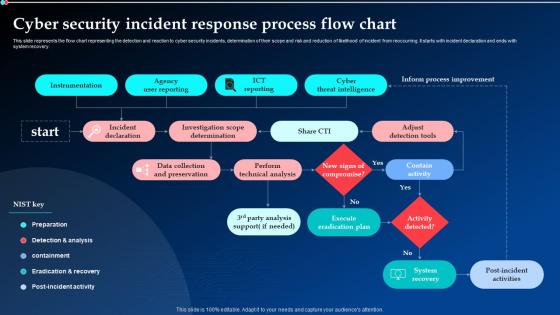
This slide represents the flow chart representing the detection and reaction to cyber security incidents, determination of their scope and risk and reduction of likelihood of incident from reoccurring. It starts with incident declaration and ends with system recovery.
People who downloaded this PowerPoint presentation also viewed the following :
Cyber Security Incident Response Process Flow Chart Ppt Powerpoint Presentation Model File Formats with all 6 slides:
Use our Cyber Security Incident Response Process Flow Chart Ppt Powerpoint Presentation Model File Formats to effectively help you save your valuable time. They are readymade to fit into any presentation structure.





FAQs for Cyber Security Incident Response Process Flow Chart Ppt Powerpoint Presentation
You need six main pieces for a decent incident response plan: preparation (policies, tools, team training), identification (spotting and analyzing threats), containment (stopping the spread), eradication (getting rid of the threat), recovery (back to normal operations), and lessons learned (reviewing what happened). Most places totally blow off that review step, which is dumb because that's how you get better. Preparation's gonna eat up most of your time upfront - your team needs to know what they're doing and have tools ready. Oh, and document whatever processes you have now, even if they're kind of messy.
Okay so first thing - get an incident response plan written up before disaster strikes. Map out who's doing what, how everyone talks to each other, different scenarios and procedures. Honestly, the practice part is where most teams screw up. Run tabletop exercises and simulations all the time because when shit hits the fan, you'll just react on autopilot. Your team needs to know exactly who to call at 3am (and how to actually reach them). Document everything as you go - trust me, legal will need it later. The whole point is drilling this stuff until it's muscle memory, because panic mode is real.
Okay so first - breathe, but move quickly. Isolate those compromised systems right now before this spreads further through your network. Write down everything you're seeing because trust me, your brain will be mush later when everyone's freaking out. Get your incident response team on the phone immediately, plus legal counsel. I know it sounds like overkill but you'll thank me later. Don't touch anything else until forensics says it's okay - I've seen people accidentally destroy evidence trying to "help." Oh, and someone needs to start documenting every single action taken from this moment forward.
Dude, threat intelligence is like having insider info on the attackers before they hit you. Your incident response team won't be scrambling around clueless anymore - they'll actually know what tactics to watch for and can spot if it's a known threat group. Honestly, it saves so much time during investigations. You can prioritize which alerts actually matter instead of chasing every random ping. My old team used to waste hours on false leads before we got smart about this. Start by feeding threat intel into your SIEM, then make sure your IR folks know how to use it when stuff goes sideways.
Honestly, training your employees is huge - it's like the best defense you'll get. Most hackers are basically counting on people not knowing what to look for, so when your team can actually spot phishing emails and weird links, you're already way ahead. Plus they'll know to report sketchy stuff right away instead of freaking out or trying to handle it themselves (which never goes well). The tricky part is you can't just do it once - these scammers are always coming up with new tricks, so the training needs to be regular.
So you're gonna see malware infections constantly - that's just the reality. Phishing attacks are honestly the worst because people fall for them way too easily. Ransomware hits hard when it does happen. Data breaches and insider threats are always lurking too, which kinda sucks because you can't fully prevent the human element. DDoS attacks will mess up your day, plus there's constant unauthorized access attempts. Oh, and social engineering keeps getting sneakier. My biggest advice? Get that incident response plan sorted NOW because when stuff goes sideways, you don't want to be scrambling around trying to figure out what to do.
Honestly, tabletop exercises are a game changer for testing your incident response plans. Get your team together and walk through scenarios like ransomware hits or data gets breached. Then do full simulations that actually test your tech and how people communicate. Surprise drills work great too - you'll see who panics and who keeps their head on straight. Pull in everyone from IT to legal to PR, not just the tech folks. Different scenarios keep it fresh. Oh, and document what went wrong after each one - that's literally the most important part since you'll update your plan based on real gaps.
Dude, SOAR platforms are absolutely worth it - Phantom and Demisto can handle all those boring repetitive tasks so your team doesn't have to. Your SIEM can auto-correlate events and kick off workflows too. EDR tools? They'll isolate compromised endpoints instantly without anyone touching anything, which honestly has saved my butt more times than I can count. Oh, and threat intel platforms automatically add context to alerts. Super helpful. I'd start with whatever manual stuff eats up most of your time and automate that first. Makes the biggest difference.
Dude, you've gotta bake compliance stuff right into your incident plan from the start. Figure out which regulations hit your industry - GDPR, HIPAA, PCI-DSS, whatever applies. Document all those notification deadlines because honestly, they're all over the place and super confusing. Here's what actually works: assign specific people to handle regulatory notifications. Don't wait until you're in crisis mode to figure out who does what. Practice this during your tabletop exercises too - I can't stress this enough. Start by auditing your current plan and spotting the gaps. Trust me, there's probably more than you think.
Document everything as it happens - seriously, you'll blank on half the details once the chaos dies down. Keep a running timeline: when you first spotted it, which systems got hit, every step your team took. Screenshots, command outputs, chat logs - grab it all. The business impact matters just as much as the technical play-by-play, trust me on that one. I learned this the hard way after scrambling to piece together a post-mortem from my terrible memory and random Slack threads. Real-time logging saves your sanity later.
So basically you wanna track how fast you catch problems and contain them. MTTR is huge - that's mean time to recovery, aka how quickly you get everything back to normal. Communication matters too because nothing's worse than panicked executives blowing up your phone when they don't know what's happening. I always check data loss, which systems got hit, and honestly? Whether the team actually learned anything useful. Oh and definitely do a post-mortem with everyone - that's where you'll figure out what actually worked versus what was a total mess.
Honestly, most companies just don't have enough resources or clear roles defined - that's problem number one. When chaos hits, everyone forgets the playbook anyway because communication totally breaks down. Your procedures get outdated fast too since threats keep evolving. Oh, and people freeze up without proper training, which is way more common than you'd think. Run those tabletop exercises every quarter if you can. Test your communication channels beforehand too - you don't want to discover Slack's down during an actual incident. Trust me on that one.
Pick one person to handle all the internal updates - seriously, office gossip spreads faster than the actual breach sometimes. Use secure channels only. Get your legal and PR people involved before you tell anyone outside the company. Draft some basic holding statements now so you're not panicking later trying to figure out what to say. Be honest but don't dump every technical detail that could backfire. Regular updates work better than people constantly bugging you for status. Document everything though - investigations and compliance stuff will want that paper trail later.
Dude, those massive breaches like Equifax and Target? They show you can't just procrastinate on patches - that stuff will bite you hard. Your incident response plan is useless if it's just gathering dust somewhere. Actually test it regularly with tabletop exercises, maybe quarterly. Communication matters way more than people think - botch how you tell customers and your reputation is toast. Yahoo tried covering things up and got absolutely wrecked for it (honestly, what were they thinking?). Have your PR messaging ready beforehand. You'll thank yourself later when crisis hits.
Once you've got things contained, it's really about two main things: getting back up and running, then figuring out what went wrong. Rebuild your affected systems from clean backups - don't rush this part though, test everything thoroughly first. Update whatever security stuff failed you initially. The learning piece is huge too. Do a proper post-incident review with everyone involved, document the whole mess, and spot your weak points. Skip the blame game entirely. Oh and definitely update your response plan with whatever insights you dig up, otherwise you're just gonna repeat the same mistakes next time.
-
Loved the templates on SlideTeam, I believe I have found the go to place for my presentation needs!
-
Professionally designed slides with color coordinated themes and icons. Perfect for enhancing the style of the presentations.