

Cyber Security Incident Response Plan Timeline Ppt Powerpoint Presentation Summary Layout




Try Before you Buy Download Free Sample Product
 Impress Your
 Audience
 100%
100% Editable
 Save Hours
 of Time


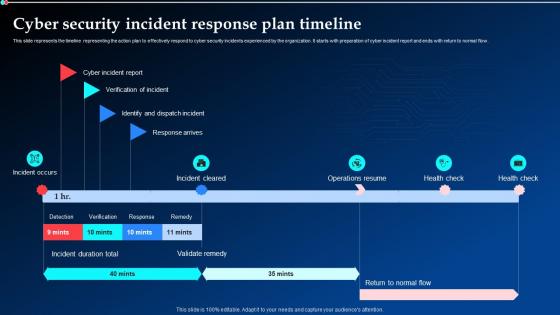
This slide represents the timeline representing the action plan to effectively respond to cyber security incidents experienced by the organization. It starts with preparation of cyber incident report and ends with return to normal flow.
People who downloaded this PowerPoint presentation also viewed the following :
Cyber Security Incident Response Plan Timeline Ppt Powerpoint Presentation Summary Layout with all 6 slides:
Use our Cyber Security Incident Response Plan Timeline Ppt Powerpoint Presentation Summary Layout to effectively help you save your valuable time. They are readymade to fit into any presentation structure.





FAQs for Cyber Security Incident Response Plan Timeline Ppt Powerpoint
You'll want six main pieces: prep work (policies, tools, trained people), spotting threats, containing the damage, wiping out the malware, getting systems back online safely, and reviewing what went wrong afterward. Most companies totally botch the prep stage though - they scramble after getting hit instead of planning ahead. Don't forget communication protocols and who to call (legal, PR, cops if needed). Oh, and actually test your plan with mock scenarios. A dusty binder won't save you when everything's on fire. Start by listing your assets and defining what counts as an "incident" for your setup.
Annually is the standard, but that's kinda lazy if you ask me. I'd say every 6 months minimum. Major infrastructure changes? Review it. New threats pop up? Time for another look. Actually had to use the plan during an incident? Definitely update it after that mess is cleaned up. Your team's probably different than 6 months ago anyway - people quit, new folks join, roles shift around. The plan's worthless if half the contact info is outdated or pointing to someone who left last month. Set a calendar reminder right now and just treat it like you would any other maintenance thing that'll bite you if you ignore it.
Dude, training your people is everything. Most breaches happen because someone clicks the wrong link or falls for a scam - it's wild how often it comes down to human error. Get everyone trained on spotting phishing attempts and reporting weird stuff fast. The real game-changer is having your whole team know exactly what their role is during an incident. Run drills so when things actually hit the fan, people don't just panic. Start with basic security awareness, then practice incident responses. Your security team can't be everywhere, but trained employees basically become extra eyes and ears across the company.
Honestly, you gotta cast a pretty wide net here. Start with threat feeds - CISA's solid, plus whatever your industry puts out and maybe some commercial stuff if budget allows. Your SIEM and endpoint tools should be running 24/7 obviously. But here's the thing people overlook - your employees are actually gold for this. They catch those sketchy emails way before your tech does sometimes. Oh, and definitely get into those sector threat-sharing groups because hackers are lazy and just recycle the same tricks across similar companies. Mix all that external intel with what you're seeing internally, then you can build response plans that actually make sense for your specific situation.
You definitely need a dedicated IR team - trust me on this one. When stuff goes sideways, you don't want everyone standing around asking "wait, whose job is this?" Clear roles and practiced procedures save your butt when seconds count. The team can run drills beforehand so they're not figuring things out during an actual breach (which honestly happens way too often). Make sure someone's always on call though - cyber criminals don't exactly keep business hours. Document your escalation process too, because panicked people forget everything.
Dude, simulated attacks are seriously worth doing. Your team gets to practice when there's no real danger, which beats learning during an actual breach. Run them quarterly maybe? Start small with phishing tests, then build up to nastier stuff. They'll show you where your procedures suck and if your detection tools actually catch anything. Communication between teams gets tested too - honestly that's where most places fall apart. Your people build up those quick reflexes for following playbooks. I'd say it's one of the smartest ways to prep without the panic.
Honestly, you've gotta map out your communication plan way before shit hits the fan. Set up those Slack channels or Teams groups now - and make sure everyone actually knows who they're supposed to contact first. I've watched companies completely fumble this and waste hours just figuring out the basics. Pick one person to be your communication lead so you don't end up with mixed messages everywhere. Have backup methods ready too since your main systems might go down. Oh, and test it every few months - you want this stuff to be automatic when you're panicking.
Okay so first thing - set up automated backups and follow that 3-2-1 rule (3 copies, 2 different storage types, 1 offsite). Daily backups for anything critical. But here's what people always mess up: they never actually test if their backups work until it's too late. I've seen companies get hit with ransomware only to find out their backup files were toast. Keep those backups isolated from your main network so malware can't touch them. Document everything clearly so your incident response team isn't scrambling around looking for files. Test a full restore quarterly - seriously, don't wing it during a real emergency.
So compliance basically flips your whole incident response on its head. GDPR gives you 72 hours to notify authorities once you find a breach - HIPAA's got different timelines for healthcare stuff. The documentation is honestly such a pain when you're already stressed about the actual problem. What I'd do is bake those reporting rules right into your procedures from day one. Have specific people handle the compliance paperwork, practice notifications during those tabletop exercises. Oh, and definitely create templates for regulatory reports ahead of time - trust me, you don't want to be googling "proper GDPR notification language" at 2am during a real incident.
So you're gonna want a SIEM like Splunk or Sentinel for log stuff - that's your bread and butter. CrowdStrike or SentinelOne are solid for endpoint protection. Network monitoring is huge too. Wireshark's great for packet analysis, though Darktrace costs a fortune but catches weird anomalies really well. Oh, and get a decent ticketing system because you'll drown in incidents otherwise. Communication tools for your team are a must. Start small with what you can afford - I've seen too many places blow their budget on fancy tools they don't even use properly yet.
Get everyone together within a week while the chaos is still fresh. Walk through the whole mess step by step - what actually worked, what failed miserably, where things got stuck. Communication breakdowns always surprise me in these meetings, but honestly that's the whole point of doing them. Track your response times, how well you contained things, recovery speed. Then stack those numbers against what you planned and what others in your industry are hitting. Oh and definitely use this to fix your incident response plan - plus figure out what training gaps you've got.
Dude, post-incident analysis is where the real learning happens. Document everything - what went down, how your team handled it, what actually worked vs what totally flopped. Yeah, getting breached sucks but not learning from it? That's way worse. Look for the gaps in your defenses and update your playbooks based on what you discovered. Your team needs training on these new attack methods too. Skip this step and you'll probably get nailed by the exact same thing again. Oh, and schedule that post-mortem within 48 hours while it's all still fresh.
Break incidents down by impact and urgency first. Critical stuff like data breaches or ransomware obviously comes first. Then high priority (malware), medium (phishing), and low (policy violations). Honestly, I've watched teams waste way too much time arguing over categories instead of just fixing the problem. Plot business impact against how time-sensitive it is - that usually works. Anything hitting customer data, financial systems, or core operations gets top priority. Set up clear escalation rules so your team knows when it's worth calling the CISO at 2am versus waiting until morning.
Most companies build these fancy incident response plans but never actually test them - total waste. When chaos hits, everyone's confused about who does what. Communication falls apart because nobody thought through how info should flow. Here's what kills me though - they leave legal and PR out of planning, then panic when reporters start calling. Documentation gets forgotten during the actual crisis, making it impossible to learn afterward. Honestly? Run practice drills every few months. Your plan needs to work when people are stressed and everything's breaking, not just look good in a PowerPoint.
So threat intelligence basically gives your IR team context about who's attacking and how they operate. When an incident hits, you're not starting from zero - you can quickly check if it matches known attack patterns or threat actors. Honestly, it's a game changer for prioritizing which alerts actually matter. Your team gets insight into what attackers typically do next in their campaigns, which is huge for containment. The tricky part is getting people to actually use it during investigations instead of just having feeds sitting there. Start with integrating intel into your SIEM and make sure everyone knows how to query it when stuff goes sideways.
-
“The presentation template I got from you was a very useful one.My presentation went very well and the comments were positive.Thank you for the support. Kudos to the team!”
-
This design is not only aesthetically pleasing but it has many uses making the cost worthwhile. The graphics look stunning, and you can edit them as per your needs.