


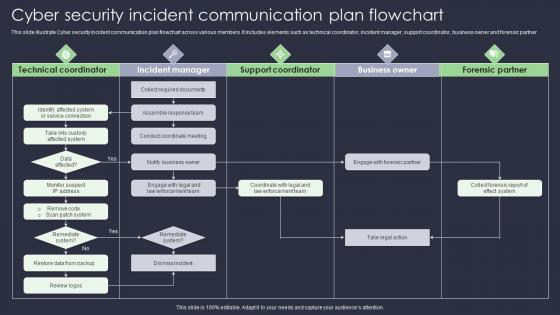
Cyber Security Incident Communication Plan Flowchart




Try Before you Buy Download Free Sample Product
 Impress Your
 Audience
 100%
100% Editable
 Save Hours
 of Time


This slide illustrate Cyber security incident communication plan flowchart across various members. It includes elements such as technical coordinator, incident manager, support coordinator, business owner and forensic partner
People who downloaded this PowerPoint presentation also viewed the following :
Cyber Security Incident Communication Plan Flowchart with all 6 slides:
Use our Cyber Security Incident Communication Plan Flowchart to effectively help you save your valuable time. They are readymade to fit into any presentation structure.





FAQs for Cyber Security Incident
So you'll need to figure out who gets what info when - like executives need different details than your IT team or customers. Map out your messaging templates ahead of time and set up clear escalation paths. Honestly, the approval workflow part is huge because you really don't want lawyers slowing things down mid-crisis. Make sure you've got backup people who can communicate if your main person's out sick or whatever. Oh, and definitely test everything with tabletop exercises first. Nothing worse than discovering gaps when you're already dealing with a breach. Have designated channels ready to go too.
Get your roles sorted out ahead of time - who's talking to leadership, who handles internal stuff, who deals with external comms. Make templates for different scenarios because writing clear emails at 2am when everything's on fire? Good luck with that. We learned this the hard way. Run practice drills to catch what you missed. Pick one central spot for all communication - Slack, Teams, whatever works - so you're not hunting through a million email threads later. Honestly, the tabletop exercises make a huge difference. You'll thank yourself when it's actually happening.
You definitely need to map out who gets called when stuff goes sideways - trust me on this one. Think internal people like your boss, IT folks, legal team, HR. Then external ones too: customers, vendors, maybe even regulators depending on what happened. Each group needs totally different info though. Your executives don't care about technical details, but your IT team absolutely does. The timing matters too - some people need immediate alerts, others can wait until morning. Build that contact list now with phone numbers, emails, who prefers what. You'll thank yourself later when you're not frantically googling your CEO's cell at 3 AM while everything's on fire.
Dude, tackle the most urgent stuff first - safety issues and anything that could tank the business. Hit up customers, key vendors, and execs who need to make quick decisions. Your IT and legal teams should be next since they're the ones actually putting out fires. Don't go overboard though. Too many updates just confuse everyone when they need clear info. Skip the technical deep-dive for now - just tell people what's broken, what you're doing, and when you'll circle back. Make a quick list ranking who needs to know what based on urgency vs impact. Trust me, less is more right now.
Get a holding statement out fast - just acknowledge something happened. Then set up regular updates so people know what to expect. Going silent is the worst thing you can do, trust me. One person should handle all external communication or you'll have chaos with mixed messages. Stick to verified facts only and skip the tech speak that confuses everyone. Honestly, customers just want to know you're on it. Have legal and PR check anything public before it goes live. Keep the same message across all your channels too.
Dude, pick ONE person to speak for your company and get your crisis templates written NOW. When shit hits the fan, everyone panics and starts contradicting each other - it's a nightmare. Better to say "we're still looking into it" than guess wrong and look like idiots later. Your comms team has to double-check everything before it goes out. Set regular update times so people aren't totally in the dark. Oh, and make sure legal signs off on everything first - learned that one the hard way. Keep the same message everywhere though. Seriously, don't wait until you're already burning to prep this stuff.
Get mass notification tools like Everbridge set up first - they'll blast SMS, email, and calls to everyone instantly. Slack channels are honestly clutch for real-time coordination (way better than email chains). StatusPage handles customer updates automatically, which saves your sanity. PagerDuty's good for escalating alerts based on how bad things get. Oh, and test everything beforehand! Last thing you want is scrambling for passwords when everything's on fire. We learned that one the hard way.
Test it every quarter, update yearly at minimum. Most places I've worked barely do it once a year though, which is terrible. Run tabletop exercises where you pretend different breaches happened - you'll catch outdated contact info and figure out who's supposed to do what. Also update after big org changes or new regulations hit. After real incidents too, obviously. The whole thing falls apart if people don't know their roles or if you're calling someone who left six months ago. Honestly just put those quarterly tests on your calendar right now or you'll keep pushing it off.
Honestly, your team needs to get everyone on the same page with some proper media training and crisis workshops. Run tabletop exercises that mimic real incidents - trust me, people freeze up without practice. Your PR team especially needs to learn how to translate technical jargon into normal human speak. Make sure both sides understand each other too - tech folks need to grasp communication timing while PR learns incident severity levels. Quarterly drills work well, maybe rotate roles so everyone gets uncomfortable. Start with a solid two-day fundamentals workshop, then keep practicing scenarios regularly. The muscle memory thing is huge.
Look at response times from when stuff hits the fan to your first message out. Survey employees, customers, partners on whether your comms were clear and timely - good luck getting people to actually respond though, seriously. Track media sentiment and count duplicate inquiries you received (less = your messaging worked). I'd also check if you stayed consistent across all your channels. The real trick? Do your post-incident review within 72 hours while everyone still remembers what the hell happened. Oh, and measure stakeholder satisfaction scores if you can swing it.
Pick one person to talk to reporters - someone who won't panic and stick to facts. Write your statements NOW before anything happens. Trust me on this one. Draft different versions for various scenarios because you'll be a mess if you're scrambling when journalists start calling. Include your disclosure timeline and focus messaging on what you're actually doing to fix it. Your legal team needs to approve everything, so loop them in early. Be straight with people but don't dump technical details that'll just confuse everyone or make things worse. Practice this stuff while your head's clear.
Ugh, this is such a nightmare to navigate. First thing - map out what GDPR or whatever regs apply to you actually require, because those timelines are non-negotiable. Don't go radio silent though, that just makes everyone panic more. Tell customers what data got hit, what you're doing about it, and what they need to do on their end. But here's the thing - you can't spill technical details that'll help other hackers figure out your weak spots. Keep it simple and factual. And seriously, run every single statement past both legal and PR before it goes anywhere. They'll catch stuff that could bite you later.
Okay so here's the thing - you absolutely need to jump on social media fast when a cyber incident hits. Don't wait around because rumors will fill that vacuum and honestly? I've watched companies get destroyed by staying quiet too long. Post something quick to acknowledge what's happening, then keep updating people regularly. Direct them to your official channels for the detailed stuff. Oh and definitely set up your crisis protocols beforehand - like who's allowed to post what and maybe some template messages ready to go. You'll thank yourself later when you're not scrambling to figure out the approval chain while everything's on fire.
Look, ransomware and data breaches need totally different approaches. Ransomware? Hit the panic button - alert everyone internally, call IT vendors, maybe even law enforcement. You're literally racing the clock before everything gets encrypted. Data breaches are more like... methodical chess moves. Legal team first, then figure out regulatory notifications (ugh, those deadlines are brutal). Different incidents = different people in the loop. Honestly, just make templates for each scenario now while you can think straight. Trust me, scrambling to write incident emails at 2am when everything's on fire is not fun.
Look, the biggest screwup companies make is going radio silent while they scramble behind the scenes. Bad move - people start making up their own stories. You've gotta talk early and keep talking, even if you're still figuring things out. Equifax totally bombed this, by the way. Have templates ready beforehand, pick one person to speak so you don't get mixed messages flying around. Be honest about what you know and what you don't. And seriously, practice this stuff when there's no fire to put out. Your brain turns to mush during actual crises.
-
The PPT layout is great and it has an effective design that helps in presenting corporate presentations. It's easy to edit and the stunning visuals make it an absolute steal!
-
I am not the best at presentations but using SlideTeam’s PPT template made it easier for me. Thank you SlideTeam!