

Cyber Security Event And Incident Flow Diagram Deploying Computer Security Incident Management




Try Before you Buy Download Free Sample Product
 Impress Your
 Audience
 100%
100% Editable
 Save Hours
 of Time


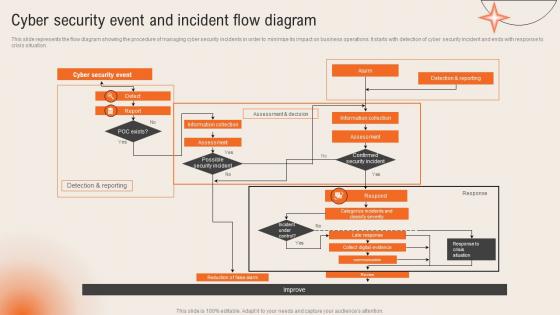
This slide represents the flow diagram showing the procedure of managing cyber security incidents in order to minimize its impact on business operations. It starts with detection of cyber security incident and ends with response to crisis situation.
People who downloaded this PowerPoint presentation also viewed the following :
Cyber Security Event And Incident Flow Diagram Deploying Computer Security Incident Management with all 6 slides:
Use our Cyber Security Event And Incident Flow Diagram Deploying Computer Security Incident Management to effectively help you save your valuable time. They are readymade to fit into any presentation structure.





FAQs for Cyber Security Event And Incident Flow Diagram Deploying Computer
You'll want six main things: detection tools, a response team with clear roles, documented containment procedures, communication protocols, forensics processes, and post-incident reviews. Communication honestly screws up most teams I've worked with. Document escalation rules and who gets notified when before anything happens - trust me, you don't want to figure that out mid-crisis. Also map out legal reporting requirements ahead of time. Run tabletop exercises regularly to catch gaps. Oh, and make sure someone actually knows where all the documentation lives when things go sideways at 2am.
Start with vuln assessments and pen testing - they'll show you weak spots before hackers do. Honestly, pen testing is probably the most eye-opening thing you can do for your security posture. Regular scans of your network and apps will catch unpatched software and misconfigurations. Run tabletop exercises with your incident response team too. Third-party vendors are huge - they're like the side door everyone forgets to lock. I'd do quarterly assessments and use those findings as your security roadmap. Oh, and don't just let the reports sit there gathering dust.
You'll want an Incident Commander running the show - they coordinate everything and make the calls. Technical Leads handle the actual fixing (obviously the most crucial part). Communications Lead manages updates internally and externally so people aren't freaking out. Documentation Lead tracks everything as it happens plus captures what went wrong for later. Legal might need to jump in depending on your industry, but honestly that's case-by-case. The main thing? Get everyone clear on their roles beforehand. Last thing you need is people tripping over each other when stuff's on fire. Run some practice scenarios now while you can actually think straight.
So basically, incident response happens *after* you've been hit. Prevention tries to block stuff before it gets in - like your firewalls, security training, all that good stuff. But let's be real, something's gonna slip through eventually. That's where your incident response kicks in with its whole playbook: prep, detection, containment, getting rid of the threat, recovery, then figuring out what went wrong. Prevention runs constantly in the background. Response? That's pure chaos mode when things go sideways. You definitely need both though - good prevention means fewer headaches, but solid response planning saves your butt when prevention fails.
Start with a SIEM like Splunk or QRadar - that's your main hub for everything. Then grab endpoint tools like CrowdStrike to catch stuff on individual machines. For network monitoring, Wireshark or Darktrace work great at spotting suspicious traffic. Fair warning though - you'll get buried in alerts initially and it's pretty overwhelming. Good tuning fixes that mess. Oh, and don't skip vulnerability scanners like Nessus plus threat intel feeds. Seriously, just pick one SIEM first and expand from there. Way easier than trying to deploy everything at once.
Focus on the big three first: mean time to detection, containment, and recovery. Those tell you if your team's actually fast when stuff hits the fan. Track repeat incidents too - nothing's more annoying than the same issue popping up again next week. Don't forget customer impact duration and SLA performance. Honestly, I'd stick to maybe 5-6 metrics max because tracking everything just creates noise. Monthly reviews work well for spotting patterns. Oh, and make sure whatever you pick actually connects to what your business cares about.
Honestly, the worst thing is when nobody knows who's supposed to do what during an outage. Teams end up duplicating work while missing the important stuff completely. Communication falls apart fast - and don't even get me started on how documentation just disappears when people panic. Companies also have this habit of thinking incidents are smaller than they actually are, so they forget to bring in legal or PR until it's way too late. Oh, and practice your response plan! Seriously though, get one person to run the whole thing as incident commander.
Right off the bat, pick ONE person to handle all the communication - otherwise it's just chaos with everyone talking over each other. Keep your team updated regularly but stick to facts, not guesses. Don't say anything public without running it by legal first (learned that one the hard way). Document every single thing you send out and when. Short sentences work better when people are stressed. Also, create some basic templates now while you're thinking clearly - you'll thank yourself later when everything's falling apart and your brain's fried.
Definitely start with phishing simulation training - people hate it but it actually works since they get caught red-handed. Mix in some social engineering awareness stuff and password workshops too. Cover the basics: spotting sketchy emails, fake websites, malware threats, how to report incidents properly. Oh and don't do this once a year like most companies - run it quarterly because hackers aren't taking breaks lol. The key thing is creating a "when in doubt, report it" culture so people won't feel dumb asking about suspicious stuff. Trust me, quarterly sessions make a huge difference.
So here's the deal - regulations totally control your incident response timing and how you report stuff. GDPR gives you 72 hours, healthcare is even tighter. Document everything because auditors are obsessed with paperwork (trust me on this one). Your incident categories have to match what regulators expect, and different stakeholders need different communication approaches. Honestly, the smartest thing is mapping out which rules apply to you ahead of time. When everything's going sideways during an actual incident, you really don't want to be googling reporting deadlines.
Document everything NOW while it's fresh - seriously, wait even a few days and people forget half the details. Build a timeline of what happened and who did what. Run a post-mortem where nobody gets blamed, otherwise people won't be honest (learned this the hard way). Turn those lessons into actual process changes, not just notes that sit in some folder forever. Oh, and update your incident playbook with what you learned - that's honestly the most valuable part. The whole point is making sure this mess doesn't happen again.
Treat every incident like you can actually learn something from it. Do those post-mortem reviews and actually document what went wrong - then update your playbooks with real stuff that happened. Run tabletop exercises too, though I know everyone's always "too busy" for those. Train your people properly and maybe bring in external red teams to mess with your systems. It's honestly crazy how many teams just... skip all this when they're slammed. Make the improvement part systematic instead of something you randomly remember to do when things are quiet.
So threat intel is basically your incident response team's secret weapon. You get context about attackers - who they are, their usual tactics, what they'll probably try next. Game changer honestly. Instead of staring at random alerts wondering what's happening, you can spot known threat actors right away and prioritize the scary stuff first. Hunt for their indicators before things blow up. Response times get way faster when you're not flying blind. Oh and definitely hook up some threat feeds to your SIEM - it'll auto-enrich those alerts and save you tons of manual work.
Build a risk matrix - impact vs likelihood is key. Sort incidents by potential damage first. Data breach with customer info? That's high priority. Single computer with malware? Not so much. Then think about spread risk and immediate harm potential. Your team will probably overthink this initially (we all did), but you get faster with practice. Core systems and sensitive data incidents always go first, no question. Write down your criteria so everyone's on the same page. Trust me, you'll need consistency when everything's on fire and three incidents hit at once.
Start with the basics: MTTD and MTTR (how fast you detect and fix stuff). Those two alone will tell you tons about your team's performance. Also track containment times and false positive rates - nobody wants alerts going off for nothing. Communication metrics matter too, like how quickly you notify stakeholders and customer satisfaction afterward. Honestly, I'd rather have 3-4 solid metrics that actually get used than 15 that sit in a dashboard collecting dust. Business impact stuff like downtime costs is crucial if you want leadership to care. Oh, and definitely monitor repeat incidents - those are usually signs of deeper issues.
-
A perfect platform for all your presentation needs. Unlimited products at an affordable price.
-
Unique and attractive product design.