


Eight Phases Of Cyber Attack Lifecycle




Try Before you Buy Download Free Sample Product
 Impress Your
 Audience
 100%
100% Editable
 Save Hours
 of Time


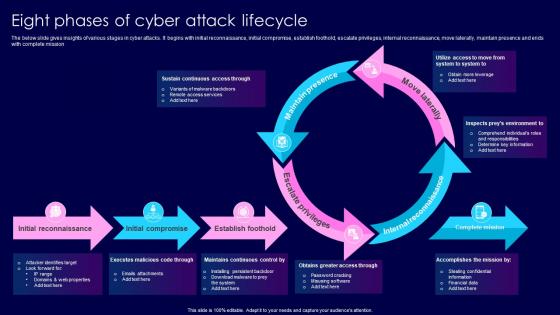
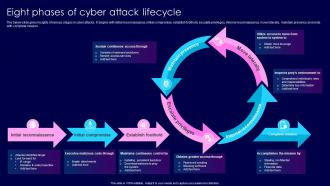
The below slide gives insights of various stages in cyber attacks. It begins with initial reconnaissance, initial compromise, establish foothold, escalate privileges, internal reconnaissance, move laterally, maintain presence and ends with complete mission
People who downloaded this PowerPoint presentation also viewed the following :
Eight Phases Of Cyber Attack Lifecycle with all 6 slides:
Use our Eight Phases Of Cyber Attack Lifecycle to effectively help you save your valuable time. They are readymade to fit into any presentation structure.





FAQs for Eight Phases Of
So basically cyber attacks follow this predictable pattern - reconnaissance (they scope out your systems), weaponization (build the nasty stuff), delivery (sneak it in), exploitation (execute the attack), installation (dig in deep), command & control (stay connected), then finally actions on objectives (steal your data or whatever). Think of it like a digital heist movie, honestly. Instead of just building walls around everything, you should map your defenses against each stage. That way you'll catch gaps you didn't know existed. Most companies miss this and only focus on keeping bad guys out initially.
Attackers pick their recon based on what they're after. APT groups? They'll spend weeks digging through social media, public records, company info - basically building entire victim profiles. Ransomware crews just blast automated scans everywhere hoping something sticks. Social engineering relies on pretexting calls and phishing to map out who knows who in your org. Honestly, the time investment tells you everything - targeted guys might recon for weeks while opportunistic attacks are done in minutes. You should monitor for both patterns since they look totally different in your logs.
Oh man, social engineering is basically when hackers mess with people instead of computers. They'll send fake emails, call pretending to be IT support, or even show up with bogus badges. Honestly, it's wild how many people fall for a convincing phishing email - I've seen it happen to really smart folks. Your employees become the target because breaking humans is way easier than cracking technical stuff. Just make sure everyone knows to double-check requests through different channels. Trust me, a little paranoia goes a long way with this stuff.
Yeah, weaponization is a pain to catch since it's happening on their end, not yours. You can't really detect it directly. Your best shot? Threat intel feeds and watching for stuff like new malware signatures or sketchy domain registrations. I know, feels super reactive but that's just how it is. Focus on hardening against delivery methods instead - patch everything aggressively, train people on phishing (they'll hate it but whatever), and get solid email filtering. Assume they're already building weapons and prep your defenses accordingly.
Attackers mostly use phishing emails with nasty attachments - infected PDFs, sketchy Office docs, that kind of stuff. Malicious links are huge too, they'll redirect you to exploit kits. USB drops still happen (people never learn), plus watering hole attacks where they compromise legit websites. Email's honestly their favorite because it works so damn well. They're getting sneaky though, hiding payloads on cloud storage or social media to dodge detection. Social engineering's always in the mix. Your email security better be tight, and definitely train users to recognize this crap.
So phishing and malware work totally differently when it comes to actually attacking stuff. Phishing tricks people's brains - you're basically conning someone into clicking bad links or handing over their password. It's wild how a fake email can fool smart people. Malware's more technical though. It goes after actual bugs in software or systems to break in and run code. One targets humans, the other targets code vulnerabilities. That's why you need user training AND good patching - gotta cover both angles, you know?
Ugh, this is when things get really bad. Attackers can steal whatever they want, jump between computers on your network, and set up shop permanently - even surviving restarts. You might not realize anything's wrong while they're quietly doing damage in the background. Traditional antivirus? Pretty much useless at this point. Honestly, behavioral monitoring tools are your only real shot at catching this stuff since they watch for weird system activity. It's like the difference between someone breaking into your house versus them already living in your basement rent-free.
Focus on monitoring your network traffic for weird outbound connections - especially to sketchy domains or IPs. Beaconing patterns are a dead giveaway where infected machines check in with attackers regularly. DNS stuff is critical too since they love tunneling through it and using domain generation algorithms. Your SIEM needs to catch connections to brand new domains or known bad infrastructure. Watch for data leaving your network and random encrypted traffic spikes, particularly outside business hours (which honestly should be obvious but gets missed a lot). Set up automated alerts for this stuff so you can jump on it fast.
Network monitoring's your best bet - catches most of the obvious stuff right away. DNS sinkholing trips up tons of attackers, especially ones using those domain generation things. Segment your network and watch for weird outbound traffic patterns. Deep packet inspection helps spot encrypted C2 protocols too. Oh, and definitely get threat intel feeds running to block known bad infrastructure before it even hits you. That proactive blocking saves so much headache later. Start with the monitoring piece first though - you'll catch active attacks way faster that way.
Definitely go with network monitoring and DLP tools - they're your main defense against data theft. Watch for weird outbound traffic, big file transfers, or people hitting sensitive stuff at 2am. Honestly, half the battle is knowing what normal activity looks like in the first place. DNS tunneling is sneaky as hell, so keep an eye out for that. Also watch for encrypted channels popping up randomly or data getting moved to weird staging folders. Real-time DLP policies work best - they'll either block the transfer or at least scream at you when someone tries moving sensitive data outside your network.
Ugh, first thing - get your legal team on the phone RIGHT NOW. You've got breach notifications due to regulators and customers, some within 72 hours which is honestly insane timing when you're still in crisis mode. Document absolutely everything for potential lawsuits later. There's also the whole transparency thing - you'll need to tell stakeholders what data got hit and your prevention plan. I know it's tempting to stay quiet, but that usually backfires. Oh, and don't touch any evidence until investigators give the okay. It's a mess but tackle notifications first since those deadlines are brutal.
Right after an attack, get your incident response team together and map out exactly what happened - like, minute by minute if you can. Talk to everyone who was involved, from IT folks to the C-suite, because they all saw different warning signs. Yeah, some of those conversations will be uncomfortable, but you've gotta do them! Find every security gap and document it all. Then prioritize fixes based on how bad the damage could be next time. Here's the thing though - you can't sugarcoat your weaknesses or just slap bandaids on the obvious problems. Create action items with real owners and deadlines, otherwise nothing gets done.
Think of threat intelligence as your early warning system. You join sharing groups with other companies and get feeds from security vendors - suddenly you're seeing attack patterns way before they show up at your door. Short sentences work better here. The neighborhood watch comparison is spot on, though I'd say it's more like having insider info on what the bad guys are planning next. Your SOC team gets trained on fresh threats, you patch the scary stuff first, and detection rules stay current. Honestly? Just pick an industry sharing community and jump in.
So emerging tech is basically turbocharging the whole attack cycle for everyone involved. Attackers use AI to automate recon and write way more convincing phishing emails. Defenders counter with AI-powered threat detection. IoT devices? They're expanding attack surfaces but also giving us more monitoring points. Cloud tech is completely reshaping how data gets stolen (and recovered, thankfully). Machine learning speeds up how we analyze lateral movement too. Honestly, the pace of change is insane right now. You've gotta stay on top of both offensive and defensive trends when you're doing threat modeling - otherwise you'll miss something critical.
Honestly, start with training your people - phishing still works like crazy and causes most breaches. Network segmentation helps contain damage when someone clicks the wrong link. Get multi-factor auth set up everywhere since that stops attackers from moving around once they're in. Endpoint detection and keeping everything patched are pretty standard but necessary. The whole idea is making life harder at every step so they either screw up or just move on to easier targets. Oh, and test your incident response plan first - trust me, you're gonna need it eventually.
-
Use of icon with content is very relateable, informative and appealing.
-
SlideTeam is very efficient when it comes to saving time. I am happy that I chose them for my presentation.