

Cyber Threat Intelligence Maturity Model




Try Before you Buy Download Free Sample Product
 Impress Your
 Audience
 100%
100% Editable
 Save Hours
 of Time


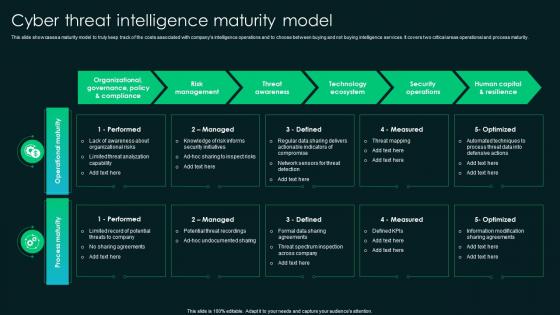
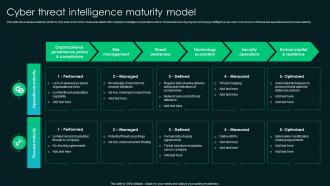
This slide showcases a maturity model to truly keep track of the costs associated with companys intelligence operations and to choose between buying and not buying intelligence services.It covers two critical areas operational and process maturity.
People who downloaded this PowerPoint presentation also viewed the following :
Cyber Threat Intelligence Maturity Model with all 6 slides:
Use our Cyber Threat Intelligence Maturity Model to effectively help you save your valuable time. They are readymade to fit into any presentation structure.





FAQs for Cyber Threat
Dude, ransomware is absolutely brutal right now - they lock up everything and want money to unlock it. Your employees are still falling for phishing emails constantly, which is honestly so frustrating. Malware's another big one that can steal data or let hackers sneak around your network. I know training sounds boring, but you've gotta drill this stuff into your team regularly. Also - and I can't stress this enough - get solid backups running. Most companies think they're fine until they're not, you know? Those three things will save you from like 90% of the headaches out there.
Pick a framework that matches your org's size - NIST works well but don't just copy everyone else. Get leadership on board first since this costs real money. Honestly assess where you are now (spoiler: it's messier than expected). Map the biggest gaps, then tackle them in phases instead of trying to fix everything at once. Quick wins early on help build momentum with the team. Oh, and assign specific owners for each control - seriously, "everyone's job" means nobody's job. I've seen too many controls just sit there because nobody claimed them. Phase it out over like 6-12 months depending on your resources.
Look, training your employees is probably the best thing you can do for cybersecurity. Most hacks don't happen because someone's breaking into your system - they happen because Dave from accounting clicked on a weird email. Your team can either be your biggest weakness or your best protection. Teach them to recognize phishing emails and create decent passwords. I'd say start with training every few months, cover the basics first. Then throw in some realistic scenarios they might actually see. It's way more effective than you'd think, and honestly cheaper than dealing with a breach later.
So malware is basically the catch-all term for any nasty software that gets on your computer - viruses, worms, spyware, all that stuff. Ransomware's actually a type of malware, but it's the worst because it locks up your files and makes you pay to get them back. Super annoying. Phishing is totally different though - that's when scammers send you fake emails or texts trying to steal your passwords or personal info. Your best bet? Keep good backups for the ransomware stuff, and honestly just train your team to spot sketchy emails.
So encryption scrambles your data - like locking it in a box where you're the only one with the key. Two main types: data moving between systems (in transit) and data sitting on servers (at rest). Both protect against hackers who try intercepting stuff or break into storage. Honestly can't stress enough how much this saves your ass during breaches. Oh and use AES-256 if you can - it's the good stuff. Always encrypt before sending anything sensitive outside your network. Short answer: it's probably your best defense against getting screwed over.
Dude, IoT completely screws with the old security playbook. You're not just dealing with computers anymore - literally everything's connected now. Printers, thermostats, even those fancy door locks can become attack vectors. I'd start by figuring out what devices you actually have (trust me, there's probably double what you think). Segment your network so IoT stuff can't touch critical systems. Keep firmware updated, which honestly is a pain but whatever. The monitoring side gets tricky with so many devices constantly chattering. Basically assume every smart device wants to betray you and plan accordingly.
Definitely start with 12+ character passwords mixing upper, lower, numbers, and symbols. Length trumps complexity though - "CorrectHorseBatteryStaple" destroys "P@ssw0rd1" any day. Multi-factor authentication should be mandatory, not optional. Don't make people change passwords constantly unless there's an actual breach. That just creates terrible patterns like adding numbers to the end. Block obvious ones like "password123" and make sure passwords are unique across systems. Oh, and run your current passwords through HaveIBeenPwned first - you might be surprised what's already compromised.
So basically, AI can crunch through tons of network data super fast and catch weird patterns that might mean an attack is coming. It learns what normal traffic looks like on your network, then freaks out when something's sketchy - like random login attempts or data moving where it shouldn't. Honestly, the accuracy is getting pretty insane these days. You can set it up to auto-patch vulnerabilities too, which is way faster than waiting for your IT team to get around to it. Just make sure you've got solid data feeds first and let it learn your specific setup over time.
Ugh, this stuff is such a maze honestly. GDPR's the big one if you touch any EU data - doesn't matter where you're based. CCPA covers California people, HIPAA's massive for healthcare obviously. Financial stuff? You've got SOX and PCI DSS for payments, which is genuinely awful to set up but you can't skip it. Education has FERPA too. Start with what data you're actually grabbing and where your users live. That'll tell you which ones matter for your situation. Way easier than trying to figure out every single regulation that exists.
Dude, you NEED an incident response plan. Seriously - it's what keeps companies alive when they get breached. Without one, your team just scrambles around like headless chickens while hackers are doing whatever they want in your systems. The plan should spell out who does what, how you talk to people, containment steps - all that stuff. I've watched companies take forever to bounce back from attacks that should've been handled in days. Oh, and actually test the thing! Run some tabletop exercises or whatever. A plan that just sits there collecting digital dust won't save you when everything's on fire.
Start with the basics - firewall, IDS/IPS, and endpoint protection on everything. Network monitoring tools like Wireshark are lifesavers for catching suspicious traffic. Vulnerability scanners will find problems before the bad guys do. SIEM platforms help piece everything together, but honestly they're a nightmare to configure at first. MFA is basically mandatory now. Oh, and don't try to implement everything at once - I've seen companies blow their budget on tools they never actually use properly. Pick one area, master it, then expand from there.
First thing - map out everything you've got digitally. Servers, laptops, all the connections to outside vendors. Run those vulnerability scans often and get someone to do penetration testing. Your current security setup needs an honest look too. Oh, and test your people with fake phishing emails - you'd be surprised how many click on sketchy links. Review your incident response plan because something WILL happen eventually. Backups matter too, obviously. The trick is keeping this going regularly, not just doing it once and forgetting about it.
So cloud computing flips your whole security approach - instead of guarding a physical building, you're protecting data that's scattered everywhere. Your cloud provider handles the heavy infrastructure stuff while you deal with who gets access to what and encrypting your data. Honestly, losing control over the underlying systems feels weird at first. But here's the thing - you get access to security tools that would cost a fortune if you bought them yourself. Just make sure you actually read through their shared responsibility docs (I know, boring) so you know what they cover vs what's still on you.
Okay so first thing - get strong passwords for everything and turn on two-factor auth. Yeah, those software update notifications are super annoying but just do them, the patches actually matter. Your team needs to know how to spot sketchy emails and weird links. Back up your stuff regularly (cloud plus something offline). Definitely get good antivirus software. If you're dealing with customer data, cyber insurance isn't a bad idea either. Oh and make some kind of plan for when things go sideways so you're not totally freaking out trying to figure it out in the moment.
Honestly, you've got to bake cybersecurity requirements directly into those vendor contracts from day one. Hit them with a security questionnaire during selection - SOC 2, ISO 27001, whatever fits your space. But here's the thing that trips people up: you can't just check once and call it good. Regular reviews are a must. Make them report incidents to you. I actually think periodic audits are worth the hassle too, even if vendors hate it. Too many companies get burned through vendor vulnerabilities - it's wild how often it happens. Bottom line? Cybersecurity can't be negotiable anymore.
-
Fantastic and innovative graphics with useful content. The templates are the best and latest in the industry.
-
Graphics are very appealing to eyes.