


Cyber Security Incident Response Process Flow Chart Deploying Computer Security Incident Management




Try Before you Buy Download Free Sample Product
 Impress Your
 Audience
 100%
100% Editable
 Save Hours
 of Time


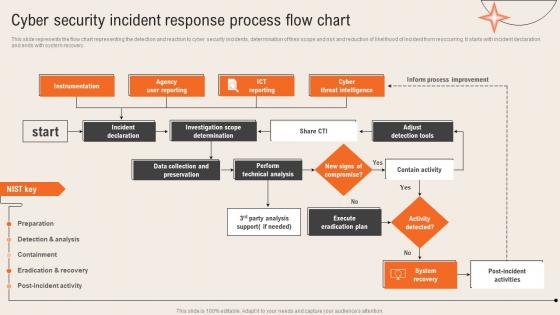
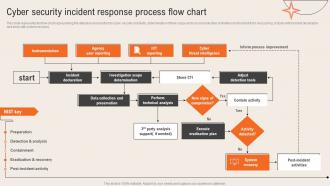
This slide represents the flow chart representing the detection and reaction to cyber security incidents, determination of their scope and risk and reduction of likelihood of incident from reoccurring. It starts with incident declaration and ends with system recovery.
People who downloaded this PowerPoint presentation also viewed the following :
Cyber Security Incident Response Process Flow Chart Deploying Computer Security Incident Management with all 6 slides:
Use our Cyber Security Incident Response Process Flow Chart Deploying Computer Security Incident Management to effectively help you save your valuable time. They are readymade to fit into any presentation structure.





FAQs for Cyber Security Incident Response Process Flow Chart Deploying Computer
So you need six main pieces: prep work, detection, containment, getting rid of the threat, recovery, and learning from it afterward. Map out who does what beforehand and set up your communication - seriously, everything goes sideways fast during an actual incident. Get automated detection running, then have solid procedures for isolating infected systems before stuff spreads everywhere. Once you've completely wiped out the threat, restore everything carefully and document what went down. The post-incident review is honestly where the real magic happens - that's how you actually get better. Oh, and test your plan with mock scenarios regularly.
Start with a risk-based scoring system - impact, scope, urgency. Critical infrastructure and customer data? That's your first priority, no question. How many users are hit? Is it spreading? Those answers matter big time. A solid incident classification matrix will literally save your sanity when everything's on fire. Here's the thing though - sometimes you gotta be smart about resources. Maybe hit that smaller, containable mess first so your team can focus on the real nightmare. Clear escalation triggers are clutch. Everyone needs to know exactly when something gets bumped up the list.
Dude, threat intel is a game changer for incident response. You get context about attackers before shit hits the fan - their usual methods, what they're hunting for, all that good stuff. No more going in completely blind. My team uses it to figure out which alerts actually matter (trust me, most don't) and predict what attackers might try next. It's basically having insider knowledge of their playbook. Get those threat feeds hooked up to your SIEM sooner rather than later. Way better than trying to piece everything together while you're already dealing with an active breach.
Test it twice a year minimum - but honestly, most places skip this and pay for it later. Run tabletop exercises where everyone talks through scenarios. Do one full simulation annually too. Update the plan whenever you add new tech, switch vendors, or deal with an actual incident. I've seen too many companies let these plans just sit there gathering dust. The testing is what actually matters though - without it, you're basically flying blind. Schedule those sessions now and make sure they're actually on people's calendars.
Honestly, you've gotta sort out your comms before everything goes sideways. Get your incident channels set up (Slack works fine), figure out who's talking to the big bosses and customers, and prep some message templates now. Writing PR statements while everything's burning? Total nightmare. Your incident commander should own all the updates - regular intervals, not whenever people freak out and start blowing up your phone. Oh, and run tabletop drills so people actually know what they're doing when it hits. Sounds boring but it'll save your ass later.
Honestly, you want to mix tabletop exercises with actual hands-on simulations. Tabletops are great for walking through incidents step-by-step without the chaos - you'll catch gaps in your processes that way. Then do simulation labs where your team gets real practice with the actual tools. Red team exercises are amazing too (ethical hackers testing your defenses while you respond live). Make it regular but switch it up - quarterly tabletops, monthly technical drills, maybe one big simulation each year. Oh and seriously, go schedule your next tabletop right now while you're thinking about it.
Legal stuff totally controls how you handle incidents - timelines, who you tell, what records you keep. GDPR gives you 72 hours, but state laws are all over the place (seriously, what a mess). You can't just figure it out as you go when something breaks. Map out your requirements ahead of time based on your industry and what kind of data you're dealing with. Get your legal team's contact info ready too. Document everything properly because regulators will ask for specifics later. Trust me, winging it during an actual incident is not the move.
Poor communication kills you every time - nobody knows who's supposed to do what. Teams panic and stop documenting stuff, which makes figuring out what went wrong later basically impossible. Don't forget to loop in legal and PR early, especially if there's any chance customer data got hit. Most places get tunnel vision on just stopping the bleeding but totally space on actually recovering properly. Oh, and run practice drills! Your fancy incident plan is useless if it falls apart the second something real happens.
So automation and AI can really speed things up by tackling all the boring, repetitive tasks that normally eat up your team's time. They'll monitor traffic 24/7 and connect alerts from different systems automatically. AI is crazy good at finding patterns in huge data dumps that humans would totally miss - I mean, who has time to manually sift through all that? Plus it can start containment right away without waiting around. My advice? Start with something simple like alert triage, get that working smoothly, then build from there. Don't try to automate everything at once.
Don't touch anything yet! Keep systems powered but isolate them completely. Document everything first - timestamps, screenshots, the works. You'll want forensic images of drives and memory dumps before doing anything else (trust me on this one). Chain of custody matters big time, so track who accessed what. Network logs are gold - grab those too. Honestly, it's like a crime scene until proven otherwise. My old boss used to say "document now, dig later" and he wasn't wrong. Start logging everything immediately.
First thing - figure out what's actually broken. Which systems are down? Can your people work? Are customers locked out? Map this stuff to what matters most for keeping the lights on. Money-wise, you're looking at direct hits like recovery costs and legal fees, but don't forget the sneaky stuff - lost sales, angry customers, reputation mess. That part honestly hurts more long-term. Document everything as you go (I know, pain in the ass, but insurance and regulators will want receipts). This whole assessment basically drives what you do next and how you bounce back.
Oh man, post-incident reviews are a lifesaver - they basically turn your worst day into something useful. Do it within a week though, seriously. People forget everything if you wait longer. Get everyone who dealt with the mess together and walk through what happened step by step. Ask the hard stuff: what worked, what was a disaster, where did people stop talking to each other? No pointing fingers - just brutal honesty about what went wrong. Then actually write it down with real action items and deadlines. Otherwise you'll just complain about the same problems next time.
Dude, training your people is honestly a game changer. Once they know what sketchy phishing emails look like and understand basic social engineering tricks, they'll spot threats way before IT does. I've seen one alert employee save a company thousands just by questioning a weird "CEO" email asking for wire transfers. Your whole team becomes extra eyes and ears for security issues - which is huge when you think about it. Just don't make the training super boring or people will tune out completely. Oh, and definitely cover why they shouldn't click random links, that one's still surprisingly common.
Honestly, start with the basics - MTTD and MTTR are your bread and butter. Containment time matters too. Track how incidents get distributed by severity, and here's something most people miss: measure unnecessary escalations. That metric alone will show you where your process is broken. Recovery time is obvious, but don't sleep on post-incident surveys from your team - way more valuable than you'd think. Customer impact duration is huge if you're client-facing. Pick maybe 4-5 metrics tops and actually look at them monthly. I've seen too many dashboards that just collect dust.
Working with outside groups like FBI cyber units, CERT teams, and industry partners gets you way more intel than you'd have solo. They share real-time threat updates and can jump in with technical help during nasty incidents. When there's a big coordinated attack, they usually see the full scope while you're just dealing with your piece of it. Honestly, the timing matters most here - build those connections now, not when you're panicking at 2am. Reach out to local law enforcement cyber folks or join industry sharing groups. Trust me, having those relationships already in place makes all the difference when stuff hits the fan.
-
I’ve been your client for a few years now. Couldn’t be more than happy after using your templates. Thank you!
-
Helpful product design for delivering presentation.