

Cyber Security Incident Response Process Flow Chart Development And Implementation Of Security




Try Before you Buy Download Free Sample Product
 Impress Your
 Audience
 100%
100% Editable
 Save Hours
 of Time


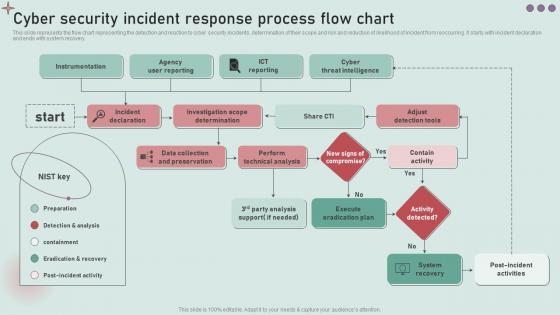
This slide represents the flow chart representing the detection and reaction to cyber security incidents, determination of their scope and risk and reduction of likelihood of incident from reoccurring. It starts with incident declaration and ends with system recovery.
People who downloaded this PowerPoint presentation also viewed the following :
Cyber Security Incident Response Process Flow Chart Development And Implementation Of Security with all 6 slides:
Use our Cyber Security Incident Response Process Flow Chart Development And Implementation Of Security to effectively help you save your valuable time. They are readymade to fit into any presentation structure.





FAQs for Cyber Security Incident Response Process Flow Chart Development And
Look, you need six main pieces: prep, detection, containment, eradication, recovery, and post-incident analysis. Figure out who's doing what beforehand - seriously, incidents turn into total chaos if nobody knows their role. Communication plans are huge, both for your team and external folks. Build playbooks for the stuff you see most often. Oh, and evidence preservation matters more than people think (legal stuff gets messy). Containment's probably the biggest thing though - stop the damage first, fix everything else after. Test your plan with tabletop exercises regularly. I've seen too many companies with "perfect" plans that fall apart the second something actually happens.
Dude, you gotta get some SIEM tools running to catch weird stuff happening across your network. Train your people too - they're usually the ones who spot phishing attempts first. Most companies get hacked because nobody noticed the obvious warning signs, which is honestly frustrating. Set up threat intelligence feeds and do regular vuln scans. Oh, and pen testing helps a ton - better you find the holes than some hacker. The whole thing's about staying ahead of problems instead of scrambling after they hit.
Dude, training your people is seriously the make-or-break factor for incident response. Quick spotting of threats? That's your employees. Proper reporting when something looks fishy? Also your employees. I've seen companies where untrained staff actually made breaches worse - total nightmare. Everyone needs to know their role, not just IT folks. Response times drop like crazy when people know what they're doing. Tabletop exercises are clutch too. Honestly, the chaos of a real incident isn't the time to figure out protocols for the first time.
Track your MTTD, MTTC, and MTTR - those are your bread and butter metrics. False positive rates matter too since nobody wants to chase ghosts all day. Tabletop exercises are honestly pretty fun and give you solid data without the panic of real incidents. Business impact stuff like downtime costs and angry customer calls - yeah, measure that too. Monthly dashboards work well for spotting trends. Oh, and definitely check if your team actually follows procedures during real events. That's where you'll find the gaps.
Honestly, the worst part is everyone wanting answers RIGHT NOW while you're piecing together scraps of info. Plus you're stuck translating between IT nerds, lawyers, PR people, and executives - they might as well speak different languages. Time pressure makes documentation sloppy, which totally screws you during audits later. And Murphy's Law guarantees your big incident hits at 2 AM when half your team is unreachable. Most places just aren't staffed for real emergencies anyway. Build your response playbooks ahead of time and actually practice them - sounds boring but you'll thank yourself when everything's on fire.
Set up a risk-based scoring system - business impact, threat level, which assets got hit. High/medium/low categories work fine. Honestly, half the teams I've seen just chase whatever incident screams loudest, which is backwards. Put your senior people on the scary stuff. Junior analysts can handle phishing reports and basic tickets. Build playbooks for the stuff you see constantly - saves so much time later. Track your response times too. You'll probably find one type of incident eats way more resources than expected. Then you can actually staff appropriately instead of just guessing.
Okay so for incident response you're gonna want SIEM stuff first - Splunk or Sentinel work great for collecting logs and catching threats. CrowdStrike is solid for endpoint monitoring too. Forensics tools like SANS SIFT or Volatility are clutch but honestly? They're a pain to learn at first. You'll also need ServiceNow or similar for tracking cases, plus some secure chat setup for your team. Oh and start with the SIEM - that's where you'll catch most incidents anyway. The forensics stuff can wait until you've got the basics down.
Map out every vendor with access to your critical stuff and get them in your incident response plan. Don't rely on those useless generic support numbers - you need direct lines to their actual security people. Most companies totally whiff on this part because they think vendors will magically coordinate during a crisis (spoiler: they won't). Get contracts sorted beforehand that cover how you'll work together, share data, and who's liable for what. Oh, and run tabletop exercises with them so everyone knows what they're doing. Trust me, you don't want to be herding cats across five different vendors while everything's on fire.
So once you've handled the immediate crisis, schedule a post-incident review in the next week or two while everyone still remembers what went down. Yeah, these meetings are super awkward but you gotta do them. Get the whole team together and walk through everything - what happened, what worked, what was a complete disaster. Write it all down: the root cause, timeline, how well you responded, where communication broke down. Then figure out what you're actually going to change about your processes and tools. Update your playbooks with what you learned and test the changes. Honestly, half the teams I know skip this step and then wonder why they keep having the same problems.
Think of simulation exercises like fire drills but for cyber attacks. Your team gets to practice without dealing with actual chaos. Most people completely freeze during their first real incident - I've seen it happen way too many times. These exercises show you where your response plan falls apart and how teams actually communicate when stressed. Start simple with a phishing scenario. Work up to the crazy multi-stage stuff later. Honestly, it's all about building that muscle memory so people know their role instead of panicking when everything hits the fan.
Oh man, breach notification laws are a nightmare - you've got 72 hours in most places to notify everyone and their mother. GDPR's super strict, then you've got state laws plus stuff like HIPAA if you're dealing with health data. Each one wants different info too, which is honestly just cruel when you're already putting out fires. Don't forget to save evidence for lawyers and loop in cops if it looks sketchy. Real talk though? Get that legal checklist sorted now, not when you're panicking at 2am trying to figure out who to call first.
Okay so first thing - tell your internal team right away, then get executives and legal in the loop before you go public with anything. When you do talk to customers, just stick to the facts: what broke, what you're doing to fix it, when they'll hear back. Never promise timelines you can't hit - trust me on that one, it bites you later. People freak out when they don't hear anything, so send regular updates even if it's just "still working on it." After everything's fixed, write up what actually caused the problem and how you'll prevent it next time. Oh and definitely create message templates beforehand because your brain doesn't work great during a crisis.
Track technical stuff like system downtime, how many endpoints got hit, and data volume lost. Time to contain it matters too. Business-wise, you're looking at revenue loss, customer complaints, fines, remediation costs. Reputational damage is honestly the worst part but super hard to measure. Detection time and resolution speed show how well your team responds - those numbers can be brutal but they're useful. Oh, and start collecting everything from day one of the incident. You'll need all that data for reports later and figuring out what went wrong.
So basically, proactive means you're getting ready for threats before they actually happen - like setting up monitoring, training your team, building response plans. Reactive is when you're already getting hit and scrambling to figure out what to do. Think of it like... you know how some people practice fire drills vs others who'd just panic if there was an actual fire? Same thing here. Being reactive means you're always playing catch-up with attackers, which honestly just makes everything way harder than it needs to be. My advice? Don't wait - start putting together your incident response stuff now.
So AI/ML tools are crazy fast at spotting weird stuff in your network traffic and logs - way faster than manually digging through everything. They catch those sneaky patterns that usually slip past us. What's cool is they can automatically quarantine infected systems and kick off your response playbooks without waiting around. Plus they'll suggest fixes based on what worked before. Oh, and train them on YOUR actual data, not just random threat feeds from the internet. Makes a huge difference in accuracy. Short version: they're basically like having a really paranoid security analyst who never sleeps.
-
The PPTs are extremely simple to modify. Thank you for providing the slides that are ready to be used. They assist me in saving a lot of time.
-
Innovative and Colorful designs.