


Cyber Security Incident Response Lifecycle Ppt Powerpoint Presentation Ideas Good




Try Before you Buy Download Free Sample Product
 Impress Your
 Audience
 100%
100% Editable
 Save Hours
 of Time


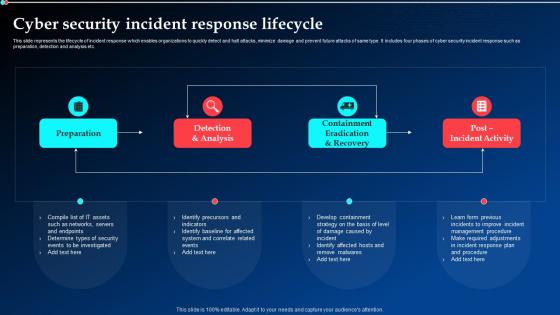
This slide represents the lifecycle of incident response which enables organizations to quickly detect and halt attacks, minimize damage and prevent future attacks of same type. It includes four phases of cyber security incident response such as preparation, detection and analysis etc.
People who downloaded this PowerPoint presentation also viewed the following :
Cyber Security Incident Response Lifecycle Ppt Powerpoint Presentation Ideas Good with all 6 slides:
Use our Cyber Security Incident Response Lifecycle Ppt Powerpoint Presentation Ideas Good to effectively help you save your valuable time. They are readymade to fit into any presentation structure.





FAQs for Cyber Security Incident Response Lifecycle Ppt Powerpoint
So there are six phases in cyber incident response - Preparation, Identification, Containment, Eradication, Recovery, and Lessons Learned. Preparation's where you build playbooks beforehand (seriously, don't skip this step). Then you've got Identification for detecting threats, followed by Containment to stop the spread. Eradication removes the actual threat completely. Recovery gets everything back online safely - though honestly, this part always takes longer than you think it will. Finally, Lessons Learned helps you not repeat the same mistakes. During real incidents, make sure everyone knows what phase you're in or things get messy fast.
So most companies use a combo of automated tools and actual people watching for weird stuff. SIEM systems catch things like sketchy network traffic or failed logins. Endpoint monitoring spots malware signatures. But here's the thing - sometimes your best tip-offs come from employees going "hey, this email looks fishy" or complaining their computer's acting slow. Threat intel feeds help too, plus constant log analysis. The tricky part? You gotta tune everything just right so you're not getting swamped with fake alerts while real problems slip through.
Communication can totally make or break your incident response - I've watched teams fall apart just because nobody was talking. Get a dedicated comms person right away so your tech people aren't constantly interrupted with "what's the status?" questions. Map out beforehand who needs updates and when - internal teams, executives, customers, maybe regulators depending on your situation. Honestly, half the time incidents spiral not because of the technical issue but because everyone's operating on different info. Clear channels prevent that mess where people are duplicating work or missing critical stuff entirely.
Build flexibility into your response plan from day one - don't try adding it later. Create modular frameworks that scale based on how bad things get. Tiered escalation works great here. Honestly, tabletop exercises are a game changer because they show you what's broken before you're actually on fire. Update your procedures every quarter, not just after disasters. Short sentences work. Document what you learn from each incident and work those lessons back in. Oh, and test weird scenarios regularly - real incidents never match the textbook stuff anyway. Your team needs to know how to pivot when things get messy.
Document everything as it happens, not later when you're trying to remember what the hell went wrong. Screenshots are your best friend here. Grab timestamps, save any commands you ran, note who did what. I learned this the hard way after spending hours reconstructing an incident timeline from my terrible memory. Your response tool probably has templates already set up. Make it detailed enough that if you suddenly had to hand this off to someone else, they wouldn't be completely lost. Phone calls? Record those too if you can. Trust me, future you will thank present you.
So basically you gotta look at what got hit - compromised data, busted systems, how long everything was down. The money stuff is what executives freak out about most: direct costs, lost sales, potential fines. Honestly though, the reputation damage can be way worse long-term than the immediate financial hit. Most companies use some kind of scoring matrix to rank how bad things are across different areas. Just make sure you document everything properly so you can actually learn from it and maybe get more security budget approved next time. It's all about showing the real business impact.
For containment, you're gonna want firewalls and VLANs to isolate compromised systems fast. EDR platforms can quarantine endpoints remotely - super helpful when you can't physically get to machines. SIEM tools track lateral movement while you're scrambling to contain everything. Write isolation scripts ahead of time, trust me on this. When you're in panic mode, you don't want to be figuring out command syntax. NAC solutions automatically block sketchy devices. DNS sinkholes redirect malicious traffic too. Build your playbooks now with actual commands written out. I learned this the hard way during my first major incident.
Run tabletop exercises with real scenarios - like ransomware hitting your email server on a Friday night (classic timing, right?). Make sure everyone knows their role and who makes the calls. Don't wait a whole year between drills though, quarterly works way better since people forget this stuff fast. Mix up the scenarios too - phishing one time, data breach the next. Honestly, start simple with a basic phishing attack scenario and you'll probably spot gaps right away. The key is making it feel real, not just reading from some manual.
Focus on timing metrics first - how fast you detect, contain, and recover from incidents. Those numbers tell the real story. Track containment success rates too, plus whether stuff keeps escalating or happening again. The lessons learned piece is honestly where the magic happens though. Count how many actual improvements you make after each incident. Don't forget stakeholder satisfaction scores and whether you're hitting those RTO/RPO targets you set. My advice? Pick 3-5 metrics that actually matter to your business and stick with measuring those consistently. No point drowning in data you won't use.
Honestly, threat intel is like having cheat codes for security. Your team can see what attack methods are hot in your industry right now and figure out what warning signs to actually watch for. I spent way too much time last week diving into this stuff, but it's worth it - you'll know which vulnerabilities need fixing ASAP and can build realistic response plans. Plus you can fine-tune your detection tools instead of just hoping they catch something. My advice? Start connecting with those intel feeds now because scrambling during an actual incident sucks.
Honestly? The hardest part is knowing when to actually flip the switch back to normal operations. Everyone's gonna be breathing down your neck to get things running again fast, but if you rush it you'll just create new problems or mess up evidence you might need later. Coordinating between IT, security, legal, and business teams is a total nightmare too - everyone has different priorities and timelines. Oh, and your whole team is probably running on fumes by then, which makes everything worse. My take? Write up a recovery checklist way before you need it. Define exactly what "ready" looks like so you're not making huge decisions while stressed and sleep-deprived.
Get your IT and legal teams talking NOW, before anything goes wrong. Run practice drills together so they're not figuring out who does what during an actual breach - been there, it's awful. Legal needs to grasp how long tech stuff actually takes, while your IT folks gotta learn evidence handling rules. Joint response teams work best. Oh, and set up shared documentation tools ahead of time. Define decision-makers for each phase too. The lawyers-meet-techies-for-first-time scenario? Absolute nightmare. Those regulatory requirements aren't going anywhere, so might as well get everyone on the same page early.
Get everyone together within 48-72 hours while it's all still fresh in your heads. Document what actually happened - no blame game though, that just makes people clam up. I've seen way too many of these turn into witch hunts. Focus on the broken processes, not who screwed up. What worked? What didn't? Update your playbooks based on what you learn and assign specific action items with real deadlines. Honestly, the best part is each incident becomes this weird learning opportunity that makes your whole security setup stronger. Turn the mess into something useful.
Build a simple matrix - severity on one axis, business impact on the other. Severity is the technical stuff (systems down, data breached, whatever). Business impact? Revenue loss, compliance headaches, angry customers. Most teams obsess over the technical side and completely ignore business context, which is honestly backwards. Score each 1-5 and multiply them. That critical payment system going down beats some random dev server having issues every single time. Write down your scoring criteria beforehand so you're not arguing about priorities while everything's on fire. Trust me on this one.
Honestly, your cybersecurity maturity is pretty much what determines if you're scrambling around like headless chickens during an incident or actually handling things smoothly. Lower maturity? You're doing everything manually and just reacting when stuff breaks. But when you've got your act together - automated alerts, solid playbooks, trained team - you can actually spot threats early and bounce back fast. I'd say start by figuring out where you really stand right now (be brutally honest). Then pick one thing to improve instead of trying to overhaul everything. Trust me, that never works.
-
Excellent template with unique design.
-
Good research work and creative work done on every template.