


Firewall Network Security Comparison Between Stateful Inspection And Stateless Firewalls




Try Before you Buy Download Free Sample Product
 Impress Your
 Audience
 100%
100% Editable
 Save Hours
 of Time


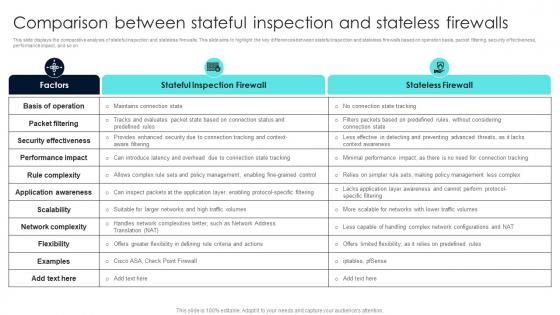
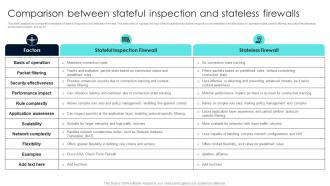
This slide displays the comparative analysis of stateful inspection and stateless firewalls. This slide aims to highlight the key differences between stateful inspection and stateless firewalls based on operation basis, packet filtering, security effectiveness, performance impact, and so on.
People who downloaded this PowerPoint presentation also viewed the following :
Firewall Network Security Comparison Between Stateful Inspection And Stateless Firewalls with all 9 slides:
Use our Firewall Network Security Comparison Between Stateful Inspection And Stateless Firewalls to effectively help you save your valuable time. They are readymade to fit into any presentation structure.








FAQs for Firewall Network Security Comparison Between Stateful Inspection
So basically, stateful firewalls remember your connection history while stateless ones just check each packet separately. When you make an outbound request, stateful ones are smart enough to let the response back through automatically. Stateless firewalls? They have to check every single packet against the rules from scratch - kinda annoying honestly. Yeah, stateful uses more resources but the security is way better since it actually understands connection flows. Most companies go with stateful these days because it's become the standard. Makes sense when you think about it - it knows what legit return traffic should look like.
So NGFWs are basically way smarter than regular firewalls. Instead of just blocking ports, they actually peek inside your traffic and figure out what apps people are using. Traditional ones only check basic stuff like IP addresses - pretty outdated honestly. The newer ones bundle everything together: intrusion prevention, web filtering, malware scanning, all in one box. You'll actually see what your users are doing instead of just guessing from port numbers. Managing one device beats juggling like five different security tools. If you're still on old-school firewalls, definitely look into upgrading.
So intrusion prevention is like having a really smart bouncer for your network. Regular firewalls just check basic rules - like is this traffic allowed or not? But IPS actually digs into what's happening inside that traffic flow. It's watching for weird behavior patterns and can catch stuff like zero-day attacks or malware trying to sneak data out. Way more sophisticated than basic packet filtering. You'll definitely want a firewall that has this built in with current threat signatures - honestly, anything less feels pretty outdated these days. Think of it as your network's paranoid security guard who actually pays attention.
Your firewall's speed matters way more than people think. When it can't handle the traffic volume, you get two bad choices - dropped packets or uninspected threats sliding through. Both suck. Plus slow firewalls create those annoying bottlenecks that make users hate IT (and then they start doing sketchy workarounds). You need something that can actually inspect thoroughly without killing performance. Don't trust vendor specs though - they're always too optimistic. Test your setup with real-world traffic loads instead.
Honestly, hardware firewalls are pretty solid if you can swing the cost. You get way better performance since they're not hogging your computer's processing power. The cool thing is they sit at your network edge and protect everything behind them - so all your devices get covered without installing stuff on each one. Malware can't really touch them either since they're completely separate from your OS. Software firewalls? They can get disabled if something nasty gets on your machine. Yeah, they're more expensive, but if you've got multiple devices or you're running any kind of business setup, it's honestly worth it for that network-wide protection.
Honestly, cloud firewalls are just way more convenient. You don't have to deal with hardware headaches, and they scale automatically when traffic gets crazy. The cool part? You can monitor everything from one dashboard even if your stuff is spread across different locations. Your traditional on-premise firewall is basically stuck guarding one spot. Plus cloud ones update themselves and get fresh threat data constantly - kinda like having security guards that actually stay awake lol. On-premise firewalls need manual updates and can choke during busy periods. Really depends on how complex your network setup is though.
Honestly, start with figuring out your network size - small office vs enterprise makes a huge difference. Performance is critical too, like how much throughput you need and concurrent connections. Management dashboards and logging are pretty essential these days. Budget's tricky because licensing costs add up over time, not just the initial purchase. Integration with your current security tools matters more than people think. I learned this the hard way at my last job. Create a list of must-haves first, then nice-to-haves. Don't let vendors talk you into features you'll never use.
So firewalls play nice with other security tools - they dump logs straight into your SIEM for monitoring everything in one place. IDS/IPS actually picks up the sneaky stuff that gets past basic firewall rules. Honestly, next-gen firewalls with built-in IPS are clutch if you can swing it. The trick is getting all your tools to communicate through APIs or log forwarding. I'd map out what data each system spits out first - you'll definitely spot some integration gaps. Makes troubleshooting way easier when everything's connected properly.
Dude, you really need to keep your firewall updated. Hackers are constantly finding new ways in, and those patches fix the holes they're exploiting. Skip an update and you're basically rolling out the red carpet for them. These updates don't just patch stuff either - they boost performance and add better threat detection. Most compliance rules demand timely updates anyway, so there's that. Auto-updates are great but honestly? Test the big ones first. I learned that the hard way when a patch broke our whole system last year.
So basically your firewall stops being just a dumb gate and becomes way smarter about who gets through. You can set up rules based on actual users - like preventing your marketing folks from wandering into sensitive database areas (trust me, you don't want that happening). It'll check identities and apply different permissions depending on someone's role. Even if hackers slip past your outer defenses, they'll still slam into these user-based blocks. Honestly, this layered setup cuts down your vulnerable spots big time. I'd start with protecting your most critical stuff first.
Most firewall issues come down to misconfigurations and outdated rules - honestly, it's usually someone forgetting to change default settings or skipping firmware updates. DDoS attacks are another big problem that can overwhelm everything. For protection, audit your rules regularly and set up rate limiting. Application-layer attacks are sneaky too since they slip past basic packet filtering. Oh, and actually read those firewall logs monthly instead of ignoring them (guilty as charged). Layering different security controls works way better than relying on just one thing.
So basically, application-layer firewalls are way smarter than regular ones. They don't just check ports and IP addresses - they actually read what's inside your data packets. Think of it like having a bouncer who doesn't just check IDs but also listens to conversations. These firewalls can catch SQL injections, malware downloads, and hackers trying to steal your data by hiding in normal web traffic. Regular network firewalls would totally miss that stuff. Honestly, if you're worried about serious attackers (and who isn't these days?), you'll want something that can spot the sneaky stuff.
Honestly, start with your blocked vs allowed traffic ratios - that's your baseline. False positive rates matter too because nobody wants legitimate stuff getting nuked. Pen testing and vulnerability scans will show you the real gaps. Your logs are pure gold if you actually analyze them (most people just ignore them though). Track how fast you detect incidents and adapt rules when new threats pop up. Response times are huge. Set up automated dashboards or you'll hate yourself pulling reports manually every month. Also measure mean time to detection - if someone's already been in your network for weeks, your firewall isn't doing its job.
Dude, a screwed up firewall is basically like leaving your front door wide open. Attackers can slip right through ports you thought were locked down, or you might accidentally block stuff your business actually needs to run. Once they're inside, they can just hop around your network stealing whatever they want. The really annoying part? You probably won't even realize it's happening until way too late. I learned this the hard way at my last job - we thought everything was fine for months. Just double-check your firewall rules every now and then and actually test them instead of crossing your fingers.
So basically your firewall becomes like a security camera system instead of just a dumb lock. Real-time alerts pop up when weird traffic happens, plus you get detailed logs showing who tried to mess with your network. I always tell people it's like - yeah, your door locks work, but wouldn't you want to see the guy rattling your doorknob at 3am? The logs help you tweak your firewall rules later too. Oh, and if something bad does happen, you'll have evidence. Set up alerts for failed connections and check your logs weekly.
-
Excellent template with unique design.
-
A fantastic collection of templates. I'll likely use this as my go-to resource for future templates and support.