

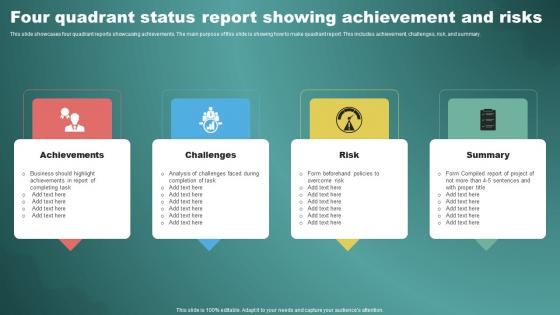
Four Quadrant Status Report Showing Achievement And Risks




Try Before you Buy Download Free Sample Product
 Impress Your
 Audience
 100%
100% Editable
 Save Hours
 of Time


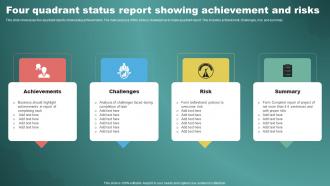
This slide showcases four quadrant reports showcasing achievements. The main purpose of this slide is showing how to make quadrant report. This includes achievement, challenges, risk, and summary.
People who downloaded this PowerPoint presentation also viewed the following :
Four Quadrant Status Report Showing Achievement And Risks with all 9 slides:
Use our Four Quadrant Status Report Showing Achievement And Risks to effectively help you save your valuable time. They are readymade to fit into any presentation structure.








FAQs for Four Quadrant Status Report Showing
So for status reports, I always start with what got done this week, then hit the roadblocks and what's coming up next. Metrics and milestones are key too. Oh, and honestly? Throw in a "quick wins" section - managers eat that stuff up. Timeline changes go in there if dates shifted around. Don't forget to mention if you need help with anything. Keep it to one page though - nobody reads past that anyway. The whole point is someone should glance at it and immediately know if you're on track or drowning.
Honestly, visuals are a game changer for status reports. People's brains just process charts way faster than walls of text - I've watched entire rooms zone out during bullet-point marathons. Color coding works great for project phases, and progress bars are perfect for showing completion percentages. Simple icons help categorize issues too. If you're showing deliverables, throw in some screenshots or mockups. Just don't get crazy with animations or whatever - that stuff's distracting. Oh, and I always forget this but it's clutch: keep everything clean and simple. You want people focused on your progress, not trying to decode some rainbow spreadsheet.
Okay so basically weekly reports need to be way more in-the-weeds than monthly ones. Focus on what's blocking you right now, what you actually got done this week, next few days' priorities. Monthly reports? That's your big picture stuff - how the whole project's going, major milestones, budget updates, all that. I always think of it like this: weeklies are "here's what's happening this second" and monthlies are "here's how we're doing against our original plan." Oh and ask yourself if people need to make decisions this week based on your update - that usually tells you how detailed to get.
Honestly, the two biggest traps are being way too vague or dumping every tiny detail on people. Hit that middle ground where stakeholders actually get what's happening without drowning. Skip listing your daily tasks - trust me, nobody's as interested in those as you think. What people really want? Outcomes, what's blocking you, and what's next. Be straight about problems instead of sugarcoating everything. Oh, and stick to a consistent schedule and format so they know when updates are coming and can quickly find what they need.
Honestly, I just write two different versions - saves so much hassle. Stakeholders want the big picture stuff: budget, timeline, major wins or disasters. They'll glaze over if you start talking technical details. Your team needs the opposite though. Give them the actual blockers, specific tasks, maybe that weird bug that's been driving everyone crazy. Short sentences work for execs. Developers need more context and actionable details they can actually work with. I always figure out who's reading first, then decide what they need to make their next move. Sounds obvious but you'd be surprised how many people send the same update to everyone and wonder why half the recipients look confused.
Track your completion percentage, budget burn rate, and timeline stuff first - those are the basics. Risk indicators are clutch too because last-minute surprises suck. Resource utilization and milestone dates matter, plus whatever's blocking progress. Quality metrics work great if you're doing something where defect rates actually make sense. Honestly, stakeholders love seeing approval rates for deliverables. Pick maybe 5-7 things that actually paint the picture instead of drowning everyone in data. You can always start simple and beef it up later when people start asking for more details.
Honestly, just turn your status updates into mini-stories. Instead of "Task completed," try something like "We hit that API roadblock last week, but Sarah found this brilliant workaround that saved our butts." Way more engaging than boring bullet points, right? Our brains love stories anyway – it's how we're wired. Give your team members little character arcs, make challenges into plot twists. Structure it like: here's what went down, how we dealt with it, what's next. Trust me, people actually read these reports when you write them this way.
So for status reports, I'd go with Google Docs or Notion first - everyone can jump in and comment without the back-and-forth email mess. Slack's actually where I do most of my quick updates now. Way easier than formal reports. If your boss wants something fancier, Monday.com pulls project data automatically which saves time. But honestly? Pick whatever your team actually uses daily. There's no point building beautiful reports in some tool nobody checks. Start simple, see what sticks. You can always get fancier later if people complain it's too basic.
Color coding is seriously a game changer for status reports! Green means everything's good, yellow for risky stuff, red when things are falling apart. Before I started doing this, I'd write these long paragraphs and nobody would read them - honestly can't blame them. Now people instantly see what's broken without digging through walls of text. Just stick with the same colors every time, maybe throw a little legend up top so nobody gets confused. Trust me, try it once and watch how fast people actually start responding to your red items. It's almost like magic or something.
Oh totally, you need to actually ask people what they think about your templates! I've watched so many people create these fancy reports that nobody reads because they're missing what people actually care about. Ask your stakeholders regularly - what's confusing? What do they want more of? Your manager might need way more detail on blockers while your team thinks half the sections are pointless. Keep tweaking it based on what you hear back. The template should change as your project changes too, you know?
Honestly, I just stick to three things: wins, problems, and what's next. Lead with the good stuff first - gets everyone in a better mood. Then don't sugarcoat the messy parts because people can smell BS from miles away. I make a quick one-pager beforehand so I don't ramble (happens more than I'd like to admit). Throw in actual numbers instead of saying "things are going well" - way more convincing. Keep it under 3 minutes unless someone starts drilling you with questions. End by asking for whatever you actually need. Support, decisions, whatever. Makes the whole thing feel less like a performance.
Basically, when people know their progress is gonna be shared with everyone, they're way more likely to actually get stuff done. You can't just say you'll do something and then forget about it - you have to own up to what you actually accomplished. And honestly? Nobody wants to be that person saying "yeah, still working on it" for the third week in a row. Been there, it sucks. The trick is doing them consistently so it just becomes how your team operates. Otherwise it feels like being called to the principal's office or something.
Honestly, RAG indicators are a game changer for status reports. Your stakeholders can scan them super quickly instead of wading through walls of text. Color coding naturally pulls attention to the amber and red stuff first - which is perfect since that's what needs discussion anyway. It also forces you to actually think about severity levels rather than just word-vomiting everything into one paragraph (guilty as charged). Executives especially love this since they can assess project health in like 5 seconds. Oh, and definitely add quick explanations for your red/amber criteria so people aren't guessing what constitutes each level.
Weekly updates work for most projects. High-priority stuff might need twice a week, but daily reports? That's way too much unless you're literally putting out fires. Nobody has time for that. Find the balance where people feel in the loop without drowning them in emails - trust me, there's nothing worse than being that person who over-communicates. If something big happens between your regular updates, shoot a quick message. Start weekly and see how it goes. Your team will definitely let you know if they need more or less info.
Honestly, just automate the whole thing - pull data straight from your PM tools and CRMs so you're not digging around for numbers every week. Set up templates once, schedule them to go out automatically (because who actually remembers to send reports on time?). Multiple people can jump in and edit simultaneously with collaboration tools. The real game-changer though? You build it once and forget about it. No more spending half your Friday formatting spreadsheets when you could be doing literally anything else. Real-time updates hit everyone's inbox without you lifting a finger.
-
SlideTeam makes creating presentations easy. Unlimited products, premium quality designs and affordable.
-
I want to express my gratitude to SlideTeam’s presentation design services team for helping me create the best presentation of my life!