

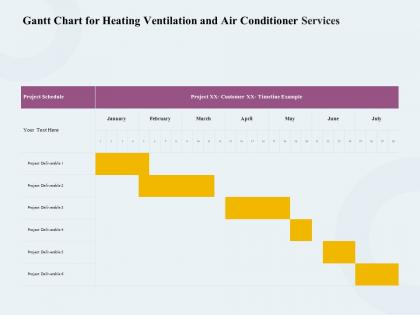
Gantt chart for heating ventilation and air conditioner services ppt icon




Try Before you Buy Download Free Sample Product
 Impress Your
 Audience
 100%
100% Editable
 Save Hours
 of Time


Our Gantt Chart For Heating Ventilation And Air Conditioner Services Ppt Icon are topically designed to provide an attractive backdrop to any subject. Use them to look like a presentation pro.
People who downloaded this PowerPoint presentation also viewed the following :
Gantt chart for heating ventilation and air conditioner services ppt icon with all 2 slides:
Use our Gantt Chart For Heating Ventilation And Air Conditioner Services Ppt Icon to effectively help you save your valuable time. They are readymade to fit into any presentation structure.
FAQs for Gantt chart for heating ventilation and air conditioner
So a Gantt chart is basically this visual timeline showing when your project tasks start, end, and how they connect. Super helpful for seeing the big picture. I literally used one last week and caught that I was scheduling two things at once - saved me from a total mess. You can spot bottlenecks right away, track what's behind schedule, and figure out which tasks are blocking everything else. Honestly beats trying to keep it all in your head. Excel works fine to start with, or even Google Sheets if you want something simple.
Honestly, Gantt charts are a game changer for team visibility. Everyone sees who's doing what and when things are due. No more "wait, where are we on this?" meetings every other day. The visual setup makes it super easy to catch dependencies you might miss otherwise - like when Sarah's waiting on Mike's design but Mike doesn't even know that yet. Awkward, right? You can spot potential bottlenecks way ahead of time too. Just stick it somewhere everyone can actually access and update it. Way better than endless email chains about project status.
So you need tasks running down the left side, timeline across the top, then bars showing when stuff happens. Dependencies are huge - those arrows connecting tasks that can't start until others finish. Most people skip these and wonder why their timeline's garbage. Add milestones for big deliverables too. Oh, and assign someone to own each task or nothing gets done. Pick your time scale based on project length - daily for short sprints, weekly/monthly for longer ones. Honestly just start basic with the core pieces, then layer in more details once everyone actually knows how to read the thing.
So here's the thing - most Gantt charts don't actually show you the critical path straight up. You've gotta trace through all your connected tasks and find which sequence takes the longest from start to finish. Honestly, if you're using any decent project software, it'll just highlight it for you automatically (thank god). But if you're stuck doing it by hand, map out each path of dependent tasks and add up the time. Longest path wins. Just remember - if anything on that critical path gets delayed, your whole deadline shifts. Super fun, right? Watch those tasks like a hawk.
Oh dude, Gantt charts are amazing for this! You can literally see everyone's workload laid out and catch scheduling disasters before they blow up. The visual timeline makes it super obvious when someone's swamped while another person has nothing to do. Dependencies become crystal clear too - like when Sarah finishes her part, John can jump right in. Honestly feels like Tetris sometimes, moving people around to make everything fit. Try color-coding each team member - makes the bottlenecks pop out immediately. Way easier than juggling it all in your head.
So there's a bunch of options depending on what you need. Microsoft Project is like the gold standard but honestly it's pretty heavy-duty - might be too much if you're just doing basic stuff. Asana and Monday.com are way easier to use, and Smartsheet's solid too. You can even hack something together in Excel if you're desperate, though that's kind of a headache. Oh, and there are free ones like GanttProject if budget's tight. My advice? Just see what your team's already using for project stuff - most tools have Gantt charts built in now anyway.
Honestly, most project management tools make this pretty easy to handle. Just drag the bars around or update the fields directly - works great in Microsoft Project, Asana, whatever you're using. When scope inevitably changes (because it always does), throw in new tasks or delete the old ones, then recalculate your critical path. Update your resource assignments too. The trick is staying on top of it in real-time instead of letting everything pile up. Trust me, that creates a total mess later. Oh, and definitely loop your team in on any timeline changes right away - they'll thank you for it.
Yeah, so the biggest problem is that Gantt charts get super messy when you've got a million interconnected tasks. Complex dependencies? Good luck showing those clearly. And don't even get me started on updating them - it's honestly brutal when stuff changes daily. They're terrible at catching resource conflicts too, like accidentally double-booking people. I learned that one the hard way last year. The whole thing gives you this fake sense of certainty anyway since we're all just guessing at timelines. Try splitting yours into phases or maybe throw in some Kanban boards alongside it.
Yeah, Gantt charts totally work with Agile! The trick is using them for sprints or short releases instead of massive project timelines. Honestly, some Agile people get all bent out of shape about them being too "waterfall-y" but whatever - they're super helpful for showing dependencies and keeping stakeholders happy. Just gotta update them when priorities change (which they always do). Tools like Jira let you flip between Kanban and Gantt views pretty easily. Best of both worlds really.
Dude, color-coding is a game changer! Pick different colors for each team or project phase - your eyes will thank you. Those little progress bars inside each task? Super helpful for seeing what's actually done. I know it sounds obvious but most people skip the milestone markers (diamonds work great). Oh, and make your font big enough that people don't squint. Dependency arrows showing how tasks connect are clutch too. Honestly, default Gantt charts look like spreadsheets threw up, but these tweaks fix that fast. Try the colors first - you'll be shocked how much clearer everything becomes.
Honestly, start with your hard deadlines and work backwards - that's the only way to see what time you're actually dealing with. Figure out your critical path (the stuff that can't be delayed without screwing everything up). I'm obsessed with buffer time because projects always take longer than you think they will! Look for tasks you can run at the same time instead of one after another. Don't pack things too tight though - I learned that the hard way. Build in like 10-15% buffer between big milestones so you've got room to breathe when things inevitably go sideways.
Honestly, Gantt charts are like the MVP for talking to stakeholders. They show your project timeline and what depends on what without getting into the weedy stuff. Executives love them because they can actually see what's done, what's happening now, and where things might go sideways. The color coding thing is clutch - I always do green for good, yellow for sketchy, red for "we have a problem." Oh and definitely update it before meetings or you'll look like you don't know what's going on. It's basically your project's highlight reel that non-technical people can digest.
Look, Gantt charts basically show you where everything's gonna fall apart before it happens. You'll see which tasks depend on others - like if Task A runs late, Task B is screwed too. I swear they're lifesavers for catching bottlenecks early. The visual layout makes it super obvious which activities have wiggle room versus the ones that'll tank your whole project if they slip. You can spot your critical path right away and build in buffer time where you need it most. Honestly beats trying to keep track of dependencies in your head. Check yours regularly and you'll catch problems way before they bite you.
Honestly, less is more with Gantt charts when you're presenting to stakeholders. Focus on the big milestones and skip the granular stuff - nobody wants to sit through 50 rows of micro-tasks. Hit the critical path items and any dependencies that could bite you later. I always walk through it chronologically and stop at each major phase for questions. Oh, and make your timeline actually realistic. Stakeholders can smell BS padding from a mile away, and it'll tank your credibility fast. Pro tip: have a backup plan ready because someone will definitely ask what happens if things go sideways.
Just update the completion percentages right on your Gantt chart - those progress bars filling up are weirdly addictive, not gonna lie. Most tools let you shade in how much work's actually done vs what you planned. Dependencies are clutch here because you'll see exactly how one delayed task screws up everything downstream. Compare your original timeline against actual dates to spot patterns (maybe Dave always takes longer than he estimates lol). Weekly check-ins work great - have people report their percentage and it keeps everyone honest while giving you a real-time pulse on things.
-
Enough space for editing and adding your own content.
-
Appreciate the research and its presentable format.