

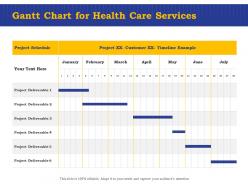
Gantt chart for health care services ppt powerpoint presentation visuals





Try Before you Buy Download Free Sample Product
 Impress Your
 Audience
 100%
100% Editable
 Save Hours
 of Time


Our Gantt Chart For Health Care Services Ppt Powerpoint Presentation Visuals are topically designed to provide an attractive backdrop to any subject. Use them to look like a presentation pro.
People who downloaded this PowerPoint presentation also viewed the following :
Gantt chart for health care services ppt powerpoint presentation visuals with all 2 slides:
Use our Gantt Chart For Health Care Services Ppt Powerpoint Presentation Visuals to effectively help you save your valuable time. They are readymade to fit into any presentation structure.
FAQs for Gantt chart for health care services ppt
You'll want clear task definitions first - patient intake, treatment phases, discharge stuff. Build in realistic timeframes and assign your resources (staff, equipment, rooms). Dependencies are massive since healthcare's so sequential - can't do surgery prep until pre-op's done, obviously. Milestones work as sanity checks throughout the workflow. Honestly, always add buffer time because things go sideways constantly in healthcare. I'd tackle your most critical pathway first, then expand from there. The sequential nature makes it tricky but once you map the first one out properly, the rest get easier.
Honestly, Gantt charts are perfect for healthcare stuff. You can map out your whole project timeline - renovations, equipment installs, new programs, whatever. The cool thing is seeing dependencies clearly, like how you obviously can't plop down that new MRI until electrical's finished. Different departments and vendors can actually stay on the same page for once. Bottlenecks become super obvious early on. Plus you'll avoid those endless "where are we at?" meetings that nobody wants to sit through anyway. Even basic online tools work great - I'd definitely try one for your next big capital project.
Gantt charts are perfect for hospital construction - there's just so many contractors and approvals happening at once. EHR rollouts are another big win since you're juggling training, data migration, all that fun stuff across departments. Clinical trials work great too because of the strict phases and FDA deadlines. Honestly, I'd probably start with your messiest project first to really see the difference. Even smaller things like new clinic openings benefit, though that might be overkill depending on how complex it gets.
Honestly, Gantt charts are a game-changer for healthcare teams because everyone's literally looking at the same timeline. You'll instantly see if lab results come back before surgery, or catch when two docs are double-booked with the same patient. Dependencies become super obvious - nurses know prep timing, doctors see their procedure windows, and admin can catch bottlenecks early. Way better than drowning in update emails all day (which nobody reads anyway). The visual dashboard thing just makes sense when you've got so many moving pieces. Short version: one shared map beats everyone wandering around lost.
Microsoft Project's solid if you already have Office - their resource management stuff is perfect for staffing schedules. But honestly? Smartsheet's way easier to use and your care teams will actually collaborate on it. Monday.com is super clean too, especially for clinical staff who don't want to deal with complicated project management tools. TeamGantt works great for smaller practices. Oh, and definitely try the free trials first - I learned that the hard way after jumping into one without testing it. See what actually fits how your team works.
Honestly, Gantt charts are clutch for hospital coordination - you can see all your department workflows at once instead of juggling everything in your head. Like when patients move from ER to surgery to recovery, you'll spot exactly where bottlenecks happen before they screw everything up. The visual timeline shows when each department needs staff and resources, so you're not having OR and lab compete for the same people. I'd start with your most critical patient pathways first, then build out from there. It's way easier than trying to coordinate discharge planning with housekeeping through endless emails.
Honestly, Gantt charts work really well for patient care timelines. You can map out the whole treatment journey - admission through discharge. The cool thing is seeing how everything connects, like when lab results have to come back before surgery can happen. For complex cases with tons of specialists? Total lifesaver. I'd suggest trying it with just one complicated patient first to see if your team likes it. You'll catch bottlenecks early and it helps coordinate staff schedules around what patients actually need. Plus nothing gets forgotten, which is obviously huge.
Honestly, Gantt charts are perfect for compliance stuff. They let you see all your deadlines in one spot - audit prep, training requirements, doc submissions, renewals. I learned this the hard way after almost missing a major certification deadline (not fun). You can spot problems weeks ahead and actually plan around them. When auditors show up, boom - you've got this nice visual timeline showing you're on top of everything. My advice? List out every single regulatory thing you need to hit first. Then just drop those into your timeline as must-do milestones. Game changer, seriously.
Oh, Gantt charts are a lifesaver for this stuff! They show you exactly when you'll need staff, equipment, and rooms all laid out visually. Super easy to spot where things clash - like when surgery schedules bump into nursing shifts or two departments want the same machine. Way better than keeping track mentally (trust me on that one). You can actually catch problems before they blow up and move resources around. Honestly, just plot out next week's needs and watch all the conflicts jump out at you. Makes scheduling way less of a headache.
Honestly, Gantt charts are game-changers for healthcare projects. You get this visual timeline showing every task and how they all connect - super useful when you're juggling a million things. Can't train staff until your system's actually running, right? The best part is catching problems before they blow up your schedule. I used to hate explaining timelines to executives, but now I just show them the chart instead of drowning them in spreadsheets. Seriously, try making one for your next rollout. Everything just clicks into place way better.
Honestly, healthcare is just chaos waiting to happen - patient conditions flip overnight and emergencies mess up whatever timeline you had planned. Your staff situation gets messy too since people call out sick or get yanked into urgent cases. Some team members will probably push back on Gantt charts because they think they're way too rigid. I mean, fair point really. You're basically trying to schedule the unschedulable sometimes! The trick is adding tons of buffer time and updating those charts constantly. Don't treat them like they're carved in stone or you'll go crazy.
So you'll want to use APIs to connect your EHR with project management tools - basically pulls patient data straight into Gantt charts automatically. Epic and Cerner both support this stuff. Fair warning though, getting IT to approve anything takes forever. But once it's set up? Pretty sweet. Treatment timelines populate themselves, appointments sync up, and when you update milestones in the Gantt chart it shows in the patient record too. No more double entry nonsense. Start by figuring out what APIs your EHR actually has available, then find project management software that already plays nice with healthcare systems.
Dude, Gantt charts are honestly pretty clutch for patient safety. They let you see the whole care timeline laid out, so you catch scheduling conflicts before they screw things up. Like when two critical treatments might overlap or there's a gap in monitoring - super important stuff. Your team stays way more coordinated too, which cuts down on those communication mess-ups that can be dangerous. I know it sounds kinda nerdy, but mapping out complex treatment plans this way makes everything so much clearer. Worth trying on your next multi-step case.
Honestly, Gantt charts saved my life when I was training new hires. You can map out everything - certifications, shadowing, department rotations, all that stuff - on one timeline. Makes it super easy to catch conflicts before they happen, like scheduling HIPAA training right when someone's supposed to be doing their first patient rotation (been there, made that mistake). Both you and the new person know exactly what's due when, which cuts down on the "wait, what was I supposed to do today?" conversations. Set up milestones too, like "cleared for solo patient care." New hires love seeing their progress visually.
Honestly, start with patient safety stuff - those deadlines are absolutely set in stone. Map your dependencies around actual clinical workflows, not just paperwork timelines. I totally screwed this up once when we planned a discharge protocol but forgot about nursing shift changes - what a mess! Regulatory approvals will drag on forever, so pad that timeline. Color-coding by department is a game changer since people can instantly see what's theirs. Keep the chart somewhere everyone walks by and update it during your weekly huddles. Oh, and make those buffer times generous because healthcare moves at its own pace sometimes.
No Reviews