


Grammarly Investor Funding Elevator Pitch Deck PPT Template




Try Before you Buy Download Free Sample Product
 Impress Your
 Audience
 100%
100% Editable
 Save Hours
 of Time


Here is a skillfully designed Grammarly Investor Funding Elevator Pitch Deck PowerPoint Presentation. This PPT encompasses the elevator pitch deck for an AI-enabled writing assistance platform. It addresses the problem statement and highlights the key solution provided by the company to enhance written communication and productivity. Additionally, the Writing Assistance Platform PPT templates include details about the products and services offered, essential facts, the unique selling point, significant milestones achieved, client testimonials, the business model, revenue streams, competitive analysis, financial performance, projections, and the investment request for the investor funding pitch deck. Lastly, the Investor Pitch Deck explores the exit strategy, introduces the team involved in the company, outlines the organizational structure, and presents the companys shareholding pattern after securing funding from potential investors. Download our 100 percent editable and customizable PowerPoint, compatible with Google Slides, to streamline your presentation process.
People who downloaded this PowerPoint presentation also viewed the following :
Content of this Powerpoint Presentation
Slide 1: This slide introduces Grammarly Investor Funding Elevator Pitch Deck. State your company name and begin.
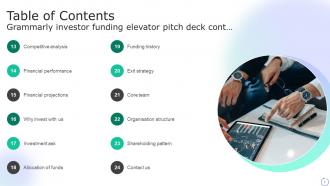
Slide 2: This slide shows Table of Content for the presentation.
Slide 3: This slide continues showing Table of Content for the presentation.
Slide 4: This slide presents the issues faced by individuals and organizations when it's comes to poor communication.
Slide 5: This slide displays the solutions offered by the AI-powered writing assistance tool. It include features like assistance across whole writing process etc.
Slide 6: This slide presents the overview of digital writing assistant solution . It includes details about organizations industry, business model, customers etc.
Slide 7: This slide describes the key figures and facts associated with the AI-enabled virtual writing assistant. It mentions facts such as team member counts etc.
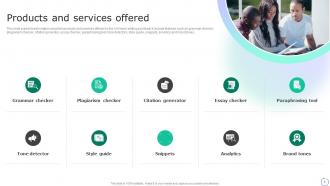
Slide 8: This slide presents information about the products and services offered by the AI-Driven writing assistant. It include features such as grammar checker, plagiarism checker etc.
Slide 9: This slide displays value proposition that the writing assistance platform offers to its customer base.
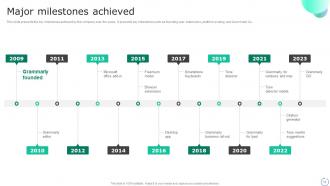
Slide 10: This slide presents the key milestones achieved by the company over the years. It presents key milestones such as founding year, extensions etc.
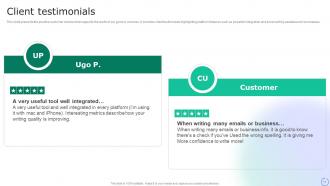
Slide 11: This slide describes the positive customer reviews that supports the worth of our good or services. It includes client testimonials highlighting platform features.
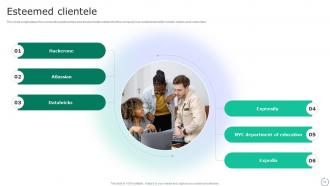
Slide 12: This slide emphasizes the successful partnerships and trusted relationships that the company has established with notable clients and customers.
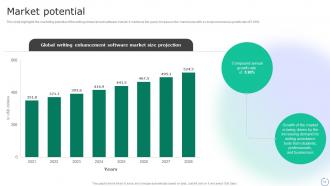
Slide 13: This slide highlights the marketing potential of the writing enhancement software market. It mentions the yearly increase in the market size with a compound annual growth rate.
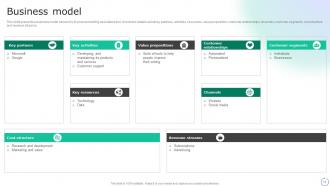
Slide 14: This slide presents a business model canvas for AI-powered writing assistance tool. It includes details about key partners, activities, resources etc.
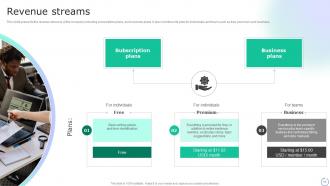
Slide 15: This slide displays the revenue streams of the company including subscription plans, and business plans. It also mentions its plan for individuals and team.
Slide 16: This slide analyzes the competitive landscape of the AI-enabled writing assistance tool. It compares on the basis of parameters such as grammar checking, spelling checking etc.
Slide 17: This slide highlights the financial performance of ai-powered writing assistance tool service providing company with the help of line graph showcasing its revenue growth.
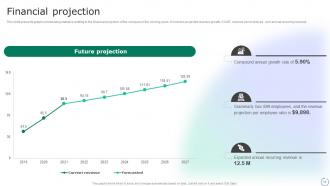
Slide 18: This slide presents graphs showcasing statistics relating to the financial projection of the company in the coming years. It includes projected revenue growth, CAGR etc.
Slide 19: This slide describes why should businesses invest in the company. It features its advantages that the company provides such as growing demand, strong financial performance etc.
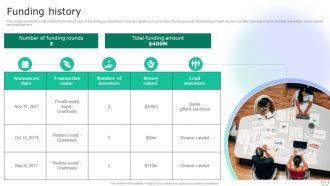
Slide 20: This slide presents details about company's investment ask from the investors. It includes amount to be raised , goal of the investment, target revenue & date.
Slide 21: This slide displays stacked bar chart highlights areas where raised funds will be allocated. It includes areas such as reach expansion, product feature enhancement etc.
Slide 22: This slide presents the revenue streams of the company including subscription plans, and business plans. It also mentions its plan for individuals and team.
Slide 23: This slide describes various exit strategies for business to reduce the risk of investors. It includes strategies such as initial public offering and acquisition.
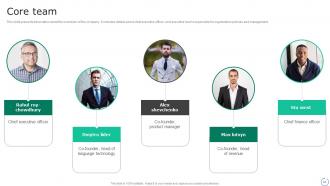
Slide 24: This slide presents information about the core team of the company. It includes details about chief executive officer, and executive team.
Slide 25: This slide presents the organization structure of writing assistance technology company. It includes details about chief executive officer and respective employees.
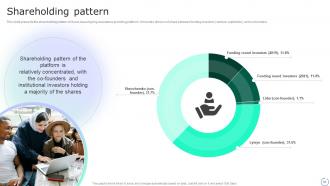
Slide 26: This slide displays the shareholding pattern of cloud-based typing assistance providing platform.
Slide 27: This is a Thank You slide with address, contact numbers and email address.
Slide 28: This slide shows all the icons included in the presentation.
Slide 29: This slide is titled as Additional Slides for moving forward.
Slide 30: This is Our Vision, Mission & Goal slide. Post your Visions, Missions, and Goals here.
Slide 31: This is About Us slide to show company specifications, services etc.
Slide 32: This is Our Team slide with names and designation.
Slide 33: This slide displays Mind Map with related imagery.
Slide 34: This slide depicts Venn diagram with text boxes.
Grammarly Investor Funding Elevator Pitch Deck PPT Template with all 42 slides:
Use our Grammarly Investor Funding Elevator Pitch Deck PPT Template to effectively help you save your valuable time. They are readymade to fit into any presentation structure.























FAQs for Grammarly Investor Funding Elevator Pitch
Honestly, Grammarly catches so many more mistakes than regular spell check - it's wild how much it picks up. The tone detection thing is pretty cool too, helps you figure out if you sound too formal or casual for whoever you're writing to. My favorite part? Those clarity suggestions that tell you when you're being way too wordy (guilty as charged lol). Real-time checking means no more embarrassing typos in work emails. You can set it for different audiences and formality levels. I'd definitely try the free version first - if you end up writing tons, then maybe upgrade.
Honestly, Grammarly's pretty solid for catching the basic stuff super quick - grammar, spelling, even tone suggestions. Way faster than going through everything manually. But it's kinda dumb when it comes to context? Like it'll flag things that are actually fine stylistically or miss when something sounds weird but is technically "correct." I'd probably run your stuff through Grammarly first to clean up the obvious mistakes. Then either give it another read yourself or have someone else look at it, because there's still no replacement for actual human judgment on whether something flows well or makes sense.
Grammarly's honestly been a lifesaver for my coworker who's still getting comfortable with English. It'll catch your grammar mistakes and suggest better words as you type. The tone thing is pretty cool too - helps you figure out if you sound too casual for work emails or whatever. What I really like about it is how it actually explains WHY something sounds off, so you're not just blindly accepting changes. My friend started with the free version and her writing confidence went way up. Oh, and it works across different sites which is nice. Definitely worth trying out first before paying for anything.
Yeah, it's pretty solid for work emails! I've noticed it catches stuff that sounds too blunt or weirdly casual before you send. Like last month it saved me from sounding like a total jerk to a client - apparently "as discussed" comes across ruder than I thought? Anyway, it'll suggest tweaks to sound more professional or friendly depending on what you need. Honestly, email tone is so weird anyway since people can't hear your voice. I'd test it on a couple important messages this week. You might get better responses back.
Yeah, Grammarly's actually gotten way better with technical stuff. You can add all your industry terms to a personal dictionary - total game changer for API names and jargon. It won't keep flagging everything as wrong. The AI's pretty decent at reading context too. But here's the thing - it still tries to "simplify" technical language sometimes, which honestly just makes things less precise. I've had it suggest dumbed-down alternatives that completely miss the point of using specific terminology. Just add your common technical terms upfront and ignore its suggestions when you know better. Trust your expertise over the tool.
So Grammarly checks four main things when it looks at your writing - grammar/spelling stuff, how clear you are, whether it's engaging, and your tone. You'll get an overall score plus readability info. The grammar corrections are pretty good, but honestly? The engagement tips can be kinda meh sometimes. It flags issues as you type and suggests fixes right away, which is nice. Oh, and here's a tip that actually helps - work on just one area at a time instead of trying to tackle everything. Way less stressful that way.
Yeah, Grammarly's decent for catching passive voice stuff. It'll underline things like "mistakes were made" and suggest "I made mistakes" instead. Pretty handy most of the time. But honestly? It misses some of the trickier passive constructions, and occasionally it flags sentences that are totally fine as-is. The suggestions are solid maybe 80% of the time. Don't just accept every change though - sometimes passive voice actually works better for what you're trying to say. I've learned to pick and choose which edits to take.
Yeah, it totally works! You'll need the browser extension or desktop app though. Works great for text boxes, speaker notes, all that stuff. I actually used it last week when I was scrambling to finish slides at like 11pm - saved my butt from so many typos. The suggestions just pop up as you type, same as when you're writing emails. Make sure you get the desktop version for PowerPoint specifically. Oh and honestly? Even if you think your slides look perfect, run it anyway. You'd be surprised what you miss when you're staring at the same presentation for hours.
Honestly, Grammarly's pretty solid for staying legit with your papers. It'll flag stuff that looks too close to other sources, which saves you from accidentally plagiarizing when you're paraphrasing research. Plus it just cleans up your grammar and makes your writing clearer - it's not writing FOR you, just fixing what you already put down. I used it all through college and never had issues. Oh, but definitely check if your prof is cool with it first since some schools are weird about writing tools now.
Yeah, Grammarly has different writing modes you can pick from - academic stuff like APA and MLA, business writing, creative, casual, whatever. You set your audience and goal in the settings and it tweaks its suggestions. The academic modes are actually pretty good at catching when you sound too casual or use contractions when you shouldn't. It'll suggest more formal alternatives too. Oh, and it helps with citation formatting, though I'd still double-check that stuff manually since it's not foolproof. But honestly, it's great for keeping your tone consistent throughout the whole paper.
Yeah, so Grammarly uploads your stuff to their servers when you use it. They claim everything's encrypted and they won't train AI on business content, but idk... I'd still be pretty careful with anything super confidential. Financial docs, client info, proprietary whatever - maybe just turn Grammarly off for that stuff? You can disable it temporarily in your browser when needed. Or if your company's serious about this, their business plan supposedly has better privacy features. I mean, offline tools exist too. Just seems risky to me with sensitive material, you know?
Yeah, Grammarly's pretty solid for English - catches all those annoying mistakes like when your subject and verb don't match up, comma problems, stuff like that. Works while you type too which is nice. But if you're doing other languages? Not so much. It's really just focused on English. I had to use LanguageTool when I was helping my cousin with some Spanish writing last month. Honestly though, for English emails and documents, Grammarly will save you from looking dumb. Those typos always show up at the worst times.
Honestly, yeah Grammarly's pretty solid. Catches those dumb typos and weird sentences when you're firing off emails too fast. The tone thing is surprisingly helpful - like when you sound too harsh without realizing it. Some people find all the suggestions annoying though, which I totally get. It's like having someone constantly looking over your shoulder. But most people I know say it actually makes them feel more confident writing at work. Non-native speakers especially love it. I'd just start with the free version and see how it feels - no point paying if it drives you crazy, right?
Nah, you're good - Grammarly's plagiarism checker won't mess with your originality. It basically scans your stuff against tons of web content and papers to catch potential matches, but they don't store or share your work anywhere. Honestly, I think of it as backup protection. You'll get heads up if something looks too similar to existing content, which helps you cite things right or fix sections that might sound like other work. Don't stress about a few flagged phrases though - that's super normal. Focus on the bigger matches that actually count. Way better to catch it early than have someone else point it out later, you know?
Honestly, Grammarly drives me nuts when it flags technical terms as "mistakes" - like, calm down, it's jargon for a reason. They really need smarter context awareness that gets what you're actually writing. Real-time collaboration would be amazing too. Picture getting live suggestions while your whole team edits a doc together. Their tone detection is still pretty rough around the edges, and don't get me started on how it handles creative writing. Better platform integration beyond just Chrome would help tons. Oh, and customizable style guides for different companies? Game changer. They've got this massive base of non-native speakers who could use way more targeted help.
-
Love how there are no boring templates here! The design is fresh and creative, just the way I like it. Can't wait to edit and use them for my extended projects!
-
“You have the structure in place that are easy to explore new opportunities.I will be recommending your services to other people.”