

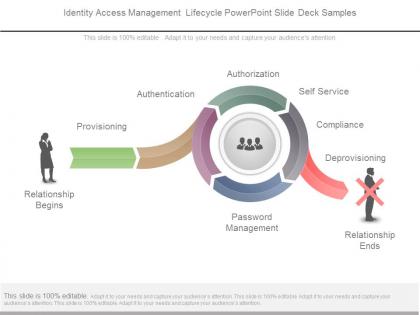
Identity access management lifecycle powerpoint slide deck samples




Try Before you Buy Download Free Sample Product
 Impress Your
Audience
 100%
Editable
 Save Hours
of Time


Folks end up buying with our Identity Access Management Lifecycle Powerpoint Slide Deck Samples. They believe they have a good bargain.
People who downloaded this PowerPoint presentation also viewed the following :
Identity access management lifecycle powerpoint slide deck samples with all 7 slides:
Guard against any accidents with our Identity Access Management Lifecycle Powerpoint Slide Deck Samples. Caution them about possible errors.


FAQs for Identity access management lifecycle powerpoint
So IAM lifecycle breaks down into four phases: provisioning, managing, monitoring, and deprovisioning. Provisioning is when you create accounts and set up initial access. Managing covers all the ongoing stuff - role changes, permission updates as people switch teams or get promoted. Monitoring tracks usage and flags weird activity, though honestly most companies are terrible at this part. Then there's deprovisioning when someone leaves or moves roles. This one's critical because leftover accounts are security nightmares waiting to happen. The real trick is having solid processes for each phase - especially that last one since I've seen way too many orgs with zombie accounts floating around.
Most companies start with an access audit - basically figuring out who can get into what systems. Map out current user roles and permissions first. Trust me, you'll find some weird legacy access that'll make you scratch your head. After that, look at your compliance needs and how much risk you're comfortable with. Check your user processes too - onboarding, role changes, when people leave. Those manual steps? They're usually where things get messy or create security holes. Just document what you've got now, then tackle the biggest headaches first.
Look, user onboarding is basically where your whole IAM game gets made or broken. Get it right from the start and you're setting up proper access controls, role-based permissions, all that good stuff. Way better than the alternative - I've seen teams spend months trying to untangle who has access to what because they rushed through onboarding. New hires get productive faster too since they actually have the tools they need on day one. Oh, and definitely nail down those approval workflows early. Standardized processes will save you so many late nights later. Trust me on this one.
Honestly, manual processes are a nightmare for this - HR always forgets to loop IT in when they're swamped. Your best bet is hooking up IAM to automatically trigger when someone gets marked as terminated in the HR system. Build out a solid checklist covering everything: AD, cloud apps, VPN, badges, shared accounts, the works. The real pain is those random legacy systems that somehow everyone forgets about until months later (we've all been there). Regular access reviews will catch most stragglers, and don't forget to nail down a handoff process for any critical shared credentials they had.
For IAM automation, start with identity governance platforms - SailPoint and Saviynt are solid choices for handling provisioning and access reviews. SCIM connectors are your best friend here since they actually sync user data between HR and your apps. Workflow engines like ServiceNow automate all those approval headaches (trust me, you'll thank yourself later). API integrations connect everything so systems can talk without you babysitting them. Honestly, just map out where you're doing stuff manually right now. Pick one process and automate that first - don't try to boil the ocean.
So basically, risk assessment helps you figure out who should access what without being totally paranoid about it. Map out your critical stuff first, then work backwards - who actually needs this to do their job? I always start there because otherwise you end up with crazy complicated policies nobody follows. Use your threat analysis to set up the right authentication levels and approval processes. Some roles need Fort Knox security, others just need basic controls. The monitoring piece is huge too - you'll want alerts when weird access patterns pop up. Oh, and definitely invest in good coffee because you'll be staring at spreadsheets for a while.
Honestly, compliance controls pretty much everything in regulated industries - no shortcuts allowed. Documentation has to be bulletproof for user provisioning. Access reviews happen constantly (monthly sometimes, ugh). Audit trails need to track every single permission change. Healthcare and finance are especially brutal with their segregation requirements and privileged access rules. Here's the thing though - build those compliance checks right into your workflows from day one. I've seen teams try to add compliance later and it's absolutely brutal. Way easier to start with it baked in, even if it feels like overkill at first.
Look, you've gotta find that balance between easy access and keeping hackers out. Single sign-on is your best friend here - nobody wants to remember 20 different passwords. Set up risk-based authentication so it only gets annoying when something actually looks sketchy. Self-service password resets save everyone headaches too. Users always whine about security stuff, but trust me, they'll whine way harder if they get hacked! The trick is using adaptive authentication that learns how people normally behave - works behind the scenes without bugging them. Map out where users struggle most and automate those spots first.
Set up quarterly access reviews - trust me, it's boring but catches so much stuff. Have managers actually look at who on their team can access what and sign off on it. Your IAM tools should generate these reports automatically. Monitor for weird activity too, like people logging in at 3am or suddenly getting admin privileges. Honestly, the amount of times I've seen old employees still having system access is ridiculous. Log everything and set alerts for anything suspicious. Make it part of your regular routine instead of scrambling after something goes wrong.
So MFA basically creates these security checkpoints everywhere - onboarding, role changes, access reviews, you name it. When someone wants new permissions or tries getting into sensitive stuff, they can't just use a password that might already be compromised. They need that second factor from their phone or authenticator app, which makes it way tougher for attackers. Honestly? It's probably the easiest security win you'll get. I'd roll it out to admin accounts first - those are the juicy targets - then hit regular users who touch critical systems.
So AI's totally changing how identity management works - it can spot weird user behavior and automate who gets access to what. Blockchain's getting hyped for decentralized identity stuff, but honestly it's not ready for prime time yet. The real winner is AI since it watches access patterns constantly and catches suspicious activity as it happens. My buddy's company just rolled out some AI-powered tools and they're catching way more anomalies than before. You should definitely check out these solutions during your next security audit, especially if you've got users doing unpredictable things.
Ugh, third-party integrations are where IAM gets really annoying. You're suddenly juggling way more user accounts and API keys across different systems. Each new integration basically opens another door that hackers could potentially walk through. The tricky part? Every vendor has their own security rules that probably don't match what you're doing. So now you've got to track all these connection points and figure out how data's moving around. Regular access reviews become super important - like, set calendar reminders important. Otherwise you'll have old permissions sitting around from that app you stopped using six months ago.
Look, start with basic stuff for everyone - password dos and don'ts, spotting phish emails, you know the drill. Your IT folks need deeper training on provisioning and access reviews. Managers have to learn they can't just rubber-stamp every request (shocking, right?). The trick is tailoring it to what people actually do day-to-day, not some cookie-cutter security presentation. Set up quarterly sessions and honestly? Track who's completing them or it won't happen. Oh, and plan for refreshers since this stuff changes constantly.
Track time-to-provision new accounts, orphaned account percentages, and how fast you kill access when people leave. Those are the basics that matter. Also watch compliance audit results, failed login attempts, and helpdesk satisfaction scores. Set up monthly automated reports so you're not stressed during audits - trust me on this one. Role drift is where things get interesting though - users slowly collecting permissions they don't actually need anymore. Honestly, start with maybe 3-4 metrics you can do something about. Don't build some crazy dashboard that'll just sit there gathering dust.
Honestly, the biggest mistake is jumping in and trying to map every system at once - you'll just drown yourself. Get your department heads on board first or they'll fight you when they can't access their usual stuff. Clean up your user data before you even start, trust me on this one. Messy data going in means your whole IAM becomes a total headache later. Oh, and don't think you can just set it up and walk away - this thing needs constant babysitting. My advice? Pick your most critical apps first, nail those, then expand out slowly.
-
Professional and unique presentations.
-
Thanks for all your great templates they have saved me lots of time and accelerate my presentations. Great product, keep them up!