


It infrastructure management asset lifecycle management ppt powerpoint skills





Try Before you Buy Download Free Sample Product
 Impress Your
 Audience
 100%
100% Editable
 Save Hours
 of Time


Our IT Infrastructure Management Asset Lifecycle Management Ppt Powerpoint Skills are topically designed to provide an attractive backdrop to any subject. Use them to look like a presentation pro.
People who downloaded this PowerPoint presentation also viewed the following :
Content of this Powerpoint Presentation
Description:
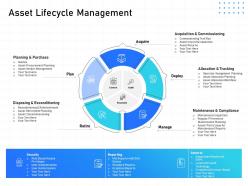
This presentation slide offers a comprehensive overview of Asset Lifecycle Management (ALM), an integrated approach to overseeing an asset's journey from planning and acquisition to retirement and disposal. Utilizing a circular diagram, the slide visually depicts the cyclical ALM process, comprising the following phases: Plan, Acquire, Deploy, Manage, and Retire. Each phase delineates specific focus areas and tasks to facilitate efficient asset management. Additionally, the slide addresses four essential supplementary elements: Security, Reporting, General, and Control, providing foundational support throughout the asset's lifecycle.
Use Cases:
Explore how this informative slide can be effectively applied across diverse industries to enhance Asset Lifecycle Management:
1. Manufacturing:
Use: Streamlines equipment management
Presenter: Operations Manager
Audience: Production and Maintenance Teams
2. IT Services:
Use: Manages IT hardware and software assets
Presenter: IT Manager
Audience: IT Support Staff and Stakeholders
3. Healthcare:
Use: Tracks medical equipment utilization
Presenter: Healthcare Administrator
Audience: Hospital Staff and Procurement Committee
4. Government:
Use: Ensures asset compliance and accountability
Presenter: Asset Manager
Audience: Government Officials and Auditors
5. Construction:
Use: Oversees construction equipment and machinery
Presenter: Project Manager
Audience: Site Engineers and Financial Planners
6. Education:
Use: Manages educational resources and IT assets
Presenter: Facility Director
Audience: Administrators and IT Personnel
7. Retail:
Use: Supervises inventory and store equipment
Presenter: Inventory Manager
Audience: Store Managers and Financial Analysts
It infrastructure management asset lifecycle management ppt powerpoint skills with all 2 slides:
Use our IT Infrastructure Management Asset Lifecycle Management Ppt Powerpoint Skills to effectively help you save your valuable time. They are readymade to fit into any presentation structure.
FAQs for It infrastructure management asset lifecycle management
Okay so there's basically five things you need to nail down: asset management (like actually knowing what equipment you have and where it lives), monitoring your performance, solid security protocols, backup plans for when stuff goes sideways, and change management processes. Most teams I've seen totally suck at the monitoring part, which is honestly where you catch problems before they become disasters. Map out what you've got first, then figure out where your biggest holes are - usually it's monitoring and backups. Oh and document everything properly with clear escalation steps. Being proactive beats scrambling around putting out fires every time.
Dude, cloud basically flips everything from putting out fires to actually planning ahead. No more babysitting physical servers or panicking when hardware dies on you. You'll be watching performance metrics and costs instead of just praying things stay online. Honestly the best part? Those nightmare 2AM server crash calls become someone else's problem. Your team gets to actually build cool stuff rather than constantly fixing broken things. Just a heads up though - you gotta get into automation and infrastructure-as-code right away because doing everything manually in the cloud is basically impossible.
Dude, automation is such a lifesaver. Your team won't have to babysit servers or manually deploy stuff anymore - workflows handle all that boring repetitive work. Response times get way faster and you'll cut down on stupid mistakes. The consistency alone makes everything more reliable. I'd probably start with automated backups or patching, nothing too crazy at first. Once you see how much time it saves, you can expand from there. Your people can actually work on interesting projects instead of monitoring systems all day. Trust me, it's worth the setup effort.
Honestly, start thinking about growth from day one or you'll hate yourself later. Modular, cloud-based stuff is your friend - way easier to scale without ripping everything apart. Containerization and virtualization are total lifesavers for quickly spinning resources up or down. Build your network with extra room to breathe, throw in some load balancers to spread traffic around. Oh and monitoring tools are crucial - you want to catch bottlenecks before they wreck your day. Flexibility at every level is the goal. Also test your scaling regularly because theory and reality are... different things.
Honestly? You're gonna hit three main walls: scaling, security, and money. Predicting growth is basically impossible - I swear it's just guessing half the time. Security vs performance becomes this endless tug-of-war, plus legacy systems that just hate everything new. Downtime costs will make you cry, and don't forget compliance stuff. Oh, and start documenting NOW. Seriously. Also build monitoring from the beginning - future you will thank me when things inevitably break at 3am.
So your IT infrastructure is what keeps everything from falling apart when stuff breaks - which it will. Basically you're building backup systems for your network, servers, all that fun stuff so when something dies, another piece takes over. Kind of like backup generators but way more headache-inducing honestly. The infrastructure folks have to map out what depends on what, set up those failover processes, and test recovery stuff regularly. Oh and document everything because good luck remembering how you fixed it six months later! Running those disaster drills beforehand saves you from panicking when things actually go wrong.
Start with listing everything you have - all hardware and software. Document it somewhere central because trust me, searching for this stuff later is pure hell. Set up a lifecycle process from when you buy something until you toss it. Track warranties, licenses, compliance stuff. Regular audits keep your data clean. Automated alerts for renewals and end-of-life dates will save your sanity. Oh, and assign owners to each category - someone needs to be responsible or it'll just turn into chaos. Honestly, the upfront work sucks but you'll thank yourself later.
Build security right into your network setup and server configs from day one - firewalls, intrusion detection, endpoint protection, all that stuff. Don't treat it like an add-on later. Automate your vulnerability scans with your other monitoring tools because doing manual security checks is honestly just setting yourself up to miss something critical. Zero-trust access policies are huge right now, and you'll want to bake security patches into regular maintenance. Oh, and definitely audit what you've got first to spot the worst gaps. That's where I'd start anyway.
Honestly, I'd start with the obvious stuff - uptime, response time, throughput, and how much your CPU/memory is getting hammered. Network lag and error rates matter too because slow pages drive everyone crazy. Don't forget capacity planning so you're not scrambling for upgrades at 2am. Security incidents and recovery times are pretty critical. The trick is getting automated dashboards running before things blow up and users flood your inbox. Those basics will cover most situations, then you can get fancy with whatever weird metrics your specific setup needs.
So IaaS is great because you don't have to deal with buying servers or any of that hardware headache stuff. Cloud providers handle the heavy lifting - maintenance, security updates, all that boring backend work. You can scale up instantly without guessing what you'll need months from now, which honestly saves so much stress. Only pay for what you use too, instead of having expensive equipment just sitting there doing nothing. My buddy's team tried it with one project first and said they got back like 10 hours a week they used to spend on server babysitting. No more 3am panic calls about things breaking either.
So virtualization is honestly a game changer - you can squeeze way more out of your current hardware by running multiple VMs on one physical server. No more servers just sitting there doing basically nothing. Scaling becomes super quick too since you don't have to wait around for new equipment to show up. The disaster recovery stuff is huge - just fire up your VMs somewhere else if things go sideways. I'd probably start with some less critical stuff first though, just to see how it works for you. Way better than the old one-server-one-app approach we used to do.
Look, your IT infrastructure is what actually makes digital transformation happen. Bad infrastructure = failed projects, period. I've watched companies blow tons of money because their network couldn't handle new cloud tools or analytics platforms. You really gotta audit what you have first and spot the weak points. Build in some extra capacity too - nothing worse than hitting a wall right when things get interesting. Security's obviously huge, but don't forget flexibility. Your needs will change fast once you start rolling out digital stuff, so plan for that upfront.
Honestly, you need backups in multiple locations - don't put all your eggs in one basket. Test your recovery plan regularly because discovering it's broken during an actual emergency is nightmare fuel. Cloud solutions are pretty solid, especially if you're working with a smaller team. Automate what you can and document everything (future you will thank present you). Oh, and run drills! Start with your most critical systems first. Geographic redundancy is clutch too - if one location goes down, you're still covered.
Oh man, IoT devices will mess with your head - suddenly you've got hundreds of random endpoints scattered everywhere. Half are probably in some closet you forgot existed. Your bandwidth planning? Gone. Storage needs? Through the roof. Each device is basically a tiny security risk waiting to happen, which is honestly the worst part. You'll need access controls for everything and way more monitoring than before. The data volume alone will surprise you. My advice? Build that device inventory first and get automated monitoring running early. Trust me on this one.
Ugh, hybrid setups are honestly such a mess to deal with. You're constantly switching between different dashboards just to monitor everything. Data integration becomes this whole thing, plus your backup strategies end up all over the place. The networking alone will make you want to pull your hair out sometimes. Security is probably the worst part though - trying to keep standards consistent when you've got on-prem stuff mixed with cloud platforms that all update differently. Each one has its own access controls too. Get some unified monitoring tools ASAP, trust me on this. Also set up governance policies before things get too crazy to wrangle.
-
Best Representation of topics, really appreciable.
-
Great quality product.
-
Great quality product.
-
Awesome use of colors and designs in product templates.
-
Much better than the original! Thanks for the quick turnaround.