

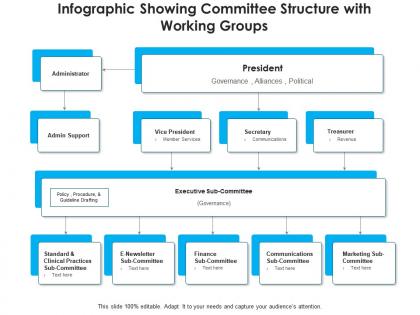
Infographic showing committee structure with working groups




Try Before you Buy Download Free Sample Product
 Impress Your
 Audience
 100%
100% Editable
 Save Hours
 of Time


Our Infographic Showing Committee Structure With Working Groups are topically designed to provide an attractive backdrop to any subject. Use them to look like a presentation pro.
People who downloaded this PowerPoint presentation also viewed the following :
Infographic showing committee structure with working groups with all 2 slides:
Use our Infographic Showing Committee Structure With Working Groups to effectively help you save your valuable time. They are readymade to fit into any presentation structure.
FAQs for Infographic showing committee structure
So you definitely need org charts or flowcharts - those box-and-arrow visuals are honestly pretty clutch for this stuff. Show who reports to who, meeting schedules, and how info moves around. Each role should have clear responsibilities and decision-making power spelled out. I'd keep the text super minimal since people just want to scan it quickly and figure out who's doing what. Oh, and make sure the hierarchy is obvious - like, really obvious. Nobody wants to guess whether they can actually make a call or need to ask their boss first.
You should totally use color psychology for your committee thing! Blue works perfect for leadership since people associate it with trust. Green's great for operational stuff - growth, stability, all that. Don't go crazy with red though, save it for urgent/high-priority groups only. Orange and warm colors? Perfect for creative teams. Honestly, most people just slap random colors on these charts and it looks so messy. Map out your roles first, then pick colors based on what they actually represent psychologically. Your whole structure will look way more polished and people will subconsciously understand the hierarchy better.
Don't cram every single person and reporting line on there - it gets messy super quick. I've been in way too many meetings where nobody could even read the thing! Use consistent colors and shapes so people actually understand who reports to who. Honestly, half the org charts I see look like someone just threw roles at a wall. Keep it simple with clear visual cues. Include contact info if you can fit it. Here's what I always do: show it to someone who doesn't know your committee structure first. If they're confused, you need to simplify more.
Start with your main board at the top - make it the biggest box. Then add subcommittees below, getting smaller as you go down. Color coding is honestly a game changer here, otherwise these things look like the most boring diagrams ever. Connect everything with lines so people can see who reports where. Put the most critical committees higher up and toward center. Don't go crazy with text - just key roles and what each group actually does. Oh, and arrows help show how decisions move through the whole thing. You'll want people to scan it quickly and get the hierarchy without squinting at tiny text.
Honestly, start by sketching everything on paper first - saves so much headache later. Different shapes and colors are your best bet for showing who reports to whom. I always do flowcharts with arrows for the reporting stuff, then use boxes to group related committees. Color-coding works amazing - like blue for executive level, green for subs, whatever makes sense. Keep text super minimal and let the visuals tell the story. Oh, and try dotted lines for advisory relationships versus solid ones for direct reporting. Makes it way clearer at a glance.
Honestly, infographics are a game-changer for this stuff. Nobody wants to wade through boring committee docs, but throw in some org charts and flowcharts? Suddenly people actually pay attention. You can map out who's responsible for what and how decisions move between groups - way clearer than those dense text blocks everyone ignores. Stakeholders get the big picture fast and see where they fit in. Easy to share in meetings or stick on walls too. I'd make one main overview infographic, then break it down into smaller ones for each committee's specific stuff. Trust me, visual beats text every time.
Oh there's a bunch of good options! I'd probably start with Canva - super easy to use and people can edit together. Figma's also solid if you want more control over the design. Miro's perfect for brainstorming the whole structure first (I actually love using that one). Google Drawings works too if you just need something quick and free. Your company might already have Lucidchart or Visio licenses which are more professional. Honestly though? Just go with Canva. Upload your logo, grab a template, and you'll have something decent done in like 20 minutes tops.
Honestly, icons are a game-changer for committee stuff. Your brain just processes pictures way faster than text - like, you'll instantly see who reports to whom instead of squinting at boring org charts. Different shapes can show different committee types, arrows show the chain of command. I mean, nobody wants to read through walls of bureaucratic text anyway, right? It's so much easier to spot the key players when you've got visual cues. Actually made this mistake myself once - presented a text-heavy structure and watched everyone's eyes glaze over. Simple icons make everything click.
Check out nonprofit annual reports first - United Way and Red Cross have really clean committee charts that show all the hierarchical stuff without looking messy. Government sites are surprisingly good at this too (I know, weird right?). City councils especially do nice org charts with their standing committees and advisory groups laid out clearly. Corporate governance pages can be solid inspiration - they usually map out audit and compensation committees pretty well. I'd definitely browse some nonprofits in your field since they're good at making complex structures actually readable. Most have that sweet spot between thorough and digestible.
Honestly, you gotta tailor it completely differently for each group. Internal people need all the nitty-gritty stuff - who reports to who, specific roles, how processes actually work. But external folks? They just want the big picture and how it affects them. Also make your visuals match - internal can look basic and functional, external should be way more polished. I swear, committees always try using the same graphic for everyone and it's such a mess. Just write down what each audience actually cares about first, then build from there. Way easier than trying to make one thing work for everybody.
Ditch the boring org chart approach – nobody wants to stare at boxes and lines. Instead, map out how decisions actually flow between committees like a journey. Character profiles work great too. Give each role an icon and describe their "superpowers" or whatever. Sports team metaphor? Perfect. Different positions, same goal. I always throw in color coding because it guides people's eyes naturally. The key thing is showing WHY your structure exists, not just listing who sits where. Makes the whole thing way more relatable and people actually get it.
Dude, make an infographic! New members can grasp your whole committee setup in like 30 seconds instead of slogging through boring documents. Show who reports to whom, what each subcommittee actually does, and how decisions get made. Way better than those ancient organizational charts that look like they haven't been updated since the Clinton administration. People'll quickly spot their role and know who to bug with questions. Just make sure it works on phones - trust me, everyone's gonna pull it up during meetings when they're lost.
Consistent branding on your infographics makes people take you way more seriously - like, they'll instantly know it's from your committee and trust the info more. Same colors, fonts, layouts every time. Shows you're not just throwing stuff together, you know? Your materials look professional across different meetings and platforms. Honestly, I've seen committees lose credibility just because their stuff looked messy. Create one solid template with your brand elements and just use it for everything. Way easier than starting from scratch each time, and stakeholders will notice the difference.
Honestly, I'd update it whenever someone new joins, leaves, or switches roles - basically any time the actual committee changes. Most places probably need to do this quarterly at least. Though it really depends on your company - some orgs are constantly moving people around (super annoying tbh), others stay the same for ages. Set a monthly calendar reminder to check it over. Way better to catch changes early than having people email the wrong person asking about stuff. The whole point is making sure people know who's actually doing what, so don't let it get too stale.
Honestly, I'd start with the basics - are people actually engaging with it? Check if they're clicking, sharing, downloading. Then maybe send out a quick survey asking if they can identify who reports to who after looking at it. That's pretty telling right there. Also watch how long people spend viewing it - if they bounce fast, something's off. Oh, and here's what I think is the best indicator: do people bring it up in meetings later? Like "hey remember that org chart thing?" If yes, you nailed it. Quick feedback form wouldn't hurt either.
-
Much better than the original! Thanks for the quick turnaround.