


It operations management powerpoint presentation slides




Try Before you Buy Download Free Sample Product
 Impress Your
 Audience
 100%
100% Editable
 Save Hours
 of Time


Our IT Operations Management Powerpoint Presentation Slides are topically designed to provide an attractive backdrop to any subject. Use them to look like a presentation pro.
People who downloaded this PowerPoint presentation also viewed the following :
Content of this Powerpoint Presentation
Slide 1: This is the cover slide of IT Operations Management PowerPoint Presentation.
Slide 2: This is the Table of Content slide that lists out all the essential elements covered in the deck.
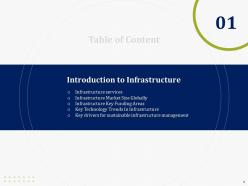
Slide 3: This slide presents Introduction to Infrastructure.
Slide 4: This slide presents Different categories of Infrastructure services.
Slide 5: This slide presents Infrastructure market size globally.
Slide 6: This slide shows key areas of infrastructure investment. You can edit this as per your requirement.
Slide 7: This slide presents key technology trends in Infrastructure.
Slide 8: This slide presents Key drivers for sustainable infrastructure management.
Slide 9: This slide presents asset management process.
Slide 10: This framework depicts an organisation's asset management responsibilities.
Slide 11: This slide presents asset management process that can aid you in meeting your investment goals.
Slide 12: This slide presents Asset Management Lifecycle(1/1)
Slide 13: This slide presents Asset Management Lifecycle(1/1)
Slide 14: This slide presents asset and condition management.
Slide 15: This slide presents asset assessment table that can be used to include all your assets as well any hazards associated with them.
Slide 16: This slide shows condition assessment for individual facilities.
Slide 17: This slide provides a glimpse of Deterioration Modelling.
Slide 18: This slide provides a glimpse of Types of Deterioration Modelling.
Slide 19: This slide shows the past and future condition of your assets and also prescriptive measures to be taken.
Slide 20: This slide presents Risk Assessment and Deterioration Modelling
Slide 21: This slide provides a glimpse of Optimization and Decision making.
Slide 22: This slide provides a glimpse of Infrastructure Optimization
Slide 23: This slide presents Asset Management Decision Journey.
Slide 24: This slide presents Value Driven Decision Making Methodology
Slide 25: This slide provides a glimpse of performance and cost functions.
Slide 26: This slide presents Asset Performance Management
Slide 27: This slide presents Performance Management Maintenance Pyramid
Slide 28: This slide presents Performance Scoring and Analytics
Slide 29: This slide presents Infrastructure Cost Table
Slide 30: This slide shows various factors that may change the cost of your infrastructure project.
Slide 31: This slide provides a glimpse of Interdependence, Resiliency, and Security.
Slide 32: This slide presents Critical Infrastructure Dependencies & Interdependencies Assessment Framework.
Slide 33: This slide presents Infrastructure Resiliency wheel.
Slide 34: This slide presents Lifecycle Adaptive Components of a Resilience Framework.
Slide 35: This slide presents 4 Dimensions of Infrastructure Security.
Slide 36: This slide presents Contract and Workflow Management.
Slide 37: This slide presents Key components of Contract Management.
Slide 38: This slide presents Contract Lifecycle Management.
Slide 39: This slide presents Workflow Management Process.
Slide 40: This slide provides a glimpse of commissioning new facilities.
Slide 41: This slide shows various levels of commissioning at different project phases.
Slide 42: THis slide presents differnet commissioning levels.
Slide 43: This slide presents capital budgeting.
Slide 44: This slide present capex summary.
Slide 45: This slide presents capital expenditure details.
Slide 46: This slide provides a glimpse of Discounted Payback Period – Valuation Summary.
Slide 47: This slide provides a glimpse of Net Present Value - Valuation Summary.
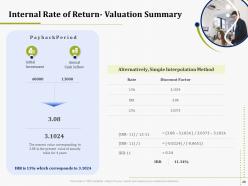
Slide 48: This slide presents Internal Rate of Return - Valuation Summary.
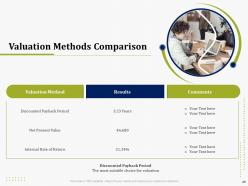
Slide 49: This slide presents Valuation Methods Comparison.
Slide 50: This slide presents KPI Metrics and Dashboard
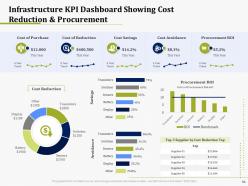
Slide 51: This slide provides a glimpse of Infrastructure KPI Dashboard Showing cost reduction and procurement.
Slide 52: This slide provides a glimpse of Infrastructure KPI Dashboard showing resource allocation.
Slide 53: This slide provides a glimpse of Infrastructure KPI Dashboard showing project revenue.
Slide 54: This slide provides a glimpse of Infrastructure KPI Metrics showing square meter area
Slide 55: This slide provides a glimpse of Infrastructure KPI Metrics Showing Cost Savings.
Slide 56: This is an Icon Slide. Use it as per your needs.
Slide 57: This is an Additional Slides
Slide 57: This is an Additional Slides
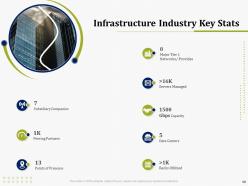
Slide 58: This slide presents Infrastructure Industry Key Stats
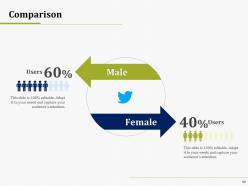
Slide 59: This is a Comparison slide that can be used to conduct a comparative analysis.
Slide 60: This is Our Mission slide that can be used to state your mission and vision.
Slide 61: This is Idea Generation image slide to present innovative/ creative aspects.
Slide 62: This is Financial scores slide. State your financial aspects etc. here.
Slide 63: This is a Clustered Column-Line chart slide that can be used to compare different elements.
Slide 64: This is the Post it Notes slide that can be used to keep important information at one place.
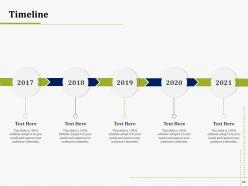
Slide 65: This is a Timeline slide that can be used to present chronological sequence of events.
Slide 66: This is 30 60 90 Days Plan slide that can be used to create robust plans.
Slide 67: This is Thankyou slide for acknowledgment. You can share your contact details here.
It operations management powerpoint presentation slides with all 67 slides:
Use our IT Operations Management Powerpoint Presentation Slides to effectively help you save your valuable time. They are readymade to fit into any presentation structure.
-
IT Operations Management
-
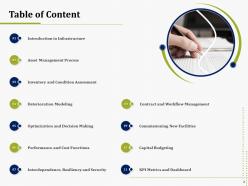
Table of Content
-
Introduction to Infrastructure
-
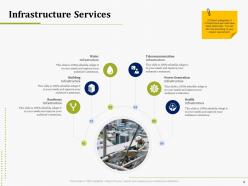
Infrastructure Services
-
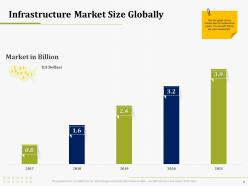
Infrastructure Market Size Globally
-
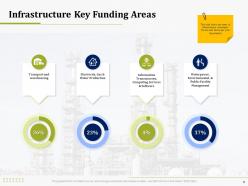
Infrastructure Key Funding Areas
-
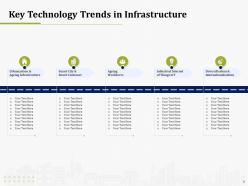
Key Technology Trends in Infrastructure
-
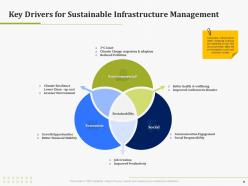
Key Drivers for Sustainable Infrastructure Management
-
Asset Management Process
-
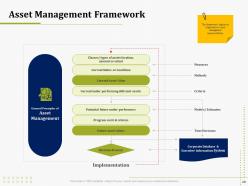
Asset Management Framework
-
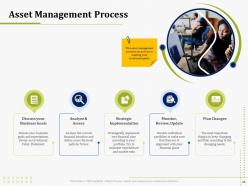
Asset Management Process
-
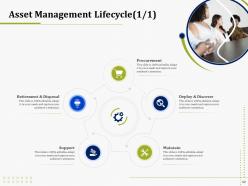
Asset Management Lifecycle 1 1
-
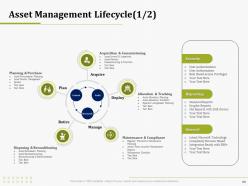
Asset Management Lifecycle 1 2
-
Asset and Condition Assessment
-
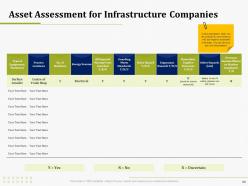
Asset Assessment for Infrastructure Companies
-
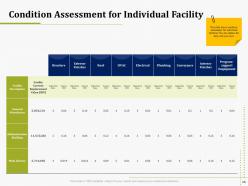
Condition Assessment for Individual Facility
-
Table of Content
-
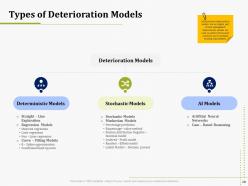
Types of Deterioration Models
-
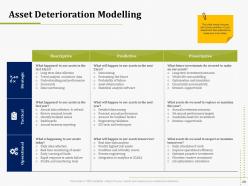
Asset Deterioration Modelling
-
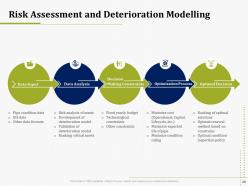
Risk Assessment and Deterioration Modelling
-
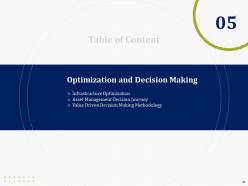
Optimization and Decision Making
-
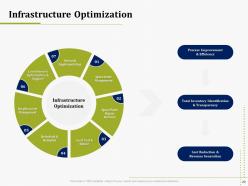
Infrastructure Optimization
-
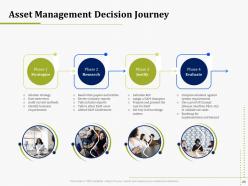
Asset Management Decision Journey
-
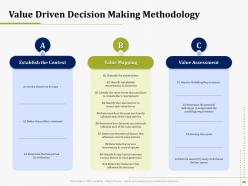
Value Driven Decision Making Methodology
-
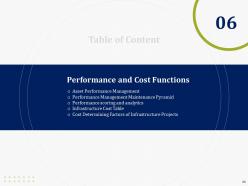
Performance and Cost Functions
-
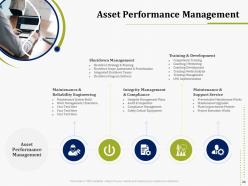
Asset Performance Management
-
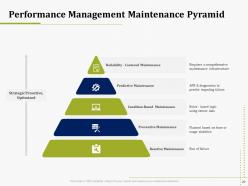
Performance Management Maintenance Pyramid
-
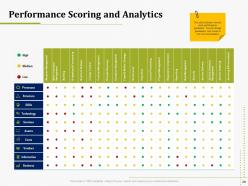
Performance Scoring and Analytics
-
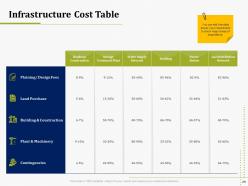
Infrastructure Cost Table
-
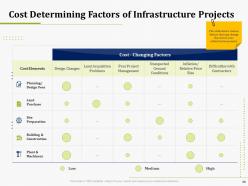
Cost Determining Factors of Infrastructure Projects
-
Interdependence Resiliency and Security
-
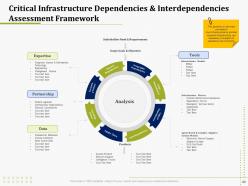
Critical Infrastructure Dependencies Interdependencies Assessment Framework
-
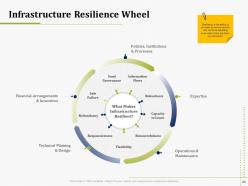
Infrastructure Resilience Wheel
-
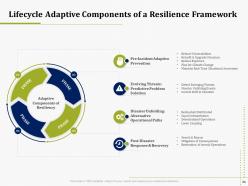
Lifecycle Adaptive Components of a Resilience Framework
-
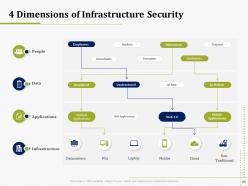
4 Dimensions of Infrastructure Security
-
Contract and Workflow Management
-
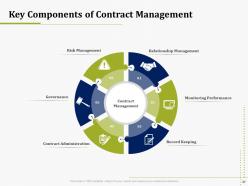
Key Components of Contract Management
-
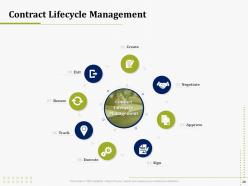
Contract Lifecycle Management
-
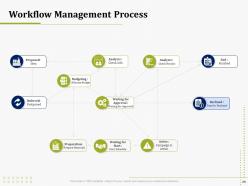
Workflow Management Process
-
Commissioning New Facilities
-
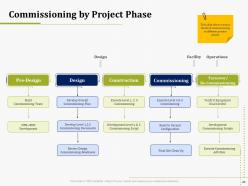
Commissioning by Project Phase
-
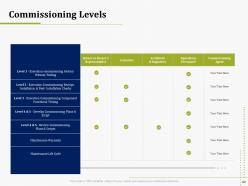
Commissioning Levels
-
Capital Budgeting
-
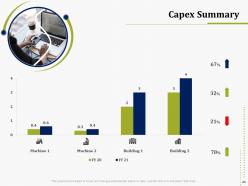
Capex Summary
-
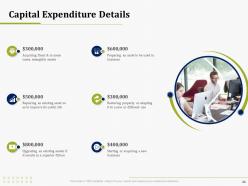
Capital Expenditure Details
-
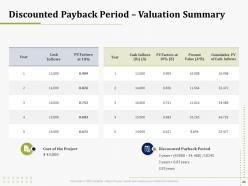
Discounted Payback Period Valuation Summary
-
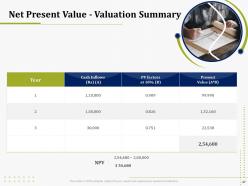
Net Present Value Valuation Summary
-
Internal Rate of Return Valuation Summary
-
Valuation Methods Comparison
-
KPI Metrics and Dashboard
-
Infrastructure KPI Dashboard Showing Cost Reduction Procurement
-
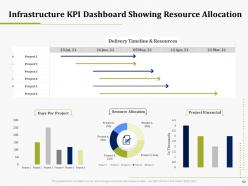
Infrastructure KPI Dashboard Showing Resource Allocation
-
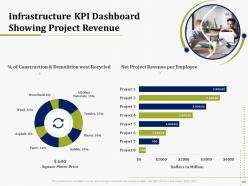
Infrastructure KPI Dashboard Showing Project Revenue
-
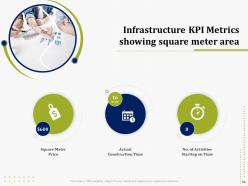
Infrastructure KPI Metrics showing square meter area
-
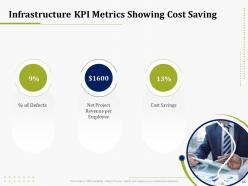
Infrastructure KPI Metrics Showing Cost Saving
-
IT Operations Management Icons Slide
-
Additional Slides
-
Infrastructure Industry Key Stats
-
Comparison
-
Our Mission
-
Idea Generation
-
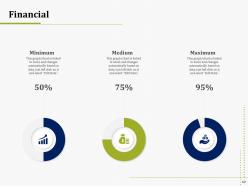
Financial
-
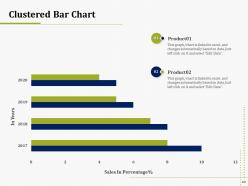
Clustered Bar Chart
-
Post It Notes
-
Timeline
-
30 60 90 Days Plan
-
Thanks for Watching
FAQs for It operations management
Honestly, start by figuring out what's currently broken - audit your setup and find the biggest headaches first. Monitoring and alerts are huge so you catch problems before your users start complaining. You'll want solid incident management for when stuff inevitably goes wrong, plus change management so nobody accidentally nukes production on a Friday (been there). Capacity planning keeps you ahead of growth, and automate whatever you can because manual work sucks. Don't skip performance tracking and service levels either - gotta know if you're actually meeting business needs.
Honestly, just pick 3-5 metrics that actually move the needle. Response times and uptime are obvious ones. MTTR and MTBF will tell you way more than most other stuff - they show if your systems actually work when they need to. User satisfaction surveys matter too since that's what the bosses care about anyway. I've watched teams go crazy tracking like 20 different KPIs and it's just noise. Build your dashboards around the core metrics first, then maybe add more later if you need them. Way easier to start simple.
Dude, automation seriously saves your sanity in IT ops. You can set it up to handle all the boring stuff - server monitoring, patches, backups, incident responses. No more checking logs at 3am (worst part of the job honestly). When something breaks, automated systems spot it fast and kick off fixes before you even know there's a problem. Your team stops playing whack-a-mole with issues. Fewer mistakes happen too since humans aren't doing the repetitive grunt work. Just pick one annoying process first and automate that.
Build adaptability into your IT ops from day one. Get continuous monitoring tools that catch anomalies as they happen, and keep your incident response playbooks fresh - threats evolve constantly. Automate your security patching (trust me, manual patching is a nightmare). Keep that asset inventory current too. Your team should run tabletop exercises regularly to practice different attack scenarios. Oh, and audit your monitoring gaps first - that's usually how attackers sneak in. The threat landscape moves crazy fast these days, so staying reactive just doesn't cut it anymore.
Honestly, it's all about having a solid process and actually following it. Define your severity levels upfront. Know who calls who when things go sideways - seriously, nothing's worse than scrambling to find contact info at 2 AM. Document everything as it happens because stakeholders will definitely come asking questions later. Post-incident reviews are huge too, that's where you actually learn what broke down instead of just putting out the same fires repeatedly. Oh and make sure everyone knows their role beforehand. Sounds obvious but you'd be surprised how often that gets overlooked.
So ITIL is basically like having a playbook for IT stuff - handles incidents, changes, service delivery, all that. Without it, everyone just wings it and things get chaotic real quick. You'll get way better at prioritizing problems and actually showing the business why IT matters through proper service catalogs. Honestly, the incident management part alone is worth it since that's usually where teams are drowning. Makes everything less of a fire drill, you know? I'd start there first - you'll see improvements pretty fast and it's not as overwhelming as trying to implement everything at once.
So basically you want to track four main things: uptime, how fast everything responds, resource usage (CPU/memory/storage), and stuff like how quickly you resolve tickets. Don't go crazy tracking every possible metric though - I've seen teams drown in data they never actually look at. Start with automated monitoring for system health, measure response times from your users' perspective, and track how long it takes to fix issues. Honestly, pick like 5-7 metrics that actually matter to your business and check them regularly. Way better than having 50 dashboards nobody uses.
First thing - actually talk to the business people regularly and figure out what they're trying to accomplish. I know, sounds basic, but IT teams love working in their own bubble. Connect your services to real business outcomes instead of just tech stuff. Meet with leadership often because priorities change constantly - I've watched teams build entire systems that became useless because nobody told them the strategy shifted. Your monitoring should track things that affect customers or revenue, not just server uptime. Oh, and when things break? Fix what hurts the business first, not whatever looks scariest in your logs.
Honestly, start by figuring out what's driving you crazy right now - that's your priority. For monitoring, you can't go wrong with Datadog or New Relic to watch your infrastructure. Ansible and Terraform will save your life for deployments (seriously, automation is everything). If you're dealing with tickets and workflows, ServiceNow works but there are cheaper options too. AWS CloudWatch or Azure Monitor are obvious choices if you're already in those clouds. Oh, and don't sleep on log aggregation - Splunk's pricey but the ELK stack does the job. Audit what you've got first though.
Dude, cloud computing totally changes everything about IT ops. You're not babysitting physical servers anymore - now it's all APIs, auto-scaling, and trying not to cry when you see your AWS bill. The shift from hardware to services is honestly pretty overwhelming at first. Your monitoring gets way more complicated since everything's distributed, but at least you can actually see what's happening with costs and performance. Oh, and forget treating servers like precious snowflakes - they're disposable now. Infrastructure-as-code becomes your religion. Start with automating deployments though, that's where you'll build everything else from.
Honestly, just get people talking to each other instead of lobbing tickets back and forth like grenades. Start with daily standups between dev and ops - sounds basic but it actually works. Set up shared dashboards so everyone's seeing the same metrics instead of arguing about whose numbers are right. I'd try pairing developers with ops engineers on small stuff first, builds empathy way faster than any workshop. Pick one tiny pilot project where both teams sink or swim together. Oh, and get your CI/CD pipeline sorted so it's not this frankenstein monster that only three people understand.
Look, good IT ops is basically what keeps your customers from wanting to throw their phones at the wall. When your apps are fast and your systems don't crash every other Tuesday, people can actually get stuff done without losing their minds. I've watched companies tank because they ignored this stuff - it's brutal. Your ops team is literally preventing those nightmare scenarios where everything breaks at once. Short answer? Set up solid SLAs and have a game plan for when things go sideways. Systems that work smoothly usually equal customers who don't hate you.
Honestly, the cultural stuff is brutal - people hate giving up their silos. Your tools probably won't talk to each other either, which is super annoying when you're trying to integrate monitoring and deployment systems. Plus ops teams suddenly need to code, which... yeah, that's a learning curve. Oh, and developers have to actually care about production (good luck with that). Start with just one team or app though. Prove it works there first, then slowly expand. I've seen companies try to flip everything at once and it's a disaster.
Dude, get yourself a decent ITSM tool first - spreadsheets are basically change management suicide. Set up different workflows for emergency vs standard vs normal changes since they're totally different beasts. For routine stuff like patches, create pre-approved templates so you're not reinventing the wheel every time. Risk assessments upfront will save your ass later, trust me. Track your success rates and how fast you can roll things back when stuff inevitably goes sideways. Oh, and actually communicate what's happening - shocking concept, right? Most teams skip this and wonder why everyone's confused.
AI/ML automation is eating up routine monitoring tasks - happening faster than most people realize. Edge computing's the other big shift since processing keeps moving closer to users, completely flipping how we handle distributed stuff. Traditional monitoring is basically dead now. Observability platforms give you actual insight into what's going wrong (finally). Serverless and infrastructure-as-code aren't trendy anymore - they're just how things work. My advice? Pick one boring task you hate doing and automate it. Or mess around with an observability tool for a weekend. Don't overthink it though - just start somewhere and build from there.
-
Graphics are very appealing to eyes.
-
Great quality slides in rapid time.
-
Innovative and Colorful designs.
-
Perfect template with attractive color combination.
-
Wonderful templates design to use in business meetings.
-
The content is very helpful from business point of view.
-
Commendable slides with attractive designs. Extremely pleased with the fact that they are easy to modify. Great work!
-
Thanks for all your great templates they have saved me lots of time and accelerate my presentations. Great product, keep them up!
-
Enough space for editing and adding your own content.
-
The content is very helpful from business point of view.