

IT Service Transition Process Checklist




Try Before you Buy Download Free Sample Product
 Impress Your
 Audience
 100%
100% Editable
 Save Hours
 of Time


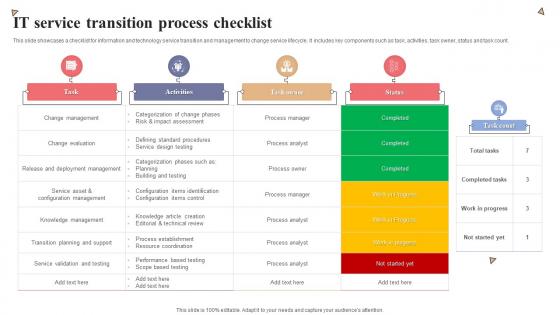
This slide showcases a checklist for information and technology service transition and management to change service lifecycle. It includes key components such as task, activities, task owner, status and task count.
People who downloaded this PowerPoint presentation also viewed the following :
IT Service Transition Process Checklist with all 6 slides:
Use our IT Service Transition Process Checklist to effectively help you save your valuable time. They are readymade to fit into any presentation structure.





FAQs for IT Service
So you've got four main stages to hit: planning, building/testing, deployment, and then that fun babysitting phase after launch. Start with your transition plan and getting everyone on board - honestly, the politics part can be just as tricky as the technical stuff. Building and testing comes next, but seriously budget way more time than you think you need because something always breaks. Then you deploy to prod and enter "hypercare mode" where you're basically hovering over everything until it runs smoothly. Oh, and set clear milestones for each stage so you actually know when you can move on.
Honestly, just talk to people constantly - like way more than feels normal. Weekly emails work great, plus those milestone updates when you hit something big. Set up meetings where they can actually ask stuff instead of just nodding along. The thing that kills these projects? People sitting there quietly freaking out because no one's telling them what's going on. I'd definitely do one-on-ones with your main people too. Don't assume everyone's cool just because they showed up to that first meeting - they're probably not! Ask for their thoughts throughout the whole thing.
Start with whatever change management system you're already using - don't overthink it. ServiceNow and Jira Service Management are solid for workflows and audit trails. Slack or Teams work great for keeping people updated during changes (communication is like 80% of this stuff anyway). You'll need a CMDB to map out dependencies so you don't break things. Git's your friend for version control. Oh, and one thing - trying to implement everything at once is a recipe for disaster. Build it up piece by piece.
Honestly, just track the basics first - did you hit your timeline and budget? Then look at defects that made it through and whether people can actually do their work with the new system. Performance metrics matter too, obviously. But here's the thing - don't sleep on those stakeholder satisfaction surveys. Yeah they're subjective, but they'll tell you stuff the numbers won't. Set up your measurement criteria upfront so you're not frantically figuring it out mid-transition. Short term "does it work" is crucial, but you'll also want to watch adoption rates over time.
Dude, you HAVE to document everything - it's your lifeline when handing things off. Current configs, dependencies, procedures, weird quirks that'll bite someone later. I've watched transitions crash and burn because people thought they'd just figure it out as they went. Bad idea. Don't just write down what you did - explain why you made those choices. Future you (or whoever takes over) will thank you when something breaks at 2am. Oh, and start this stuff early. Trust me, scrambling to document everything last-minute is pure hell. Your team needs to actually understand the system, not just inherit a mess.
Honestly, you've gotta do a proper risk assessment before making any big moves. Map out everything that could go sideways - tech stuff, people, timing, all of it. I swear by those simple probability vs impact grids because they make the real nightmares jump out at you immediately. Look at what's blown up before in your company too. Get your tech people involved early since they'll spot things you missed. Don't forget about outside stuff like vendors or new regulations that might mess with your timeline. Oh, and actually write this down - sounds obvious but you'd be surprised how many people skip that part.
Start documenting stuff way sooner than you think - trust me on this one. I learned that the hard way lol. Get screenshots of the tricky processes and keep contact lists current with who to escalate to. Don't cram everything into one massive meeting either. Break it into multiple sessions and record them so people can go back later. Cover the technical basics but also those random edge cases that pop up like twice a year. The big thing though? Have them actually do the work while you're still there to fix whatever goes wrong.
Start planning UAT from the very beginning - seriously, don't just tack it on at the end. Your actual users need to write the test cases, not the IT team (I've watched that mistake blow up so many times). Make sure they're testing realistic scenarios, not just the perfect-world stuff that never happens. Give them a proper test environment that actually matches what they'll be working with. Oh, and they need real time to test thoroughly - not just squeezed in between their regular work. Build in a way to catch and fix problems early instead of finding out everything's broken after launch.
Honestly, you're gonna want to nail down a few things before going live. Response times and error rates are huge - trust me, you don't want your phone blowing up at 2am because the site crashed. Make sure your team actually knows what they're doing too. Training docs, support workflows, all that boring stuff matters more than you think. Oh and test your backup systems! I've seen way too many launches go sideways because nobody checked if rollbacks actually worked. Set hard numbers for everything and don't budge until you hit them. It's tempting to rush but you'll regret it.
Dude, automation is a game changer for service transitions. Pick those mind-numbing tasks like environment setup and config deployments - let scripts handle that stuff instead of doing it manually every single time. Your team gets to work on actual problem-solving while pipelines run tests and push changes. Honestly, the rollback features alone are worth it when deployments go wrong (and they will). Start with whatever manual process is currently driving you nuts - maybe provisioning? Don't try to automate everything at once though.
So you're basically the person who makes sure everything doesn't explode when code goes live. Coordinate between dev teams, stakeholders, timelines - all that fun stuff. Think air traffic controller but for software releases. Risk assessment, status updates, deployment activities are all on you. When shit hits the fan? Yeah, that's your phone ringing. Honestly, the best thing you can do is write detailed runbooks for each transition. Trust me on this one - when you're juggling three releases at once, you'll be so glad you documented everything properly instead of trying to wing it.
Start communicating way earlier than you think you need to - like 2-3 weeks out minimum. Figure out who's getting hit by the changes and map out what they'll actually need to do differently. Users will definitely ask stuff you've already covered (happens every single time, I swear), so get your FAQ ready before they start panicking. Multiple ways to reach you help too - email, help desk, maybe some quick drop-in sessions if it's complicated. Oh, and don't just send one announcement and call it done. Follow up with reminders and step-by-step instructions as you get closer to launch day. Being ahead of their questions beats scrambling to answer them later.
Honestly, role-based training is where it's at - don't torture everyone with stuff they'll never use. Hands-on practice beats documentation every time (seriously, when's the last time anyone actually read those things?). Get your power users trained early so they can help others when questions come up. Quick reference cards are lifesavers on launch day. Oh, and timing matters big time - people need weeks to practice, not days. Otherwise you'll have chaos when you go live. Train-the-trainer sessions work great too since people trust their coworkers more than some random trainer anyway.
Do a post-mortem 2-3 weeks after each go-live - document what worked and what was a total mess. Dump everything into whatever system your team actually checks (wiki, SharePoint, whatever). Communication screwups, timing issues, tech problems, all of it. Make it searchable though, because honestly I've watched teams make identical mistakes over and over just because Bob from 2019 was the only one who remembered that one thing. Oh and actually USE this stuff when you're planning the next transition. Sounds obvious but you'd be surprised how often these repositories just... sit there collecting digital dust.
Honestly, poor communication kills most projects before they even start. Don't rush your timeline either - I've seen that backfire so many times. Make sure stakeholders are actually on board, not just nodding along. Test everything twice, have rollback plans ready, and document EVERYTHING (seriously, you'll thank yourself later). User training always takes longer than you think it will. Oh, and define what "success" actually looks like upfront - sounds obvious but people skip this constantly. Resource conflicts between old and new systems create total chaos. My take? Add buffer time everywhere, communicate way more than feels necessary, and test those rollback procedures before you're panicking at 2am trying to figure them out.
-
These stunning templates can help you create a presentation like a pro.
-
They saved me a lot of time because they had exactly what I was looking for. Couldn’t be happier!