

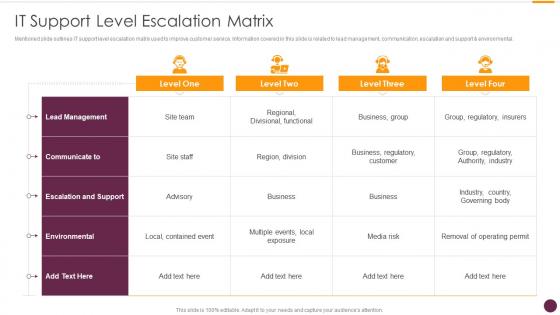
IT Support Level Escalation Matrix




Try Before you Buy Download Free Sample Product
 Impress Your
 Audience
 100%
100% Editable
 Save Hours
 of Time


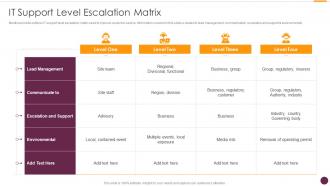
Mentioned slide outlines IT support level escalation matrix used to improve customer service. Information covered in this slide is related to lead management, communication, escalation and support and environmental.
People who downloaded this PowerPoint presentation also viewed the following :
IT Support Level Escalation Matrix with all 6 slides:
Use our IT Support Level Escalation Matrix to effectively help you save your valuable time. They are readymade to fit into any presentation structure.





FAQs for IT Support
Scope creep's probably the biggest one - that plus budget issues and timeline slips. When stakeholders can't agree on what matters most, that's your cue too. Technical stuff that needs senior approval, definitely escalate that. Politics getting weird? Yeah, don't try to handle that solo. Quality problems are huge red flags. Honestly, the trick is catching this stuff early before it becomes a total mess. I learned that the hard way on my last project - waited too long and ended up explaining to leadership why everything went sideways. Way better to flag potential issues now than deal with the aftermath later.
Honestly, just talk to people upfront when you're escalating stuff. Tell them why you're doing it and what you already tried - nobody likes getting hit with a problem out of nowhere. I've watched so many escalations blow up because someone forgot to give context (which is super annoying for everyone involved). Don't just throw the issue over the fence either. Give realistic timelines and keep everyone updated, even if it's just "hey, still working on this." People get way less stressed when they know what's happening. Trust me, the transparency really helps.
Dude, escalation is like your emergency contact list for when work gets messy. Set up clear paths beforehand so everyone knows who to call when stuff hits the fan. I learned this the hard way at my last job - we'd have interns trying to handle major outages while VPs got pinged about broken coffee machines. You need specific triggers mapped out: revenue drops, customer complaints spike, or suddenly you're trending on Twitter for all the wrong reasons. That way decisions get bumped to the right level automatically. Think fire drill but for business disasters. Trust me, figure this out during the calm times because you won't have bandwidth when everything's burning.
Honestly, just figure out who decides what at each level first. Set up clear triggers - like dollar amounts or deadlines that automatically send things up the chain. Document the whole thing so people aren't constantly asking "who do I talk to about this?" Response times for each level are clutch too. Put it somewhere obvious like your team wiki (not buried in some random folder). The worst is when someone's stuck waiting and doesn't know if they should escalate or keep waiting. Been there way too many times. Once it's written down, half your decision-making headaches disappear.
Ugh, don't even get me started on PMs who think they can fix everything themselves. Seriously though, when you delay escalating stuff, small problems snowball into massive disasters. Your timeline? Toast. Budget gets completely wrecked. Stakeholders feel totally blindsided when they find out about issues weeks later through the grapevine - that's how you lose all credibility. I watched one guy try to "hero" his way through a resource crunch and it was painful to watch. Set your escalation triggers early and actually use them. Trust me on this one.
Definitely map out your current escalation flow first - that's the boring but necessary part. Then you can automate the trigger points so issues get routed to the right people way faster. Set up alerts based on severity, use ticketing systems that auto-escalate after X hours, stuff like that. Dashboards are clutch for giving managers real-time visibility into problems. Fair warning though - notification fatigue hits hard if you don't dial in those settings properly! Slack integrations and incident management tools will slash your response times. Those manual handoffs are such a pain and automation kills most of them.
Write everything down while it's still fresh - timeline, what caused it, who helped, your fix attempts, final solution. Trust me, I've been burned trying to remember details weeks later! The stuff that didn't work is actually super valuable too. Don't just save it in your personal notes though, put it somewhere the whole team can find it. Nothing worse than solving the same problem twice because someone couldn't access the solution. Short sentences work. Longer ones keep things flowing naturally when you're explaining the more complex steps you took.
Honestly, you've gotta nail down exactly when to escalate stuff and drill it with your team constantly. Pick specific triggers - customer complaints hitting certain levels, timelines slipping by X days, budget going over whatever threshold. Then role-play the hell out of these scenarios. I can't tell you how many teams I've watched just freeze because nobody knew if something was "escalation-worthy" or not. Better to escalate too early than let crap fester, right? Monthly practice sessions work great - use real examples from your industry and always talk through what happened afterward.
Honestly, it usually comes down to a few things. People escalate when they're scared of getting blamed if something goes wrong - nobody wants to be the fall guy. Then there's that whole sunk cost thing where they've already spent hours on it, so giving up feels like failure. Time pressure makes it worse too. When someone's stressed, they just punt it upward instead of thinking it through. I've totally done this myself lol. Watch your team for these signs - if someone's freaking out about consequences or seems overwhelmed, jump in with some guidance. You can usually prevent the unnecessary escalation.
Oh man, this is such a real thing! Different cultures handle escalation totally differently - some people will hint around problems forever expecting you to just *get it*, while others go straight to the top immediately. There's also this whole hierarchy respect thing where certain team members won't escalate even when stuff's genuinely breaking. And don't get me started on how "urgent" means completely different timelines depending on where someone's from. I'd honestly just set super clear criteria for when to escalate what, then regularly check if people actually feel comfortable speaking up.
Escalation totally messes with team vibes when you handle it wrong. People start thinking you don't trust their judgment or they screwed up somehow. I've watched teams turn into these weird blame-fests where nobody wants to stick their neck out - honestly, it's painful to see. Your crew ends up second-guessing every little decision. But flip the script and present it as "let's get the right person for this" instead of "we failed." Suddenly it's about being smart, not giving up. Just explain why you're doing it and loop them in so they don't take it personally.
Honestly, I'd start by being super clear about what needs your approval vs what doesn't. Budget stuff, timeline issues, anything affecting other teams - yeah, loop me in. But if someone's got the skills and authority? Let them run with it. I used to micromanage literally everything (terrible idea). Document who decides what so there's no confusion later. Over-communicate these boundaries at first - people won't magically know otherwise. Then back off as trust builds. Short sentences work. Trust me, being explicit about this upfront saves so much headache down the road.
Honestly, start with resolution time and customer satisfaction - those tell you the most. First-call resolution is massive too since it shows whether stuff's getting bounced around unnecessarily. I'd definitely track how often escalations ping-pong between teams (so annoying for everyone involved). Also measure what percentage actually gets fixed at each level, plus any SLA breaches during handoffs. Customer effort scores help too - they'll show if your process is making things harder than they need to be. Pick maybe 2-3 that match your worst headaches right now and build some basic dashboards. Don't overthink it at first.
Honestly, getting the right people involved early makes such a huge difference. You get actual buy-in instead of resistance later. Nobody wants to be blindsided by problems - I learned this the hard way! When stakeholders understand the context upfront, decisions happen way faster. Plus they'll often know about constraints or solutions you hadn't thought of. The trick is figuring out who actually needs to be in the loop versus people who just want updates. Before you escalate next time, take like 5 minutes to map out your real decision-makers first. Trust me on this one.
Honestly, most people just wait way too long before escalating - we all think we can figure it out ourselves or don't want to look clueless. Been there! Then you've got situations where nobody knows who to actually talk to, so they either skip their boss entirely or bug the wrong person. Super awkward. When people finally do escalate, they usually give like zero context, which just creates more chaos. My advice? Figure out your escalation triggers ahead of time and actually explain what's happening when you need help. Sounds obvious but you'd be surprised how often this gets screwed up.
-
The templates you provide are great! They have saved me tons of time and made my presentations come alive. Thank you for this awesome product. Keep up the good work!
-
Great product, helpful indeed!