


Documentation Map Current Processes ISO 9001 Quality Management Ppt Pictures




Try Before you Buy Download Free Sample Product
 Impress Your
 Audience
 100%
100% Editable
 Save Hours
 of Time


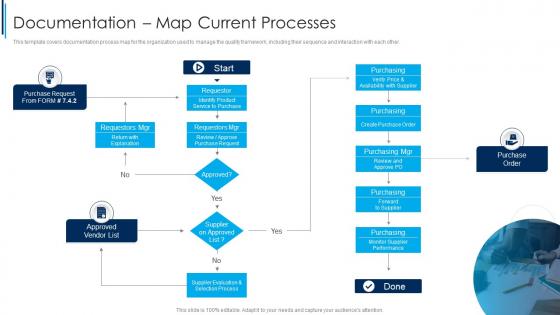
This template covers documentation process map for the organization used to manage the quality framework, including their sequence and interaction with each other.
People who downloaded this PowerPoint presentation also viewed the following :
Documentation Map Current Processes ISO 9001 Quality Management Ppt Pictures with all 6 slides:
Use our Documentation Map Current Processes ISO 9001 Quality Management Ppt Pictures to effectively help you save your valuable time. They are readymade to fit into any presentation structure.





FAQs for Documentation Map Current Processes ISO 9001 Quality
So a Documentation Map is like your project's GPS - shows what docs you have, where they are, and how they connect. Without one? You'll spend forever digging through folders looking for that spec Dave mentioned last week. Been there, done that, bought the t-shirt. Your team can actually find stuff when they need it instead of bugging you constantly. I'd start by just writing down your main documents and how they relate to each other. Sounds boring but honestly saves so much time down the road. Plus no more "wait, which version are we using?" conversations.
So basically, a Documentation Map is like having a master list that shows your team what docs exist and where to find them. No more "wait, did someone already write this?" in Slack every five minutes. You'll spot gaps in your knowledge base way easier too. Plus it's super helpful for tracking who owns what content - honestly saves so much time when you need updates. I'd start with just a simple spreadsheet listing your main docs and their purpose. Nothing fancy at first! It prevents people from recreating stuff that already exists, which happens more than you'd think.
Start with who needs what info first - that's your audience segmentation. Then do a content inventory of what you've got now. Map out how users actually move through your stuff, because honestly that's where you'll spot the biggest problems. Also include content types, who owns what, and maintenance schedules. Cross-reference related docs too. I always find tons of outdated or duplicate content during this part - it's weirdly satisfying to clean up. Sketch the big picture user paths before diving into details. Makes it way less overwhelming that way.
So Documentation Maps are like interactive guides that actually show you how info connects together. Way better than those static files we're all used to. You get this visual roadmap that changes based on what you're trying to do - honestly it's pretty smart. Regular docs just tell you what exists, but these maps actually guide you to where you need to go. Like GPS vs those paper maps your dad probably still has in his glove compartment lol. Start with figuring out what people do most often on your site. That's where you'll really notice the difference.
Visual tools are honestly game-changers for doc organization. You'll see connections between topics instantly instead of scrolling through boring lists forever. Mind maps, flowcharts, interactive diagrams - they all work. People can spot gaps in content and find related stuff without thinking too hard about it. I've watched teams burn entire afternoons hunting for one document that a decent visual map would've surfaced in seconds (so frustrating to watch). The trick is picking tools that filter by audience or topic type. Otherwise you're just looking at digital spaghetti. Turns your static reference into something people actually want to use.
Figure out what people actually need to do with your project first. Map those user journeys, then build your docs around those workflows instead of just throwing everything in alphabetical order (seriously, that approach is painful). Visual hierarchy is your friend here - use consistent naming and make it scannable. You'll want both beginner guides and technical deep-dives, but keep them clearly separated. Here's the thing though - your structure means nothing if users can't navigate it. Test early with teammates. Have them hunt for specific info using just your doc structure. You'd be surprised what seems obvious to you but confuses everyone else.
Think of it like a GPS for your documentation - new hires know exactly which docs to hit first instead of getting lost in some chaotic wiki. Start them with the must-know stuff: team processes, tools, maybe key project background. Honestly, most companies just throw people into a documentation black hole and wonder why onboarding sucks. You can structure it however works - by role, timeline, whatever. The goal is giving people a clear path through everything. Otherwise they're just clicking around randomly hoping something clicks. Way better than the usual "here's our entire knowledge base, good luck!"
Don't try mapping everything at once - your team will hate you and you'll build some monster nobody can update. Most companies obsess over what docs they have instead of what people actually need to get stuff done. Honestly, that's completely backwards. Start with one department, maybe two processes max. Get real feedback from users who'll actually use this thing. Then grow from there. Also, build in regular updates because your docs will change constantly (trust me on this). The whole point is solving real problems, not creating something pretty for your next meeting.
Honestly? Do it at every major milestone and whenever you mess with documents - add, delete, whatever. I usually tackle mine after each sprint, but real talk, it's so easy to forget until you're scrambling around looking for something. Monthly reviews are clutch even when nothing seems different, because stuff definitely changed and you just didn't notice. Don't be like me last quarter - set an actual calendar reminder or it'll slip right past you. Way better to make it routine than wait until everything's a disaster.
Oh totally! Documentation Maps are a lifesaver for compliance stuff. When auditors show up, you can literally point them to exactly where everything is instead of digging through random folders like a maniac. It shows you've got your act together, which they eat up. Plus you'll spot missing docs way before audit time hits - saves so much stress. The visual aspect is honestly brilliant because it proves your controls are solid without having to explain everything. I'd start with whatever compliance docs you already have. Trust me, future you will thank present you for getting organized now.
Getting feedback from stakeholders is a total game-changer for your Documentation Map. Trust me on this one. They'll spot gaps you completely missed and call out sections that made perfect sense to you but confuse everyone else. I've watched so many maps that seemed solid just crumble once actual users tried following them. The trick is getting feedback super early - don't wait until you think it's "done." Set up review sessions with different groups throughout the process. Yeah, it means more meetings (ugh), but you'll save yourself from major headaches later when people actually need to use the thing.
Honestly, I'd just grab a tool like Lucidchart or Miro to handle the boring stuff. You can drag things around to map out how your content connects, and some of them will even auto-generate flowcharts from what you already have. The AI ones are pretty cool - they'll scan through your docs and point out connections you totally missed. Oh, and most integrate with whatever system you're already using, which is clutch. I'd start small though. Pick one section, mess around with it, see what clicks. Once you figure out what works, you can expand from there.
Honestly, Documentation Maps are lifesavers when you've got complex projects or people scattered across time zones. Nobody wants to ping someone at 2am asking where the API docs are hiding, right? They're clutch for onboarding new people too - saves you from explaining the same stuff repeatedly. Perfect timing when teams are doing handoffs or you're scaling fast. Also super useful during those fun compliance audits (ugh). The whole point is creating a shared brain so you don't get stuck in that "I swear Jake documented this somewhere" rabbit hole. My advice? Start with whatever docs people ask about most. That's where you'll actually notice a difference right away.
Honestly, a Documentation Map is a lifesaver for catching gaps before they bite you. Shows what docs you have, what's missing, and who's responsible for each piece. The dependency tracking is clutch - when something gets outdated, you'll know exactly what else breaks. Handovers become way less painful too since everyone sees the complete picture. Oh, and definitely pull it out during your risk reviews - I've caught some scary blind spots that way. Way better than scrambling later when you realize nobody documented the critical stuff.
Dude, software dev, healthcare, manufacturing, aerospace - they're all obsessed with Documentation Maps for good reason. One missed step in these fields can literally kill someone or cost millions. Picture a pilot skipping something crucial because the checklist was a mess - terrifying, right? Documentation Maps help these industries organize their insane amounts of technical docs, procedures, and compliance stuff visually. Your team can map everything from user guides to regulatory requirements. Makes finding critical info way faster. Oh, and definitely tackle your most important documents first - don't get overwhelmed trying to map everything at once.
-
My team has been relying on SlideTeam’s professional PPT designs for a while now. It has greatly sped up quality work at my organization. So thanks!
-
I faced no difficulty while searching for the slide I wanted. Honestly, the website’s interface is easy to use and can be navigated easily!