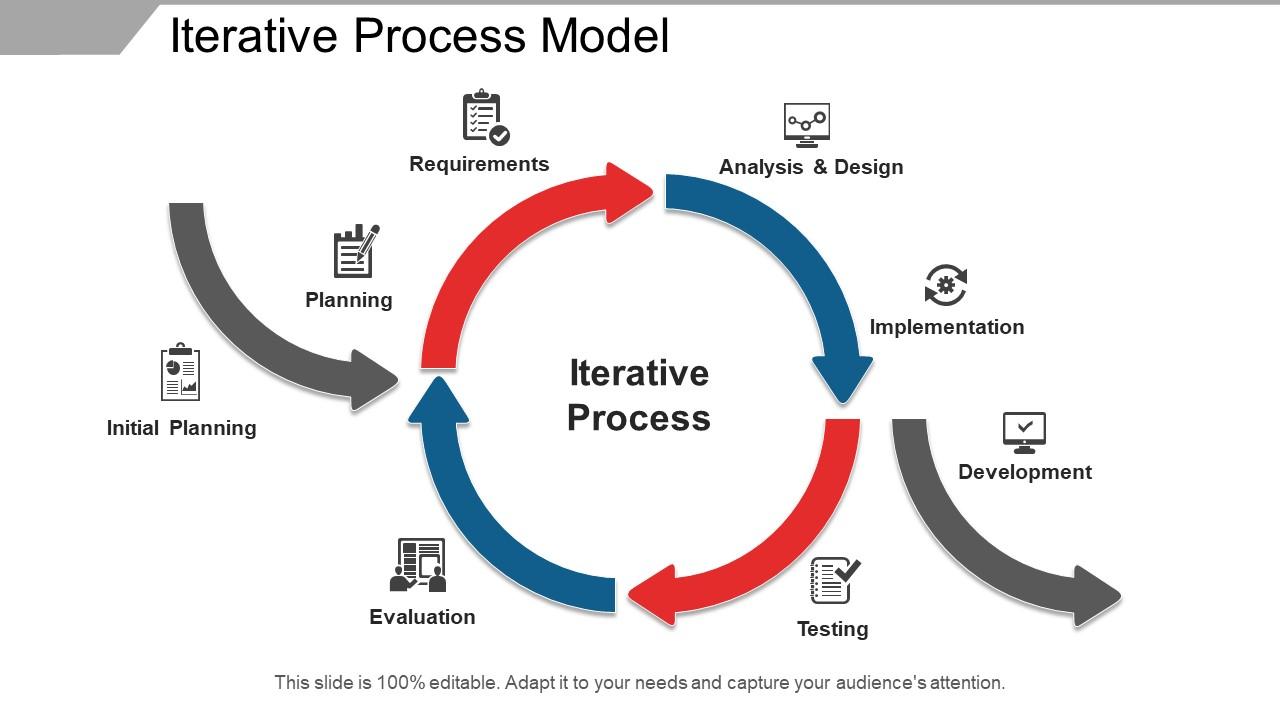
Iterative process model

Rating:
90%
Slide 1 of 5
Favourites Favourites

Try Before you Buy Download Free Sample Product

Audience Impress Your
Audience
Editable 100%
Editable
Time Save Hours
of Time
The Biggest Sale is ending soon in
0
0
:
0
0
:
0
0
Rating:
90%
Presenting the Iterative Process Model template. You can include high-resolution graphics to the slide. It is having compatibility with Google Slides. The slideshow is totally editable in PowerPoint and other related software. Easily modify various attributes such as font size, type, background color, diagram color, etc.. Transform this slide to JPG, PDF or other formats. High-quality graphics will ensure that distortion does not occur.

People who downloaded this PowerPoint presentation also viewed the following :

FAQs for

So basically you research your problem first, then brainstorm solutions and build quick prototypes. Test those with actual users and see what they say. Honestly, the hardest part is convincing your boss that "failing fast" isn't just an excuse to mess around - but it really does save money in the long run. Each round should be cheaper and quicker than the last one. Short iterations are your friend here. That way when something's clearly not working, you can change direction without having already spent your whole budget on a bad idea.

Definitely get feedback immediately after users touch your prototype - like, don't wait around. I screen record everything because you'll always spot stuff you missed. Quick 15-20 min calls are honestly perfect for this. Look for patterns instead of random complaints, and keep asking "why" until you figure out what's actually breaking down. Oh, and build this into your timeline upfront rather than scrambling later. I just throw everything into a basic spreadsheet to track what keeps popping up between iterations. Way easier to spot the real problems that way.

Honestly, just go with Figma. It's web-based so your whole team can hop in and comment without downloading anything - which is huge when you're iterating fast. Version control happens automatically too. I used to swear by Sketch + InVision but Figma's basically eaten their lunch at this point. Early wireframing? Miro works great, or honestly just sketch stuff out first - sometimes that's faster than fighting with software. The main thing is picking something everyone can actually figure out quickly. Figma's free tier handles everything from rough mockups to polished prototypes, so start there if you're unsure.

Honestly, just pick 2-3 things you actually care about before each cycle starts. Like, are people finding your search button or are they rage-quitting? Set those specific goals first. Then grab whatever data makes sense - user tests, analytics, surveys, whatever. I always compare against the last iteration so you can tell if stuff's actually improving. Don't go crazy tracking everything though, you'll drown in numbers. The trick is staying consistent with your metrics. Otherwise you're just guessing if things are better or worse than before.

Oh man, time pressure is the worst one. Stakeholders always want to rush through iterations or throw in "just one more feature" to test - which totally misses the point. Another thing that trips me up (still!) is knowing when you've got enough user feedback to actually move forward. Resource constraints suck too, especially when you need like three rounds of prototyping. Here's what I've learned though - set those iteration boundaries early and don't budge when people start pushing. Trust me on this one.

So instead of planning everything perfectly upfront like traditional waterfall design, iterative design is more like... build something basic, test it, then keep improving it in cycles. Way less pressure honestly! You're not trying to nail everything before launch. Traditional methods basically assume you can predict what users want from day one (spoiler: you can't). With iterative design, you accept that learning happens as you go. The cool thing is your final product ends up being way stronger since it's been through multiple rounds of real feedback and tweaks.

Yeah, totally works for non-digital stuff too! Architects sketch before doing detailed blueprints. Chefs constantly taste and tweak recipes. Event planners do practice runs - honestly, anyone NOT doing this is kinda asking for trouble. The trick is building in feedback moments throughout whatever you're doing. Prototype early (napkin sketches count), test it with actual people, get their thoughts, then improve and do it again. Just look at your current process and find spots where you can pause for feedback before pushing ahead. Way easier than fixing everything at the end.

So prototyping is like your sandbox for testing stuff out before you go all-in. I usually start super rough - literally paper sketches sometimes work better than you'd think. Build fast, test it, see what breaks. Each version teaches you something new about what's actually working vs what you thought would work. Don't get attached to any single prototype though, they're meant to be throwaway. Focus on your biggest question marks first and build just enough to get answers. Way smarter than spending months building something nobody wants.

Honestly, cross-functional teams are game-changers because everyone catches different stuff. Developers spot technical roadblocks, designers see UX issues, PMs notice when you're building something nobody wants. It's way better than finding out months later that you missed something obvious. The trick is making sure people actually contribute during meetings instead of just sitting there updating everyone on their progress - which, let's be real, happens way too often. When done right though, you'll have multiple people reviewing everything from different angles. Saves you from those "oh crap, why didn't we think of this earlier" moments that totally blow up your timeline.

Honestly, just make it easy for them and show them their input actually matters. Do quick demo sessions regularly so they can see real progress - nothing beats showing off features they suggested. Between meetings, shoot them visual updates because people get swamped and totally forget about projects (happens to the best of us). Instead of asking "what do you think?" give them specific feedback forms so they know exactly what you need. The key thing though? Always circle back and show how you used their suggestions in the next version. Once they see their feedback actually shaped something, they'll stay invested. Trust me on this one.

Honestly, I'd focus on three main things when prioritizing features. First, tackle anything blocking core user tasks - that stuff can't wait. Then dig into how many people are actually asking for each feature (sometimes one vocal user sounds like half your user base, which is annoying but whatever). Impact versus effort is huge here. I usually sketch out a quick matrix showing user value against dev time needed. Makes the trade-offs way clearer. Also factor in what your team can realistically handle. No point planning features you can't build in a reasonable timeframe.

Dude, skipping iterative design is like trying to bake a cake blindfolded. You'll build something that totally misses what users actually want because you never tested anything early. The worst part? Finding out about major problems when it's super expensive to fix them. I've watched entire teams burn through months like this - it's painful to see. Your stakeholders start getting pissed, costs go crazy, and deadlines become a joke. Honestly, even a crappy prototype beats spending forever on "perfect" plans. Test stuff quickly and pivot when needed.

You get to fail fast with iterative design, which honestly is where the magic happens. Test your assumptions early, get feedback, then pivot based on what you learn - you'll spot opportunities that traditional approaches totally miss. Your team stays way more creative too since they know nothing's permanent. Each round builds on the last one's insights. Sometimes you end up going down random paths that become your best features (happened to us twice last year). I'd say plan for 3-4 feedback cycles minimum when you start your next project. Keep it small at first.

Honestly, daily standups are a lifesaver for quick updates. Get everyone on the same shared doc or project board so nobody's flying blind. Slack channels beat email chains every time - trust me on this one. Feedback needs to go both ways though, not just managers talking down to everyone. Oh, and write down decisions when you make them! I can't tell you how many times teams forget why they switched directions. Longer review meetings help too, maybe weekly? That's where you actually dig into what's broken vs what's working.

Look, iterative design will definitely eat up more time at the start - probably 20-30% extra in the design phase alone. Stakeholders hate this because they want to see "done" stuff immediately. But honestly? It's so much better than discovering major issues post-launch when you've already blown your budget on the wrong approach. I've seen teams pivot their whole budget from heavy dev work to research and prototyping instead. Yeah, multiple testing rounds feel tedious, but catching problems early costs way less than emergency fixes later. Trust me on this one - those extra weeks upfront will save you months of headaches.

Ratings and Reviews

90% of 100
Review Form
Write a review
Most Relevant Reviews
  1. 100%

    by Del Holmes

    Best Representation of topics, really appreciable.
  2. 80%

    by Dong Santos

    The content is very helpful from business point of view.

2 Item(s)

per page: