

Learning Management System Training Program Powerpoint Presentation Slides




Try Before you Buy Download Free Sample Product
 Impress Your
 Audience
 100%
100% Editable
 Save Hours
 of Time


Learning Management System Training Program Powerpoint Presentation Slides contain informative content organized through aesthetically pleasing design practices. Employ our PPT slideshow to represent the requirement of a learning management system within your organization. Consolidate the training need assessment based on several variables. These include the organization’s business goals, employee skill gap analysis, and employee survey highlights. Utilize this training and learning system PowerPoint theme to elucidate the training requirements of your organization. Communicate the measures involved in developing a training program. Compile different methods of offering training like classroom-based training, interactive training, online training, and on-the-job training. Demonstrate the training tools needed to carry out an online training program through our PPT template deck. Explain video training tools, mobile training tools, and micro-learning platforms. Highlight the LMS used for online training. So, download now to Illustrate the budget, implementation, and evaluation of the online training program. Our Learning Management System Training Program Powerpoint Presentation Slides are explicit and effective. They combine clarity and concise expression.
People who downloaded this PowerPoint presentation also viewed the following :
Content of this Powerpoint Presentation
Slide 1: This slide introduces Learning Management System Training Program. State your Company name and begin.
Slide 2: This slide displays Agenda for Online Training
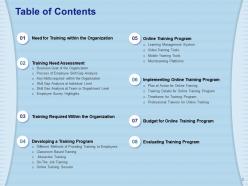
Slide 3: This slide displays Table of Contents
Slide 4: This slide shows Table of Contents.
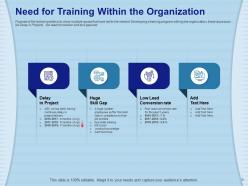
Slide 5: The Purpose of the following slide is to show multiple issues that have led to the need of Developing a training program withing the organization, these issue scan be Delay in Projects , low lead conversion and skill gaps etc.
Slide 6: This slide displays Table of Contents.
Slide 7: The following slide displays the multiple business goals that the organization is willing to achieve with the help of training that is to be provided t the employees
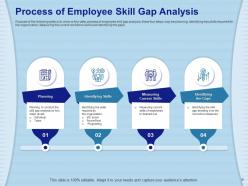
Slide 8: The Purpose of this slide is to show a four-step process of employee skill gap analysis, these four steps may be planning, identifying key skills required for the organization, Measuring the current workforce skills and identifying the gaps
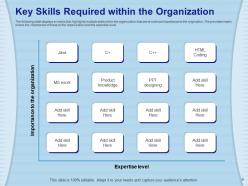
Slide 9: The following slide displays a matrix that highlights multiple skills within the organization that are at outmost importance to the origination. The provided matrix shows the importance of these to the organization and the expertise level. Adapt it to your needs and capture your audience's attention.
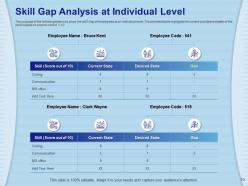
Slide 10: The purpose of the following slide is to show the skill Gap of employees at an individual level. The provided table highlights the current and desired state of the skills based on a score card of 1-10.
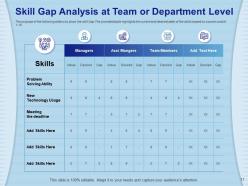
Slide 11: The purpose of the following slide is to show the skill Gap The provided table highlights the current and desired state of the skills based on a score card of 1-10.
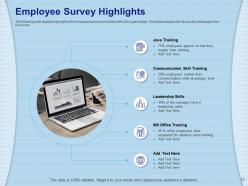
Slide 12: The following slide displays highlights of the employee survey conducted within the organization. This slides displays the various key takeaways from the survey.
Slide 13: This slide displays Table of Contents.
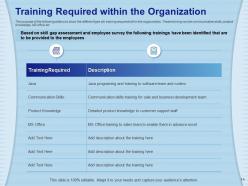
Slide 14: The purpose of the following slide is to show the different type sfo training required within the orgaznaition. These training can be communication skills, product knowledge, MS office etc.
Slide 15: This slide displays Table of Contents
Slide 16: The purpose of the following slide is to show the different type of methods through which the organization can provide training to the employees, these can be classroom based training, interactive training, on-the-job training, social training and online training.
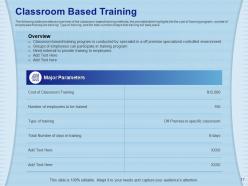
Slide 17: The following slide provides an overview of the classroom-based training methods, the provided table highlights the the cost of training program, number of employees that require training, Type of training, and the total number of days that training will take place.
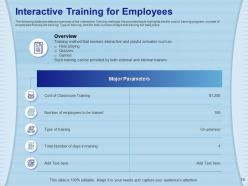
Slide 18: The following slide provides an overview of the Interactive Training methods, the provided table highlights the the cost of training program, number of employees that require training, Type of training, and the total number of days that training will take place .
Slide 19: The following slide provides an overview of the On-the-Job Training methods, the provided table highlights the the cost of training program, number of employees that require training, Type of training, and the total number of days that training will take place.
Slide 20: The following slide provides an overview of Online training methods, the provided table highlights the the cost of training program, number of employees that require training, Type of training, and the total number of days that training will take place
Slide 21: This slide displays Table of Contents
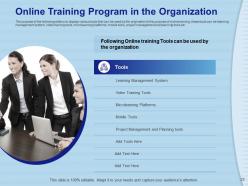
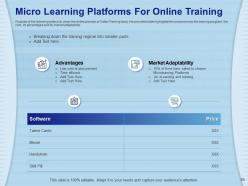
Slide 22: The purpose of the following slide is to display various tools that can be used by the origination fo the purpose of online training, these tools can be learning management system, video training tools, microlearning platforms, mobile tools, project management and planning tools etc.
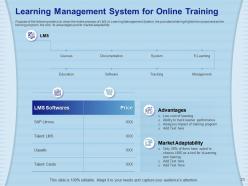
Slide 23: The Purpose of the following slide is to show the entire process of LMS or Learning Management System, the provided slide highlights the component so the training program, the cost, its advantages and its market adaptability.
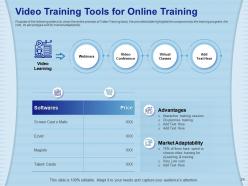
Slide 24: The following slide is to show the entire process of Video Training tools, the provided slide highlights the component so the training program, the cost, its advantages and its market adaptability.
Slide 25: This slide shows Mobile Training Tools for Online Training
Slide 26: The Purpose of the following slide is to show the entire process of Video Training tools, the provided slide highlights the component so the training program, the cost, its advantages and its market adaptability.
Slide 27: This slide displays Table of Contents.
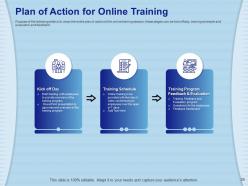
Slide 28: The Purpose of the following slide is to show the entire plan of action of the online training session, these stages can be kick off day, training schedule and evaluation and feedback.
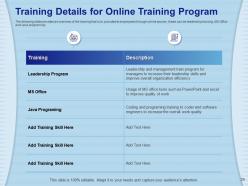
Slide 29: The following slide provides an overview of the training that is to provided to employees through online source , these can be leadership training, MS Office and Java programing.
Slide 30: The Purpose of the following slide is to show the timeframe of the training program, the provided table highlights the training that is to be provided, the date it is to be provided on , the venue and the ,mode which will be used.
Slide 31: The purpose of the following slide is to highlight the professional trainers who will provide the training to the employees.
Slide 32: The purpose of the following slide is to highlight the professional trainers who will provide the training to the employees
Slide 33: This slide displays Table of Contents
Slide 34: The following slide displays the budget for online training program . The provided graph highlights the amount that will each specific activity will take.
Slide 35: This slide shows Table of Contents
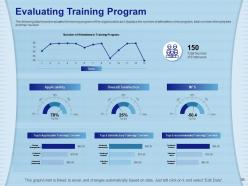
Slide 36: The following dashboard evaluates the training program of the organization as it displays the number of attendees in the program, total number of employees and their reviews
Slide 37: This is Icons Slide for Learning Management System Training Program
Slide 38: This slide is titled as Additional Slides for moving forward.
Slide 39: This is About Us slide to showcase Company specifications.
Slide 40: This slide displays Our Mission, Vision and Goals.
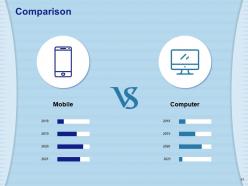
Slide 41: This slide displays Comparison.
Slide 42: This is Dashboard slide.
Slide 43: This slide is titled as Post It Notes. Post your important notes.
Slide 44: This slide displays Location
Slide 45: This is Idea Generation slide.
Slide 46: This is Thank you slide with Contact details.
Learning Management System Training Program Powerpoint Presentation Slides with all 46 slides:
Use our Learning Management System Training Program Powerpoint Presentation Slides to effectively help you save your valuable time. They are readymade to fit into any presentation structure.














FAQs for Learning Management System Training Program
Honestly, start with whether your team can actually navigate the thing - sounds basic but you'd be shocked how many platforms are confusing as hell. Mobile access is pretty much mandatory now since everyone learns on their phones. The reporting features matter too for tracking who's actually completing stuff. Oh, and if you need it to sync with HR systems or whatever, check integration options early. I'd also make sure subject matter experts can build courses without wanting to throw their laptop out the window. Good customer support isn't optional either - trust me on that one. Write down your must-haves first before demoing anything.
So your LMS basically watches how you're doing and adjusts stuff accordingly. If you're bombing a topic, it'll suggest extra modules. Already know something? Skip ahead. The whole thing adapts to how you actually learn, which is honestly pretty cool. You can pick your own pace too - videos, reading, interactive stuff, whatever works. Your dashboard shows where you're at and what's next. Oh, and definitely check out the recommendation engine thing - mine suggested a course I never would've thought to take but ended up loving. It's like Netflix but for learning, kinda.
Honestly, LMS training is a game changer for onboarding. New people get this structured path they can work through at their own speed from day one. Everything stays consistent - policies, procedures, company culture stuff - instead of crossing your fingers that someone remembers to mention important details. Your managers will thank you too since they won't be doing the same presentations over and over (trust me on this one). The system tracks where people get stuck so you can help them out. Set it up once and you're golden - saves tons of time while new hires actually have a better experience.
Honestly, analytics are the only way to know if your LMS training is worth the money or just a waste. Track completion rates, quiz scores, how long people spend on stuff. See where they're bailing out. The really useful part is looking at engagement - are people actually learning or just clicking through for credit? I always tell people to set up your metrics first, then check the data monthly. You can spot weird trends that way. Oh and definitely measure if behavior actually changes after training. That's where you see real ROI.
Honestly, measuring LMS ROI isn't as complicated as it sounds. Track your total costs first - platform fees, content creation, time spent training. Then compare that against real improvements like faster onboarding, better test scores, or reduced training hours. I'd start with the easy wins like time and cost savings since those are concrete numbers. Performance metrics can come later once you've got the basics down. Oh, and definitely measure stuff before you implement so you can actually prove improvement - sounds obvious but tons of companies skip this step. Retention rates matter too, though they're trickier to pin down directly.
Break everything into small chunks - seriously, people's attention spans are shot these days. Videos and quizzes work way better than those boring PDFs nobody opens. Each module should be like 10 minutes max, then hit them with a quick quiz to make sure they actually absorbed something. The content needs to solve real workplace problems, not just theoretical stuff. Oh, and don't forget mobile - half your people will probably do this on their phones anyway. I'd honestly just start with one solid course first. See what lands before you go crazy building out everything.
Honestly, mobile access is a game changer for training programs. People actually finish courses when they can do them anywhere - I've literally seen someone complete a module while in line at Starbucks (which is kind of impressive tbh). Your employees aren't waiting around for computer time anymore. They'll squeeze training into commutes, lunch breaks, random downtime. Completion rates go way up because of this flexibility. Just make sure your LMS actually works smoothly on phones though. Don't assume it does - test it yourself first. Mobile content usually ends up more digestible too.
Honestly, it comes down to three things: make it stupid easy, show people what they're getting, and get some momentum going. Quick wins are everything - if your software sucks on day one, you're done. Each group needs to know "what's in it for me" whether that's saving time or better tracking. Find your power users first because they'll sell it for you (way better than any training session). Oh, and definitely celebrate the early adopters publicly. People love being recognized for trying new stuff, and it creates this buzz that just spreads naturally.
Honestly, gamification works really well for training stuff. Points and badges might sound cheesy, but people actually love that shit. Most LMS platforms already have these features built in, so you don't need to build anything from scratch. Try setting up leaderboards or team competitions first - makes everything feel less like work. Award badges when someone masters a skill, create different achievement levels. The trick is keeping progress visible so people can see they're actually getting somewhere. Don't dump every game feature on them at once though. Start small, see what clicks with your group, then add more based on what they respond to.
Honestly, getting people to actually use the new system is your biggest nightmare - everyone hates change. Technical stuff can get messy too, especially hooking it up to payroll or whatever HR systems you've got. Oh, and moving all your old training content over? Total pain. You'll definitely think the rollout will take way less time than it actually does (we all do this). Here's what worked for us though - find like 5-6 people who are actually excited about new tech and let them test it first. They'll become your cheerleaders when you go company-wide.
Dude, LMS is clutch for compliance stuff. It handles all the annoying parts - tracks who finished what, sends reminders when people's certs are about to expire (because let's be real, nobody keeps track of that). You can customize training by department too. Best part? When auditors show up, everything's already documented in one spot. Oh and set up those reporting dashboards early - trust me, you don't want to be frantically pulling data during a compliance review. Makes the whole process way less stressful.
Oh man, there's so much you can hook up to your LMS! HR systems are clutch for onboarding new people. CRM integration works great if you're doing customer training. Obviously Zoom and Teams for live stuff, plus SSO so nobody has to remember a million passwords (thank god). Content creation tools and analytics dashboards make a huge difference too. Honestly though, don't go crazy connecting everything just because you can - I made that mistake once. Map out where your biggest headaches are first, then tackle those integrations. Way better approach than trying to do it all at once.
Honestly, your LMS choice can totally make or break team collaboration. Some platforms are amazing - they've got discussion boards, real-time chat, shared project spaces where everyone can actually work together. Others are basically just fancy file storage (which is useless). Look for group assignments, peer reviews, built-in video calls. Interface matters way more than you'd think - if it's confusing, nobody will use it. Oh, and definitely test a few options with your actual team first. They're stuck using it every day, so their input is clutch.
Honestly, the biggest thing right now is bite-sized training that people can actually do on their phones. Companies are finally ditching those awful hour-long courses (seriously, who has time?). Everything's moving toward 5-10 minute modules that solve real problems instead of just checking boxes. AI personalization is huge too - it actually shows you what skills you're missing, not just completion stats. Mobile-first design is basically mandatory now. Oh, and VR training is getting pretty cool for hands-on stuff, though that's still expensive. My advice? Break everything into phone-friendly chunks and make it useful, not just required.
Oh man, this stuff is trickier than people think! Different cultures have totally different comfort levels with tech, plus some prefer group learning while others want to work solo. Don't just worry about time zones either - local holidays and work schedules will mess with your timeline. Language barriers aren't just translation issues; even your examples need to make cultural sense. Honestly, the biggest mistake is trying to force everyone into the same system. Get local people involved from day one and build in ways to customize things regionally. Way less headache than retrofitting later!
-
Informative design.
-
Really like the color and design of the presentation.
-
The content is very helpful from business point of view.
-
Great quality slides in rapid time.
-
Use of different colors is good. It's simple and attractive.