

Corporate Training Plan Powerpoint Presentation Slides






Try Before you Buy Download Free Sample Product
 Impress Your
 Audience
 100%
100% Editable
 Save Hours
 of Time


Provide skills and knowledge to your organization by employing Corporate Training Plan PowerPoint Presentation Slides. Utilize learning roadmap PPT visuals and help in the learning and development of the industry by using this interactive learning roadmap PPT slides. Showcase the process of creating a training plan using the training roadmap PPT slideshow. Describe what a project roadmap should contain like project goals and objectives, timeline indicating the schedule, possible risks, etc by utilizing the training roadmap PPT graphics. Present a general learning roadmap for students and all industries with the assistance of this technology roadmap PowerPoint layouts. Design your employee training program by mentioning the steps for the same with the help of our professionally designed employee training and development PPT themes. You can also mention the four phases of learning roadmap such as assessment, curriculum development, logistics, certification, etc with the help of the professionally designed information technology planning PPT slideshow. Download this strategic roadmap PPT graphics to make the learning process smoother.
People who downloaded this PowerPoint presentation also viewed the following :
Content of this Powerpoint Presentation
Slide 1: This slide introduces the Corporate Training Plan. Add your Company Name to begin.
Slide 2: This slide SHOWS Our Agenda.
Slide 3: This slide SHOWS the Interactive Learning Roadmap- Planning, Pedagogy, Production, Content Development, Delivery, Evaluation.
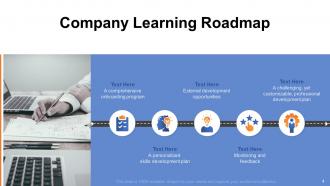
Slide 4: This slide SHOWS the Company Learning Roadmap- A personalized skills development plan, Monitoring and feedback, A comprehensive onboarding program, External development opportunities, A challenging, yet customizable, professional development plan.
Slide 5: This slide SHOWS the Four Phase Learning Roadmap- Logistics, Certification, Curriculum Development, Assessment.
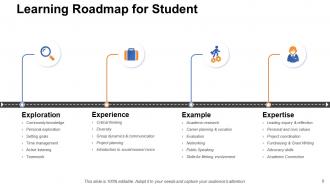
Slide 6: This slide SHOWS the Learning Roadmap for Student- Exploration, Experience, Example, Expertise.
Slide 7: This slide SHOWS the General Learning Roadmap for all Industry.
Slide 8: This Template consists of the Corporate Training Plan Icons Slide.
Slide 9: This slide is titled as Additional Slides for moving forward.
Slide 10: This slide SHOWS Our Mission.
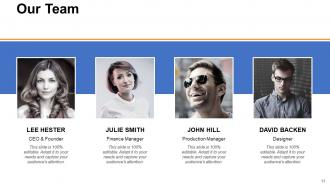
Slide 11: This slide reveals the names and designation of Our Team members.
Slide 12: This slide reveals About Us.
Slide 13: This slide reveals the Financial information.
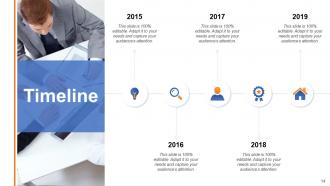
Slide 14: This slide reveals the Timeline.
Slide 15: This is a Thank You slide consisting of Address, Contact numbers and email Address.
Corporate Training Plan Powerpoint Presentation Slides with all 15 slides:
To better suit your presentation needs we have developed a range of high quality Corporate Training Plan Powerpoint Presentation Slides. Full color design is waiting to give your presentation a boost.





FAQs for Corporate Training Plan
Honestly, start with getting leadership on board first - I've watched so many programs crash because the bosses weren't actually into it. Once you have that, figure out your biggest skill gaps and work backwards. Mix up your content formats... workshops, online modules, hands-on stuff. Different people learn differently, you know? Set realistic deadlines with checkpoints along the way. Make everything tie back to actual business goals, not just fluffy training for training's sake. And build in ways to get feedback so you can tweak things if they're not working. Measuring results is key too.
Start with a skills gap analysis - just compare what people can do now vs what you actually need them to do. Surveys and one-on-ones are your best bet for this. Also dig into performance reviews and ask managers where they're seeing problems. Industry trends matter too because, let's be real, tech moves fast and last year's "must-have" skill might already be irrelevant. Here's the thing though - just ask your employees what they want to learn. They usually know exactly where they're struggling better than anyone else. Focus on the departments that are either underperforming or about to go through major changes first.
Honestly, feedback is like your reality check for whether training actually works or not. Without it, you're basically throwing stuff at the wall and hoping it sticks. We had this disaster leadership program last year - could've saved ourselves so much grief if we'd just asked people what they thought earlier! Quick surveys work great, or just casual check-ins. Don't make it feel like another task on their list. Hit them up during the session, right after, then maybe a few months out to see if they're actually using what they learned. That last part's crucial - sometimes people love training in the moment but then... nothing changes.
Honestly, personalization is where you'll see the biggest wins. Start with mobile-first stuff since everyone's always on their phones anyway. AI recommendations and bite-sized learning work great for busy people - way better than those marathon training sessions nobody wants to sit through. VR and AR are actually pretty cool for hands-on skills, though they might be overkill depending on your budget. But here's the thing - don't just grab whatever's trendy. Survey your team first about what they actually want, then pick maybe 2-3 tools that fix real problems. Trust me, shiny doesn't always mean useful.
Honestly, you need to look at four main things. Did people actually learn the material? Are they using it at work? Check business stuff too - better performance, fewer mistakes, higher sales. ROI matters obviously. Don't skip satisfaction scores either, but here's the thing - happy participants don't mean much if nothing actually changes afterward. The cool part is when you can tie training directly to real results like productivity or customer ratings going up. I'd start measuring this stuff 30-90 days after training wraps up to see what actually stuck.
Honestly, you've gotta mix up your training formats because everyone learns differently. Some people are super visual - they'll eat up infographics and videos. Others need to talk it out or listen to stuff. Then there are those fidgety types (you know the ones) who actually need to DO things with their hands to get it. Oh, and don't forget the people who just want to read everything and take notes. The worst thing you can do is force everyone through the same boring slideshow. Blend different approaches so people can actually connect with what you're teaching them.
Honestly, soft skills training is a game changer for teams. Communication gets clearer, people actually collaborate instead of working in silos, and conflicts don't turn into drama. The whole thing sounds kinda touchy-feely at first, but employees with solid emotional intelligence become your go-to problem-solvers and leaders. ROI-wise? You'll keep good people longer, which saves money. Oh, and fewer misunderstandings means less time wasted on stupid back-and-forth emails. I'd definitely focus on communication basics and leadership fundamentals when you're starting out.
Honestly, just figure out what your company's actually trying to do first. New markets? Better customer service? Whatever it is, build training around those specific skills. Don't just throw random workshops at people - that's such a waste of money. Get leadership involved early so they don't question the budget later (trust me on this one). The whole thing becomes way easier when you're targeting real business goals instead of doing generic stuff. Short answer: be picky about what training you actually invest in. Most companies do way too much fluff.
Honestly, you've got tons of options for remote training. Zoom-style live sessions are perfect when people need to ask questions on the spot. Self-paced stuff is a lifesaver though - nobody has to deal with scheduling nightmares, and people actually learn better at their own speed. Those short microlearning videos work really well too. VR is pretty cool if you can swing the budget, especially for hands-on training. I'd probably survey your team first to see what they're into, then just mix different formats based on what you're teaching. Oh, and don't overthink it - sometimes the simplest approach works best.
First thing - check your current content for bias and add more diverse examples. Survey your team about what barriers they're actually facing, because there's probably accessibility or language stuff you haven't thought of. People learn totally differently, so mix up your formats. Oh, and definitely get input from underrepresented folks during planning, not after. Timing matters too - consider different schedules and learning styles. Honestly, just ask people what they need instead of guessing. I'd pilot one program first and tweak from there.
Okay so training budgets are tricky because everyone forgets the hidden costs. Obviously you've got instructor fees, materials, venue rental if it's in-person. But honestly? Employee wages are your biggest hit - you're literally paying people to sit in training instead of work. Technology stuff adds up fast too. Assessment tools, learning platforms, all that. I always tell people to add like 15% cushion because something random always pops up. Maybe get quotes from a few different vendors first so you're not flying blind on pricing.
Honestly, leadership buy-in is everything. When executives actually show up and care, everyone else follows suit. I've watched too many programs die because they felt like mandatory busywork. But get your C-suite involved? Attendance shoots up, people engage, and - this is key - they actually apply what they learned afterward. Your boss controls the money and resources too. Better venues, proper time blocks, follow-up coaching. The whole nine yards. What really works is when leaders don't just sponsor the training but actually participate and bring it up in later meetings. That's when you know it stuck. Seriously, fight for visible executive involvement right from the start.
Honestly, external trainers are worth it if you need results fast. They've seen this stuff at tons of companies, so they know what actually works vs. what sounds good on paper. Your internal team won't have those battle-tested methods or the time to focus solely on training. Plus, outsiders can call out problems without worrying about office politics - which let's be real, is huge. The materials they bring are usually way better too. Yeah, it costs more upfront, but I'd rather pay for expertise than watch someone stumble through learning on the job. Depends on your timeline though.
Honestly, gamification works pretty well if you don't go overboard with it. Points and badges are solid - people get weirdly competitive about that stuff. Progress bars are my favorite though, there's something satisfying about watching them fill up (probably says something about our psychology lol). Make sure whatever game elements you add actually help the learning instead of just being flashy distractions. Challenges work great too - like earning rewards for finishing courses or hitting certain milestones. I'd start with maybe one or two features in a test run, then see what people actually engage with before adding more.
Look, you've gotta make learning actually feel worth it, not like some mandatory training BS. Give people real time for it - maybe not Google's famous 20% thing, but something concrete. Have employees teach each other stuff they know, and when someone uses a new skill on an actual project? Make a big deal about it. Here's the thing though - if your managers aren't visibly learning new things, forget it. Nobody else will bother. Lunch-and-learns work great, reimburse courses, but honestly the biggest win is connecting learning directly to promotions. People need to see that growing their skills here actually gets them somewhere.
-
Thanks
-
Thanks
-
Thanks