


Professional Development Training Powerpoint Presentation Slides




Try Before you Buy Download Free Sample Product
 Impress Your
 Audience
 100%
100% Editable
 Save Hours
 of Time


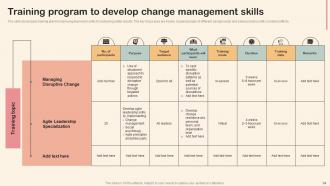
Training and development program is an essential activity for any organization to keep their employees up to date with the latest technologies and to fill any skill gap with the right training program. Check out our professionally designed Professional development training PowerPoint presentation. It will help organizations in planning and budgeting for the training program to improve employees interpersonal skills, leadership skills, and technical skills. The first step for planning any training program is to look for the need for training and to forecast the expected outcome of such a training program. Additionally, the deck covers three important skill set which is required for any employee to achieve his her goal while maintaining the right attitude in the organization. The first skill covered is interpersonal skills which are required to deal with others in the organization to foster a healthy and positive environment. Interpersonal skill includes communication skills, emotional intelligence, and teamwork spirit. The second skill covered under this module is leadership skills which are important to handle employees in a fair and positive way which can boost their confidence and, at the same time, increase their efficiency to achieve more in less time. Leadership skills included in this deck are strategic thinking, people management, and change management. At last, the third skill that is covered under this deck is a technical skill that is required to do any work or use any technology to complete any given task. This deck focuses on developing skills to work on technologies like Python, SQL, CRM, spreadsheets, word documents, and presentation techniques. Get access now.
People who downloaded this PowerPoint presentation also viewed the following :
Content of this Powerpoint Presentation
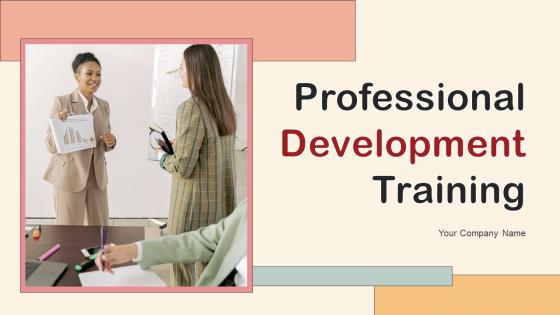
Slide 1: This slide displays the title Professional Development Training.
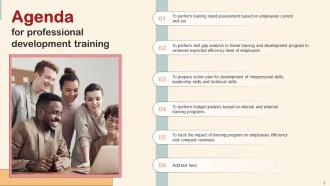
Slide 2: This slide displays the title Agenda for professional development training.
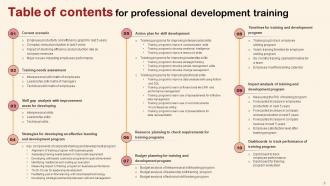
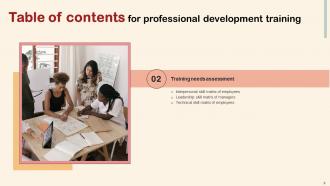
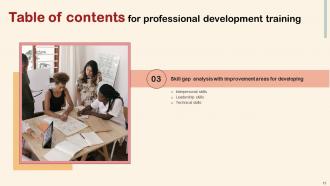
Slide 3: This slide exhibit table of content.
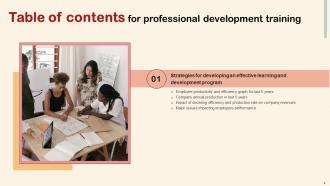
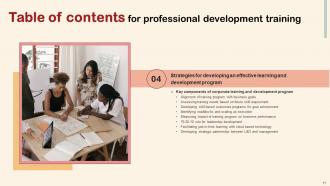
Slide 4: This slide showcase table of content that is to be discuss further.
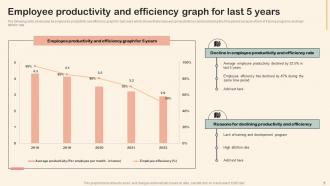
Slide 5: This slide showcases the employees productivity and efficiency graph for last years.
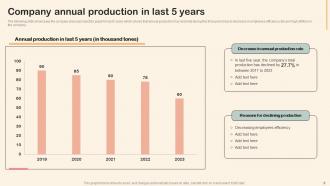
Slide 6: This slide showcases the company annual production graph for last 5 years which shows that annual production has declined during this time period.
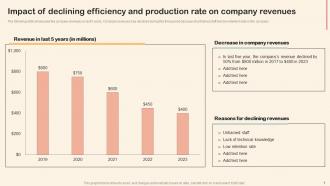
Slide 7: The following slide showcases the company revenues in last 5 years.
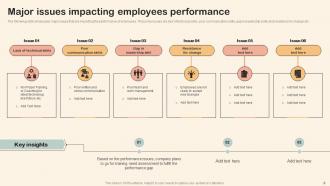
Slide 8: The following slide showcases major issues that are impacting the performance of employees.
Slide 9: This slide showcase table of content that is to be discuss further.
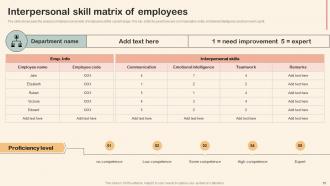
Slide 10: The slide showcases the analysis of interpersonal skills of employees at the current stage..
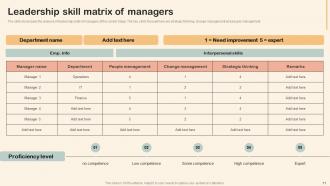
Slide 11: The slide showcases the analysis of leadership skills of managers at the current stage.
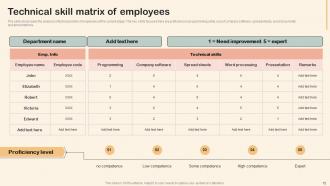
Slide 12: The slide showcases the analysis of technical skills of employees at the current stage.
Slide 13: This slide showcase table of content that is to be discuss further.
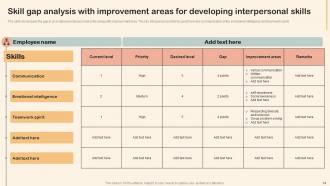
Slide 14: The slide showcases the gap in an employee interpersonal skills along with improvement area.
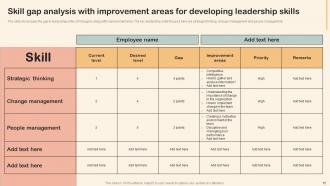
Slide 15: The slide showcases the gap in leadership skills of managers along with improvement area.
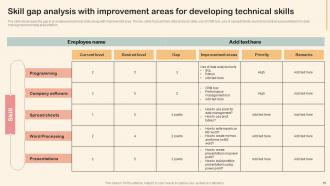
Slide 16: The slide showcases the gap in an employee technical skills along with improvement area.
Slide 17: This slide showcase table of content that is to be discuss further.
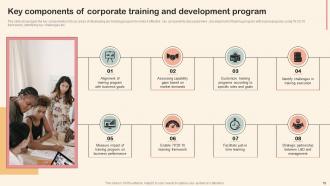
Slide 18: The slide showcases the key components or focus areas of developing any training program to make it effective.
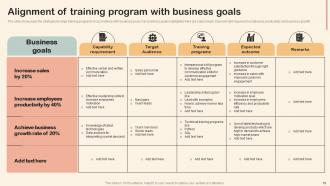
Slide 19: The slide showcases the strategies to align training programs in accordance with business goals.
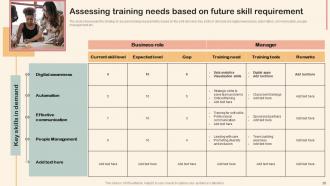
Slide 20: The slide showcases the strategy to assess training requirements based on the skill demand.
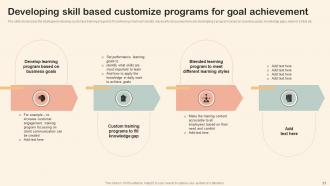
Slide 21: The slide showcases the strategies to develop customize training programs for achieving maximum results.
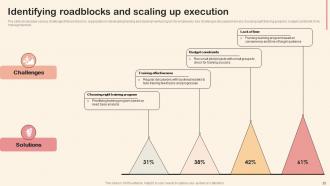
Slide 22: The slide showcases various challenges that are faced by organization in developing training and development prrogram for employees.
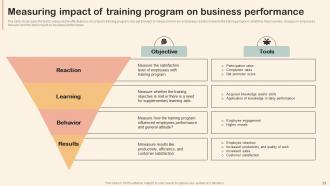
Slide 23: The slide showcases the tool to measure the effectiveness of company training program.
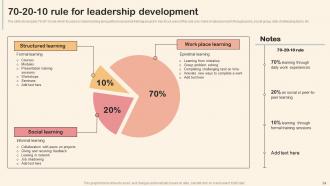
Slide 24: The slide showcases 70-20-10 rule which focuses on daily learning along with processional training program.
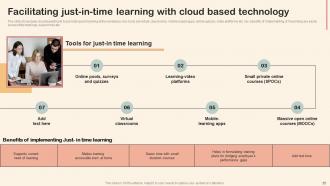
Slide 25: The slide showcases cloud-based tools to promote quick learning at the workplace.
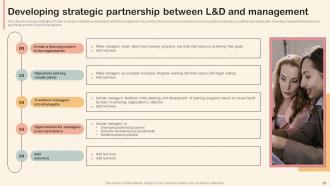
Slide 26: The slide showcases strategies to foster synergies between learning team and the management.
Slide 27: This slide showcase table of content that is to be discuss further.
Slide 28: The slide showcases training plan for improving communication skills of employees for building professional relationships.
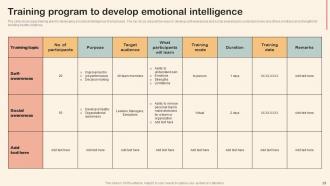
Slide 29: The slide showcases training plan for developing emotional intelligence of employees.
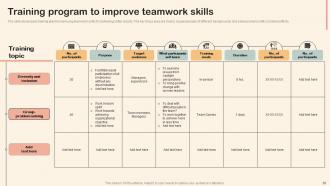
Slide 30: The slide showcases training plan for improving teamwork skills for achieving better results.
Slide 31: This slide showcase table of content that is to be discuss further.
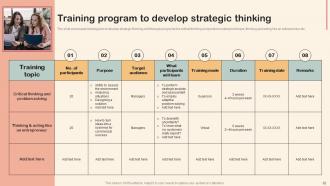
Slide 32: The slide showcases training plan to develop strategic thinking skill through programs like critical thinking and problem solving technique, thinking and acting.
Slide 33: The slide showcases training plan for improving teamwork skills for achieving better results.
Slide 34: The slide showcases training plan for improving teamwork skills for achieving better results.
Slide 35: This slide showcase table of content that is to be discuss further.
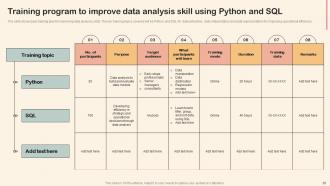
Slide 36: The slide showcases training plan for improving data analysis skills.
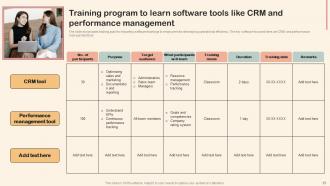
Slide 37: The slide showcases training plan for imparting software trainings to employees for developing operational efficiency.
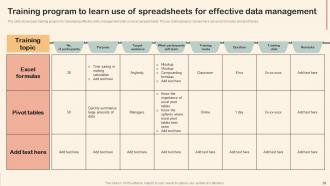
Slide 38: The slide showcases training program for developing effective data management skills on excel spreadsheets.
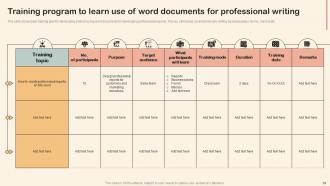
Slide 39: The slide showcases training plan for developing skills in using word documents for developing professional reports.
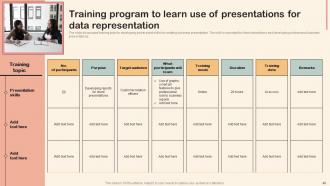
Slide 40: The slide showcases training plan for developing power point skills for creating business presentation.
Slide 41: This slide showcase table of content that is to be discuss further.
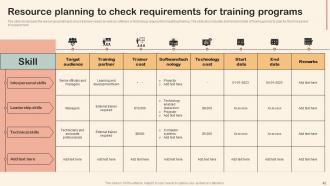
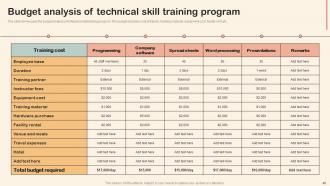
Slide 42: The slide showcases the resources planning to check trainers needs as well as software or technology required for imparting training.
Slide 43: This slide showcase table of content that is to be discuss further.
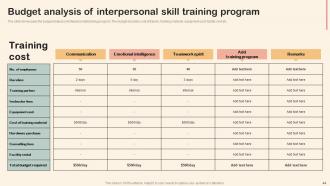
Slide 44: The slide showcases the budget analysis of interpersonal training program.
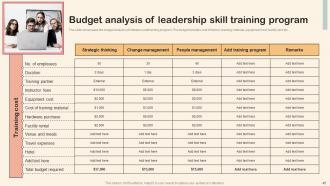
Slide 45: The slide showcases the budget analysis of interpersonal training program.
Slide 46: The slide showcases the budget analysis of interpersonal training program.
Slide 47: This slide showcase table of content that is to be discuss further.
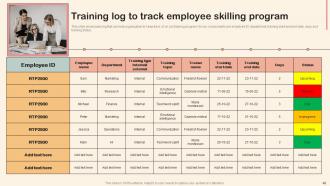
Slide 48: This slide showcases log that can help organization to keep track of on job training program.
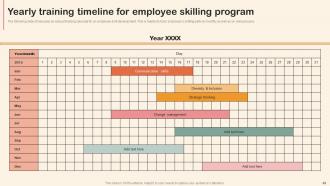
Slide 49: The following slide showcases an annual training calendar for an employee skill development.
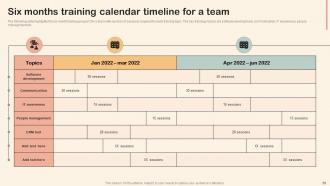
Slide 50: The following slide highlights the six month training program for a team with number of sessions required for each training topic.
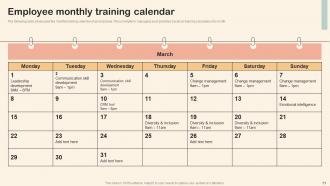
Slide 51: The following slide showcases the monthly training calendar of an employee.
Slide 52: This slide showcase table of content that is to be discuss further.
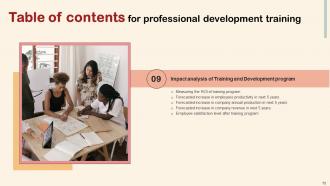
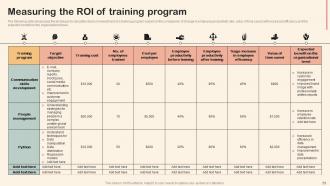
Slide 53: The following slide showcases the technique to calculate return on investment of a training program based on the comparison of change in employee.
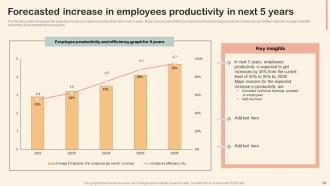
Slide 54: The following slide showcases the expected increase in employees productivity rate in next 5 years.
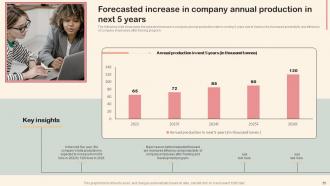
Slide 55: This slide showcases the expected increase in company annual production rate in coming 5 years.
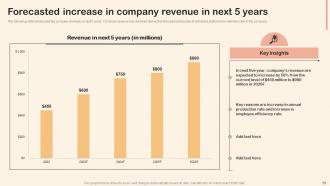
Slide 56: The following slide showcases the company revenues in last 5 years.
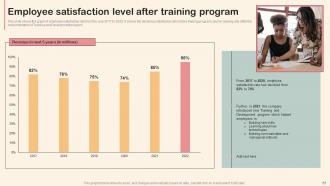
Slide 57: This slide shows the graph of employee satisfaction rate from the year 2017 to 2022.
Slide 58: This slide showcase table of content that is to be discuss further.
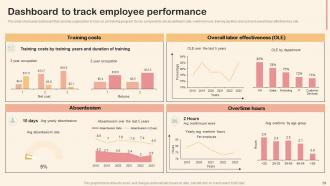
Slide 59: This slide showcases dashboard that can help organization to track on job training program.
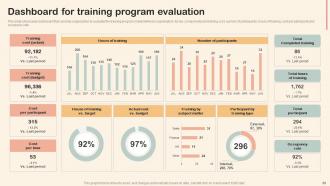
Slide 60: This slide showcases dashboard that can help organization to evaluate the training program implemented in organization.
Slide 61: This is the icons slide.
Slide 62: This slide presents title for additional slides.
Slide 63: This slide depicts 30-60-90 days plan for projects.
Slide 64: This slide presents your company's vision, mission and goals.
Slide 65: This slide display the Roadmap.
Slide 66: This slide exhibit Timeline.
Slide 67: This slide exhibits ideas generated.
Slide 68: This slide shows puzzle for displaying elements of company.
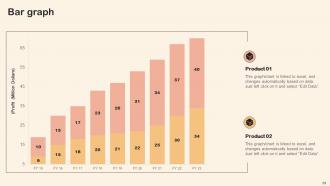
Slide 69: This slide displays yearly bar graph for different products.
Slide 70: This slide showcase the Mind Map.
Slide 71: This is thank you slide & contains contact details of company like office address, phone no., etc.
Professional Development Training Powerpoint Presentation Slides with all 76 slides:
Use our Professional Development Training Powerpoint Presentation Slides to effectively help you save your valuable time. They are readymade to fit into any presentation structure.









FAQs for Professional Development Training
Honestly, start by figuring out where you want to be in like 12-18 months, then just work backwards from there. You need three main things: specific goals that actually matter for your career (not just whatever's trending on LinkedIn), a timeline that won't burn you out, and real action steps - courses, certifications, finding a mentor, whatever works. I always tell people to schedule regular check-ins with yourself because plans change and that's totally normal. Don't get stuck chasing shiny skills just because everyone's talking about them. Focus on what'll genuinely help you level up in your specific role.
Templates are honestly a game-changer for workshops. People get way less distracted by formatting issues and can actually focus on what you're saying. The visual consistency looks professional too, especially if you have multiple presenters - nothing worse than mismatched slide styles. Built-in interactive stuff like polls keeps everyone engaged without you having to think about it. Here's the thing though: you'll save SO much prep time. Instead of messing around with design, you can focus on making your content actually good. Just start simple with something that fits your brand and workshop style.
Honestly, feedback is like having a GPS for your career - without it you're just wandering around hoping you're going the right direction. Templates are a game changer here because they take away that weird awkwardness of "um, so can you tell me how I'm doing?" You'll have actual structure for asking good questions and organizing what people tell you. Plus you can track patterns over time, which is pretty cool. I mean, I used to just wing these conversations and they were terrible. Templates give you a framework for both requesting feedback and giving it to others. Grab a simple template and try it with your manager this week.
Honestly, you gotta track more than just who finished the courses. Sure, completion rates matter, but retention and internal promotions tell the real story. Survey people like 3-6 months later - are they actually using this stuff? Do they feel more confident? That's where the magic happens. Compare teams too. The ones getting more development should be crushing their goals compared to others. Oh, and set up your tracking system BEFORE you start anything. I learned this the hard way - trying to measure results after the fact is absolutely brutal. You'll thank me later.
Honestly, digital tools are a game-changer for career growth. I'm obsessed with Coursera and LinkedIn Learning - you can learn pretty much anything on your own time. Webinars are huge too since you don't have to deal with travel expenses or time off work. LinkedIn's obviously great for networking and keeping up with what's happening in your field. Oh, and online forums are clutch for getting real advice from people actually doing the work. My cousin got her promotion partly from skills she picked up this way. I'd start with whatever addresses your biggest skill gap first.
Honestly, just mix up the formats for the same stuff. Some people need visuals - infographics, demos, mind maps work great for them. Others are all about discussion groups and podcasts where they can actually talk it out. The hands-on people? They'll zone out unless you give them simulations or role-playing exercises. I'm one of those weirdos who has to write everything down by hand or my brain just... doesn't keep it. Oh, and timing matters too! Some folks want intense bootcamps while others prefer smaller chunks spread out. Just ask what they actually want before you plan anything - saves everyone headaches later.
Be super specific about what you want - like "help me get better at presentations" instead of just "help me grow professionally." That vague stuff never works. Schedule regular check-ins, even if it's only 30 minutes a month, and actually show up with real questions about challenges you're dealing with. Honestly? The best mentoring feels like you're just chatting with someone smart over coffee. Don't forget to mentor someone else too - explaining things to others makes you realize what you've actually learned. Reach out to one person whose career you admire this week.
Honestly, just focus on small wins instead of staring at that massive end goal all the time. Break everything down into tiny chunks you can actually handle. Get someone to check in on you - could be a mentor or just a friend who'll ask how it's going. When I get bored with articles, I'll throw on a podcast or try to shadow someone instead. Oh, and track your progress somehow! Maybe a simple checklist or whatever works. It's weird how motivating it is to actually see you're moving forward. You'll definitely burn out if you keep looking at how much further you need to go.
Look, the whole professional development thing really does pay off in the end. People who keep learning new stuff get promoted faster and make more money - that's just how it works. Your boss notices when you're growing your skills instead of coasting. Plus you'll feel way more confident tackling new projects. Honestly, I've seen too many people hit a wall because they stopped updating their knowledge like five years ago. Pick one thing you're weak at and work on it over the next few months. Even something small makes a difference.
Look, the trick is making learning feel normal instead of like homework nobody wants to do. Give your team actual time for it - even an hour weekly helps. Lunch-and-learns work great, or just have people demo cool stuff they picked up. I swear, half of this is literally just bringing up growth in your regular meetings and one-on-ones. When someone experiments with something new? Celebrate it, even if they kinda mess up. Shows you're not just paying lip service to development. Pick one small thing and try it this month.
So AI's everywhere now, obviously. Plus companies are doing micro-learning instead of those marathon training sessions (thank god). Skills matter way more than your degree these days. Most places are pushing continuous learning rather than random one-off workshops. Remote platforms are standard now, and everything's getting personalized based on what you actually do. Oh, and mental health training is finally a thing alongside the technical stuff. Honestly? Pick 2-3 skills you need and find small ways to work on them regularly. Don't wait around for your company to figure it out.
Honestly, soft skills training is worth it. Technical stuff only gets you so far - if you can't communicate or work with people, you're kinda stuck. These programs teach emotional intelligence and conflict resolution, which actually makes you promotable instead of just good at your job. Way more engaging than boring technical courses too (at least the decent ones are). Pick something that matches where you want your career to go though. Don't waste time on those generic leadership workshops that teach you nothing useful.
Honestly, just ask your team what's actually stopping them first - way better than guessing. Virtual sessions are huge for busy people, plus recorded stuff they can watch whenever. Micro-learning works great too, like 10-minute modules instead of those brutal all-day workshops nobody wants to sit through. Different people learn totally differently - some need to read, others have to actually do it hands-on. Budget's probably an issue, but peer mentoring costs basically nothing. Internal knowledge sharing sessions where people teach each other? Also free. Start with a quick survey about barriers. You'll probably be surprised what comes up.
Honestly, just pick 3-5 specific goals for the next 6-12 months - none of that vague "get healthier" nonsense that never works. Break them down into smaller chunks every quarter. Then actually schedule monthly check-ins with yourself (put it in your calendar or you'll forget). I literally just use my notes app because fancy systems stress me out, but whatever works for you. The real trick? Being brutally honest about what's not working and pivoting when needed. Oh, and do that calendar thing right now while you're thinking about it.
Budget's always the first headache - leadership thinks training costs money instead of making it. Time's brutal too since everyone's already drowning and managers hate "losing" people for a few hours. Honestly, proving ROI is such a pain because how do you even measure if someone got better at leadership? Most places also do these generic programs that don't fit anyone's actual needs or how they learn best. My take? Start with small pilot stuff, maybe track retention numbers since those are concrete, and always connect it back to whatever your executives are obsessing over this quarter.
-
The designs are very attractive and easy to edit. Looking forward to downloading more of your PowerPoint Presentations.
-
“The presentation template I got from you was a very useful one.My presentation went very well and the comments were positive.Thank you for the support. Kudos to the team!”