


Motivation and productivity ppt slides download




Try Before you Buy Download Free Sample Product
 Impress Your
 Audience
 100%
100% Editable
 Save Hours
 of Time


Our Motivation And Productivity Ppt Slides Download are like dietary supplements. They enhance quality of intake.
People who downloaded this PowerPoint presentation also viewed the following :
Content of this Powerpoint Presentation
Description:
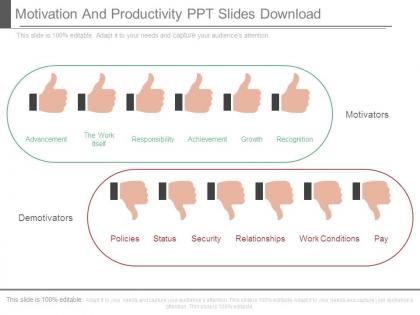
The image presents a PowerPoint slide titled "Motivation And Productivity PPT Slides Download." It is designed to discuss factors that motivate and demotivate employees in the workplace. The upper half, enclosed in a green oval, lists "Motivators" with corresponding thumbs-up icons, indicating positive impacts. The motivators include Advancement, The Work Itself, Responsibility, Achievement, Growth, and Recognition. The lower half, encircled in red, outlines "Demotivators" with thumbs-down icons, signaling negative impacts. These demotivators are Policies, Status, Security, Relationships, Work Conditions, and Pay.
Use Cases:
This slide is useful for a variety of industries focused on improving employee engagement and productivity:
1. Technology:
Use: Team motivation and retention strategies.
Presenter: HR Director
Audience: Development Teams, Managers
2. Healthcare:
Use: Enhancing caregiver motivation to improve patient outcomes.
Presenter: Healthcare Administrator
Audience: Medical Staff, Support Staff
3. Education:
Use: Motivating educators for better academic performance.
Presenter: School Superintendent
Audience: Teachers, Educational Staff
4. Finance:
Use: Incentivizing performance in competitive financial environments.
Presenter: Financial Officer
Audience: Analysts, Brokers, Advisors
5. Retail:
Use: Boosting employee morale for better customer service.
Presenter: Retail Manager
Audience: Store Associates, Team Leaders
6. Construction:
Use: Addressing workplace morale for safer and more efficient projects.
Presenter: Project Manager
Audience: Construction Workers, Safety Officers
7. Hospitality:
Use: Staff motivation for improved guest experiences.
Presenter: Hotel General Manager
Audience: Service and Front Desk Staf
Motivation and productivity ppt slides download with all 7 slides:
Put your best foot forward in any contest with our Motivation And Productivity Ppt Slides Download. They allow you to compete confidently.
FAQs for Motivation and productivity
Honestly, the biggest game-changer is making things interactive - throw in polls, ask questions, break people into small groups. Death by PowerPoint is real and it's brutal. Connect everything back to what actually matters for their specific roles. I always share real success stories because people need to see it's actually working, you know? Mix up your pacing so you're not droning on at the same speed for 45 minutes straight. A little humor doesn't hurt if it feels natural. Oh, and definitely end with concrete next steps - people hate leaving meetings confused about what they're supposed to do next.
Dude, visual templates are seriously underrated. People get overwhelmed trying to decode messy layouts, so when you use consistent design, they can actually focus on what you're saying instead. Your audience knows where to find stuff - like a mental shortcut, I guess? I've watched the most painfully boring presentations suddenly click just because someone stuck to clean, repeated elements. Short sentences work. But flowing through your content with good visual hierarchy makes everything feel natural. Pick one template and don't overthink it. You'll be shocked how much better people pay attention when they're not confused about where to look next.
Dude, goals are basically your brain's GPS - otherwise you're just spinning your wheels all day. Break big stuff into smaller pieces you can actually check off. I swear, there's nothing better than that feeling when you cross something off your list. Without clear targets, you'll get pulled into every stupid meeting and random email that comes your way. Been there way too many times lol. Try picking 2-3 specific things to knock out this week and see how much sharper your focus gets. Trust me, it's way better than having those endless lists that never seem to shrink.
Here's the thing - people actually want to feel like their voice matters. I always throw in polls or quick Q&As during presentations because honestly? Sitting through someone talking AT you for 30 minutes is brutal. Temperature checks work too. The cool part is when team members see you actually use their input to make decisions or change direction. That's when they start feeling like they own part of the process instead of just... existing in meetings, you know? Oh and try opening your next presentation with a poll about what they want to dive into most. Works every time.
Ok so the big thing is people need three things: autonomy (control over their work), mastery (getting better at stuff), and purpose (actually knowing why they're doing it). Fear of failure and comparing yourself to others just destroys everything though. For presentations, give people choices in how they tackle things. Show them how they're progressing skill-wise. Connect goals back to something that actually matters - this part's huge honestly. Celebrate the small wins instead of only focusing on the final result. Structure your next presentation around those three things and you'll see way better engagement. Works every time.
Dude, template design totally makes or breaks your presentation. Bad ones create this mental chaos where people can't focus - tiny fonts, crazy colors, cluttered mess everywhere. Clean layouts though? Game changer. White space gives your content room to breathe, and good typography hierarchy shows what actually matters. I swear I've watched amazing speakers bomb because their slides looked like a rainbow exploded on them. Keep things simple. Test from the back row first - if you can't read it, neither can they. Colors should help your message, not fight against it.
Dude, stories are where it's at for presentations. Skip the data dumps - nobody remembers numbers anyway. Tell them about real people, like how Sarah used to work weekends but now she's free to coach her kid's soccer team instead of just saying "20% efficiency boost." Personal failures work great too. Here's the thing though - make THEM the hero, not yourself. I always start with "imagine if..." and people actually lean in. It's wild how much better this works than bullet points. Your audience needs to see themselves in whatever story you're telling.
Honestly, time management saves your butt with presentations. You avoid that awful last-minute panic where you're throwing slides together at 2am. Break everything into chunks - research one day, outline the next, slides after that. Your brain actually processes stuff better between sessions too. I always get my best ideas randomly, like when I'm walking my dog or something. Time-blocking helps tons because you're not bouncing between tasks. Set actual timers for each part. Sounds dumb but deadlines make you work way faster. Way better than stressing the whole week before.
Okay so here's what works - chunk everything into like 10-15 minute sections, then throw in something interactive. Could be questions, quick polls, or just having people chat with whoever's next to them. Honestly, I bombed a presentation last year by just talking AT people for 45 minutes straight. Never again! Mix up your energy too, and use stories they'll actually connect with. The trick is switching things up every few minutes so nobody zones out. Oh and definitely end each chunk with one clear point before jumping to the next thing. Works way better than just plowing through everything.
Honestly, when your values and work actually match up, everything just clicks better. You're not fighting yourself every day to get stuff done. The work feels like it matters instead of just being this thing you drag yourself through for money. It's way easier to stay motivated when you actually care about what you're doing - like, you'll put in extra effort without even thinking about it. Setbacks don't hit as hard either. I'd suggest writing down what really matters to you and seeing how it connects to your job. Might surprise you how much overlap there is.
Dude, skip PowerPoint if you can - Canva's templates are so much cleaner and don't look like every other corporate deck. Figma works too but honestly might be overkill unless you're already using it. Google Slides is solid for collab stuff. I actually love Notion for keeping research organized, though I know some people think it's overhyped. Grammarly catches the dumb typos I always miss when I'm rushing. Oh, and Pocket's great for saving articles without having 47 browser tabs open (guilty). Pick whatever fixes your biggest headache first - probably the design thing - then add more tools later.
Honestly, getting your team involved in building the presentation is a game-changer for motivation. People actually care when their ideas make it into the final thing, you know? I'd try pairing people up for different sections instead of having everyone work solo - way less lonely that way. The pressure feels lighter when it's shared, but somehow everyone stays more accountable too. Your teammates will naturally back each other up and get excited about wins together. Brainstorming sessions especially get people pumped because they see their input matters. It's just more energizing than grinding through slides by yourself!
Ugh, low motivation during presentations is the worst - you can literally feel yourself bombing up there. Your voice goes flat and monotone, which makes everyone zone out instantly. Plus you don't prep as well, so your slides look thrown together and you're fumbling through points. The anxiety gets worse because deep down you know you're phoning it in. People stop listening. Your credibility takes a hit too, which honestly might be the most frustrating part. Quick fix though - try linking whatever you're presenting to something you actually give a damn about. Makes a huge difference.
Honestly, colors make a huge difference in keeping people motivated. Red and orange get everyone pumped up and create urgency, but blues and greens are too chill - they'll make your audience zone out. I always go with bold fonts like Arial or Helvetica because they're clean and easy to focus on. Don't even think about using fancy decorative fonts (trust me on this one, I bombed a presentation last month because of it). High contrast is your friend - dark text on light backgrounds keeps people reading. Oh, and throw in some bright accent colors for your main points if you really want them fired up to act.
Don't just throw quotes everywhere - that's amateur hour. Start strong with one that actually fits your theme, or drop one between sections when energy's dipping. Honestly, your own stories usually hit harder than some Gandhi quote everyone's heard a million times. The trick? Make sure it connects to your actual point, not just sounds pretty. After you share it, pause. Let it breathe. Then immediately link it back to what you're talking about. And pick something your crowd will actually care about, not generic LinkedIn inspiration stuff.
-
Good research work and creative work done on every template.
-
Great designs, really helpful.