

Network Architecture Powerpoint Presentation Slides





Try Before you Buy Download Free Sample Product
 Impress Your
 Audience
 100%
100% Editable
 Save Hours
 of Time


Check out our professionally designed Network Architecture PowerPoint presentation. It gives a brief idea about the network architecture, including its overview, importance, and layers. In addition, this Network Design PPT contains the various types of network architecture such as Peer-To-Peer, client or server, etc. Also, the Network Framework PPT presentation includes design components of network architecture, which include hardware, network protocols, and transmission media. Furthermore, this Network Structure template outlines the topologies structure of network architecture, including 3-Tier, 2-Tire, Public, Private, and so on. Moreover, this Networking Blueprint deck comprises a checklist, best practices, training, and a budget for network architecture. Lastly, this Network Design PowerPoint Presentation highlights the various challenges and possible solutions, a roadmap, a timeline, and a dashboard for evaluating network architecture. Download our 100 percent editable and customizable template, which is also compatible with Google Slides.
People who downloaded this PowerPoint presentation also viewed the following :
Content of this Powerpoint Presentation
Slide 1: This slide introduces Network Architecture. State your company name and begin.
Slide 2: This slide states Agenda of the presentation.
Slide 3: This slide shows Table of Content for the presentation.
Slide 4: This slide highlights title for topics that are to be covered next in the template.
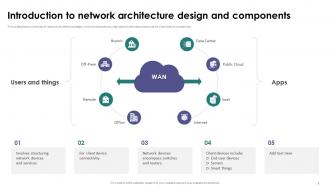
Slide 5: This slide shows Introduction to network architecture design and components.
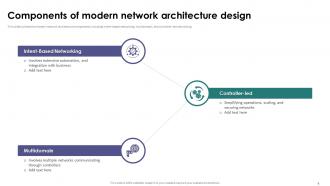
Slide 6: This slide displays Components of modern network architecture design.
Slide 7: This slide presents Four basic network architecture criteria.
Slide 8: This slide highlights title for topics that are to be covered next in the template.
Slide 9: This slide displays Business benefits of network architecture system.
Slide 10: This slide highlights title for topics that are to be covered next in the template.
Slide 11: This slide represents Common types of network architecture system.
Slide 12: This slide showcases Peer-To-Peer network architecture type.
Slide 13: This slide shows Client or server network architecture type.
Slide 14: This slide presents Hierarchical client server architectural model.
Slide 15: This slide displays Networks types based on coverage area.
Slide 16: This slide represents Common types of enterprise network architecture.
Slide 17: This slide showcases Pros and cons of client or server network architecture.
Slide 18: This slide shows Pros and cons of Peer-To-Peer network architecture.
Slide 19: This slide presents Primary layers of network architecture system.
Slide 20: This slide highlights title for topics that are to be covered next in the template.
Slide 21: This slide displays Hardware network architecture design component.
Slide 22: This slide represents Network protocol architecture design component.
Slide 23: This slide showcases Transmission media- network architecture design component.
Slide 24: This slide highlights title for topics that are to be covered next in the template.
Slide 25: This slide shows Modern network topologies architecture design.
Slide 26: This slide presents 3-Tier network topology architecture design.
Slide 27: This slide displays 2-Tier network topology architecture structure.
Slide 28: This slide represents Spine leaf network topology architecture.
Slide 29: This slide showcases SOHO network topology architecture design.
Slide 30: This slide shows Private cloud service network topology.
Slide 31: This slide presents Public cloud service network topology.
Slide 32: This slide highlights title for topics that are to be covered next in the template.
Slide 33: This slide displays About system and network architectural model.
Slide 34: This slide represents Difference between network and internet architecture.
Slide 35: This slide highlights title for topics that are to be covered next in the template.
Slide 36: This slide showcases Challenges and possible solutions of network architecture.
Slide 37: This slide highlights title for topics that are to be covered next in the template.
Slide 38: This slide shows Checklist for implementing network architecture in organization.
Slide 39: This slide presents Best practices for implementing network architecture.
Slide 40: This slide highlights title for topics that are to be covered next in the template.
Slide 41: This slide displays Training schedule for network architecture implementation.
Slide 42: This slide represents Network architecture implementation budget for organization.
Slide 43: This slide highlights title for topics that are to be covered next in the template.
Slide 44: This slide showcases 30-60-90 days plan for network architecture implementation.
Slide 45: This slide shows Roadmap for implementing network architecture strategy.
Slide 46: This slide presents Timeline to implement network architecture in organization.
Slide 47: This slide displays Network performance monitoring and tracking dashboard.
Slide 48: This slide highlights title for topics that are to be covered next in the template.
Slide 49: This slide represents Before vs. after network architecture implementation.
Slide 50: This slide showcases Impact of network architecture design on organization.
Slide 51: This slide shows Impact of network architecture design on organization.
Slide 52: This slide contains all the icons used in this presentation.
Slide 53: This slide is titled as Additional Slides for moving forward.
Slide 54: This is a Location slide with maps to show data related with different locations.
Slide 55: This slide shows Post It Notes. Post your important notes here.
Slide 56: This is an Idea Generation slide to state a new idea or highlight information, specifications etc.
Slide 57: This slide shows SWOT describing- Strength, Weakness, Opportunity, and Threat.
Slide 58: This is Our Target slide. State your targets here.
Slide 59: This is a Timeline slide. Show data related to time intervals here.
Slide 60: This slide contains Puzzle with related icons and text.
Slide 61: This is a Financial slide. Show your finance related stuff here.
Slide 62: This is a Thank You slide with address, contact numbers and email address.
Network Architecture Powerpoint Presentation Slides with all 70 slides:
Use our Network Architecture Powerpoint Presentation Slides to effectively help you save your valuable time. They are readymade to fit into any presentation structure.












FAQs for Network Architecture
So you're basically looking at routers, switches, firewalls, and load balancers as your main stuff. Routers move traffic between different networks. Switches connect devices within the same network. Firewalls are like the annoying bouncer - they control what gets through for security. Load balancers spread traffic across multiple servers so nothing crashes from too much load. Oh, and you'll need DNS servers plus some monitoring tools to actually see what's happening. Honestly though, map out what you really need first because I've seen people way overdo it and waste money on gear they never use.
So basically, how your network's set up totally changes performance based on where data gets stuck. Star setups are nice because everything's centralized, but if that hub dies you're screwed. Mesh networks are way more reliable since they can route around problems - though honestly they're a pain to manage. Ring and bus topologies? Super simple but one cable goes bad and everything's down. I'd say figure out what you absolutely can't afford to lose first, then decide if you want simple/cheap or bulletproof/expensive. There's always that tradeoff.
Dude, scalability is huge - basically how your network handles growth without completely falling apart. Start thinking about it now, not later when everything's on fire. You've got two main routes: horizontal (more servers) or vertical (bigger servers). Load balancers and microservices will save your life here. I swear, I've watched so many teams build stuff that's perfect for like 100 people then completely crashes at 1000. Super frustrating to watch, honestly. Map out where you think you'll be in a year and build those growth points in early. Trust me on this one.
So basically virtualization turns your whole network into software instead of being stuck with physical hardware. You can create virtual switches and routers that only exist as code - sounds crazy but it actually works really well. The flexibility is insane though, you'll be able to spin up new network segments instantly without touching a single cable. Everything gets managed centrally through software rather than walking around configuring boxes manually. I'd honestly just start with a small virtual lab to mess around with it first, that's how I figured out how different it makes network design.
Honestly, start with firewalls at your network edges and segment everything - isolate your critical stuff from the rest. Multi-factor auth is a must, plus role-based access controls so people only see what they need to. VPNs for remote work aren't optional anymore, trust me on that one. Get some intrusion detection running to catch weird activity, and set up regular monitoring - way easier to fix problems before they blow up. I'd map out what you currently have first, then tackle the biggest security holes. Oh, and don't skip those security audits.
So cloud computing totally flips how networks work - you're not running everything in one data center anymore. Instead, your stuff gets spread across different cloud regions and zones on AWS, Azure, whatever. Some things might stay local while other services live in the cloud. The crazy part? Your security boundaries become super blurry now. You don't have that nice clean network perimeter anymore - everything's connected through APIs and internet links. Plus you've got to think about latency between regions, which can be annoying. Network segmentation becomes huge, and honestly zero-trust is the way to go since your network spans everywhere now.
So basically, centralized means one boss calls all the shots, while decentralized splits control between a bunch of different points. Centralized is super fast for decisions and way easier to manage - but honestly, if that main hub crashes, you're screwed. Everything just dies. Decentralized doesn't have that problem since there's backup everywhere, but then you've got coordination headaches and things might act weird across different parts. Really depends what you need though. Want tight control? Go centralized. Need something bulletproof that won't totally fail? Decentralized's your move.
Think of it like planning roads for rush hour - you gotta eliminate those data traffic jams first. Map out where your slowdowns actually happen, then focus on proper segmentation and load balancing. Your backbone needs to handle peak loads without choking. QoS policies are clutch for making sure critical stuff gets priority over random background traffic. Honestly, most people skip the redundant connections part but you'll regret it later. Oh, and don't forget to design around your actual traffic patterns, not what you think they should be.
Dude, honestly the worst part is getting your on-prem stuff to actually talk to the cloud without wanting to throw your laptop. Security becomes this weird juggling act where you're managing two totally different systems. Plus network latency can really mess with you when data's bouncing back and forth. I learned this the hard way - monitoring everything gets super messy since you're dealing with completely different setups. Start with something small first though. Get your connectivity sorted out, figure out the security thing, then worry about scaling up. Trust me on that one.
Honestly, IoT totally flips network design on its head. Instead of just handling computers and phones, you're suddenly managing thousands of tiny sensors and smart devices all talking at once. The scale gets crazy fast - thermostats, cameras, door locks, you name it. Edge computing becomes your best friend because sending every little data ping to the cloud will destroy your bandwidth budget (learned that one the hard way). You'll need different protocols too, like MQTT or CoAP. Security's a nightmare since each device is basically another way hackers can get in. Start with distributed processing at the edge - that's where I'd focus first.
You'll want to watch bandwidth utilization, latency, packet loss, and throughput - those are your bread and butter metrics. Jitter's crucial if you've got VoIP or video calls running. Error rates and uptime stats matter too, obviously. Most decent monitoring tools will automatically track this stuff now (thank god, because doing it manually sucks). Oh, and set up alerts when things hit your danger zones. Trust me, you'd rather catch problems before Karen from accounting starts blowing up your phone about slow internet.
Dude, 5G is flipping network design on its head. Instead of everything flowing through central hubs, you need computing power scattered everywhere - right at the edge where users actually are. Latency has to be crazy low, so the old hub-and-spoke thing just doesn't cut it anymore. The coolest part? Network slicing lets you carve up the same physical infrastructure into custom virtual networks for different purposes. Honestly feels like sci-fi sometimes. My advice - start mapping out your edge strategy now because going back to retrofit this stuff later will cost you a fortune. Trust me on that one.
Honestly, redundancy is everything here. Get duplicate hardware first - backup switches, routers, the works. Multiple ISP connections are a lifesaver too, trust me on that one. I had a fiber cut last year that would've been way worse without backup internet. Configure OSPF or EIGRP so traffic reroutes automatically when links die. Link aggregation helps at the access layer. But here's the thing - you gotta actually test this stuff regularly or it's pretty much useless when you need it most. Nothing worse than finding out your "redundant" setup doesn't work during an actual outage.
Three main things to nail down: visual diagrams showing logical and physical layouts, solid documentation of your IP schemes and device configs, plus version control for everything. The real killer though? Actually keeping it updated - I can't tell you how many "current" network docs I've seen that haven't been touched since like 2018. Document the "why" behind design choices too, not just what's there. Trust me, you'll be grateful when you're troubleshooting something at 2am and can't remember why you set it up that way. Just pick one area and start there.
So ML basically does all that network planning stuff your team normally spends forever on. Traffic analysis, bandwidth predictions, automatic routing adjustments - it handles the whole mess. Honestly the guesswork elimination alone is worth it. Future capacity planning becomes way easier too since it spots bottlenecks before users start complaining (which is huge). Oh and the routing optimizations it suggests are usually things you'd never think of yourself. Just make sure you're feeding it decent monitoring data first - garbage in, garbage out and all that.
-
Best way of representation of the topic.
-
The service is fast, and I could access any presentation after buying the subscription. I don’t think I’ll ever have to worry about a presentation in my life.