

Next Generation Firewall Implementation Proposal Powerpoint Presentation Slides




Try Before you Buy Download Free Sample Product
 Impress Your
 Audience
 100%
100% Editable
 Save Hours
 of Time


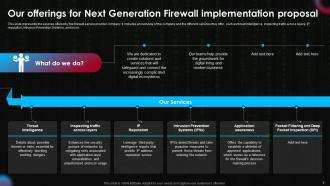
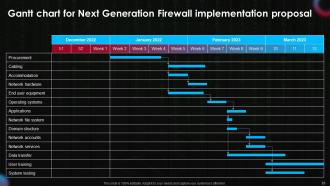
Introducing Next-Generation Firewall Implementation Proposal designed to help organizations navigate the complex process of shifting to firewall security. Our insightfully designed Next-Generation Firewall Deployment Proposal template covers details about Firewall services such as Threat Intelligence, Inspecting traffic across layers, IP Reputation, Intrusion Prevention Systems IPSs, Application awareness, Packet Filtering and Deep Packet Inspection DPI, and so on. Additionally, this Next-Gen Cloud Security Gateway Proposal aims to identify problems with the legacy network security system and develop a plan for migrating to firewall security and management. Our NGWs deck also exhibits details about the expert team, client testimonials, sponsorship agreement, and the terms and conditions. It further incorporates the Gantt chart, along with the timeline and contact details of the organization. Lastly, this Intelligent Intrusion Prevention System consulting module can help the company in network security transformation and management alignment. Download our 100 percent editable and customizable template, also compatible with Google Slides.
People who downloaded this PowerPoint presentation also viewed the following :
Content of this Powerpoint Presentation
Slide 1: This slide introduces Next-Generation Firewall Implementation Proposal. State Your Company Name and begin.
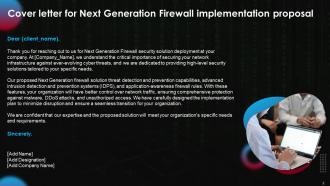
Slide 2: This slide presents the cover letter.
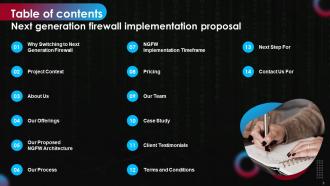
Slide 3: This slide shows a Table of Contents for the presentation.
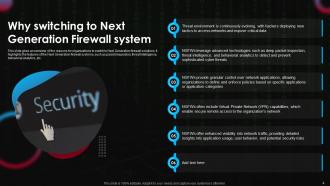
Slide 4: This slide gives an overview of the reasons for organizations to switch to Next Generation firewall solutions.
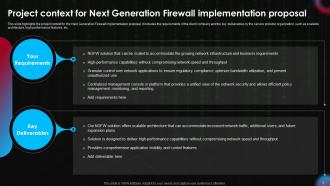
Slide 5: This slide puts the project context for the Next Generation Firewall implementation proposal.
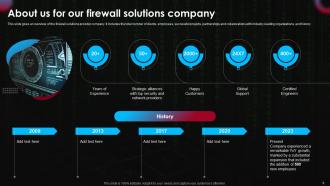
Slide 6: This slide illustrates an overview of the firewall solutions provider company.
Slide 7: This slide represents the services offered by the firewall service provider company.
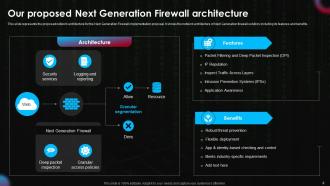
Slide 8: This slide entails the proposed network architecture for the Next Generation Firewall implementation proposal.
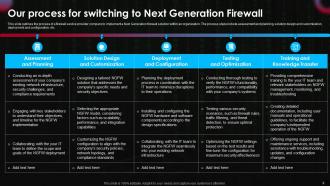
Slide 9: This slide outlines the process of a firewall service provider company to implement a Next Generation firewall solution.
Slide 10: This slide projects the timeline for implementing a Next Generation firewall solution within a company.
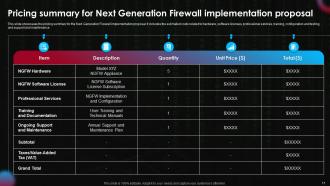
Slide 11: This slide showcases the pricing summary for the Next Generation Firewall implementation proposal.
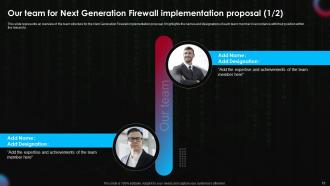
Slide 12: This slide entails an overview of the team structure for the Next Generation Firewall implementation proposal.
Slide 13: This slide provides an overview of the team structure for the Next Generation Firewall implementation proposal.
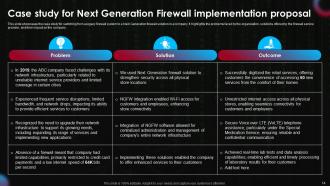
Slide 14: This slide shows the case study for switching from a legacy firewall system to a Next Generation firewall solution.
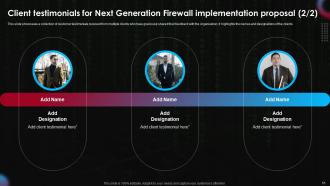
Slide 15: This slide illustrates a collection of customer testimonials received from multiple clients.
Slide 16: This slide is in continuation with the previous slide.
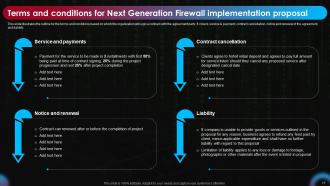
Slide 17: This slide illustrates the outline for the terms and conditions based on which the organization will sign a contract with the agreement party.
Slide 18: This slide covers the next step after the proposal has been accepted.
Slide 19: This is a Contact Us slide. Add your Email Address, Contact, Social Media Handles, and Address.
Slide 20: This slide shows all the icons included in the presentation.
Slide 21: This slide is titled Additional Slides for moving forward.
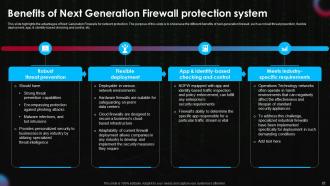
Slide 22: This slide highlights the advantages of Next Generation Firewalls for network protection.
Slide 23: This slide contains the chart and figures for information.
Slide 24: This slide presents a Roadmap with additional text boxes.
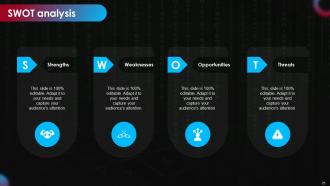
Slide 25: This slide shows SWOT describing- Strength, Weakness, Opportunity, and Threat.
Slide 26: This slide is an Idea Generation slide to state a new idea or highlight information, specifications, etc.
Slide 27: This slide is Our Goal slide. State your firm's goals here.
Next Generation Firewall Implementation Proposal Powerpoint Presentation Slides with all 35 slides:
Use our Next Generation Firewall Implementation Proposal Powerpoint Presentation Slides to effectively help you save your valuable time. They are readymade to fit into any presentation structure.














FAQs for Next Generation Firewall Implementation Proposal
So basically, your firewall is like a bouncer for your network - it sits between your stuff and the wild west of the internet. Checks every piece of data trying to get in or out based on rules you set up. It looks at IP addresses, ports, all that technical stuff to decide what's allowed through. Honestly, most people just leave it on default settings which is... not great. You really want to customize those rules for your actual setup. Without it though? You're basically leaving your front door wide open. It's one of those things that's boring until something goes wrong.
So basically a firewall watches what's trying to get into your computer from the internet - blocks sketchy connections and stuff. Antivirus is different - it hunts down malware that's already made it onto your device. Like if you clicked some random email attachment (we've all been there). The firewall can't do anything about viruses you accidentally download, and antivirus won't stop hackers trying to break in through your network. Honestly, running just one is kinda pointless. You really gotta have both working together or you're leaving yourself wide open.
So there's basically three types you'll run into. Packet filtering just looks at basic info like where data's coming from - super fast but pretty basic. Then you've got stateful inspection, which actually remembers your connections and can catch weird stuff happening. Application firewalls dig way deeper into the actual content, though they can bog things down sometimes. Honestly, I'd go with stateful as your starting point - gives you decent protection without making everything crawl. My old job used packet filtering and we got burned a few times, so yeah, don't cheap out completely.
So packet filtering is your firewall checking every data packet trying to get in or out of your network. It's like a bouncer at a club, but way more organized (and less likely to be bribed lol). The firewall looks at IP addresses, port numbers, protocols - all that technical stuff. You can make rules like "block this sketchy IP" or "only let web traffic through port 80." Honestly, it's pretty straightforward once you get it. This is firewall basics 101, so definitely worth knowing when you're setting up security rules.
So basically, stateful firewalls remember your connections while stateless ones just check each packet individually. It's like having a bouncer who knows you're already inside vs. one who cards you every time you walk by lol. The stateful ones are way better at blocking random crap because they know if incoming traffic is actually responding to something you requested. Stateless firewalls are faster but honestly pretty useless against spoofing since they can't tell fake packets from real responses. For anything you actually care about protecting, stateful is the only way to go.
Firewalls are like having a good bouncer - they'll block most of the obvious troublemakers trying to get into your network. But here's the thing, they're just one piece of the puzzle. Bad stuff can still sneak through or already be inside your system. That's why you need multiple layers going - endpoint protection, email filters, teaching your users not to click sketchy links (good luck with that one lol). Each layer catches different threats the others miss. Keep your firewall rules locked down tight, but don't think it's gonna solve everything by itself.
So basically your firewall looks at each packet's header info and decides what to do based on the protocol - HTTP, SSH, FTP, whatever. Most firewalls today are stateful, which means they're tracking your connections and making smarter choices about what gets through. FTP is honestly such a nightmare because it uses multiple ports (whoever designed that protocol clearly hated network admins), but modern firewalls can handle it with deeper packet inspection. You'll need specific rules for each protocol you want to allow since everything's blocked by default. Just don't forget to review your rules occasionally or you'll be troubleshooting weird connection issues later.
So basically, small businesses usually just need a hardware firewall at the edge plus software ones on each computer. Pretty straightforward setup. Enterprises though? Total different beast - they're dealing with multiple firewall layers, network segmentation, intrusion detection, all that jazz. Way more departments and servers to protect. Enterprise configs can get absolutely insane with all the rules they pile on (I've seen some that are just... wow). For you, I'd figure out what you're actually protecting first and count your access points. That'll tell you if you need the crazy enterprise stuff or can keep it simple.
Look, firewalls help with DDoS by rate limiting connections and blocking sketchy IP ranges, but they're not gonna save you from the big nasty attacks. You can set connection limits per IP and create rules to drop traffic that goes crazy high. Most newer firewalls will catch common DDoS patterns too. But here's the thing - when you're dealing with massive volumetric stuff, you really need proper DDoS protection services sitting upstream. I'd start tweaking your firewall's rate limiting though. Better than doing nothing, and it'll handle the smaller attempts just fine.
Ugh, rule sprawl is the worst - you end up with like 200+ rules and half of them are probably useless by now. Plus nobody ever updates the documentation because let's be real, who has time for that? The tricky part is when you need to change something and you're not sure what'll break. I've seen people accidentally kill VPN access trying to tighten security rules. What works for me: clean house regularly and delete the dead rules. Use names that actually make sense so future-you won't hate past-you. And seriously, test everything in staging first - learned that one the hard way.
So regular firewalls are pretty basic - they just look at ports and IP addresses to decide what gets through. Next-gen ones actually dig into the data packets themselves. They can tell what apps you're using, block specific sites like Facebook while letting other web stuff work fine, and catch malware that's trying to sneak by. It's like having a bouncer who doesn't just check your ID but also knows your whole deal and what you've got with you. Honestly, with all the crazy stuff happening online these days, you really want that deeper protection if you can swing it.
Scalability should be your first priority - cloud traffic spikes are brutal and totally unpredictable. Make sure whatever you pick plays nice with your cloud provider's existing tools and can auto-scale without you babysitting it. Multi-tenancy support is pretty critical since you're sharing infrastructure with everyone else. The rule management piece gets annoying quick when you're dealing with dynamic IPs, so definitely go for something with solid automation and API support. You'll need to decide between cloud-native firewall services versus deploying your own virtual appliances too. Test everything with real workloads in staging first - trust me on this one.
Dude, you absolutely need logging and monitoring for your firewall - it's like having security cameras. Without logs, good luck figuring out what happened during a breach. I found that out the hard way! Plus you can spot attack patterns and fix connectivity problems way easier. Compliance auditors love seeing proper logs too. Here's the thing though - don't just collect them and forget about it. Set up alerts for weird activity and actually review the data regularly, otherwise you're just hoarding files. Oh, and use real traffic patterns to adjust your rules instead of just guessing what might work.
Yeah, firewalls are solid but they're way better when you connect them to your other security stuff. Like, set yours to auto-block sketchy IPs that your IDS catches. Feed those traffic logs into your SIEM too - gives you the bigger picture. Most newer firewalls can share threat intel with your endpoint and email tools, which is honestly pretty sweet because everything actually works together instead of just... existing separately. Oh, and definitely get those firewall logs piped into your monitoring dashboard first. Makes spotting attacks so much easier.
Dude, misconfigured firewalls are basically network nightmare fuel. They'll either block stuff you actually need or - way worse - leave ports wide open for hackers. I've seen companies accidentally expose their whole internal network because someone made a "quick change" and never double-checked the rules. The crazy part? These screwups can sit there undetected for months. Default configs are usually trash too, so don't just install and walk away. You gotta audit those rules regularly and actually test them. Honestly, it's one of those things that seems boring until it totally wrecks your day.
-
Definitely a time saver! Predesigned and easy-to-use templates just helped me put together an amazing presentation.
-
Visually stunning presentation, love the content.