

Organization management system powerpoint presentation slides





Try Before you Buy Download Free Sample Product
 Impress Your
 Audience
 100%
100% Editable
 Save Hours
 of Time


Determine your organization structure and design by using the Organization Management System PowerPoint Presentation Slides. This presentation analyzes the current situation of the organization by highlighting problem areas. Utilize our content-ready organization structure and management PowerPoint templates and depict the organization readiness criteria for the development process. Discuss the organization development action plan by using a visually appealing PPT slide deck. The presentation will help to develop an organization development framework with a timeline to complete each phase of the development process. Present management skills and styles along with the features and discuss the impact on the organizational success rate. The organization management system PPT slides also covers work culture improvement plan, communication plan after organization management. After that discuss common threats faced by the organization such as data misused, insider threats, strict compliance regulations, etc. It also covers the roles of team members in the organization development process, roles of employees in reducing threats, the role of HR consulting in redesigning organizational structure, organization management workstream, etc.
People who downloaded this PowerPoint presentation also viewed the following :
Content of this Powerpoint Presentation
Slide 1: This slide introduces Organization Management System. State your Company name and begin.
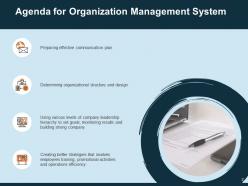
Slide 2: This slide displays Agenda for Organization Management System
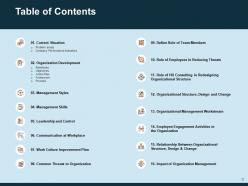
Slide 3: This slide shows Table of Contents.
Slide 4: This slide displays Table of Contents of the presentation.
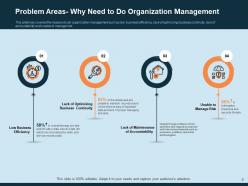
Slide 5: This slide has covered the reasons to do organization management such as low business efficiency, lack of optimizing business continuity, lack of accountability and unable to manage risk
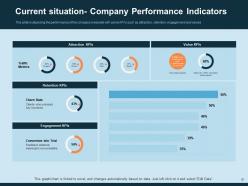
Slide 6: This slide is depicting the performance of the company's website with some KPI’s such as attraction, retention, engagement and values
Slide 7: This slide displays Table of Contents.
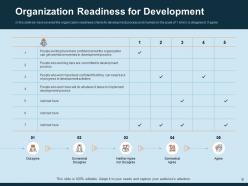
Slide 8: In this slide we have covered the organization readiness criteria for development process and marked on the scale of 1 which is disagree to 5 agree
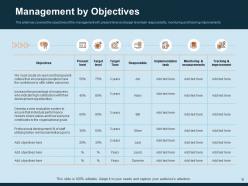
Slide 9: This slide has covered the objectives of the management with present level and target level task responsibility, monitoring and tracking improvements
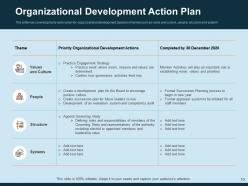
Slide 10: This slide has covered priority action plan for organizational development based on themes such as value and culture, people, structure and system
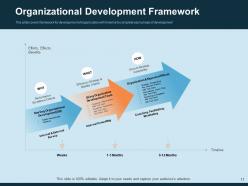
Slide 11: This slide covers framework for development of organization with timeline to complete each phase of development
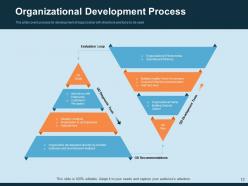
Slide 12: This slide covers process for development of organization with directions and tools to be used
Slide 13: This slide displays Table of Contents.
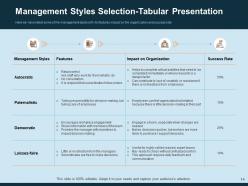
Slide 14: Here we have listed some of the management styles with its features impact on the organization and success rate
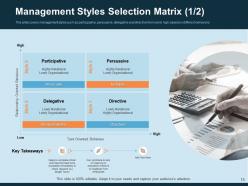
Slide 15: This slide covers management styles such as participative, persuasive, delegative and directive from low to high based on different behaviors
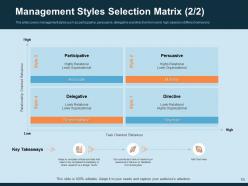
Slide 16: This slide covers management styles such as participative, persuasive, delegative and directive from low to high based on different behaviors
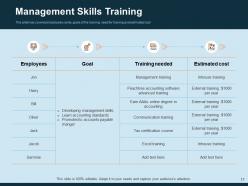
Slide 17: This slide has covered employees name, goals of the training, need for training and estimated cost
Slide 18: This slide displays Table of Contents
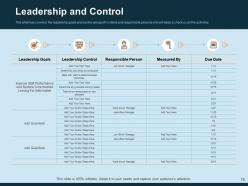
Slide 19: This slide has covered the leadership goals and control along with criteria and responsible persons who will keep a check on all the activities
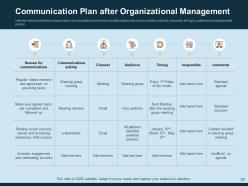
Slide 20: Here we have covered the organization communication plan which includes reasons for communication, activity, channels, timing’s, audience and responsible person
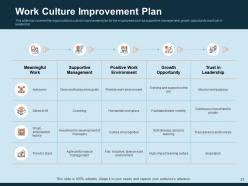
Slide 21: This slide has covered the organization’s cultural improvement plan for the employees such as supportive management, growth opportunity and trust in leadership
Slide 22: This slide shows Table of Contents
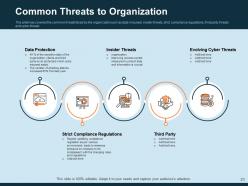
Slide 23: This slide has covered the common threats faced by the organization such as data misused, insider threats, strict compliance regulations, third party threats and cyber threats
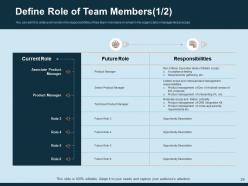
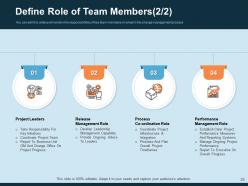
Slide 24: You can edit this slide and mention the responsibilities of key team members involved in the organization management process
Slide 25: This slide mentions the responsibilities of key team members involved in the change management process
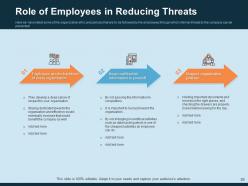
Slide 26: Here we have listed some of the organization ethic and policies that are to be followed by the employees through which internal threats to the company can be prevented
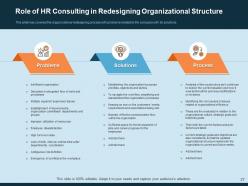
Slide 27: This slide has covered the organizational redesigning process with problems related to the company with its solutions.
Slide 28: This slide displays Table of Contents
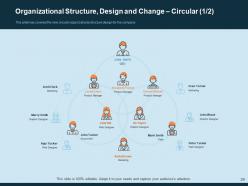
Slide 29: This slide has covered the new circular organizational structure design for the company
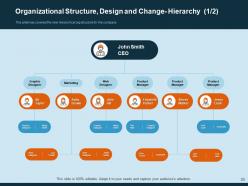
Slide 30: This slide has covered the new hierarchical organizational structure for the company
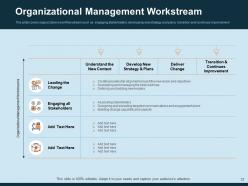
Slide 31: This slide covers organization’s workflow stream such as engaging stakeholders, developing new strategy and plans, transition and continues improvement
Slide 32: This slide displays Table of Contents.
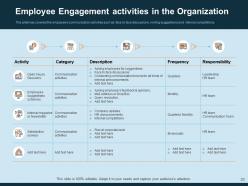
Slide 33: This slide has covered the employee’s communication activities such as face to face discussions, inviting suggestions and internal competitions.
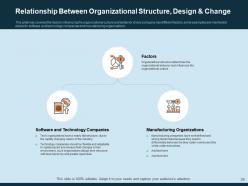
Slide 34: This slide has covered the factors influencing the organizational culture and behavior. Every company has different factors some examples are mentioned below for software and technology companies and manufacturing organizations.
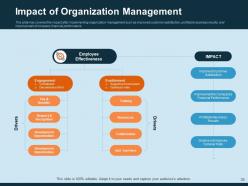
Slide 35: This slide has covered the impact after implementing organization management such as improved customer satisfaction, profitable business results, and improvement of company financial performance.
Slide 36: This is Icons Slide for Organization Management System.
Slide 37: This slide is titled as Additional Slides for moving forward.
Slide 38: This is About us slide to showcase Company specifications.
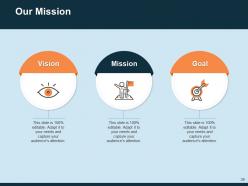
Slide 39: This slide displays Vision, Mission and Goals.
Slide 40: This slide shows Targets of the Company.
Slide 41: This slide shows Puzzle process.
Slide 42: This slide is titled as Post It Notes. Post your important notes.
Slide 43: This is Thank You slide with Contact details.
Organization management system powerpoint presentation slides with all 43 slides:
Use our Organization Management System Powerpoint Presentation Slides to effectively help you save your valuable time. They are readymade to fit into any presentation structure.
FAQs for Organization management system
Honestly, start by mapping who reports to whom and where decisions get stuck - that'll show you what's broken first. You need clear structure and defined roles, plus solid communication systems. Documentation is huge too, even though it's boring as hell. Performance tracking helps, but don't go overboard with metrics. The trick is making sure your leadership setup actually matches how work flows through the place. Oh, and feedback loops - people need to know what's happening. Think of it like building blocks where each piece supports the others. Otherwise everything gets wobbly fast.
Honestly, it's a game changer for keeping everyone on the same page. Instead of digging through endless email threads, everything lives in one spot - project updates, calendars, who's doing what. Real-time progress tracking means no more awkward "so... how's that thing going?" conversations. Everyone can actually see deadlines and priorities instead of just pretending they remember from last week's meeting lol. The transparency cuts way down on those pointless check-ins that could've been avoided. I'd probably test it with just one project first though - see how your team handles it before going all in.
Honestly, tech has completely transformed how companies manage their people nowadays. Everything's automated - from hiring new folks to tracking performance reviews. Real-time data, cloud access, workflows that actually talk to each other... it's pretty wild. AI can even predict when you'll need more staff before you realize it yourself. Mobile apps changed the game too - managers aren't chained to their desks anymore. Oh, and here's the thing - most companies are barely scratching the surface of what their systems can do. You should dig into those automation features you're probably ignoring. Could save you hours every week.
Track the obvious stuff first - how fast people finish tasks, onboarding time, whether anyone's actually using your new system (shocking how often they don't). But honestly? The real wins show up in vibes. Survey your team about role clarity and if they can find stuff without hunting around forever. Fewer panicked "wait, who owns this?" Slack messages = you're winning. Oh, and productivity rates matter but don't obsess over them daily - that's exhausting. Pick maybe 3-4 things to measure now, then check back quarterly. Your people feeling less chaotic is worth more than perfect spreadsheets anyway.
Honestly, the worst part is always people pushing back on change - they'd rather stick with broken processes than learn something new. Data migration from old systems will make you want to pull your hair out. Integration problems pop up everywhere, training usually sucks so users get pissed off, and suddenly everyone wants their own special features added. Oh, and you'll definitely go over budget because these things always take forever. Get your key people excited about it first though - once they're on board, everyone else follows. Change management sounds boring but it's literally the difference between success and disaster.
So basically, an Organization Management System pulls all your data into one spot so you can actually make smart decisions instead of just winging it. Track your KPIs, see where resources are going, monitor project results - honestly beats those awful quarterly meetings where everyone's just guessing. It'll help you spot patterns and bottlenecks across departments, plus you can run different scenarios to test strategies before committing. Oh, and the forecasting stuff is pretty solid too. Just figure out which metrics actually move the needle for your goals first, then build dashboards around those. Way less headache than spreadsheets everywhere.
Honestly, start with the basics - good reporting and something that actually plays nice with your email/calendar setup. Mobile access is huge since everyone's glued to their phones anyway. You'll need decent security (encryption, backups, all that stuff) and permissions so teams aren't accidentally messing with each other's work. Automated workflows are a lifesaver if you can swing it. The dashboards should be customizable too - there's nothing worse than being stuck with someone else's idea of "optimal layout." Make sure whatever you pick can grow with you. Oh, and seriously make a list of deal-breakers versus nice-to-haves before you start looking. Saves so much time.
Here's the thing - your company culture totally shapes how your OMS needs to work. Flat, collaborative teams? You want transparency and easy cross-department chat. More hierarchical places need proper approval chains and permission levels. Oh, and decentralized vs centralized makes a huge difference for data access patterns. I've watched so many systems crash and burn because they went against how people naturally work together. Like, why force your team into some rigid process when they're used to being flexible? Design it around how decisions actually get made in your company, not some textbook ideal. Way more likely to succeed that way.
Dude, you absolutely cannot mess around with data security on this stuff. Your OMS is going to have employee records, payroll info, performance reviews - basically everything that could ruin people's lives if it gets out. One hack and you're dealing with lawsuits, angry employees, and those brutal regulatory fines. Remote work makes it even scarier honestly - so many more ways for bad actors to get in. You'll want end-to-end encryption and role-based access controls at minimum. Regular security audits too. I know it's tempting to save money elsewhere, but this isn't the place.
Yeah, totally! Your management system can definitely help with engagement. People want to see how their work connects to bigger company goals - it's not rocket science, right? Better communication means less confusion about what's happening. Most systems have feedback tools built in too, which matters because honestly everyone just wants to know they're not screwing up. The trick is picking features that actually connect people to their purpose instead of drowning them in more paperwork. I'd focus on transparency first, then work on getting real two-way conversations going.
So basically it puts all your project stuff in one spot where you can actually see what's going on. No more hunting through a million emails to figure out if someone's behind schedule. Real-time updates on budgets, timelines, who's doing what - that kind of thing. It'll send you alerts when stuff goes sideways too, which honestly saves so much headache. All your docs and conversations live there instead of scattered everywhere. My advice? Map out how you currently handle projects first, then figure out what parts are driving you crazy that the system could fix.
Honestly? Skip the boring PowerPoint stuff and let people actually play around in the system. Way better for learning. Focus on what each person's role actually needs - don't dump everything on them at once. Pick a couple tech-savvy people to train first as your go-to helpers (saves you so much headache later). Make some simple cheat sheets they can stick by their computers. Oh, and this is huge - give everyone practice time before you flip the switch. I've seen too many rollouts crash because people were stressed trying to figure things out with customers waiting. Nobody learns well when they're panicking!
Build it modular from day one - think Legos, not concrete blocks. You can swap pieces out when things change. Check in quarterly (more if your industry's moving crazy fast). Here's what most people miss though: actually talk to the people using it daily, not just the higher-ups. They'll catch problems way earlier. Oh, and don't treat it like you're done once it's built. Your system needs to grow with you. Otherwise you'll be stuck with something that worked great two years ago but makes zero sense now. It's honestly more art than science sometimes.
Look, feedback is what stops your Organization Management System from becoming a fancy paperweight. Get input from managers, employees, whoever's actually using the thing - they'll tell you what's broken or annoying. Without their voices, you're basically throwing darts blindfolded when making changes. Surveys work, but honestly the best stuff comes from casual conversations and quick check-ins. People will point out bottlenecks you missed and gaps between what you promised the system would do versus reality. Just don't be that person who collects feedback then ignores it.
So here's the thing - every industry builds their OMS totally differently based on what they actually need. Healthcare has to worry about HIPAA and protecting patient info, so that's baked right into theirs. Manufacturing? They're obsessed with tracking supply chains and quality control stuff. Retail companies focus hardcore on inventory and customer data - their dashboards honestly look nothing like what a law firm would use. Finance throws crazy security and audit features on top of everything. My advice? Figure out your industry's biggest headaches first, then find systems that already handle those specific problems. Way easier than trying to hack together some generic platform later.
-
Great quality product.
-
Colors used are bright and distinctive.
-
Out of the box and creative design.
-
Designs have enough space to add content.
-
The Designed Graphic are very professional and classic.
-
Attractive design and informative presentation.
-
Great designs, really helpful.
-
Much better than the original! Thanks for the quick turnaround.