

Management team powerpoint presentation slides





Try Before you Buy Download Free Sample Product
 Impress Your
 Audience
 100%
100% Editable
 Save Hours
 of Time


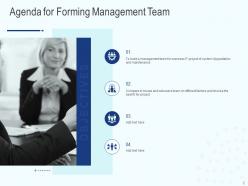
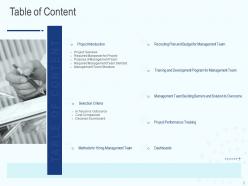
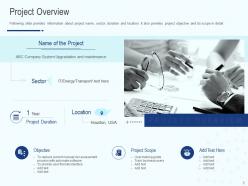
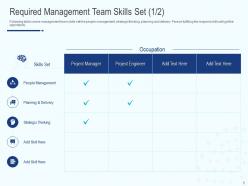
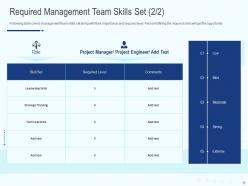
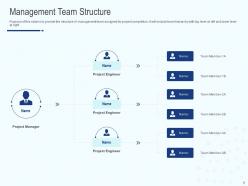
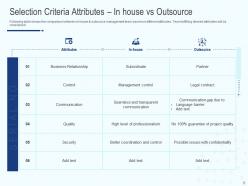
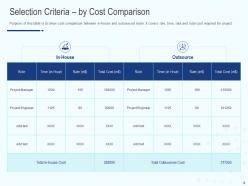
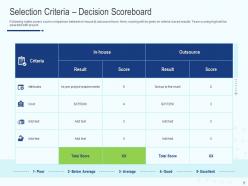
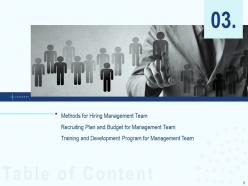
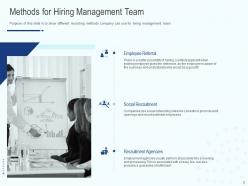
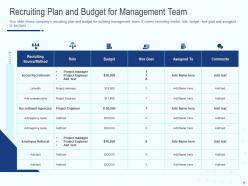
Introducing our content ready Management Team PowerPoint Presentation Slides. Talk about management team skills like people management, planning and delivery, strategic thinking and so on, with the aid of this professionally designed PPT slideshow. Provide the structure of the management team assigned for project completion by using the visually appealing PowerPoint complete deck. Take the assistance of the topic-specific PPT slides to showcase the comparison between in-house and outsource management teams based on different attributes such as business relationship, control, communication, quality, and security, etc. Utilize the ready to use PowerPoint templates to talk about methods of hiring management team e.g. employee referral, social recruitment, recruitment agencies, etc. You can also use the PPT graphics to demonstrate the company’s recruiting plan and budget for building the management team. Thus, download our informative executive leaders’ team-building PowerPoint presentation to create training programs for improving the different skills set of your in-house team. Bask in the blessings of the Divine with our Management Team Powerpoint Presentation Slides. You will feel as if in God's country.
People who downloaded this PowerPoint presentation also viewed the following :
Content of this Powerpoint Presentation
Description:
The image presents a slide with the title "Management Team" prominently displayed in a bold, blue font, which conveys a sense of professionalism and structure. Below the title, there's a placeholder text "Your Company Name," suggesting that the slide is a template to be customized with the specific name of a company using this presentation. The photograph on the left side of the slide features a business environment where a person is standing and appears to be delivering a presentation or leading a discussion, indicating the collaborative and managerial aspects typically associated with a management team.
The styling of the slide is clean, with a decent amount of white space that helps draw attention to the title and the imagery. The color scheme is composed of neutral and blue tones, which are often associated with trust, efficiency, and communication - key traits in management. This slide could apply to various settings and industries that require a presentation on the organization's management team or leadership structure.
Use Cases:
This slide could apply to various settings and industries that require a presentation on the organization's management team or leadership structure.
1. Consulting:
Use: Presenting the firm's leadership team.
Presenter: Managing Partner.
Audience: Potential clients or new employees.
2. Information Technology:
Use: Introducing the IT project management team.
Presenter: Chief Technology Officer.
Audience: Stakeholders or project team members.
3. Healthcare:
Use: Highlighting administrative leadership in a hospital.
Presenter: Hospital Administrator.
Audience: Hospital staff or board members.
4. Marketing:
Use: Showcasing the top-tier management of a marketing agency.
Presenter: Marketing Director.
Audience: Clients or new team members.
5. Education:
Use: Describing the management team at an educational institution.
Presenter: School Principal or Dean.
Audience: Faculty or educational board.
6. Manufacturing:
Use: Introducing the plant management team to staff and stakeholders.
Presenter: Plant Manager.
Audience: Plant employees and corporate executives.
7. Hospitality:
Use: Presenting the management team of a hotel or restaurant chain.
Presenter: General Manager.
Audience: Investors or new staff.
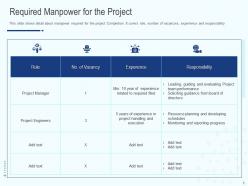
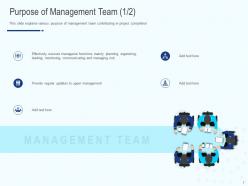
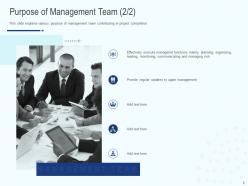
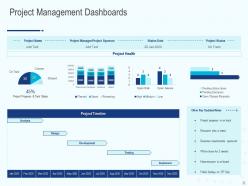
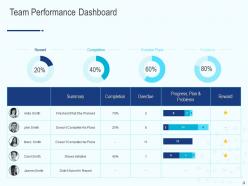
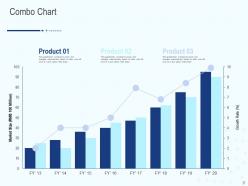
Management team powerpoint presentation slides with all 34 slides:
Use our Management Team Powerpoint Presentation Slides to effectively help you save your valuable time. They are readymade to fit into any presentation structure.





FAQs for Management team
Cover your team first - backgrounds, why they're perfect for their roles, past wins that actually matter for this project. Investors really do bet on people over ideas, so don't skimp here. Then hit your vision and roadmap, where you stand against competitors, financials and projections, plus milestones you've crushed and what's next. Each section should be tight but interesting. Oh, and definitely practice those transitions between speakers beforehand - nothing kills momentum like awkward handoffs where everyone's just staring at each other.
Look, nobody wants to sit through another slide deck full of spreadsheets and bullet points. Instead, think of your presentation like telling a story - you've got a problem, some drama in the middle, then boom, your solution saves the day. Charts become way more interesting when they're revealing something surprising rather than just showing last quarter's numbers. People actually remember stories, weird how that works. Start with figuring out what story you're telling first, then pick visuals that back up each part. Your data should feel like characters helping move the plot forward. Trust me, execs will stay awake for this approach.
Honestly, data viz is a game changer with executives. Those people don't want to stare at endless spreadsheet rows - who does? Show them a clean trend line or comparison chart instead, and boom, suddenly they're asking smart questions and actually engaged. The trick is keeping everything super focused on one key insight you want them to remember. Skip the fancy stuff that looks cool but confuses the message. I learned this the hard way after watching too many presentations bomb because someone got carried away with bells and whistles. Simple storytelling through charts gets decisions made faster than anything else.
Know your audience first - that's everything. Investors want ROI numbers and growth stats. Employees? They're worried about their jobs and whether the company culture actually sucks. Board members think strategy and risk. Customers just want to know what's in it for them. Ask yourself what's keeping them awake at 2am, then build your pitch around that. Financial jargon works with VCs but you'll lose regular staff immediately. I learned this the hard way once - totally bombed a presentation because I used the wrong tone. Match your language and data to who's listening, and you're golden.
Jump straight into interaction - polls, quick discussions, whatever gets them talking. Trust me, execs zone out fast with slide-heavy presentations. Mix in case studies they'll actually recognize, pull data from your own company if you can. Don't save Q&A for the end either, let them interrupt you. Keep slides clean but honestly, the visuals matter way less than you think. Here's the thing though - everything needs to tie back to their teams and budgets. That's literally the only way they stay focused. Oh, and break up the content every 5-7 minutes or you'll lose them completely.
Start with your main point - what's the ONE thing they need to walk away with? Cut all the corporate BS that adds zero value. Seriously, buzzwords kill presentations. Use the rule of three for organizing info - brains love that structure. Headlines help too. Practice your timing so you're not racing through the good stuff at the end (been there, done that). Oh, and test it on someone outside your team first! They'll spot confusing parts you're blind to. Sometimes you're too close to see what doesn't make sense.
Dude, biggest mistake is running way over time - you'll lose them completely. Skip the operational details too, execs want strategy and results, not process stuff. Never just read your slides (we all have eyes lol). Oh and here's something I learned the hard way: don't blindside leadership with bad news in front of everyone. Give them a heads up first. Your data needs to tell an actual story, not just be corporate buzzword soup. Practice your timing beforehand and always end with one specific thing you need from them.
Don't wait until the last second to get feedback - seriously, start way earlier in your prep. Grab a few trusted people and run key sections by them. Ask stuff like "Does this data story actually make sense?" or "Am I dragging on too much with the financials?" I swear, every team I know waits until like the night before and then freaks out trying to fix everything. Set up some simple tracker (even just a doc) so you can catch patterns. Three people saying the same thing? Yeah, you should probably listen. Oh, and actually make the changes instead of just saying "thanks for the feedback!" then doing nothing.
Okay so first, hook them with something leadership actually gives a shit about - like "we're bleeding 20% of customers after month two." Create that tension upfront. Then walk through your solution step by step: problem, what you found, what to do about it, what winning looks like. I know you probably want to show off all that analysis you did (totally get it), but resist the urge to data-dump on them. Focus each slide on moving the story forward. Oh and practice your transitions out loud beforehand - that's honestly where most presentations completely tank and people zone out.
Dude, try Mentimeter for live polls during your presentation - people actually pay attention when they can vote on stuff. Tableau makes boring numbers look way cooler too. Oh, and those breakout rooms in Zoom? Perfect for getting execs to actually talk instead of just sitting there. I swear, half these corporate presentations would be 10x better with just some basic interaction. Miro's solid for brainstorming sessions if you're doing that collaborative thing. But honestly? Don't go overboard. Pick maybe two tools max or you'll just confuse everyone and spend the whole time troubleshooting instead of presenting.
Honestly, design matters way more than most people realize for exec presentations. Those folks have zero patience for messy slides - they'll tune out immediately if your charts are unreadable or text is crammed everywhere. I've literally watched brilliant ideas get shot down because the slides looked like garbage (which is pretty unfair but whatever). Clean formatting shows you're detail-oriented, especially when you're asking for money. Stick with simple layouts, readable fonts, tons of white space. Yeah, it takes extra time to polish everything, but executives notice that stuff and it's totally worth the effort.
Okay so first thing - always acknowledge the question, then pause to actually think. Don't just word-vomit immediately. Stay calm even when someone's obviously trying to mess with you (and trust me, there's always one). If you don't know something? Just say it. Way better than bullshitting. Then promise to follow up by X date. For pushback, try this: "I get how you feel, others felt the same way, but here's what actually worked for us." Oh and definitely prep for your three worst-case questions beforehand. You'll thank yourself later.
Your call-to-action needs to be crazy specific - none of that "let's circle back" nonsense. Tell them exactly what you need and by when. Something like "I need budget approval by Friday so we can kick off Monday" or "Who's taking ownership of the customer research?" Most presentations just awkwardly fizzle out without clear next steps. Don't be that person! Explain why timing actually matters to create some urgency. Always assign ownership too. Instead of asking "any questions?" try "what questions do you have about next steps?" It's way more focused and keeps the momentum going.
Yeah, interruptions are brutal - they mess with your flow and make the whole team look scattered. Your audience stops listening to your actual points and just focuses on the chaos. Here's what works: think through the obvious tough questions beforehand and have extra slides ready. Right at the start, tell everyone when Q&A happens. When someone jumps in anyway (and they will), be nice but firm: "Good question - I'll hit that in two slides when we cover financials." Honestly, practice this stuff during rehearsals. You'll thank yourself later when you can smoothly pivot back without missing a beat.
Pick case studies that actually match what your audience deals with daily - otherwise they'll tune out. Walk through real numbers and decisions, not just fluffy success stories. Honestly, the failures are usually way more interesting anyway. I've sat through so many presentations where the example felt totally made up or irrelevant. Structure it like a story with clear before/after. Include what went sideways too. By the end, they should be thinking "okay yeah, we could actually pull this off." Make it feel real, you know?
-
Great experience, I would definitely use your services further.
-
Perfect template with attractive color combination.
-
Excellent Designs.