

People process technology diagram ppt example 2017




Try Before you Buy Download Free Sample Product
 Impress Your
 Audience
 100%
100% Editable
 Save Hours
 of Time


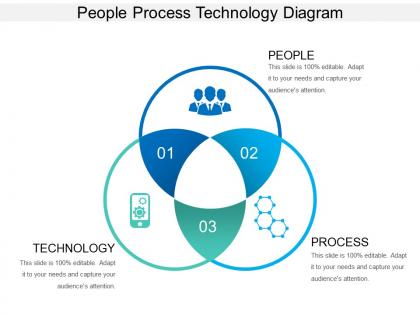
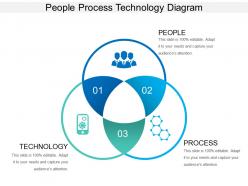
In order to gain competitive advantage in today’s competitive market, Enterprise Performance Management is necessary. To help you present your People Process and Technology for Strategic Planning idea well, we present this People Process Technology Diagram PPT Example 2017 PowerPoint slide. The Golden Triangle of a business organization – people, process and technology have to go hand – in – hand to fulfill the business processes. Also, to balance IT security in your company, you need to have a balance of the three pillars – i.e. people, process and technology. With the help of this People Process Technology Venn Diagram, you can identify the area where the perfect synchronization between the three can be obtained. The process needs to ne effective, technology should be relatable and the people should be well trained. These three are the keys to successful implementation of processes. This template will ensure that these three pillars of your company are well aligned and help successful implementation of the business process. The slide can be downloaded at the ease of a click! Benefit from an influx of ideas with our People Process Technology Diagram Ppt Example 2017. Acquire the advantage of having great choices.
People who downloaded this PowerPoint presentation also viewed the following :
People process technology diagram ppt example 2017 with all 5 slides:
Get the advantage firmly in your grasp with our People Process Technology Diagram Ppt Example 2017. Be able to deliver the first blow.
FAQs for People process technology diagram
So PPT breaks down into People, Process, and Technology - yeah, I know, super creative naming. Your team's skills and structure fall under People. Process is basically how stuff actually gets done - all those workflows and procedures. Technology covers your tools and systems. Honestly, the real goldmine is where these three intersect. That's where you'll spot your biggest bottlenecks or find opportunities to improve things. I'd start by looking for gaps between the three areas first - like when your process doesn't match what your tech can handle. Those misalignments are usually where you can make the most difference.
Don't treat these as separate things - they're totally connected. Map out what you're doing now, figure out what skills people actually need, then find tech that works with both. I see companies all the time buying fancy software first and then scratching their heads when nobody uses it. Get your team involved from the start when you're designing processes and picking tools. Oh, and set up regular check-ins to catch problems early. Honestly? Just pick one workflow first. Get everything working smoothly there, then copy that approach everywhere else.
Data analytics is what makes People Process Technology actually click together - otherwise you're just managing three random things. Track how your team performs within existing workflows. Spot where tech isn't supporting people properly. Look for patterns in employee behavior that scream "this process sucks." Honestly, most companies skip this part and wonder why nothing improves. Set up dashboards covering all three areas so you can see the bigger picture. Way better than randomly fixing stuff and hoping it works. Without the data you're basically flying blind, which nobody has time for these days.
Honestly, these diagrams are lifesavers when you've got different teams talking past each other. Picture this - tech people see their systems, business folks spot their workflows, and HR gets the people side all in one visual. No more endless meetings where everyone's confused because they're thinking about totally different things. It's basically like having a map instead of trying to give directions by waving your hands around (which never works btw). I always throw these up on the screen during meetings to keep everyone focused. Way easier than playing telephone between departments.
Make sure none of the three elements overpowers the others - equal visual weight is key. I'd go with consistent shapes and colors, but don't cram everything together. White space actually helps more than you'd think. Keep your text readable (seriously, tiny fonts are the worst in presentations). The connections between People, Process, and Technology need to be obvious - arrows or overlapping sections work well. Step back when you're done. If someone seeing it fresh can't immediately get the relationships, you'll need to tweak it.
Honestly? Any industry dealing with messy, interconnected stuff gets huge value from these diagrams. Healthcare is probably the biggest user - makes sense when patient safety depends on doctors, nurses, and tech systems all being in sync. Manufacturing companies love them for spotting workflow bottlenecks. Financial services uses them constantly for compliance headaches and risk stuff. IT orgs are another big one, especially when they're trying to integrate multiple systems. Pretty much if you've got different teams that need to coordinate around shared technology, you should probably map it out. Even helped a friend at a logistics company figure out why their shipping was always delayed.
Your company culture totally dictates how you build that PPT diagram. Hierarchical places? Show clear approval chains and structured processes. But flat orgs need collaboration tools front and center. Risk-averse cultures want every single detail documented - honestly can be a pain but whatever works. Innovation-focused companies care more about tech and flexible workflows. Here's the thing though: map your actual culture first, not some idealized version. Design it around how people really work day-to-day. I learned this the hard way when my first diagram looked perfect on paper but nobody could relate to it.
Honestly, the main thing that kills these diagrams is cramming too much stuff in there - arrows going everywhere, boxes on top of boxes. Nobody can follow that mess. You also want to actually show how people, processes, and tech connect to each other, not just dump them in separate corners. Make it dynamic too, like show the real workflow instead of some static org chart situation. Oh and here's something people always skip - actually ask the team members who deal with this stuff every day if your diagram makes sense. Trust me, they'll catch things you missed. Simple beats comprehensive every time.
Track metrics across all three areas - people satisfaction, process efficiency, and tech adoption rates. First thing though, set your baselines before you start or you won't know what actually improved. Employee surveys, workflow completion times, system usage data, customer satisfaction if it's external-facing. Honestly, don't get carried away with too many KPIs - that's where things get overwhelming. I'd stick to 2-3 solid metrics per area and check them monthly. The real magic happens when you find measures showing how all three pieces work together, not just separately.
Look, you can automate almost anything in that diagram - workflow tools, chatbots, data collection, the works. RPA handles your repetitive stuff, APIs connect everything together. Automated approvals and notifications too. I'd say start by figuring out what eats up most of your time manually, then find something that won't break the bank or confuse your team. Don't go crazy right away though - pick one process first and see how it goes. You'll save hours immediately. Honestly, once you start automating things it becomes kind of addictive.
Every quarter works as a baseline, but honestly? Update them whenever big stuff happens. New software, team changes, process switches - that's when you need to jump on it. I've watched so many teams cling to diagrams that are totally wrong and it just confuses everyone. Set a quarterly reminder (boring but necessary), and get your team to speak up when they spot things that don't match reality. These aren't meant to collect dust after you make them once. Oh, and if you're noticing gaps between the diagram and actual day-to-day work - that's your biggest red flag right there.
Get your stakeholders to actually help build the diagram - people buy into stuff they create themselves. Quick wins are gold for building momentum, trust me on that one. Figure out who's impacted by each change and speak to their specific worries. Data's great, but stories about making their daily grind easier? That's what really clicks. Skip the big group presentations though - one-on-ones with key influencers work way better. Oh, and find your champions first. Get them pumped about the vision before you try converting everyone else.
Training hits all three parts of that diagram - it's basically what connects everything. You're building up your people's skills and confidence. Process-wise, you need solid learning paths and feedback so people actually retain stuff (because honestly, nobody wants to redo training that sucked the first time). Technology handles delivery - your LMS, VR stuff, even just Zoom calls. I'd say the biggest thing is designing programs that actually hit all three areas instead of just dumping content on people. Most companies mess this up by only thinking about the content part.
Here's my take: tackle each piece on its own first - people, process, tech. Don't jump straight into how they all connect or you'll lose everyone (learned this the hard way). Pull real examples from your company instead of made-up stuff. People should always be your starting point in that triangle - honestly, most places get this backwards and wonder why things fail. Oh, and here's a trick that works great: wrap up by asking which element feels weakest in their department right now. Gets them actually thinking about next steps instead of just nodding along.
So basically, you map out your people, processes, and tech to see where things are actually falling apart. Like, maybe your team doesn't know how to use the fancy software you bought, or you're doing manual work that could be automated. I've seen companies buy expensive tools when they really just needed better training first - such a waste. The trick is mapping what you have now, then figuring out your biggest bottleneck. Sometimes fixing one messy process can eliminate like three others. It gives you that bird's eye view so you're not just guessing what's broken.
-
Commendable slides with attractive designs. Extremely pleased with the fact that they are easy to modify. Great work!
-
Designs have enough space to add content.