


Post Go Live Support Plan For Effective Implementation




Try Before you Buy Download Free Sample Product
 Impress Your
Audience
 100%
Editable
 Save Hours
of Time


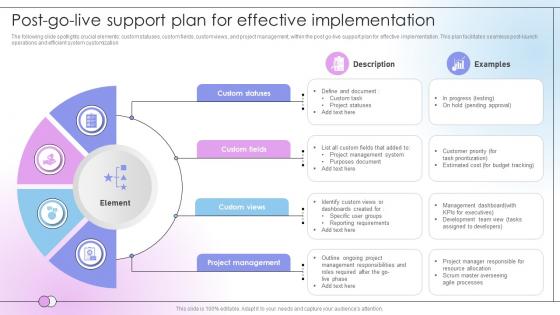
The following slide spotlights crucial elements custom statuses, custom fields, custom views, and project management, within the post go-live support plan for effective implementation. This plan facilitates seamless post-launch operations and efficient system customization
People who downloaded this PowerPoint presentation also viewed the following :
Post Go Live Support Plan For Effective Implementation with all 9 slides:
Use our Post Go Live Support Plan For Effective Implementation to effectively help you save your valuable time. They are readymade to fit into any presentation structure.








FAQs for Post Go Live Support Plan
You need three things sorted: a solid support team, monitoring that actually works, and escalation plans everyone understands. Get people who really know the system - trust me, those first few weeks are brutal when random stuff breaks. Set up dashboards so you catch problems before users start freaking out. Write down who handles what type of issue (sounds obvious but you'd be surprised how often this gets missed). Oh, and do weekly check-ins with stakeholders that first month. They'll have opinions about everything, but it's better to hear complaints early when you can still fix them easily.
Monitor login rates, feature usage, and support tickets right after launch - basically checking if people actually use what you built. Response times, uptime, and error rates tell you how the system's holding up. I always set up real-time dashboards because getting caught off guard by issues sucks. Get your baseline metrics before going live so you can actually compare things properly. Automated alerts for critical stuff are a must. Oh, and do daily team check-ins that first week - catches problems early when they're still fixable instead of disasters.
Honestly, start with New Relic or Datadog for monitoring - you'll thank me later. Sentry catches errors before your users start yelling at you, which is clutch. I'd also grab Intercom for user feedback because people will find bugs you never imagined existed. For logs, ELK stack works great if you don't mind the setup headache. Feature flags are super handy too - you can kill problematic stuff without rolling back everything. CI/CD helps you push fixes fast when things inevitably break. Focus on monitoring and error tracking first though. Those two will literally save your life during launch week.
Feedback is everything for post-launch support, trust me. Grab it from wherever you can - support tickets, surveys, even those random chats by the coffee machine where people actually tell you what's driving them nuts. That stuff is gold. Don't just collect it though, you've got to actually do something with it. Use what you learn to fix your processes and update your docs. I'd set up some kind of regular review meeting so you're not just letting feedback pile up in a corner somewhere. The whole point is figuring out what's really broken vs what you think is broken.
Honestly, figure out your support game before launch or you'll be scrambling. Get your help channels sorted - Slack, tickets, whatever works for your team. Find your power users early and get them trained up since they actually know how things work day-to-day. Documentation matters but keep it real - nobody's reading those massive manuals. Screenshots and step-by-step stuff is where it's at. Oh, and map out who's handling what types of problems ahead of time. Different tiers for different issues, you know? Trust me on this one.
Honestly, the worst part is always knowledge gaps and getting slammed with way more tickets than expected. Users find the weirdest edge cases that somehow never came up in testing - Murphy's law, right? What saved us last time was having really solid runbooks ready to go and keeping the implementation team around for backup those first couple weeks. Set up your triage process early too. Don't underestimate how overwhelming it gets for support staff - they're basically learning everything on the fly while tickets pile up. Clear escalation paths are a lifesaver when things get messy.
Honestly, I'd say monthly for the first three months after launch, then switch to quarterly. Those early months are absolutely brutal - users will find ways to break things you never imagined. Trust me on this one. Once you hit that three-month mark and things calm down, quarterly reviews should be plenty unless something major changes. Track your ticket volume, response times, and how often stuff gets escalated to spot problems early. Oh, and set those calendar reminders now before you're drowning in support requests and completely forget.
Get a Slack channel or Teams space set up right away - basically your crisis command center. Do standups twice a day the first week because honestly, stuff breaks constantly those early days. Document everything that happens, trust me on this one. When someone asks about that weird login bug from day two, you'll actually remember what you did. Keep stakeholders in the loop even when things are fine - they get antsy with radio silence. Most crucial thing? Make sure everyone knows who to call when the site crashes at 2am. Clear escalation paths save your sanity.
Data analytics can totally save your butt here - track stuff like which features are generating the most tickets and where users keep hitting walls. Volume spikes usually mean something's about to break, honestly. Set up dashboards so you're watching error rates and adoption patterns in real-time instead of finding out after everyone's already pissed. Oh, and predictive analytics helps too - sounds fancy but it's basically just spotting trouble before it hits. Way better than constantly putting out fires after the fact.
Set up your hypercare period before launch - that's the real trick. Keep your project team around for 2-4 weeks after go-live because honestly, reassigning everyone immediately is just asking for trouble. Get 24/7 monitoring going and have support shadow the implementation folks during week one. Business users need to know who handles what issues, so write up those runbooks. Oh, and tell stakeholders upfront when support responsibilities will shift over. Nobody likes surprises when something breaks at 3am and they don't know who to call.
Dude, post go-live collaboration is make-or-break stuff. Problems will hit multiple systems at once, so dev, ops, business folks, and support need to actually talk to each other. I've watched teams play hot potato with issues because nobody's communicating - it's painful to see. Your users expect quick fixes when stuff breaks. That only works if everyone knows what's priority
-
You know what? I'm so glad I opted for this PPT design. It has been a total game-changer for me and my presentations. Thank you!
-
They helped us design the pamphlets for our church’s food drive! The people loved the design, and I’m happy to say it was successful. Thank you, SlideTeam!