


Powerful five point infographic to create your business plan




Try Before you Buy Download Free Sample Product
 Impress Your
 Audience
 100%
100% Editable
 Save Hours
 of Time


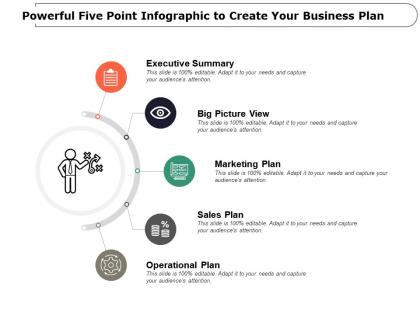
Check our powerful five point infographics create your business plan presentation slide. Coming up with creative and effective business plan is the need of the hour for corporate firm. A business plan is a written document of your business’ future, a note that defines what you plan to do and how you are planning to achieve success with it. This PowerPoint template has been crafted with five key aspect of the successful business plan which are executive summary, big picture view, marketing plan, sales plan and operational plan; you can access these vital points as available or can replace the content according to your business need as the PPT design is completely editable. Getting the right resources and finding the best talent to run a new business is the accountability of the management team, there is support available from investors, board of directors, finance institutes but to make an impact on them, you must pitch your business in the right manner. Our PowerPoint layout gives you that opportunity, so just download and then use it. Our Powerful Five Point Infographic To Create Your Business Plan assure better assimilation. Air your views with compete clarity.
People who downloaded this PowerPoint presentation also viewed the following :
Powerful five point infographic to create your business plan with all 5 slides:
Be certain that are Powerful Five Point Infographic To Create Your Business Plan will do their bit. Depend on them to always deliver.
FAQs for Powerful five point infographic to create
Start with your value prop right at the top, then break down your target market and how you'll make money. Honestly, the team section is probably more important than you think - investors want to see who's actually building this thing. Don't go crazy with text everywhere. Clean design with lots of white space, throw in some icons and charts instead. Your revenue model and competitive landscape need to be in there too, plus basic financial projections. Canva's got decent templates you can customize with your colors. The whole deck should tell your story without making people squint at tiny fonts.
Honestly, visuals are a game-changer for business presentations. Nobody wants to wade through pages of dense financial data - I mean, even *I* zone out reading that stuff. Charts make your projections super clear, and flowcharts can show your whole business model in seconds. Icons help break up text walls too. Your investors will actually scan a good infographic highlighting key metrics and timeline stuff. Plus people remember visual info way better later. Try turning your biggest stats into simple comparisons, or maybe diagram your revenue streams. Colors and graphics just make everything stick in their heads more.
Honestly, start with clarity - you want people to actually understand your business points without squinting at a hot mess of text. Pick consistent colors and fonts, then give everything room to breathe with white space. Those cramped infographics where everything's jammed together? Yeah, don't do that. Your charts should tell a story, not make people's heads spin. I'd organize everything in a logical flow that matches how someone would naturally read through it. If you're not great with design (no judgment), grab a template first, then tweak it to fit your brand. Simple beats fancy every time.
Dude, color choice can totally make or break your infographic. I'd stick with 2-3 main colors tops, plus maybe one bright accent for the really important stuff. Contrasting shades help guide people's eyes to what matters most. Dark colors work great for your key stats, lighter ones for background info. Oh, and don't go nuts with like every color of the rainbow - I've seen that disaster before and it just looks messy. Quick test: show it to someone for 5 seconds. If they can't instantly get your main point, your colors probably need work.
Ugh, the worst thing you can do is cram everything onto one graphic - it just turns into visual chaos. Stick to your main points and maybe 3-4 key numbers max. Also please don't use those cheesy stock photos of people pointing at charts lol. I swear half the ones I see look identical. Make sure there's breathing room between sections, and honestly? Show it to someone who has zero clue about your business first. They'll tell you real quick if it makes sense. Oh, and don't forget contact info - people actually need to reach you!
Look, turning your financial projections into charts is a game changer. People's eyes just glaze over when they see endless spreadsheet rows – I've been there. Line charts work great for showing revenue growth over time, bar charts are perfect for quarterly comparisons. Honestly, even simple icons can highlight your key metrics better than plain numbers. The whole point is helping people spot trends and cash flow patterns instantly. Your stakeholders will make decisions faster when they can actually see what's happening. Pick your most important numbers first, then go with whatever chart type tells that story clearest.
Dude, think of storytelling as the thread that connects everything in your infographic. You're not just dumping data on people - you're walking them through your whole business journey. Problem, solution, growth potential, boom. Way more engaging than random charts everywhere. Your investors need to feel something, not just crunch numbers. I always tell people to imagine explaining their idea over coffee (minus the caffeine jitters). Lead with the customer problem first. Then show how you fix it. Creates this natural flow that actually makes sense instead of... well, whatever most business plans look like these days.
Look, you can't just show the same stuff to everyone. Investors want hard numbers - market size, ROI, all that financial stuff. But employees? They care more about company culture and growth opportunities. I made this mistake once and bombed a pitch because I showed customers an investor deck full of boring charts. Different audiences need different approaches. Keep your investor materials clean and data-heavy, while customer-facing stuff should be colorful and focus on benefits. Don't overthink it though - just make 2-3 versions and see what works.
Canva's probably your easiest starting point - tons of business templates and pretty foolproof to use. Adobe Illustrator is amazing if you want total control, but honestly it might be overkill unless you're already comfortable with design software. Piktochart and Venngage sit somewhere in between with decent templates. You'd be surprised how far you can get with just PowerPoint too, though I know that sounds boring. I'd definitely try Canva first and see if it does what you need before diving into anything more complicated.
Stick with the basics - bar charts for comparisons, line graphs for trends, pie charts for market share. Investors get these without having to decode your masterpiece. Skip the 3D stuff, it's just distracting. Financial projections? Combo charts work well - show revenue growth next to your key metrics. Colors should match throughout, and make sure people in the back can actually read it. Oh, and definitely bring a backup slide with raw numbers because someone always asks for specifics. Trust me on that one.
Dude, investors see like 50 boring pitch decks every week, so infographics actually grab their attention. Instead of drowning them in spreadsheet numbers (which honestly makes everyone's brain shut off), you're showing your business model and market size visually. They'll remember your key stuff way better when they're talking with partners later. Oh, and it shows you get good design/branding too - not gonna lie, that matters more than people think. My take? Pick your 3-4 strongest numbers and make those really stand out visually. Don't try to cram everything in.
Honestly, I'd start small with your infographic instead of going crazy with distribution right away. Hit up investors and key partners first - they're your priority audience anyway. LinkedIn and email work great, plus throw it on your website and maybe some industry forums. Track who's actually engaging with it so you know what's working. Oh, and definitely make different versions for different people. What gets an investor excited will probably bore potential customers to death. Test it with a small group, see what feedback you get, then scale up from there. Way better than just shotgunning it everywhere.
Honestly, business plan infographics are clutch for marketing. People scroll past text but actually stop for visuals - I've noticed this with my own social posts too. Perfect for pitch decks, your website, wherever. Startups always get better engagement with infographic roadmaps vs those dry PDFs nobody reads. Smart move is making different versions for different people. Show investors the money stuff, but customers care about benefits. Create one solid master version first, then tweak it for each platform. Way more effective than trying to make one thing work everywhere.
Dude, you absolutely should use infographics in your presentations. People process visuals like 60,000 times faster than text - crazy right? Your audience will actually get your points instead of spacing out during another boring slide show. I've watched presentations go from total snoozers to actually interesting just by ditching bullet points for visual stuff. Plus viewers remember 65% of visual info after three days but only 10% of text. That's a huge difference. Start with your biggest stats or main processes and make them visual. Oh, and your retention rates will go way up too. Your audience won't hate you for it.
Get feedback from real people - investors, colleagues, whoever fits your target audience. Show it to someone fresh who hasn't seen it before. Ask them "what's the main point here?" and "where do you look first?" You'll be shocked how wrong you are about what seems "obvious." I always think something's crystal clear until I watch someone squint at it for 30 seconds. Those confusion moments? That's where you need to redesign. Don't chase every single comment though. Look for patterns in what people say and focus on the biggest issues first.
No Reviews