

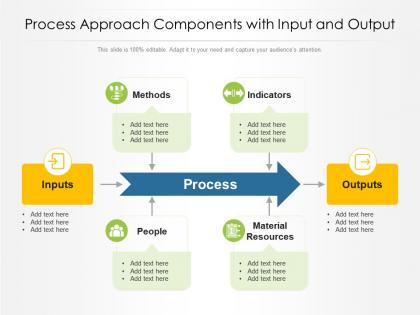
Process approach components with input and output




Try Before you Buy Download Free Sample Product
 Impress Your
 Audience
 100%
100% Editable
 Save Hours
 of Time


Our Process Approach Components With Input And Output are topically designed to provide an attractive backdrop to any subject. Use them to look like a presentation pro.
People who downloaded this PowerPoint presentation also viewed the following :
Process approach components with input and output with all 2 slides:
Use our Process Approach Components With Input And Output to effectively help you save your valuable time. They are readymade to fit into any presentation structure.
FAQs for Process approach components with
So basically there are four main things you gotta nail down for any process component. Inputs - what's going into it. The actual work or transformation happening. Outputs - what comes out the other end. Plus control stuff like rules and timing that keep everything running smoothly. Start with figuring out the transformation part first though - honestly makes the rest way easier to spot. Oh and don't forget to mark who's responsible for each piece and if it depends on other steps. It's kinda like following a recipe but for workflows instead of food.
So basically, it's like a relay race - each step needs to hand off cleanly to the next one. Map out your inputs and outputs first, then figure out where things usually get stuck. Most problems happen during handoffs between people or departments, honestly that's where like 90% of delays come from. Document who's doing what and when. Short sentences help here. Then hunt for bottlenecks where stuff sits waiting. Each component should know exactly what they're delivering and the timing. Sounds obvious but you'd be surprised how often that's missing.
So here's what I do - start with your inputs and outputs before anything else. What kicks off the process? What should you end up with? Once you've got those nailed down, you can work backwards and forwards to map everything in between. It's like having GPS coordinates instead of wandering around lost. The transformation steps become way more obvious when you know your start and end points. Honestly saves so much time compared to trying to figure out every single step from scratch. I learned this the hard way after spending hours on processes that went nowhere.
Start with a simple flowchart - boxes for each step, arrows showing direction. I bombed a presentation once because our workflow looked like spaghetti and nobody got it. Different colors help too, like blue for decisions, green for outputs, whatever makes sense. Group related stuff together so people can follow along without getting lost. Short arrows work better than lines crossing everywhere (trust me on this). Your team will actually understand what's happening instead of zoning out during another boring process review. Way better than drowning everyone in slides.
Honestly, the trickiest part is figuring out what's actually going down versus what everyone assumes is happening. Your processes are way more tangled up than they look on paper - trust me on this one. Bottlenecks hide in weird places you wouldn't expect. Data's usually a mess too, with gaps everywhere and systems that don't talk to each other properly. Oh, and people get defensive when you start poking around their work, so good luck getting straight answers. I'd say pick one tiny process first and map it out completely. Way easier to learn from something small before you tackle the big stuff.
Honestly, automation is a game-changer for cutting out those annoying manual steps that slow everything down. Your team stops wasting time on repetitive stuff and can actually focus on work that matters. The cool part is when systems start talking to each other - like your CRM kicks off shipping automatically. I worked with one team that shaved 60% off their processing time just by connecting a few systems (though they probably could've done it faster if they weren't so paranoid about breaking things). Start with whatever manual handoff pisses people off the most. Once you fix that, you'll spot the next obvious win pretty quickly.
Start with flowcharts - way easier to follow than huge blocks of text. For each part, write down what goes in, what happens, and what comes out. Here's the thing though: explain WHY each step exists, not just what it does. I can't tell you how many times I've looked at old documentation and had no clue what we were thinking. Keep your language simple and use the same naming style throughout. Oh, and make templates so everyone documents stuff the same way. Once you're done, grab someone else to actually try following your steps - they'll find holes you missed.
Honestly, I'd start by figuring out where things always get stuck - those bottlenecks are usually the biggest time wasters. Map out your process and look for the spots where everything slows down. After that, see what manual stuff you can automate with tools or templates. Standardizing workflows helps too since people won't waste time deciding how to do things every single time. Oh, and don't try to fix everything at once - that's a recipe for chaos. Pick one thing and nail it first. You'll actually see progress that way instead of spinning your wheels.
Start with throughput, cycle time, and resource utilization - those are your big three. Throughput shows how much work gets done per hour/day/whatever. Cycle time tracks how long each task takes start to finish. Resource utilization tells you if you're actually using your capacity (though honestly, hitting 100% can backfire and create bottlenecks). Error rates matter too - catch problems before they snowball. Queue lengths are another good one for spotting trouble early. Track these five consistently first. Once you've got baseline data, then you can get fancy with component-specific stuff. But yeah, start simple.
Figure out what absolutely can't bend first - safety stuff, compliance, the basics that'll get you in trouble. Lock those down tight with real procedures. Everything else? Give your team some room to breathe. Instead of rigid steps, try decision trees or "if this happens, then do that" scenarios. Most places go way overboard with standardization because it feels safer, but honestly it just pisses people off. Think guidelines with guardrails, not a prison sentence. Run through some scenarios with your team - you'll quickly see where they're getting stuck or want to throw their laptop out the window.
Honestly, your stakeholders are gonna spot broken stuff way faster than you will. They're the ones actually using your process every day, so when someone complains "this approval is taking forever" or "why don't we get notified about this step?" - that's gold. Those complaints show you exactly what needs fixing first. I'd set up regular check-ins with your main people, maybe quarterly? And here's the thing - you actually have to do something with their feedback or they'll stop giving it to you. Quick iterations based on real user pain points beat guessing what's wrong every time.
Honestly, visual aids are total lifesavers when you're dealing with complicated processes. Your brain just processes pictures way better than dense paragraphs - it's like the difference between following GPS versus written directions. Flowcharts show you exactly where things go and what decisions need to happen. Plus diagrams help you see how all the pieces actually fit together. I swear, half the time I'm reading process docs I just zone out completely. But throw in some visuals? Suddenly you can spot the weird bottlenecks and redundant steps that would've been invisible otherwise. Try sketching out a quick flowchart next time - people actually get it instead of just nodding politely while internally panicking.
Skip any part of your process and you're basically asking for trouble. Scope creep hits first, then deadlines get missed, quality tanks - sometimes all at once if you're having a really bad week. Communication gaps and ignoring risks are the worst offenders honestly. Your team starts putting out fires instead of actually getting stuff done. The annoying thing is which piece you skip totally changes what breaks. But here's what's helped me - do a quick check at your next milestone to catch weak spots early. Way easier than dealing with the mess later.
Ugh, yeah dependencies are the worst. When one thing runs late, it screws up everything that comes after it. Some tasks literally can't start until others wrap up, so any delay just snowballs through your entire timeline. The really annoying part? You won't catch all these connections upfront - some will blindside you halfway through and totally wreck your schedule. I learned this the hard way on my last project. Map everything out early if you can, and definitely pad your timeline with extra buffer days. You'll thank yourself later when things inevitably go sideways.
So there's basically three big ones you'll run into: Six Sigma's DMAIC thing, Lean process mapping, and BPR (business process reengineering). DMAIC is crazy data-heavy but honestly gets results when you need to find bottlenecks. Lean's more about spotting steps that don't actually add value. BPR? That's when everything's so screwed you just start over from scratch. Most people jump straight into the fancy stuff, but I'd say start simple with basic process mapping first. Pick whatever matches your actual problem - like, don't bring Six Sigma to a basic workflow mess, you know?
-
Very well designed and informative templates.
-
Use of different colors is good. It's simple and attractive.
-
Understandable and informative presentation.
-
The content is very helpful from business point of view.
-
Awesomely designed templates, Easy to understand.