

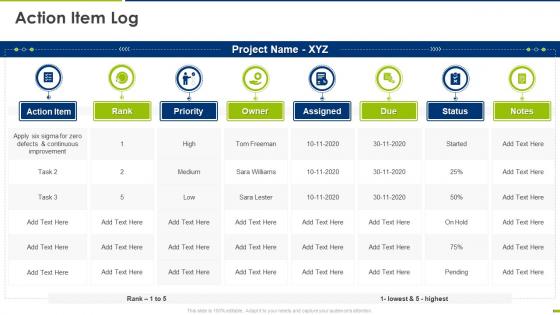
Project management schedule bundle action item log ppt pictures templates




Try Before you Buy Download Free Sample Product
 Impress Your
 Audience
 100%
100% Editable
 Save Hours
 of Time


Our Project Management Schedule Bundle Action Item Log Ppt Pictures Templates are topically designed to provide an attractive backdrop to any subject. Use them to look like a presentation pro.
People who downloaded this PowerPoint presentation also viewed the following :
Project management schedule bundle action item log ppt pictures templates with all 6 slides:
Use our Project Management Schedule Bundle Action Item Log Ppt Pictures Templates to effectively help you save your valuable time. They are readymade to fit into any presentation structure.





FAQs for Project management schedule bundle action item log
You'll want task names, descriptions, start/end dates, and how long each thing should take. Dependencies are huge - like what has to finish before something else can start. Assign people to stuff and mark your big milestones. Honestly, add a status column from day one because everyone's gonna bug you for updates constantly. Buffer time is clutch for anything on your critical path. Don't forget deliverables and approval steps either. Just don't go crazy with details or updating it becomes this whole ordeal. Better to start basic and build from there.
Gantt charts are basically visual timelines for your project - super helpful for seeing what's happening when. They show which tasks depend on each other, so you can spot bottlenecks before they become a nightmare. Honestly, they're way better than those endless "where are we?" meetings everyone hates. When stuff goes wrong (and it will), you can quickly see what needs to shift. Plus tracking actual vs. planned progress helps you get better at estimating future projects. Start simple though - don't go crazy with features right away or you'll overwhelm your team.
So basically, waterfall maps everything out upfront - like having your whole project planned from day one with set phases and deadlines. Agile's totally different though. You work in these short 1-2 week sprints and only plan the next one ahead. Waterfall can feel super rigid when stuff changes (and trust me, it always does). With agile templates, you're constantly adapting and getting feedback. I'd go waterfall if your requirements are crystal clear and won't budge. But if you need flexibility and your stakeholders want to see progress frequently? Agile's your friend.
Honestly, it totally depends on how messy your project is and who's gonna be looking at this thing. Simple stuff? Just hit the big milestones and main deliverables. But if you're dealing with something complex, you'll need the full breakdown - tasks, dependencies, who's doing what. I always start broad then drill down where teams actually care about details. No point going crazy if nobody's gonna keep it updated anyway, right? Executives just want the big picture timeline while your team leads need all the nitty-gritty tasks. My rule is start with like 80% of what you think you need, then adjust based on how people actually use it.
Pick a color scheme and actually stick with it - red for urgent stuff, yellow for things getting sketchy, green when it's done, blue for big milestones. Gray's pretty good for dependencies too. Honestly, I've seen people go crazy with like 8 different colors and it just looks like a rainbow threw up on their Gantt chart. Four or five colors tops. Write down what each color means somewhere obvious so your team isn't playing guessing games. Trust me, consistency is everything here - you'll thank yourself later when everyone instantly gets what they're looking at.
Honestly, templates are such a game changer. You get pre-built frameworks with all the usual project stuff already mapped out - phases, milestones, task categories. No more staring at blank spreadsheets wondering wtf to start with. Just jump right into tweaking timelines and handing out responsibilities. I swear they've saved me hours of setup time, plus you won't forget those random critical steps that always slip through the cracks. Your stakeholders get that clean, professional look too. Grab a basic one and mess with it until it fits how your team actually works.
Honestly, if your company has money to burn, Microsoft Project is probably your best bet - it's literally made for this stuff. But Excel or Google Sheets work fine too, especially since everyone already knows how to use them. Smartsheet's pretty decent as a middle option. Asana and Monday.com are free and have some nice template libraries, though I've found Monday.com's interface a bit clunky sometimes. My advice? Just start with whatever your team's already comfortable with. You can always switch later if it's not cutting it.
So for milestones, I'd start by picking your 3-5 biggest project moments - like design approval, testing done, client sign-off. Create specific rows for these and highlight them in a bright color (I'm obsessed with using yellow). Don't just slap random dates on there though. Each milestone needs an actual deliverable attached, not some vague "check progress" nonsense. Then work backwards and link your regular tasks so they all feed into these milestone dates. It creates this nice logical flow where everything connects. Way easier to track than just having a random list of tasks floating around.
Honestly, good stakeholder communication is what saves your project timeline from going to hell. Regular updates on progress and delays matter because these people can actually remove roadblocks or approve changes that mess with your schedule. When they're informed, you won't get those nightmare last-minute "urgent" requests that destroy everything. I've watched entire projects implode just because nobody mentioned a key dependency - it's brutal. Status meetings work, dashboards too, whatever fits your team. Just flag risks early so they can help fix problems instead of panicking after things break.
Honestly, just add some extra columns to your schedule template - stuff like risk probability and impact ratings. Buffer time is huge too, especially after big milestones. I learned that one the hard way lol. Weekly risk check-ins should be actual calendar events, not something you remember to do randomly. Get your team to brainstorm what could go wrong during planning phases and assign people to watch for specific issues. The whole point is making it routine instead of scrambling when things inevitably blow up.
Honestly, the worst thing you can do is just grab a template and run with it as-is. First thing I'd change? Those timeline estimates - they're always ridiculously optimistic. Like, who actually finishes things that fast? You'll also want to fix the task dependencies since every project flows differently. Oh, and definitely update who's responsible for what because the stakeholder roles never match your actual team structure. Templates are helpful but they're more like rough drafts. Spend some time going through each section and tweaking it for your specific situation before you start.
Honestly, deadlines are what keep projects from turning into endless black holes. They force you to actually plan backwards instead of just winging it. Templates are clutch because they've already got the timing worked out - buffer periods, milestones, all that stuff. Just drop in your real deadlines and boom, it shows you when everything needs to happen. The best part? Good ones include backup plans for when things go wrong. And trust me, something always goes wrong. Way better than panicking at 2am trying to figure out what you can realistically cut.
Look, time zone tracking has to be your number one priority - can't tell you how many times I've seen teams fall apart because someone's always missing calls. Get something with automated deadline reminders and real-time updates so people aren't constantly asking "wait, what's the status on this?" Milestone visibility is huge too. Oh, and make sure it plays nice with whatever you're already using - Slack, Teams, whatever. Dependency mapping sounds boring but trust me, it'll save you headaches when people realize their delays are screwing over three other teammates. Find one that handles notifications well so you're not babysitting everyone.
Just swap out the categories and timelines for whatever industry you're in. Construction? Focus on permits, inspections, material deliveries. Software? Think sprints, testing, deployment stuff. The template structure works fine - you just need to replace the content with what actually matters for your projects. List out your industry's typical phases first, then match them to the existing timeline. Honestly, most templates are way more flexible than they look at first glance. I've done this a few times and it's pretty straightforward once you start tweaking the details to fit your workflow.
Look, if you already know Excel, that's honestly half the battle right there. Super easy to make it look exactly how your team wants without buying new software or whatever. But here's the thing - you'll spend forever updating stuff manually that other PM tools just do automatically. Dependencies, progress tracking, all that tedious crap. For small projects? Excel's totally fine. I still use it sometimes when I need something fast. But if you're dealing with multiple stakeholders and complex timelines, you might want to bite the bullet and learn actual project management software.
-
Excellent design and quick turnaround.
-
Much better than the original! Thanks for the quick turnaround.