

Project roles and responsibilities matrix powerpoint guide





Try Before you Buy Download Free Sample Product
 Impress Your
 Audience
 100%
100% Editable
 Save Hours
 of Time


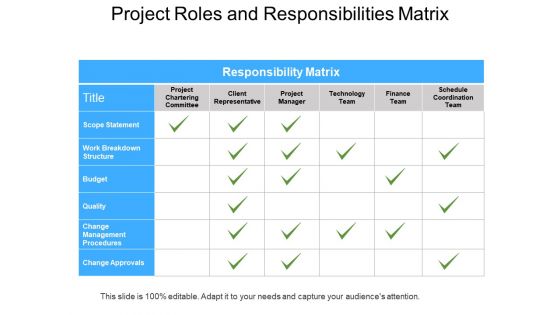
Presenting our project roles and responsibilities matrix PowerPoint guide to help all project stakeholders to understand their roles and responsibilities. This presentation layout of RACI matrix allows you to document project task by figuring out who is responsible of completing the task, who is accountable for making decisions and taking actions, who is to be consulted regarding actions and who will be informed during the project? Our project management team roles PPT presentation portrays structural chart in which it is visually made clear what should be done by whom. With this responsibility assignment matrix template you can identify the high priority activities within the project. Our responsibility matrix PowerPoint slideshow is useful for eliminating role confusion, preventing over allocation of resources to one project and under allocation to another while making sure no task is overlooked. Download this responsibility matrix template to establish a project schedule and determine each phase of the project. Our Project Roles And Responsibilities Matrix Powerpoint Guide are like the strings of a tennis racquet. Well strung to help you serve aces.
People who downloaded this PowerPoint presentation also viewed the following :
Content of this Powerpoint Presentation
"Alone we can do so little; together we can do so much." – Helen Keller
Effective projects are the consequences of meticulous forecasting and teamwork between an entire team. Management of a project is always a team effort that considers various key project roles, and each of them has its responsibilities.
For instance, Burj Khalifa, the tallest structure in the world, is the best example of influential project roles and responsibilities. This unique sky-high architecture is the result of fantastic teamwork. It was only possible because of the synchronization of effective and seamless teamwork. Similarly, you can make your projects remarkable with our well-designed.
Project Roles and Responsibilities Template.
Why use our Project Roles and Responsibilities Template?
The success of your project depends upon the skills, expertise, and experience of your team. If the roles are clearly defined, there is a high chance of delivering the project within time and budget. Our well-crafted PPT templates will help you focus on communication and accountability as well as higher productivity.
Click here to unlock the project roles and responsibilities allocation framework.
These PPT templates are 100% customizable, which allows you to change the information according to your requirements and gives you the much-needed structure.
Let’s delve into this!
Template 1- Project Roles and Responsibilities Matrix Template
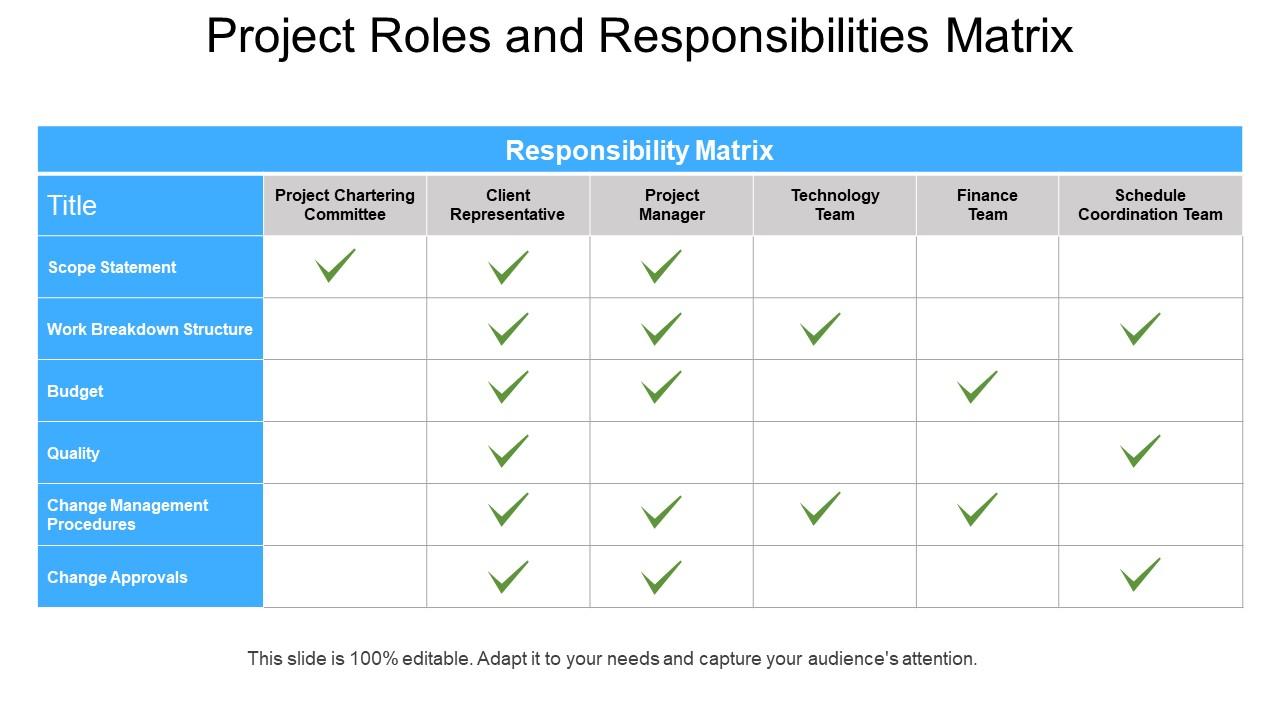
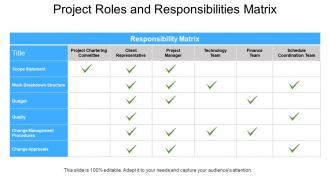
Presenting an advanced tool crafted to offer clarity to all the stakeholders so they can understand their roles and responsibilities. This presentation template shows the layout of a RACI matrix that enables you to document the project tasks carefully. Using this PPT Slide you’ll have a structural chart that points out who bears the responsibility of completing the task, decision-making, and taking actions and who holds the accountability for decision-making and actions. With its help, you can also highlight the project schedule and determine each phase of the project. Download this now.
Accountability is the Key
Build a sense of accountability and ensure projects are completed in time by assigning roles and responsibilities with precision using this content-ready PPT Design. You can now easily streamline your project requirements and achieve your desired goals with ease.
Project roles and responsibilities matrix powerpoint guide with all 5 slides:
Dark clouds float away due to our Project Roles And Responsibilities Matrix Powerpoint Guide. The horizon appears bright and clear again.



FAQs for Project roles and responsibilities
So RACI breaks down like this: **R**esponsible does the actual work, **A**ccountable owns the final outcome, **C**onsulted gives input before decisions get made, and **I**nformed just needs updates. Honestly, it's a lifesaver for avoiding those "wait, who's doing this?" disasters. You basically make a grid - tasks down the left side, team members across the top. Then drop in the letters for each person's role on each task. I know it sounds kinda corporate-y, but it actually works really well once you get everyone on the same page with it.
First thing - map out your key decisions and tasks, then figure out who does what. Round everyone up (Zoom's fine) and go through each item. Who's doing the actual work? Who makes the final call? Who gives input vs just gets updates? The "input" people always get out of hand - suddenly everyone's an expert on everything, you know? Super important: only ONE person can own the final decision per task. That's non-negotiable. After you're done, blast it out to the team and actually use the damn thing when people start getting confused about their roles.
Use RACI when projects get messy - like when you've got tons of stakeholders and nobody knows who's actually supposed to do what. It saves you from those awkward meetings where everyone's pointing fingers going "wait, wasn't that your job?" Don't bother with simple stuff though. If it's just your usual team doing something straightforward, RACI feels like busywork honestly. Small teams that already click? Skip it. Here's what I've learned: if you're spending half your time debating the damn matrix instead of working, just scrap it and have a normal conversation. Sometimes the old-school approach wins.
Dude, RACI matrices are actually pretty clutch. No more of that awkward "um, so who's handling this?" stuff in meetings. Everyone knows their lane from day one - who's doing the work, who's making final calls, who needs to give input, and who just wants updates. Honestly saves you from those brutal email threads where Karen keeps replying-all when she doesn't even need to be involved. Your team stops over-communicating because they finally know who actually matters for each decision. I started using it last month and the difference is night and day. Way less confusion, way better focus.
Look, first figure out who makes the actual decisions in your industry. Healthcare? You'll probably need something like "Clinical Oversight" as a separate role. Manufacturing companies usually split quality control from production - makes sense when you think about it. Financial services is where things get messy though, they need way more detailed accountability because compliance is everything. Honestly those people have more acronyms than anyone should be allowed to use. Just grab a basic RACI template and tweak the roles to match how approvals actually work in your field. Map out those regulatory checkpoints too.
Honestly, RACI matrices are game-changers for avoiding blame games. Each task gets one "Accountable" person - no sharing that role or you're back to square one. Map out who's Responsible, who needs to Approve stuff, Consulted, and just Informed. Sounds boring but trust me on this one. Next project, spend 20 minutes at kickoff going through major deliverables and slapping those letters on people's names. No more "wait, wasn't that your thing?" disasters during crunch time. People actually know what they signed up for instead of playing hot potato when deadlines hit.
Ugh, the classic mistakes? Having like 5 people all marked "responsible" for one thing - total disaster. Or nobody's responsible at all, which is somehow worse. Don't make everyone "consulted" on everything either, you'll just end up in endless meetings. Oh, and there's actually a difference between consulted vs informed - consulted folks give input beforehand, informed people just get the memo later. Build it WITH your team, not alone in your office. Nobody follows something they didn't help create. Keep reviewing it too since roles change constantly.
Check your RACI matrix whenever you hit major milestones or when scope/team changes happen. Monthly works for most projects, but honestly depends on your situation. Getting that "wait, whose job is this?" energy in meetings? Time to update it ASAP. I usually just set a recurring calendar reminder because otherwise I'll totally forget. Short sentences work better than long ones here - keeps everyone clear on responsibilities. If your team seems confused about who's doing what, don't wait for the next scheduled review. Just fix it right away and save yourself the headache later.
Dude, you absolutely have to get stakeholders involved when making a RACI matrix. Talk to the people who'll actually be doing the work - interview them about their current responsibilities and how they like to communicate. Otherwise you'll build something that looks perfect but totally misses how things really work. I've watched so many teams create these things in a conference room and then wonder why nobody follows them. The key is getting everyone to agree on their assignments upfront. People follow what they helped create, you know? Skip this step and your RACI just becomes another forgotten document.
Honestly, remote RACI matrices need way more detail than the in-person ones. Throw in communication channels and deadlines for each role - like "Sarah's accountable, updates us in Slack by Friday EOD" or whatever. Since you can't just walk over and ask someone wtf they're supposed to be doing, vague roles become real problems. I'd add a whole column for how people should communicate - email, Slack, calls, etc. Also review it more often because remote teams seem to shuffle responsibilities around constantly. The key is making it something people actually use, not just another forgotten doc. Trust me on this one.
So RACI is the classic one - Responsible, Accountable, Consulted, Informed. Pretty simple to follow. RASCI throws in "Support" but honestly that just makes things messier since it's basically another version of Responsible anyway. DACI's different though. Uses Driver, Approver, Contributors, Informed instead. Way better if you're mapping out who decides what rather than just task stuff. I'd go with RACI for most project work - it's tried and true. But if you're dealing with a lot of decision-making processes, DACI might save you some headaches. Really depends what you're trying to solve.
Honestly, just start with a shared Google Sheet if you're testing this out - way easier than jumping into fancy software right away. Once you get the hang of it, tools like Asana or Monday.com are pretty solid for building RACI matrices. They'll ping people automatically when roles change, which is clutch because nobody reads emails anymore anyway. You can click to assign roles and link everything to actual project tasks so people know what they're supposed to be doing. Real-time updates mean you won't have five different versions floating around. Trust me, that gets messy fast.
Honestly, different cultures handle authority super differently, so test your RACI matrix locally first. Japan and Germany? Pretty hierarchical - people won't push back much. But collaborative cultures expect everyone to weigh in. Communication styles vary too. Direct cultures will straight-up tell you if role assignments suck, while indirect ones might just smile and stay confused. Time zones are annoying for "Consulted" roles since async feedback drags everything out. I'd definitely run it by local team leads before going wide - they'll catch stuff you totally missed.
Honestly, RACI charts are a game changer. No more "wait, who's doing what?" moments that totally kill your project flow. You just map out who's Responsible, Accountable, Consulted, and Informed for each task. Takes like 30 minutes but saves you from so much headache later. I used one on this mess of a project last year - went from everyone stepping on each other to actually getting things done. You'll avoid that awkward thing where everyone thinks someone else is handling the important stuff. Seriously, try it before you dive into your next project. The clarity is weirdly satisfying.
So here's what I'd track to see if your RACI matrix is actually doing its job. Decision speed is huge - are people making calls faster now that roles are clear? Count how many "who's supposed to handle this?" emails you're getting too. Project milestones hitting on time? That's your accountability check right there. Oh and definitely survey your team about role confusion - some people won't speak up otherwise. Communication overhead drives me nuts when it gets out of control. Pick maybe 2-3 of these metrics first though. Get a baseline before you change anything or you'll have no clue if it's working.
-
Really like the color and design of the presentation.
-
The Designed Graphic are very professional and classic.
-
The content is very helpful from business point of view.
-
Presentation Design is very nice, good work with the content as well.