

Roles and responsibilities matrix template powerpoint layout






Try Before you Buy Download Free Sample Product
 Impress Your
 Audience
 100%
100% Editable
 Save Hours
 of Time


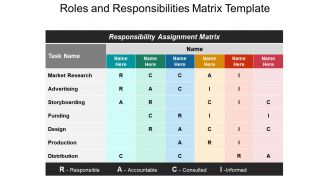
Use our intelligently designed roles and responsibilities matrix template PowerPoint layout and be able to let your team members know about their part of the job that they are supposed to perform. Every person in a team has a certain responsibility and by using our team management PowerPoint presentation you will help them fulfill that role. The use of high resolution and premium quality slides while designing this tasks of each member diagram model you will be able to raise the standard of your presentation. Using our roles and duties PPT template you can discuss various processes like task name, market research, advertising, storyboarding, funding, design, production, distribution, the name of the person performing it, the team he/ she belongs to, who is responsible, who is accountable, to whom it is to be reported, who is to be consulted, etc. So if you are ready to get rid of all the stress and workload simply hit the download button and make most of this opportunity. Address ill founded fears with our Roles And Responsibilities Matrix Template Powerpoint Layout. Convince folks you have catered for all contingencies.
People who downloaded this PowerPoint presentation also viewed the following :
Roles and responsibilities matrix template powerpoint layout with all 5 slides:
Our Roles And Responsibilities Matrix Template Powerpoint Layout will cover any cracks. Your thoughts will get that smooth shiny finish.
FAQs for Roles and responsibilities matrix
So a RACI matrix is this chart that breaks down who's doing what on your project. You've got four roles: Responsible (actually does the task), Accountable (owns the final result), Consulted (gives input), and Informed (just needs to know what's happening). Honestly, it saves you from so much drama later. List out your main deliverables first, then figure out who should be R, A, C, or I for each thing. Sounds tedious but trust me - it stops people from stepping on each other's toes or assuming someone else is handling stuff. Plus no more awkward meetings where everyone's looking around like "wait, whose job was this again?"
So first, list everyone who's involved - your team, managers, experts, people who need updates. Map out your main tasks and figure out who's doing what. R = actually doing the work, A = the one who approves it, C = gives input/advice, I = just gets updates. Don't make everyone "Consulted" though, that's a nightmare! I learned this the hard way. Short sentences work better than trying to involve half the company in every decision. Once you've got a rough draft, run it by a few key people to see if you missed anyone important.
Yeah, RACI totally works with agile! Just don't create some massive spreadsheet for the whole project - that's overkill. Build quick, lightweight versions for each sprint instead. Roles shift around more than traditional projects, but honestly that keeps everyone engaged. Map out the key stuff: sprint reviews, user stories, demos. People will definitely wear multiple hats. I'd start simple - figure out who's responsible for your current sprint's big deliverables, then tweak as you go. The accountability piece is still super valuable, just more flexible.
Honestly, RACI's biggest win is forcing everyone to nail down exactly who's doing what upfront. No more "we'll figure it out later" nonsense. It separates who's actually accountable from who just gives input - which trust me, saves tons of headaches down the road. Other responsibility charts are usually way too vague about decision-making power. RACI makes it obvious. You get clear ownership and contributors mapped out perfectly. Plus it stops those cringe moments where everyone's waiting for someone else to take the lead. I'd start by looking at your current project's big decisions and spotting where things get murky.
Honestly, RACI matrices are game-changers. They map out who's Responsible, Accountable, Consulted, and Informed for every task. No more of that "I thought you were doing it" BS that kills projects. Everyone knows their lane, so people stop duplicating work or assuming someone else has it covered. The best part? There's always one person who actually owns the outcome - no more finger-pointing when things go sideways. Stakeholders know when to speak up vs. when to just sit back and wait for updates. Spend 30 minutes setting one up during kickoff. Trust me, it'll save you so many headaches later.
Don't assign multiple people as Responsible - seriously, you need one person who actually owns it. Make sure every task has someone Accountable too, otherwise stuff just falls through the cracks. Here's what I learned the hard way: stop making everyone Consulted on everything or you'll be stuck in endless meetings (ugh). Keep it simple - no need to add weird extra categories beyond basic RACI. Oh, and definitely run it by your team first before you finalize anything. Trust me, the matrix that people actually get and use is way better than some perfect-looking chart nobody follows.
Check your RACI matrix every 2-4 weeks, or whenever big changes hit. Major milestones are perfect timing. Got new team members? Scope shifting around? Deliverables changing? Time for an update. Honestly, some projects are so chaotic you'll need weekly reviews - I've been there. The moment people start asking "wait, who's handling this?" you know it's overdue. Don't let it gather dust in some folder. Weekly might sound excessive but trust me, it beats the alternative of everyone stepping on each other's toes. Keep it fresh and actually useful.
Skip RACI for tiny teams - like 2-3 people max. You'll waste more time making the chart than getting stuff done. Also terrible for fluid, collaborative setups where everyone's doing everything. Complex projects where responsibilities keep changing? Don't bother. If your team already knows who does what, or people hate being put in boxes, it'll just create friction. Agile teams especially - they need that cross-functional flow. Honestly, if it feels bureaucratic and forced when you're setting it up, that's your answer right there. Go with something simpler instead.
Just tweak the role definitions to match your actual industry. Healthcare? Throw in compliance officers and patient advocates since regulatory stuff is literally everywhere. Tech companies usually beef up security and data privacy roles. Manufacturing focuses more on quality control and safety people. Honestly, skip the generic templates - they're pretty useless. List out who actually makes decisions on your projects first. Then build your RACI around those real people, not some textbook example. Way more effective when it reflects how your team actually works instead of some ideal scenario.
Definitely go with color-coding - makes it way easier to spot who's doing what at a glance. Those boring black and white tables are such a snooze fest in meetings, honestly. I'd throw in some icons too, like a little steering wheel for "Responsible" or whatever makes sense. If you've got tons of stakeholders, don't try cramming everything onto one slide - nobody wants to squint at that mess. Break it up by project phases instead. Oh, and definitely add a legend so people aren't guessing what your colors mean. You can highlight the really important stuff with thick borders or something.
Yeah totally! RACI works great for regular stuff too, not just one-off projects. We use them for our monthly reports and it's honestly a game changer. Before that, people were always like "wait, who's supposed to do this part again?" Just think of your ongoing process as a bunch of mini-projects. Break down all the steps that happen each time - like customer onboarding or whatever - then assign your R, A, C, I roles. I'd start with one process your team does a lot. You'll probably be surprised how much cleaner everything runs when people actually know their lane.
Honestly, ditch the spreadsheets for this stuff - digital tools are so much better. Most project management platforms like Asana or Monday.com have RACI templates built in, or you can customize them pretty easily. The real game-changer is how they sync with your actual project tasks and send notifications when roles shift around. Your team can see everything in real-time instead of hunting down the latest version of some Excel file. Oh, and the visual dashboards are actually helpful instead of just looking fancy. Just start with whatever software you're already using - no point learning something totally new if you don't have to.
Definitely get your stakeholders involved - learned this the hard way when I tried making one solo and it was basically useless. You really need people to validate who's actually doing what, otherwise you end up with this perfect-looking chart that nobody follows. Schedule a working session with the key players to go through your draft. They'll spot all the gaps and weird overlaps you totally missed. Like when you think Sarah's accountable but turns out Mike's been handling that stuff for months. Short bursts work better than marathon meetings too. Trust me, it's way better than dealing with confusion later when deadlines hit.
Honestly, RACI matrices are kind of a lifesaver for avoiding those "wait, who was supposed to do this?" disasters. You map out who's responsible, accountable, consulted, and informed for each task - sounds boring but it actually works. I've dodged so many project meltdowns this way! Start with your main deliverables and assign the roles. You'll spot problems immediately - like when three people think they're in charge or nobody's actually doing the work. Resource conflicts become obvious too. It's one of those simple tools that makes you look way more organized than you actually are.
So RACI is about ongoing stuff - who's Responsible, Accountable, Consulted, Informed. Perfect when you need clear ownership of processes. DACI flips to decision-making: Driver, Approver, Contributors, Informed. Way better for one-off choices where someone needs to actually push things through. RAPID throws in "Recommend" too, but honestly? Those multiple R's just mess with my head. Pick RACI if you're mapping regular work flows. Go DACI when you've got a specific decision to make. I'd probably start with RACI since it's more straightforward.
-
Awesome presentation, really professional and easy to edit.
-
Very well designed and informative templates.
-
Very unique, user-friendly presentation interface.
-
Understandable and informative presentation.