

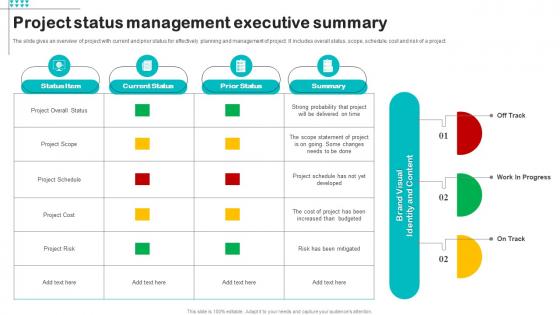
Project Status Management Executive Summary




Try Before you Buy Download Free Sample Product
 Impress Your
 Audience
 100%
100% Editable
 Save Hours
 of Time


The slide gives an overview of project with current and prior status for effectively planning and management of project. It includes overall status, scope, schedule, cost and risk of a project.
People who downloaded this PowerPoint presentation also viewed the following :
Project Status Management Executive Summary with all 6 slides:
Use our Project Status Management Executive Summary to effectively help you save your valuable time. They are readymade to fit into any presentation structure.





FAQs for Project Status
So you'll want to hit the basics: project overview, what you've accomplished since last time, current problems, what's coming up next, and where you stand on budget/timeline. Throw a red/amber/green status thing at the top - executives eat that stuff up for some reason. When you mention blockers, don't just say "we have issues." Be super specific about what kind of help you actually need from them. Also, make your accomplishments real - like "finished the database migration" instead of just "worked on technical stuff." Give clear owners and dates for next steps. Oh and honestly? Keep it to one page if you can swing it. Nobody's reading a novel.
Honestly, just pick a rhythm and stick with it - weekly emails, quick dashboard checks, whatever works. But don't BS people when things go sideways (learned that one the hard way). Visual stuff like those red/yellow/green status things are clutch because nobody reads paragraphs anyway. Your CEO wants the 30,000-foot view while developers need all the messy details. Short meetings work better than long ones. Oh, and actually ask people how they want updates instead of guessing - some hate meetings, others live for Slack notifications. Consistency beats perfection here.
Focus on the basics: schedule variance, budget variance, and how much of your scope you've actually finished. Burn rate's huge too - tells you if you'll run out of money before you're done. Quality stuff like defect rates matter if you're building something tangible. Honestly though? Don't go crazy tracking every little thing. I've seen teams spend more time updating dashboards than doing actual work. Pick maybe 4-5 metrics that answer the big question: will we hit our deadline and budget? Check them weekly and course-correct when things look sketchy.
Weekly updates are usually your best bet to start with. But honestly? It really depends on how crazy your project is. Fast-moving or super important stuff might need you checking in twice a week or even daily standups. Stakeholders are different though - they're usually fine with bi-weekly or monthly unless something major happens. I've learned consistency matters way more than how often you do it. Pick whatever schedule actually works for your team and don't budge from it. Start weekly and see how people react - you can always dial it up or down based on their feedback.
Honestly? Asana and Monday.com are your best bets - I've watched teams spend forever comparing them when they're both solid choices. Jira's perfect for software stuff, but overkill otherwise. Trello works great if you don't need fancy features (though some people think it's too basic). Microsoft Project is crazy powerful but unless you're juggling super complex timelines, it's probably more than you need. My advice? Pick whatever won't require training half your team for weeks. Start simple and see what sticks - you can always upgrade later if needed.
Ugh, when something blows up during status meetings, you gotta jump into damage control mode fast. Figure out if it's actually blocking people right now or just something that'll bite you later. Get the right people involved - like, the ones who can actually fix it, not just everyone and their manager. I used to try solving everything myself and it was a disaster honestly. Write down what's broken, who's handling what, and circle back within a day. Oh and don't overthink who to pull in - better to grab someone early than let it snowball.
Honestly, the biggest mistakes I see are being way too vague and only sharing good news. Like, nobody wants to hear "everything's fine!" when the project's obviously falling apart. Call out problems early - yeah it's awkward, but your stakeholders will thank you later instead of feeling blindsided. Set up some kind of template with red/yellow/green criteria so everyone knows what each status actually means. Also don't wait until Friday afternoon to drop bad news on people. Regular updates with real metrics work way better than sugar-coating everything.
So agile updates happen every sprint - like every week or two. You're just talking about what got done, what's coming up, and if anything's blocking you. Way more chill with daily standups and stuff. Waterfall is totally different though - you get these formal milestone reports monthly or quarterly that check if you're hitting your original timeline. TBH the biggest thing is agile lets you change direction fast when something's not working. Waterfall keeps you locked into that predetermined plan you made at the start. Really depends how much you think things might change mid-project.
Honestly, team morale will make or break your project way more than people realize. When everyone's feeling good about the work, problems get flagged early and people actually give a damn about doing things right. But when morale tanks? Good luck getting anyone to speak up about issues or hit their deadlines. I've watched projects with solid plans completely implode because the team was burned out. People just start phoning it in. Make sure you're checking in on how everyone's doing during your regular updates - not just the task stuff, but like, actually how they're feeling. It's huge.
Honestly, visuals are a game-changer for status meetings. People's eyes just glaze over when you're rattling off numbers and updates verbally. Gantt charts work great for timelines, and those red/yellow/green indicators are perfect for quick health checks - everyone gets it instantly. Burn-down charts show your progress trends too. I'd stick with just one or two clear visuals though. Don't go crazy with data overload. Oh, and match whatever you pick to your audience - some folks love detailed dashboards while others want super simple stuff. Makes such a huge difference in keeping people engaged.
Honestly, just figure out what each group actually cares about first. Executives want the big picture stuff, but your dev team needs all the technical details. Throw in some charts or dashboards - trust me, people's attention spans are shot these days. Don't just blast out emails and hope for the best though. Set up actual meetings where you can talk through things. Oh, and always explain how whatever you're doing affects *their* work specifically. That's what gets people to pay attention. Ask questions during presentations too - keeps everyone awake and you might learn something useful.
Just write everything down from those meetings - trust me, you'll forget the good stuff otherwise. I sort feedback into buckets like communication problems, resource shortages, that kind of thing. Watch for patterns too. If multiple people keep complaining about the same reporting nightmare, boom - there's your next fix. The trick is actually doing something with their suggestions and then telling them what you changed. People get weirdly motivated when they see their feedback turned into real improvements. Oh and honestly? A simple spreadsheet works fine for tracking this - don't overcomplicate it.
Honestly, just pick a format and stick with it every single time. I'm obsessed with RAG status (red/amber/green) plus accomplishments, blockers, and what's next. Weekly updates minimum - daily if stuff's crazy. Put everything in one spot where people can actually find old updates. Trust me, digging through Slack threads from February is the worst. Document the "why" behind decisions too, not just what got done. Someone will definitely ask you in six months why you killed that feature, and you'll be so glad you wrote it down instead of trying to remember.
Oh man, this stuff gets tricky fast. Some people will straight-up tell you when things are broken, others will dance around problems or just... not mention them at all. Then you've got different ideas about what deadlines actually mean and whether "90% done" is real or wishful thinking. Honestly, the time zone thing just makes everything worse. I'd set up clear communication rules from day one - maybe use some kind of status template so everyone's on the same page. Also worth checking in privately with team members who come from cultures where calling out problems publicly isn't really their thing.
For exec summaries, stick to what actually matters to leadership: project status (red/yellow/green), what you finished this cycle, and any blockers that need their help. Budget or timeline changes too, obviously. Keep it super tight - maybe 3-4 bullets tops. These people get like 200 emails a day, so novels aren't gonna work. Call out any decisions you need from them upfront. Honestly, the whole thing is just giving them enough to not feel out of the loop without overwhelming them with every little detail. Save your technical stuff for the full report - they don't care about implementation specifics unless it's breaking something important.
-
Out of the box and creative design.
-
Extremely professional slides with attractive designs. I especially appreciate how easily they can be modified and come in different colors, shapes, and sizes!