

Project team structure template ppt images




Try Before you Buy Download Free Sample Product
 Impress Your
 Audience
 100%
100% Editable
 Save Hours
 of Time


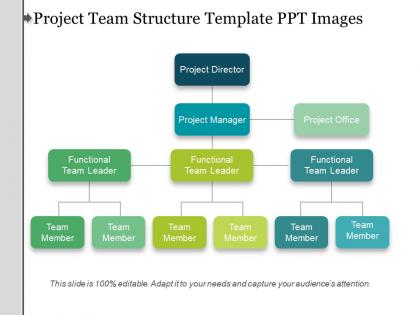
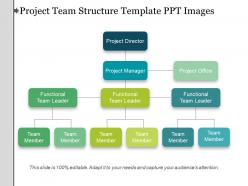
Save your precious time spent by boggling your mind over which design you should opt for while making your presentation. Simply download our project team structure template PPT images and be flabbergasted to see the results it will deliver. Talk about the hierarchy structure and reporting pattern through our aesthetically designed project management structure PPT PowerPoint template. This structural pattern of project team PowerPoint slide design background starts its ace hierarchical point from project director, and then scrolls down to project manager under whom there are three team leaders with their respective team members. Our team of experts has taken all measures to design the project team structure roles and responsibilities PPT slide design diagram which depicts a very clear idea of who is accountable to whom and responsible for which task. Set a benchmark of professional presentations through your efforts and our back support. Address the hiccups with our Project Team Structure Template Ppt Images. Handle difficulties that arise in the beginning.
People who downloaded this PowerPoint presentation also viewed the following :
Project team structure template ppt images with all 5 slides:
Ensure your alliances can endure any hardship with our Project Team Structure Template Ppt Images. Cement the good feelings that exist.

FAQs for Project team structure
Start with your key people - project manager, team leads, stakeholders. Map out who reports to who, then add a RACI matrix (seriously, this saves your sanity later). You'll want clear decision-making authority for each role too. Communication is huge - define how teams talk to each other and meeting schedules. Don't forget skill requirements and time commitments. An org chart makes everything way clearer visually. Oh, and contact info plus escalation paths are clutch when stuff hits the fan. Which it will.
So basically it maps out who talks to who and when - no more guessing games. You'll have clear reporting lines and know exactly who handles what decisions. Honestly, the best part is avoiding that awkward thing where three people email the same person about the same issue. Regular check-ins get scheduled automatically too. Start by figuring out your main stakeholders first and how they like to communicate (some people hate Slack, others live in it). Short sentences work better than long ones here. It stops people from stepping on each other and creates actual structure instead of chaos.
So you need a project manager obviously - someone to herd the cats. Get your subject matter experts who actually know what they're talking about, plus a sponsor with real decision-making power. Don't skip the stakeholders who'll be affected by this thing. Technical people too if it's that kind of project - developers, analysts, whatever. Here's what I learned the hard way though: include someone from operations early on, like whoever's gonna maintain this mess afterward. Way easier than trying to hand it off later. Just match the roles to what you're actually building instead of some cookie-cutter list.
You need role definitions that can actually bend with whatever methodology you're using. Waterfall wants that clear hierarchy thing - you know, defined handoffs between each phase. Agile's totally different though. Cross-functional pods work better there, more collaborative decision-making. I've watched so many teams mess this up by trying to jam their old structure into new processes. Doesn't work. Build your communication flows so they can adapt. Same with decision-making processes. My advice? Start with the core roles every team needs regardless, then layer on the methodology-specific stuff after. Way easier than rebuilding everything from scratch.
Honestly, start with your must-have roles first - way easier than hiring too many people then cutting back later. Look at your timeline and budget obviously, but also think about what skills you actually need. More people doesn't always mean faster work, especially when everyone's trying to coordinate. Dependencies between tasks matter too - some stuff just has to happen in order no matter how many bodies you throw at it. Oh, and check if you're competing with other projects for the same talent pool. That's been biting us lately. Communication gets messy with bigger teams, so factor that in when you're deciding.
Honestly, how you set up your team makes a huge difference in getting stuff done well and on time. When everyone knows their role and can actually talk to each other, things flow way better. But if you've got confusing chains of command or nobody knows who's responsible for what? Total disaster. I once worked somewhere with like 6 people who all had to sign off on everything - nothing ever got approved! You really want to match your setup to how complex the project is. Start by figuring out who's doing what and how info moves around. It's not rocket science, but people mess it up constantly.
So basically this template maps out who does what and keeps everyone on the same page. Honestly, it's super helpful when projects start getting chaotic - which they always do lol. Your stakeholders know exactly who to bug for different stuff, plus when they'll hear back from you. The feedback loops are built right in so you're not just making decisions in a vacuum. I love that it stops you from scrambling around trying to figure out communication last minute. Oh, and definitely tweak the stakeholder section for your specific project. Like, add whatever communication style actually works for your team instead of just copying it exactly.
Honestly, just start with whatever you're already using. PowerPoint or Google Slides work fine for basic org charts - don't overthink it. Visio's solid if you want something fancier, and Lucidchart's pretty user-friendly too. Miro's my go-to though when the whole team needs to collaborate since everyone can edit at once (they have good templates). For actually managing the project after you map it out, Monday.com or Asana let you assign real tasks to people. But yeah, seriously - use what you know first, then upgrade later if it's not cutting it.
Honestly, just be super specific about who owns what - none of this "we'll all figure it out together" nonsense. List everything that needs doing, then assign one person to each thing. Shared responsibility is basically code for nothing getting done, trust me on this. Give people the actual authority to make decisions about their stuff too, not just the work without the power. Write down who gets consulted vs just looped in later - saves so much drama. I'd probably do a simple chart or just bullet points, whatever works for your team. The main thing is being crystal clear about boundaries so people aren't accidentally duplicating work or getting territorial.
Honestly, the worst thing you can do is make your template super rigid - then you're cramming every project into the same mold no matter what. Unclear roles are another nightmare because people start pointing fingers when stuff hits the fan. Also figure out your reporting structure early or you'll regret it later. Don't skip mapping out how stakeholders fit in and who talks to who. My advice? Build something flexible first with clear core responsibilities, then tweak it for each project. Way better than trying to force a one-size-fits-all approach.
Mixed teams just crush it compared to everyone-being-the-same teams. You get people attacking problems from totally different angles, which means you spot issues way earlier. Creative solutions come easier too. Different backgrounds catch blind spots that would've bit you later - honestly, risk assessment gets so much better when you have varied viewpoints. The trick is actually letting everyone speak up during planning sessions instead of just having the usual suspects dominate. Way more fun to work with people who think differently than you anyway! Oh, and make sure quieter team members get space to share their ideas too.
Honestly, you need to watch both the numbers and the vibe. Delivery speed, quality, hitting deadlines - that's your baseline. But the team stuff is equally crucial. Are people actually talking to each other? How fast do decisions get made? I'd do quick pulse surveys to check if everyone's miserable or not. Cross-functional work is where things usually fall apart, so definitely track whether different teams are collaborating or just doing their own thing in silos. Oh, and don't go crazy with metrics - pick like 3-4 that actually matter and throw them on a simple dashboard. You'll ignore anything more complicated anyway.
Honestly, remote work totally changes how teams are structured. The whole hierarchy thing gets flattened out pretty quick. You can't just walk over to someone's desk anymore, so everything has to be way more documented and organized. Plus those async tools are actually great - no more getting steamrolled by the loudest person in meetings. Time zones become this weird new factor in deciding who runs what projects. I'd start by figuring out when your team actually overlaps during the day. Then rebuild your structure around those windows when people can collaborate in real time. It's messier than it sounds but way more democratic.
So you're basically the person making sure nothing falls apart lol. You'll coordinate between team members, track deadlines, manage resources - all that fun stuff. Running meetings becomes your life. Honestly, it's like herding cats sometimes, especially when half your team is remote and someone's always behind. But you also get to remove blockers and keep stakeholders happy. The timeline and deliverables? Yeah, that's on you. My advice - figure out who's doing what first, then worry about the when. Oh, and budget tracking too, obviously.
Honestly, just bake the feedback loops right into your template from day one. Set up those weekly check-ins between leads and team members, plus bi-weekly cross-functional stuff. I've watched too many projects crash because feedback was totally random (learned that the hard way). Make sure someone's actually responsible for collecting AND making sense of all that feedback - not just hoarding it. Short bursts work better than marathon sessions, trust me. Build in clear escalation paths for when things go sideways. The trick is making these mandatory, not some nice-to-have thing people skip when they're busy. Start with your most critical communication flows first.
-
Great designs, really helpful.
-
It saves your time and decrease your efforts in half.