


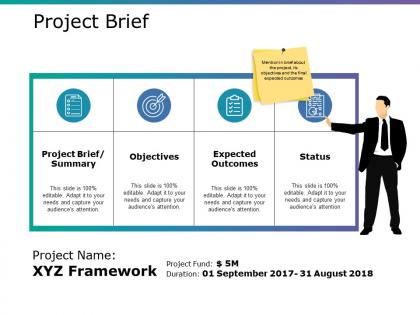
Project brief ppt slide template




Try Before you Buy Download Free Sample Product
 Impress Your
 Audience
 100%
100% Editable
 Save Hours
 of Time


Generate the desire to excel in your group with our Project Brief Ppt Slide Template. Elaborate on inspiring examples.
People who downloaded this PowerPoint presentation also viewed the following :
Project brief ppt slide template with all 5 slides:
Clarify doubts immediately with our Project Brief Ppt Slide Template. Address any cause for concern.
FAQs for Project brief
Start with the big four: objectives, scope, timeline, and budget. Make roles crystal clear - nobody wants to deal with territorial drama later. Your success metrics need actual specifics, not vague "improve things" nonsense. Stakeholder contacts are huge too (seriously, save yourself the headache of hunting people down mid-project). Throw in any constraints, assumptions, and obvious risks you can think of. The whole point is getting everyone aligned from the start. Keep it tight but thorough, then send it around for input before you lock it in.
Dude, a solid project brief is like your get-out-of-jail-free card when things get messy. You've got your goals, budget, and scope all written down upfront. So when Karen from marketing wants to add "just one tiny feature" or people start arguing about what's actually important, you literally point to the doc and say "nope, we agreed on this." I've watched so many projects go sideways without one - it's honestly painful. Short sentences work too. The key is making it detailed enough to actually help with real decisions, not just some fluff document nobody reads.
Talk to everyone first - users, execs, whoever's involved. Then do workshops to figure out what they actually mean when they say stuff like "seamless integration" (spoiler: they usually don't know either). Write it all down as you go. Budget and timeline constraints? Ask about those right away or you'll regret it. Oh, and make a requirements matrix to rank everything by priority. Scope creep will destroy you otherwise - I've seen it happen too many times. Trust me on this one.
So basically, the brief is for you and your team - it's like your internal game plan where you figure out what you're actually trying to do. Gets everyone on the same page about goals and scope before you dive in. The proposal? That's the polished version you send to clients to sell them on your idea. Way more formal, with all the timelines and pricing laid out nice and clean. I know it seems like extra work doing both, but trust me - that brief will save your butt later when things get messy. Write the brief first, then use it to craft a solid proposal.
Honestly, stakeholder analysis is a lifesaver - it shows you who actually matters for your project and what they're looking for. I always start by listing everyone from sponsors to end users, then rank them by how much influence they have versus their interest level. This way you can spot potential conflicts before they blow up (trust me, I've learned this the hard way). Understanding their different priorities helps you write a brief that addresses concerns upfront. Gets you buy-in way faster. Oh, and do this mapping before you even start writing - saves so much headache later.
Okay so visuals and templates are honestly game-changers for project briefs. People scan flowcharts and timelines way faster than reading through paragraphs of text. Templates keep your thoughts organized too - they're clutch when you're scrambling to meet deadlines. I've noticed stakeholders actually pay attention during meetings when there's visual stuff to look at instead of just walls of text. Oh and mockups? They make your ideas click instantly. It's wild how much better people understand what you're going for when they can see the structure laid out visually.
Honestly, a project brief saves your ass by making you figure out exactly what you're building before you start. Document all the features and requirements upfront - then you can actually estimate realistic timelines and budgets. Trust me, this prevents scope creep hell when stakeholders inevitably go "oh can we just add this tiny thing?" You've got it all written down, so you can point to the brief and explain how that "tiny" addition affects everything else. I learned this the hard way on my last project. Write it all down first, estimate second.
Honestly, the biggest mistake is being way too vague. Skip the fluffy "improve user experience" stuff and get specific with measurable outcomes. You'll thank yourself later when stakeholders actually know what they're getting. Define what's NOT included too - scope creep is brutal. Timeline estimates? Most people suck at this, so pad them. Dependencies between tasks will bite you if you ignore them. Keep it concise but don't leave gaps - nobody wants to read War and Peace, but they need the details. Oh, and nail down who owns what deliverable upfront. Trust me on that one.
Okay so you've gotta figure out what each group actually gives a shit about. Executives? Show them ROI and how it fits the big picture. Your team needs the nitty-gritty - specs, deadlines, who's doing what. Clients just want to know you'll fix their headache. I swear, most briefs are so boring they could cure insomnia. Speak their language instead. Data nerds want numbers. Creative people need visuals. Skeptics want proof it's worked before. Here's what I do: think about what stresses each stakeholder out, then hit those pain points head-on. Way more effective than some cookie-cutter document everyone ignores.
Pick 3-5 metrics that actually matter for your project goals. ROI and cost savings are obvious ones, but don't forget user adoption rates or customer satisfaction scores. Performance improvements work great too. I usually add one extra "nice to have" metric because stakeholders eat that stuff up. Set a baseline and target for each one before you start - trust me on this. Otherwise people will totally move the goalposts on you later. Oh, and make sure everyone agrees on how you're measuring things upfront. Short sentences keep reporting simple. You don't want to be drowning in data collection six months from now.
Dude, templates are your best friend here - Notion or Airtable can auto-fill all that boring client info stuff. Game changer once you actually set it up (which honestly takes forever but whatever). Real-time collaboration tools beat email chains any day. Your whole team can jump in without the back-and-forth nightmare. Project management software pulls requirements straight from stakeholder inputs too. Don't go crazy with tons of tools though. Pick like two that work well together. I learned this the hard way after trying every shiny new app out there.
Honestly, remote project briefs need to be WAY more detailed than usual. Think timezone stuff for deadlines, which channels to use (Slack for quick things, email for the formal stuff), and where files actually live. Those random "quick question" moments just don't happen anymore when everyone's remote, so try to guess what people will ask and answer it upfront. Oh and document your decisions more - nobody's overhearing your reasoning in the break room anymore. Trust me, over-explaining everything at the start beats dealing with a million clarification emails later.
Okay so project scope is literally your lifeline here. It stops people from asking for random stuff halfway through - like when someone thinks "website redesign" means you're also doing their entire rebrand (been there, it's messy). Without clear boundaries, your budget explodes and everyone gets pissed because they expected different things. Think of it as your official "nope" document. Be super specific about what you're actually delivering, your timeline, and - this part's key - what you're NOT doing. Trust me, that list of exclusions will save your sanity later when stakeholders start getting creative with their requests.
Honestly, I check mine every few weeks - maybe monthly if things are chill. But when stuff starts shifting (new stakeholders, scope changes, whatever), that's when you gotta update it. Don't treat it like some holy document that can't be touched! I usually set reminders around major milestones or before big meetings. Think of it more like... idk, your project's roadmap? Sometimes you hit construction and need a detour. The 2-4 week thing works for most projects, but really depends on how crazy your timeline is. Just don't let it collect dust.
Definitely loop in everyone who matters from the start - project leads, whoever controls the budget, plus any teams getting affected. I always make a quick checklist hitting scope, timeline, resources, and how you'll measure success. Seriously saves so much pain later. Don't try doing this over email though. Book an actual meeting where people can hash things out and spot problems early. Oh, and make sure whoever has final say is there to approve, not just someone "gathering feedback" (learned that one the hard way). After it's approved, write up any changes and send the final version around.
-
Use of icon with content is very relateable, informative and appealing.
-
Unique research projects to present in meeting.