


Project status report ppt file outline






Try Before you Buy Download Free Sample Product
 Impress Your
 Audience
 100%
100% Editable
 Save Hours
 of Time


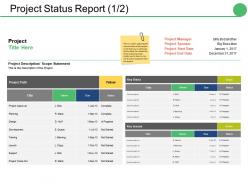
Arrive at critical decisions with our Project Status Report Ppt File Outline. Consider every applicable factor.
People who downloaded this PowerPoint presentation also viewed the following :
Project status report ppt file outline with all 5 slides:
Our Project Status Report Ppt File Outline focus on deserving aspects. Keep clear of any gibberish.

FAQs for Project status report
So for status reports, you'll want to cover progress on milestones, any roadblocks, what's coming up next, and budget/timeline stuff. Quick wins are gold - seriously, everyone eats that up. Most people just scan these things anyway, so make it easy to digest. Focus on what actually needs their input or decisions, not just "here's what we finished." Oh, and don't forget clear next steps at the end of each section. Otherwise people will just nod along and then ask you later what they're supposed to do about it.
Honestly, just give people what they actually want to hear. Executives? High-level stuff - budget, timeline, major risks. Skip the details or you'll lose them in two seconds. Your team needs the opposite though - all the specifics about tasks and what's blocking them. Clients are somewhere in the middle but talk normal to them. Don't say "sprint velocity" - just tell them when their stuff will be done. I usually make different sections of the same report or sometimes separate versions entirely. Quick test: think about what decision each person needs to make, then only include info that helps with that.
Honestly, don't sugarcoat delays or be vague about problems - that just screws everyone over when they're trying to make decisions. Skip the technical jargon that business folks won't care about. I've watched people write these massive reports when like 3 bullet points would've worked way better! Your metrics should stay consistent so people can actually see what's happening week to week. Oh, and don't just focus on what's broken - mention the wins too. Really, your report just needs to cover: where you're at, what's stuck, and what happens next. If you're not hitting those three things clearly, you're probably overthinking it.
Honestly, weekly updates work for most stuff. But if you're in crunch mode or hitting big deadlines, maybe bump it to twice a week. Daily reports are usually overkill - I've watched people burn out writing updates nobody even reads lol. Longer projects? Bi-weekly's totally fine. The trick is figuring out when your team actually makes decisions and matching that rhythm. You don't want to be sending updates into the void. Start weekly and see how it feels. Your stakeholders will let you know pretty quick if they need more or less. Just stick to whatever schedule you pick.
Honestly, it depends what you're working on, but I'd track schedule performance first - like are you actually hitting your milestones or falling behind? Budget variance is obvious but crucial. Resource utilization too, especially when you're spinning multiple plates at once (which, let's be real, is always). Quality stuff like defect rates keeps stakeholders happy - shows you're not just cramming to meet deadlines. Risk indicators are huge since they mess with everything downstream. But here's the thing - don't go overboard. Pick maybe 4-6 that actually matter and stick with them from the start. Too many metrics just becomes noise.
Dude, visual aids are a game changer for status reports. People actually pay attention when you use charts and progress bars instead of wall-of-text updates. I've seen so many meetings where everyone's scrolling their phones during boring presentations, but throw up a colorful dashboard? Suddenly they're engaged. Red/yellow/green indicators work great for quick status checks. Timeline charts show what's delayed versus on track. Bar graphs are perfect for budget stuff - honestly, numbers just hit different when they're visual. Your stakeholders will actually understand what's happening instead of pretending to read your novel-length updates.
Think of risk management as your project's smoke detector - catches fires before they burn everything down. Document what could go wrong, how likely it is, and your game plan. Honestly, I've watched way too many projects implode because nobody wanted to mention the scary stuff in meetings. New risks pop up? Add them. Old ones getting worse? Update them. Problem solved? Mark it closed. The trick is making this a regular thing in every status report, not just when things get messy. Otherwise your stakeholders will hate you when surprises hit.
Honestly, you've gotta close that loop between feedback and actual planning changes. So when people flag risks or resource issues in their status reports, don't just file them away - immediately look at how this stuff affects your upcoming milestones. Then actually adjust things. I swear, most teams collect all this feedback and then... nothing happens? Total waste. Schedule your planning reviews right after you get status updates. That way you can shift resources or timelines based on what's really happening, not whatever assumptions you made three weeks ago. Make it routine.
Ugh, status reports are the worst! But there are some decent shortcuts. Asana, Monday.com, or Jira can auto-generate reports from your task data. Saves you from manually typing everything out. Dashboard tools like Tableau work too, though Google Data Studio might be easier to start with. Here's what I've learned the hard way - sometimes you don't need anything fancy. I've literally just screenshotted my Trello board before and called it a day. Works surprisingly well! For stuff you do weekly, set up templates in Notion or Confluence where you just fill in the blanks. Start with whatever your team's already using for tracking, then build from there.
Honestly, status reports are game-changers for accountability. Everyone sees who's doing what and if deadlines are actually being met. Makes people way more likely to follow through when their progress (or complete lack of it) is right there for everyone to see. The transparency thing is huge too - your team finally knows what's going on instead of playing telephone with random updates. Oh, and the weekly rhythm? Forces people to actually think about roadblocks before they blow up into disasters. Trust me, start doing these weekly and you'll see the whole team dynamic shift.
Here's what I've learned the hard way - nobody reads those massive status email blocks. Use bullet points or those red/yellow/green indicators instead. Lead with your biggest win or your worst problem right at the top. People will actually pay attention that way. Focus on how stuff affects *their* projects specifically, not just random updates. Oh, and pick a day - like every Tuesday - and stick to it religiously. Consistency is everything. The whole point is making it stupid easy for them to scan and find what they care about. Trust me, they'll thank you for it.
Make a whole section just for changes - don't hide that stuff in paragraphs where people miss it. Lead with the big ones: scope changes, budget hits, timeline shifts. Spell out what changed, why, and what it means going forward. I swear, stakeholders lose their minds when they have to dig through walls of text to find updates. Bullet points work great here. Oh, and definitely note who signed off on changes plus when they kick in. Trust me, being super direct about this stuff saves everyone headaches later.
Check out PMI's templates and Asana's blog - they've got solid downloadable examples with real data. Monday.com's resource section is pretty good too. Honestly, I also love looking at how tech companies do their quarterly reports (Buffer shares theirs publicly and they're really well done). The best ones always start with overall project health, then use lots of visuals instead of boring text blocks. They make blockers super obvious - which is smart because that's what everyone cares about anyway. Don't forget to include next steps with clear owners. Just grab one template and tweak it for your team's vibe.
Look, your status report should actually change based on what phase you're in. Planning phase? Focus on scope and timeline stuff. Execution means you're talking deliverables, risks, budget burn. Most of us just use the same boring template the whole time (I'm totally guilty of this too), but you'll get people way more engaged if you switch it up. When you hit closing, ditch the weekly task updates - nobody cares anymore. Shift to lessons learned and final numbers instead. Seriously, try tweaking your template to match where you actually are. Makes a huge difference.
Honestly, just be straight with people about delays and budget issues - they need real info to make decisions. Don't sugarcoat the bad stuff because it'll come out anyway (learned that one the hard way). But there's a difference between being honest and being dramatic about every little thing. Stick to facts and timelines instead of pointing fingers at teammates. Also don't share confidential stuff that could screw someone over - that's just common sense. You want to give stakeholders what they need without throwing anyone under the bus or creating unnecessary drama.
-
Use of icon with content is very relateable, informative and appealing.
-
Unique and attractive product design.