

Project management status codes powerpoint slide




Try Before you Buy Download Free Sample Product
 Impress Your
 Audience
 100%
100% Editable
 Save Hours
 of Time


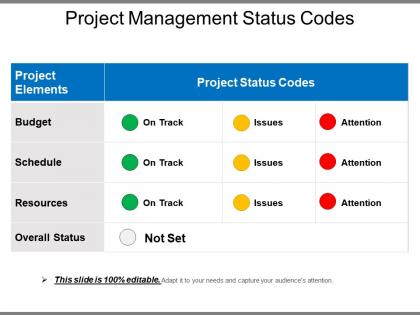
Achieve success in your business with efficient project planning using Project Management Status Codes PowerPoint Slide. Offer your audience a profound idea of your strategic action plan and its streamlined execution with the project management report template. Mention the budget, schedule and the resources you require to complete a task. Help your project manager in handling the overall budget using the project status report. A well-organized layout of the activity will ensure the organization’s success. Ensure quick and easy understanding of task management amongst the employees. Report status on projects will encourage them to function within the set timeline. Offer a precise description of the task by allocating different color codes to each project element. The project status report checklist will help to keep track of the completed task. Engage your audience with a comprehensive and impressive PowerPoint presentation. With a ready to use project status list PPT slide, curate an effective presentation in less time.
People who downloaded this PowerPoint presentation also viewed the following :
Project management status codes powerpoint slide with all 5 slides:
Mine the data with our Project Management Status Codes Powerpoint Slide. Strike gold with your ideas.

FAQs for Project management status
So pretty much every team uses the same basic setup - Green means you're good, Yellow/Amber is when things are getting sketchy, and Red is for when everything's on fire. Blue usually means done, and some places throw in Gray for stuff that got put on hold. Honestly, Yellow trips people up the most because everyone has different tolerance levels for what counts as "risky." Save Red for when you actually need someone to swoop in and help, not just because you're running a day behind. Oh, and definitely hash out what each color means with your team beforehand. Saves so much confusion later.
Honestly, status codes are a game changer for cutting through project mess. Everyone immediately gets where things stand when you use simple stuff like "In Progress" or "Blocked" - no more digging through long explanations or chasing people down for updates. Those Monday standups become way less painful! Your stakeholders can glance at dashboards and instantly spot what's stuck or needs attention. Plus you'll dodge so many "hey what's happening with X?" emails. Pick maybe 5-7 codes that actually make sense for your team (don't go overboard) and then just be consistent about using them.
Status codes are like your project's smoke detector - they'll warn you before everything catches fire. Look for patterns when you've got multiple "blocked" or "at risk" tasks piling up. That's usually when resource bottlenecks or messy dependencies are about to wreck your timeline. Your stakeholders will actually thank you for this too, since nobody wants to wade through endless status paragraphs. Honestly, the coolest part is tracking these over time. Trends show you way more than just looking at today's snapshot. Set up some alerts when certain codes start spiking across the board.
Yeah, it totally depends on what approach your team's using. Waterfall keeps it simple - "Requirements Done," "Design Phase," stuff like that since it's all sequential. Agile's where things get interesting though. Sprint statuses reset constantly: "Backlog," "In Progress," "Code Review." Some teams go wild with their Kanban boards honestly - I've seen columns like "Waiting for Coffee" lol. Scrum adds sprint-specific ones while Kanban sticks to workflow basics like "To Do" and "Blocked." Main thing is Waterfall tracks if phases are complete, but Agile cares more about whether features are actually ready to ship. Figure out your team's methodology first, then match your status codes to that.
Think of status codes like a quick health check for your whole project. You can instantly see what's stuck, what's behind schedule, and what's actually done without digging through a bunch of reports. Super helpful when your boss asks "where are we on that thing?" during meetings - you're not scrambling around trying to remember. Though honestly, they only work if people actually update them regularly. Otherwise you're just looking at old info and making decisions based on stuff that's probably changed. Pretty much saves you from those awkward "uh, let me get back to you" moments.
Honestly, I'd go with a mix of both. Start with the basics everyone knows - "Not Started," "In Progress," "Blocked," "Complete" - then throw in whatever weird project-specific stuff you need. I've watched teams create these elaborate custom systems from scratch and it just ends up being a mess. Your stakeholders will actually understand what's happening if you stick with familiar terms for the common stuff. But yeah, definitely add your own codes when the standard ones don't cut it. Keep it simple at first - maybe 4-6 codes total - then build from there based on what your team's actually talking about day-to-day.
So status codes are basically your early warning system for bottlenecks. You'll see tasks pile up in "waiting for review" or "blocked" and boom - there's your problem area. Track how long stuff sits in each stage and you'll start noticing patterns. Maybe everything dies during stakeholder approval (classic), or QA always takes forever. The trick is actually checking these regularly instead of just updating them because your PM said to. It's like checking traffic before you leave - only useful if you actually look at it and change your route.
Honestly, color-coding project statuses is a game changer. Red, yellow, green - boom, you instantly know what's going wrong. No more squinting at spreadsheets trying to figure out if something's behind schedule. Your team will thank you during standups because they won't waste time digging through updates. Stakeholders get it immediately too, which saves everyone from those awkward "so... how are we doing?" moments in meetings. I'd stick with three colors at first - you can always add more later once people aren't confused by it.
Honestly, those status codes are clutch for figuring out where to actually put your people. See something stuck on "blocked"? Pull someone off an "on track" task to help out. Way better than scrambling at the end when everything's on fire. I check mine every week and just move folks around based on what I'm seeing. Plus you'll start noticing patterns - like Sarah always has overdue stuff, maybe she's swamped. The real-time view makes such a difference. Don't overthink it, just shuffle people when the codes tell you to.
Yeah, you've got tons of options for custom status codes. Asana and Monday.com are solid choices - both let you set up whatever statuses make sense for your team instead of the boring default stuff. ClickUp's pretty powerful too, maybe even too powerful sometimes lol. Jira works great if you're doing software stuff. Notion's weirdly good at this if you don't mind the learning curve (I personally think it's a bit much but some people swear by it). Even Trello works fine for simpler projects with their label system. Honestly, just write down what statuses you actually need first, then test out the free versions. You'll know pretty quick which one feels right.
Status codes are basically project traffic lights that everyone gets right away. Green = we're good, yellow = heads up there might be trouble, red = SOS. Way better than those useless "making progress" updates that tell you nothing. The whole point is avoiding that mess where half your team thinks everything's fine while the other half is freaking out. You just gotta make sure everyone knows what the colors mean from day one - honestly, that's the part most people skip and then wonder why it doesn't work. Then actually stick to using them in all your updates.
Look, you'll definitely need to tweak your status codes when the original ones just aren't cutting it anymore. Big scope changes are usually the main culprit. New risks pop up that nobody saw coming, or stakeholders suddenly want way more detail than you planned for. Sometimes your codes end up being too vague - been there! Other teams might use totally different systems too, which is honestly kind of annoying but whatever. The main thing is keeping your codes flexible so they actually help with clear communication. If they're not working mid-project, just change them. No point sticking with something that's confusing everyone.
Yeah, it really depends on how messy your project gets. Simple stuff? Just stick with "Not Started," "In Progress," "Done" - keeps it clean. But once you've got multiple teams, dependencies, approvals (ugh, always waiting on approvals), you'll need more specific codes like "Testing Phase" or "On Hold - Dependencies." I learned this the hard way on a project last year. The trick is having enough detail to actually manage things without going overboard. Nobody's gonna use 15 different status codes - they'll just ignore the system entirely.
Honestly, just pick 3-5 statuses that actually make sense - like On Track, At Risk, Behind, On Hold, Complete. Don't get fancy with colors or weird names that'll confuse everyone later. Document what each one means (I learned this the hard way). Weekly updates work great for most stuff. Always add a quick note when something changes status - trust me, you'll be so lost trying to figure out why that project went from good to terrible without context. Oh, and make sure your whole team knows what triggers each status change. Future you will definitely appreciate not having to decode random updates.
Honestly, status codes are perfect for figuring out what actually went wrong after a project wraps up. You get real data instead of trying to piece together vague memories from months ago - which never works out well. Look at which phases kept hitting roadblocks and what kept causing delays. Your team's patterns become super obvious when you map it all out. I always find testing goes sideways right before big releases, without fail. Next time you do a retrospective, bring up those status changes and let them drive the whole conversation. Way more productive than just asking "so...what sucked?"
-
Presentation Design is very nice, good work with the content as well.
-
Awesome presentation, really professional and easy to edit.